
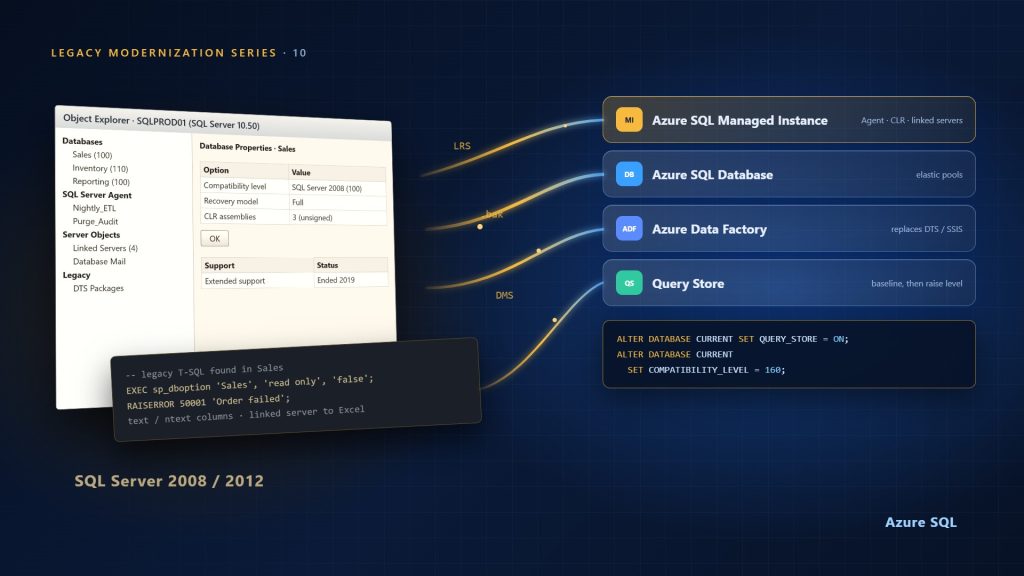
A SQL Server 2012 to Azure SQL migration (or a move from SQL Server 2008 or 2008 R2) takes databases that have been out of support for years and lands them on a managed platform that is always patched. SQL Server 2008 and 2008 R2 left extended support in July 2019 and SQL Server 2012 in July 2022, and their Extended Security Update periods have also ended. The good news: Azure SQL still accepts these databases at their original compatibility level. The work is in the old features, the newer query optimizer and choosing the right Azure target.
Technically reviewed by Harshita Pipaliya.
This is the tenth article in our Legacy Modernization Series. For the general checklist on compatibility, downtime and cost for any SQL Server version, see our SQL Server to Azure SQL migration checklist. This guide focuses on what is specific to 2008 and 2012 estates.
Executive summary
- Support: SQL Server 2012 support ended on July 12, 2022, with three years of Extended Security Updates after that (Microsoft Learn). SQL Server 2008 and 2008 R2 ended in July 2019, with ESUs that have also expired. SQL Server 2014 and 2016 have now reached end of support too (Microsoft Learn).
- Compatibility: Azure SQL Database and Azure SQL Managed Instance both support database compatibility levels “170, 160, 150, 140, 130, 120, 110, 100”, so 2008 (100) and 2012 (110) databases can run unchanged at first (Microsoft Learn).
- Tooling changes: Azure Data Studio “is retired as of February 28, 2026”, and the Azure SQL migration extension was retired with it. Use Azure Migrate for assessment and sizing, and Azure Database Migration Service (DMS) or Log Replay Service (LRS) for the move (Microsoft Learn).
- Online options are narrower for old versions: Managed Instance link does not support sources older than SQL Server 2016, but LRS restores standard backups and “supports migrations from any source” (Microsoft Learn).
- Our recommendation: most 2008/2012 estates fit Azure SQL Managed Instance best, because it keeps SQL Agent, cross-database queries, CLR and linked servers. Migrate at the existing compatibility level, capture a Query Store baseline, then raise the compatibility level deliberately.
Support status in 2026
| Version | End of extended support | Extended Security Updates |
|---|---|---|
| SQL Server 2008 / 2008 R2 | July 9, 2019 | Ended (an extra year was offered only on Azure) |
| SQL Server 2012 | July 12, 2022 | Three years after end of support; ended July 2025 |
| SQL Server 2014 | July 9, 2024 | Free ESUs on Azure VMs; paid elsewhere |
| SQL Server 2016 | July 14, 2026 | ESUs available through a paid subscription |
| Azure SQL Database / Managed Instance | Evergreen, always patched | Not needed |
What this means: a SQL Server 2008 or 2012 instance receives no security fixes at all. Moving it to an Azure VM no longer extends support for these versions, so the realistic options are upgrading or moving to a managed Azure SQL service.
Why 2008 and 2012 databases are harder to move
- Discontinued features. Code written for 2008 can use features removed in later versions, such as
sp_dboption, the oldRAISERROR integer 'string'syntax andCOMPUTE BY. - Optimizer changes. The cardinality estimator changed in SQL Server 2014 (compatibility level 120). Raising the level can make some queries faster and others slower.
- Instance-level dependencies. SQL Agent jobs, linked servers, Database Mail, SSIS and DTS packages, logins and server roles live outside the database.
- CLR assemblies. Newer versions enable
clr strict securityby default, so unsignedSAFEassemblies that loaded on 2008 may need signing. - Old backups and old drivers. Backup to URL needs SQL Server 2012 SP1 CU2 or later, and very old client drivers may not support TLS 1.2.
Choosing the target: SQL Database, Managed Instance or SQL Server on a VM
| Target | Best for | Trade-offs |
|---|---|---|
| Azure SQL Managed Instance | Most 2008/2012 line-of-business databases with Agent jobs, cross-database queries, CLR or linked servers | Higher entry cost than single databases; VNet design required |
| Azure SQL Database | Self-contained databases for modern apps, SaaS and elastic pools | No SQL Agent, cross-database queries, CLR, Service Broker or Database Mail |
| SQL Server on Azure VMs | Apps needing OS access, SSIS/SSRS on the same box or unsupported features | You patch and upgrade SQL Server yourself; still upgrade off 2008/2012 |
Feature comparison (from Microsoft’s Azure SQL features comparison):
| Feature | Azure SQL Database | Azure SQL Managed Instance |
|---|---|---|
| SQL Server Agent | No (use elastic jobs) | Yes |
| Cross-database queries | No (use elastic query) | Yes |
| CLR | No | Yes, without file system access |
| Service Broker | No | Yes |
| Linked servers | No | Yes, to SQL Server and SQL Database |
| Database Mail | No | Yes |
Feature compatibility for 2008/2012 workloads
| Legacy item | Typical issue | Remediation |
|---|---|---|
| Compatibility level 100/110 | Runs as-is, but misses newer optimizer behaviour | Migrate at 100/110, then raise with Query Store |
| Discontinued T-SQL | Fails at deployment or run time | Find with assessment tools and code search; rewrite |
text, ntext, image | Deprecated, still work | Plan a move to varchar(max), nvarchar(max), varbinary(max) |
| SQL Agent jobs | Not in SQL Database | Managed Instance Agent, elastic jobs or Azure Data Factory |
| Cross-database queries | Not in SQL Database | Managed Instance, or consolidate schemas |
| CLR assemblies | Strict security; no file access on MI | Sign assemblies; move file logic to app tier |
| Linked servers to Oracle, Excel, Access | Limited or unsupported | Azure Data Factory, app-tier integration |
| DTS / SSIS packages | DTS unsupported since 2012 | Rebuild in Azure Data Factory or SSIS on Azure (next article) |
| Windows logins | No on-premises AD in Azure SQL | Microsoft Entra ID authentication |
| Database mirroring, log shipping for DR | Replaced by the platform | Built-in high availability, geo-replication, failover groups |
| Encrypted columns, TDE | TDE certificates must move with backups | Migrate certificates before restore; consider Always Encrypted |
This table combines Microsoft’s documented feature support with our delivery experience; confirm each item with an assessment of your own databases.
Migration methods and tools in 2026
| Method | Target | Downtime | Notes for 2008/2012 sources |
|---|---|---|---|
| Azure Migrate (assessment) | All | n/a | Discovery, readiness and sizing recommendations for Azure SQL targets |
| Native backup and restore | Managed Instance, VM | Offline | Backup to URL needs 2012 SP1 CU2+; for 2008, back up to disk and upload to Blob Storage |
| Log Replay Service (LRS) | Managed Instance | Near-online | Restores full, differential and log backups; one LRS job runs at most 30 days |
| Managed Instance link | Managed Instance | Online | Not supported for sources before SQL Server 2016 |
| Azure Database Migration Service | SQL Database, MI, VM | Offline or online | Managed service; check current source-version support for your path |
| Transactional replication | SQL Database (as subscriber) | Near-online | Useful for minimal downtime into SQL Database |
| BACPAC export/import | SQL Database | Offline | Simple for small databases; slow for large ones |
Tooling note: Azure Data Studio and its migration extension were retired on February 28, 2026. If older runbooks reference Data Migration Assistant or Azure Data Studio, update them to Azure Migrate and DMS.
Code and script patterns
The scripts below are illustrative and simplified. Test on a copy first.
1. Find databases still on old compatibility levels (run on the source):
SELECT name, compatibility_level, recovery_model_desc, state_desc
FROM sys.databases
WHERE database_id > 4
ORDER BY compatibility_level;
2. See which deprecated features are actually used since the last restart:
SELECT instance_name AS deprecated_feature, cntr_value AS times_used
FROM sys.dm_os_performance_counters
WHERE object_name LIKE '%Deprecated Features%'
  AND cntr_value > 0
ORDER BY cntr_value DESC;
3. On the target, capture a baseline before raising the compatibility level:
ALTER DATABASE CURRENT SET QUERY_STORE = ON;
ALTER DATABASE CURRENT SET QUERY_STORE (OPERATION_MODE = READ_WRITE);

-- Run representative workload at the original level (e.g. 110), then:
ALTER DATABASE CURRENT SET COMPATIBILITY_LEVEL = 160;

-- If a query regresses, force its previous good plan from Query Store:
-- EXEC sp_query_store_force_plan @query_id = 42, @plan_id = 7;
4. SQL Server 2012 SP1 CU2+ backup straight to Blob Storage for Managed Instance:
CREATE CREDENTIAL [https://mystorage.blob.core.windows.net/backups]
WITH IDENTITY = 'SHARED ACCESS SIGNATURE', SECRET = '<SAS token without leading ?>';

BACKUP DATABASE Sales
TO URL = 'https://mystorage.blob.core.windows.net/backups/Sales_full.bak'
WITH COPY_ONLY, CHECKSUM, COMPRESSION;
The exact credential syntax for backup to URL differs between SQL Server versions; check Microsoft’s documentation for yours.
Recommended target architecture
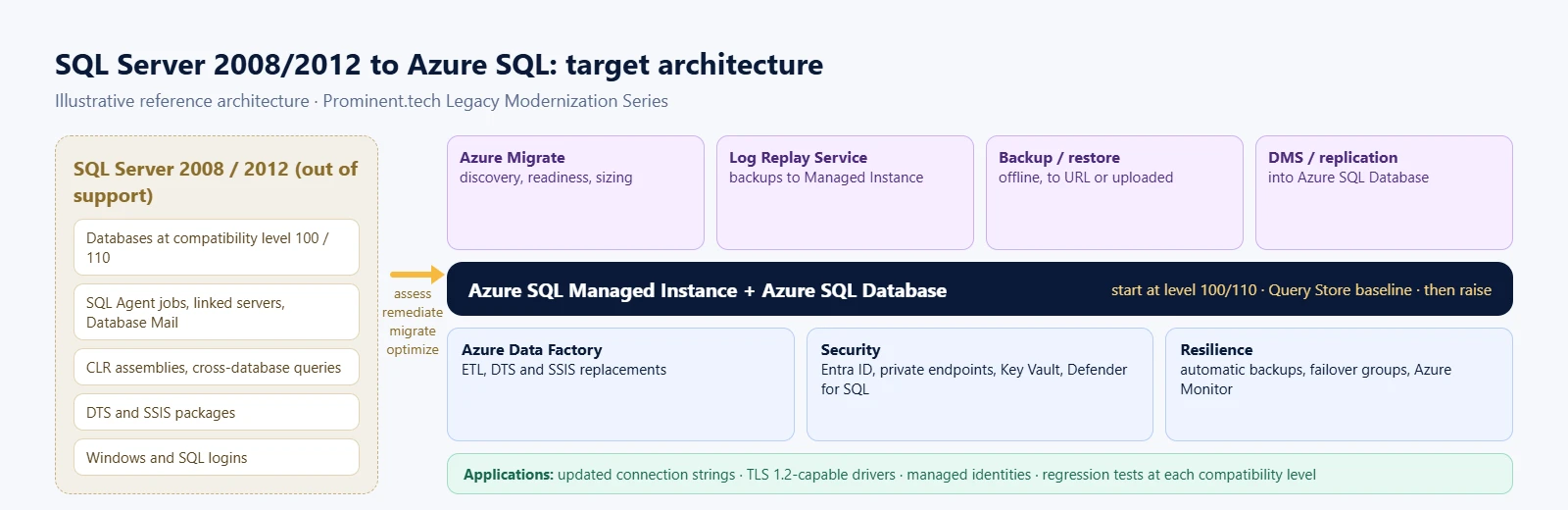
- Azure SQL Managed Instance for instance-dependent databases, with Agent jobs and linked servers kept where needed.
- Azure SQL Database or elastic pools for self-contained databases behind modern apps.
- Private networking: private endpoints or VNet integration, no public endpoints, and ExpressRoute or VPN back to on-premises during transition.
- Microsoft Entra ID authentication, managed identities for apps, and secrets in Azure Key Vault.
- Integration: Azure Data Factory for ETL and DTS/SSIS replacements; see SharePoint vs Dataverse vs Azure SQL when app data could live elsewhere.
- Operations: automatic backups, failover groups for disaster recovery, Query Store and Azure Monitor.
Still running SQL Server 2008 or 2012? Talk to our Azure data team about an assessment and a target recommendation.
Step-by-step migration roadmap
- Discover and assess (1 to 3 weeks): inventory instances, databases, jobs, linked servers, logins, SSIS/DTS packages and connection strings; run Azure Migrate.
- Choose targets per database: Managed Instance, SQL Database or VM, using the feature table above.
- Remediate: rewrite discontinued T-SQL, sign CLR assemblies, replace DTS, update old client drivers for TLS 1.2.
- Build the landing zone: networking, Entra ID, Key Vault, monitoring and policy.
- Rehearse: migrate copies, run application tests at the original compatibility level, capture Query Store baselines.
- Migrate: LRS or backup/restore for Managed Instance, DMS or replication for SQL Database, in waves by application.
- Optimize: raise compatibility levels, fix regressions, right-size compute and decommission the old servers.
For downtime and cost planning details, use our SQL Server to Azure SQL migration checklist.
Security and identity
- Authentication: move from Windows and SQL logins to Microsoft Entra ID; keep SQL logins only where an app cannot change yet.
- Encryption: TDE is on by default for new Azure SQL databases; migrate existing TDE certificates before restoring encrypted backups.
- Network: private endpoints, firewall rules and no public access by default.
- Auditing and threat detection: enable auditing and Microsoft Defender for SQL.
- Drivers: old applications may use clients that can’t negotiate TLS 1.2. Test connectivity early; this often forces small application changes, which our VB6 and VB.NET guides cover.
Testing, cutover and support
Testing
- Row counts and checksums per table between source and target.
- Application regression tests at the original compatibility level, then again after raising it.
- Performance tests with Query Store comparisons.
Cutover
- Freeze writes, apply the final log or differential backup (LRS) or stop replication, switch connection strings, and keep the source read-only for rollback.
Support
- Azure SQL Database and Managed Instance are patched by Microsoft. Review the Managed Instance update policy and plan compatibility level upgrades as part of normal releases.
Cost, effort and timeline
The ranges below are indicative planning assumptions, not benchmarks or quotes. Azure consumption is extra; Azure Hybrid Benefit can reduce it if you have eligible licences.
| Estate profile | Typical scope | Indicative cost (USD) | Indicative duration |
|---|---|---|---|
| Small | Up to 10 databases, under 500 GB, few jobs | $10,000 to $40,000 | 1 to 2 months |
| Medium | 10 to 100 databases, Agent jobs, linked servers, SSIS | $40,000 to $200,000 | 2 to 6 months |
| Large | 100+ databases, multiple instances, CLR, DTS, strict downtime | $200,000 to $750,000+ | 6 to 12+ months |
Cost drivers: discontinued features in code, instance-level dependencies, ETL packages, downtime requirements and the number of applications to retest. See legacy application modernization cost and ROI.
FAQs
Can a SQL Server 2008 database be migrated directly to Azure SQL?
Yes. Azure SQL Database and Managed Instance support compatibility level 100, which is SQL Server 2008’s level. Backups can be restored to Managed Instance through Log Replay Service or native restore, and SQL Database migrations can use DMS, replication or BACPAC. Remove discontinued features first.
Is SQL Server 2012 still supported?
No. SQL Server 2012 extended support ended on July 12, 2022, and its three-year Extended Security Update period ended in July 2025.
Should we choose Azure SQL Database or Managed Instance?
Choose Managed Instance when databases rely on SQL Agent, cross-database queries, CLR, Service Broker, linked servers or Database Mail. Choose SQL Database for self-contained databases behind modern applications.
Do we need to change the compatibility level?
Not on day one. Migrate at 100 or 110 to reduce risk, capture a Query Store baseline, then raise the level and fix any regressions using Query Store.
Can we migrate online from SQL Server 2012?
Managed Instance link needs SQL Server 2016 or later, so it isn’t an option. Log Replay Service gives near-online migration to Managed Instance from standard backups, and transactional replication can feed Azure SQL Database.
What happened to Data Migration Assistant and Azure Data Studio?
Azure Data Studio and its Azure SQL migration extension were retired on February 28, 2026. Use Azure Migrate for assessment and Azure Database Migration Service or Log Replay Service for the migration.
How long does a SQL Server 2008/2012 migration take?
Small estates can move in one to two months. Large estates with many instances, CLR, DTS packages and strict downtime windows often take six to twelve months.
Conclusion
SQL Server 2008 and 2012 databases are out of support, but Azure SQL still runs them at their original compatibility level. That makes a managed move achievable: assess, pick Managed Instance or SQL Database per database, remediate discontinued features and instance dependencies, migrate with LRS or DMS, then raise compatibility levels with Query Store as your safety net.
Previous in this series: InfoPath and SharePoint Designer Workflows to Power Apps and Power Automate. Next: DTS/SSIS to Azure Data Factory.
Related services: Microsoft Azure · Legacy Software Modernization · Hire Azure Architects · Hire Data Engineers · DevOps Services
Sources
- Microsoft Learn, SQL Server 2012 and Windows Server 2012 end of support
- Microsoft Learn, Extended Security Updates for SQL Server on Azure Virtual Machines
- Microsoft Learn, ALTER DATABASE compatibility level
- Microsoft Learn, Features comparison: Azure SQL Database and Azure SQL Managed Instance
- Microsoft Learn, Compare SQL migration tools
- Microsoft Learn, Log Replay Service overview
- Microsoft Learn, Managed Instance link overview
- Microsoft Learn, What’s happening to Azure Data Studio
Plan your SQL Server to Azure SQL migration
Prominent.tech helps teams move SQL Server 2008 and 2012 databases to Azure SQL Managed Instance and Azure SQL Database, with assessment, remediation, low-downtime migration and post-move tuning. Talk to our Azure data team or explore our Microsoft Azure services.