Readiness and roadmap
Assess sources, skills and costs, and plan the platform.
WHAT YOU RECEIVE
assessment, architecture, capacity estimate

Microsoft Fabric implementation
One analytics platform for data engineering, warehousing, real-time data and Power BI.
Microsoft Fabric is Microsoft's software-as-a-service analytics platform. It brings data integration, lakehouses, warehouses, real-time analytics, data science and Power BI together on a single data lake, OneLake. We plan, build and govern Fabric platforms that business and data teams can rely on.
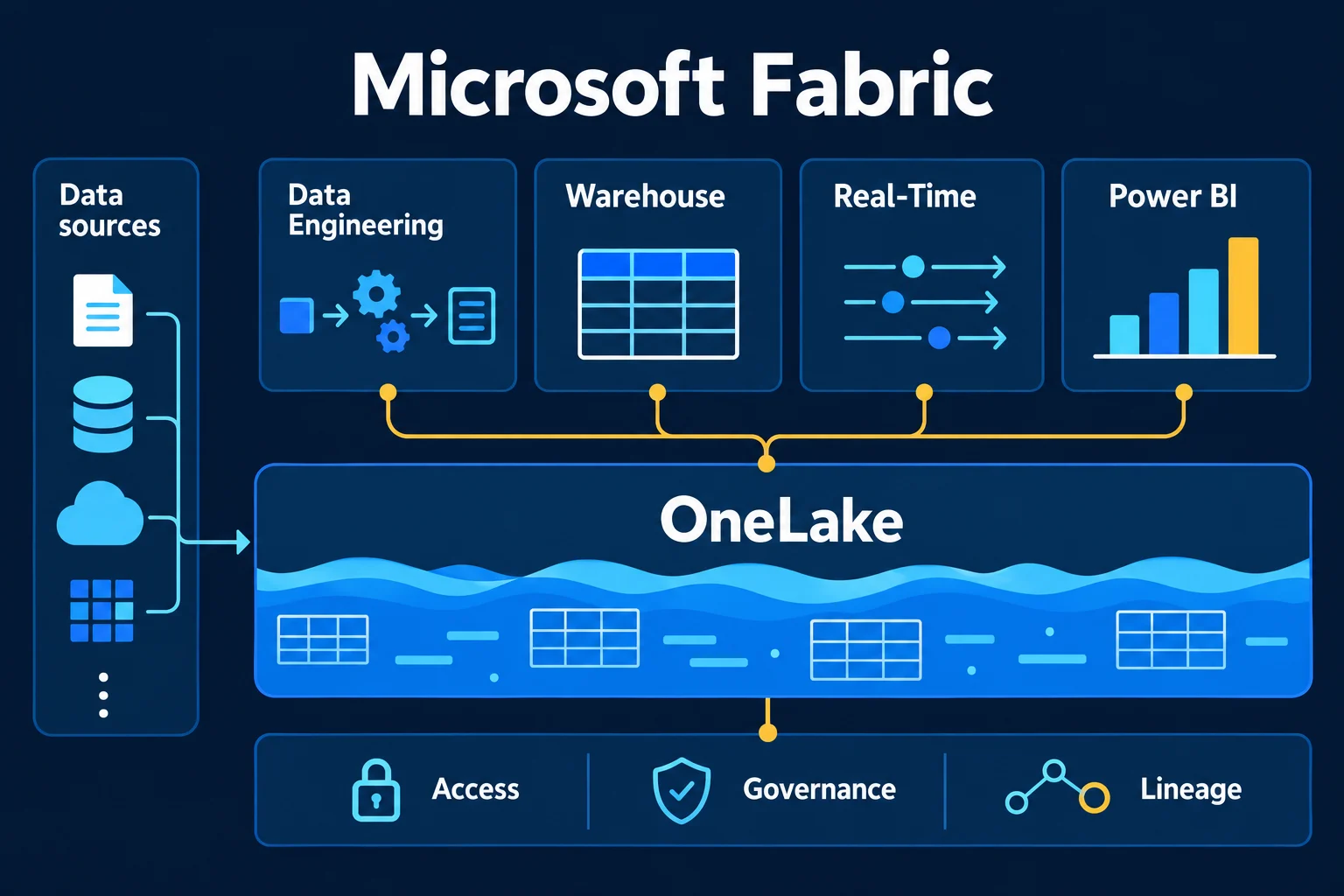
Platform overview
Microsoft Fabric combines several analytics workloads in one service: Data Factory for pipelines and dataflows, Data Engineering for Spark notebooks and lakehouses, Data Warehouse for SQL analytics, Real-Time Intelligence for streaming and event data, Data Science for machine learning, and Power BI for reporting. All of them store data in OneLake in the open Delta Parquet format, so the same tables can be used by different engines without copying.
Fabric is bought as capacity rather than per service, and workspaces organise items for each team or domain. Shortcuts and mirroring bring in data from Azure, AWS S3, Snowflake, SQL databases and other sources, and Direct Lake mode lets Power BI read OneLake tables without scheduled imports. Git integration and deployment pipelines support controlled releases.
Engagement scope
What we deliver
Each piece of work has a clear output, so you know what you will receive.
Assess sources, skills and costs, and plan the platform.
assessment, architecture, capacity estimate
Workspaces, domains, capacities, security and naming standards.
platform foundation, standards
Pipelines, notebooks and lakehouse layers with tests.
pipelines, notebooks, data model
Warehouse design and Power BI semantic models.
warehouse, semantic model, reports
Move from Synapse, Azure Data Factory or on-premises warehouses.
migration plan, migrated workloads
Purview, monitoring, capacity tuning and release processes.
governance setup, monitoring, runbook
Practical applications
Typical Fabric solutions, from a first lakehouse to a governed enterprise platform.
Bronze, silver and gold layers in OneLake.
SQL warehouse for finance and operations reporting.
Pipelines and dataflows from ERP, CRM and files.
Fast reports over large tables without imports.
Streaming data into Eventhouse for live dashboards.
Bring Synapse, Data Factory and Power BI estates together.
Notebooks and models on governed data.
Use data from other clouds and databases without copying.
Platform & integration
We use the workloads your scenario needs.
Listing a feature here does not mean every project uses it. We recommend what fits your requirements, skills, licensing and running costs.
Fabric reporting runs on Power BI, its engineering notebooks use PySpark, and its pipelines follow the same model as Azure Data Factory. Source data often comes from SQL Server and Azure SQL and Dataverse.
If you are comparing lakehouse platforms, see Databricks; many organisations use the two together. For dedicated engineers, see Hire Microsoft Fabric Engineers.
Designed for real operations
Size capacity from real workloads, and watch usage with the capacity metrics app.
Separate development, test and production workspaces from the start.
Agree a lakehouse layering and naming standard before teams build.
Decide where data should be copied and where shortcuts or mirroring are enough.
Plan security at workspace, item and row level.
Check which features are generally available for production use in your region.
Delivery approach
Goals, users, constraints and the systems Microsoft Fabric must work with.
Agreed goals, constraints and success criteria
Confirm Microsoft Fabric is the right fit and agree the architecture and scope.
Reviewed architecture and delivery scope
Deliver in short iterations with testing, reviews and documentation.
Tested solution with implementation documentation
Monitor, support and improve the solution as your needs change.
Handover, monitoring and an improvement plan
Common questions
Microsoft's SaaS analytics platform that combines data integration, engineering, warehousing, real-time analytics, data science and Power BI on OneLake.
OneLake is the unified data lake included with each Microsoft Fabric tenant. It provides shared storage and access for analytics workloads, with open table formats such as Delta Parquet and Iceberg. Exact storage and access patterns depend on the workload.
Fabric uses capacity-based licensing, commonly F SKUs. Power BI authoring, sharing and viewing rights also depend on per-user licences, capacity size and workspace roles. We review the workload and audience before recommending a capacity.
Yes. We assess pipelines, Spark and SQL workloads and migrate them in stages.
It depends on your skills, existing tools and workloads. Fabric suits Microsoft-centred teams; Databricks suits multi-cloud and advanced engineering. Some use both.
Yes. See our Hire Microsoft Fabric Engineers page.
Let’s plan your next step
Tell us about your data sources, reporting and current platform, and we will suggest a practical roadmap.