Platform strategy
Assess current use and design environments, roles and governance.
WHAT YOU RECEIVE
platform strategy, environment plan

Microsoft Power Platform consulting
Plan, build and govern low-code apps, automation and agents across your organisation.
Microsoft Power Platform brings together Power Apps, Power Automate, Power BI, Copilot Studio and Power Pages on a shared data layer, Microsoft Dataverse. We help organisations set up environments and governance, build solutions, and run a sustainable low-code programme.
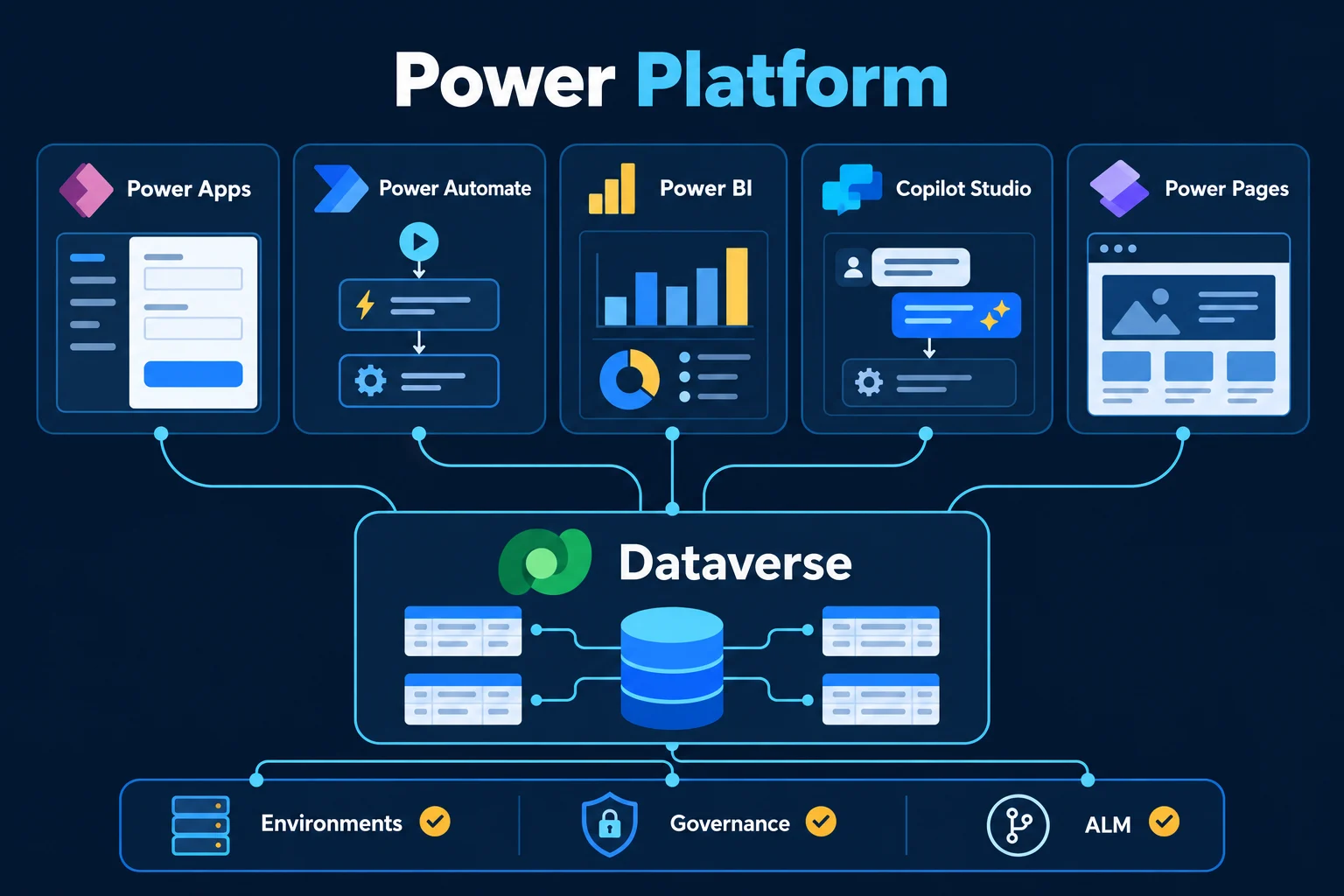
Platform overview
Power Platform is Microsoft's family of low-code products. Power Apps builds business applications, Power Automate automates workflows, Power BI delivers reports, Copilot Studio builds agents and Power Pages builds external websites. More than a thousand connectors link them to Microsoft 365, Azure and third-party systems, and Microsoft Dataverse provides a secure, relational data store shared across the products.
Because business users can build with these tools, Power Platform needs governance as much as development. Environments separate development, test and production; data loss prevention (DLP) policies control which connectors can be combined; managed environments add controls and usage insights; and solutions with pipelines move work between environments in a controlled way.
Engagement scope
What we deliver
Each piece of work has a clear output, so you know what you will receive.
Assess current use and design environments, roles and governance.
platform strategy, environment plan
DLP policies, managed environments, security roles and monitoring.
policy set, admin guide
Solutions, source control and pipelines for safe releases.
ALM process, pipelines
Tables, relationships, security and data migration.
data model, security design
Apps, flows, reports and agents built to your requirements.
working solution, documentation
Maker onboarding, standards and the CoE Starter Kit.
CoE setup, maker guidelines, training
Practical applications
Typical programmes, from a first app to an organisation-wide platform.
Inspections, requests, asset tracking and case management.
Approvals, notifications and system-to-system flows.
Power BI on the same data the apps capture.
Copilot Studio agents for staff and customers.
Power Pages sites for partners and customers.
Replace Access databases, InfoPath forms and spreadsheets.
Rules and support so business makers can build safely.
A single Dataverse model used by many apps.
Platform & integration
How the products fit together.
Listing a feature here does not mean every project uses it. We recommend what fits your requirements, skills, licensing and running costs.
Each product has its own page: Power Apps, Power Automate, Power BI, Copilot Studio and the shared data layer Microsoft Dataverse.
Power Platform connects to SharePoint and Microsoft 365, and to Azure services when a solution needs custom code, APIs or heavier processing.
Designed for real operations
Set environments and DLP policies before opening the platform to makers.
Use solutions from the start so work can move between environments.
Choose Dataverse or SharePoint as the data store based on security and scale needs.
Check licensing per app, user and capacity before committing to a design.
Agree support ownership for apps built by business teams.
Monitor usage and retire unused apps and flows regularly.
Delivery approach
Goals, users, constraints and the systems Microsoft Power Platform must work with.
Agreed goals, constraints and success criteria
Confirm Microsoft Power Platform is the right fit and agree the architecture and scope.
Reviewed architecture and delivery scope
Deliver in short iterations with testing, reviews and documentation.
Tested solution with implementation documentation
Monitor, support and improve the solution as your needs change.
Handover, monitoring and an improvement plan
Common questions
Microsoft's set of low-code products: Power Apps, Power Automate, Power BI, Copilot Studio and Power Pages, with Dataverse as shared data.
Yes. Basic environments and DLP policies take little effort at the start and prevent problems later.
Application lifecycle management: building in solutions, storing them in source control and deploying through pipelines between environments.
SharePoint lists suit simple data. Dataverse suits relational data, row-level security and larger volumes.
Licensing varies by product, features and usage. Options include user licences, capacity add-ons and consumption-based billing; availability of legacy per-app plans varies. We confirm current entitlements and model costs for your solution.
Yes. We set up a Centre of Excellence with standards, training and review.
Let’s plan your next step
Tell us how you use Power Platform today and what you want to achieve, and we will suggest next steps.