
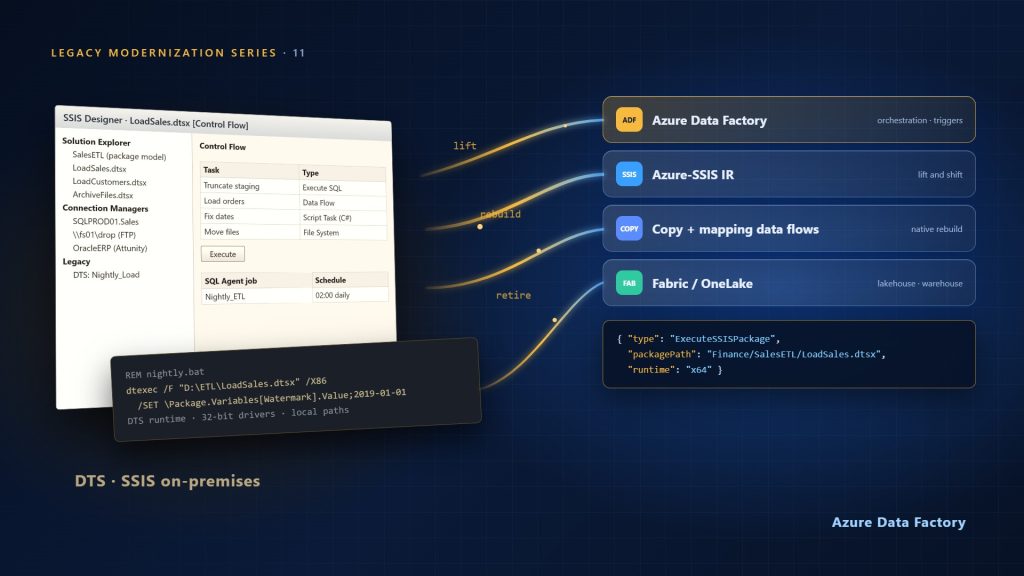
An SSIS to Azure Data Factory migration moves the ETL packages that feed your reports and data warehouses from on-premises servers to a managed cloud orchestration service. There are two very different starting points. DTS packages from the SQL Server 2000 era have been unsupported since SQL Server 2012 and must be rebuilt. SSIS packages can either be lifted into Azure Data Factory’s Azure-SSIS Integration Runtime with few changes, or redesigned as native pipelines. This guide helps you choose per package and plan the move.
Technically reviewed by Harshita Pipaliya.
This is the eleventh article in our Legacy Modernization Series. It follows our SQL Server 2008/2012 to Azure SQL guide, because ETL usually moves with or just after the databases it feeds. If you are deciding between Azure Data Factory and Fabric, see our Fabric Data Factory vs Azure Data Factory comparison.
Executive summary
- DTS: in SQL Server 2012, “support for migrating or running Data Transformation Services (DTS) packages has been discontinued”, along with the DTS runtime and the Package Migration Wizard (Microsoft Learn). Any DTS package still in use is rebuilt, not migrated.
- SSIS lift and shift: the Azure-SSIS Integration Runtime in Azure Data Factory runs existing packages. Microsoft says “you can deploy a package created with any version of SSIS to Azure”, and it is upgraded to the latest SSIS version; projects must use the project deployment model (Microsoft Learn).
- SSIS 2025 changes: the CDC components by Attunity, the Microsoft Connector for Oracle and the Hadoop tasks are no longer available in SQL Server 2025 Integration Services, and 32-bit mode is deprecated (Microsoft Learn).
- Fabric: Microsoft Fabric has an Invoke SSIS Package activity, currently in preview, with limits such as no on-premises data sources and no custom components (Microsoft Learn).
- Our recommendation: lift SSIS packages that work and change rarely to Azure-SSIS IR to exit the old servers quickly. Rebuild high-value or frequently changed pipelines as native Data Factory or Fabric pipelines with Copy activities and data flows. Rebuild DTS from scratch.
DTS and SSIS in 2026
| Item | Status |
|---|---|
| DTS packages | Not supported since SQL Server 2012; runtime and migration wizard removed |
| SSIS on SQL Server 2016 to 2025 | Supported with the matching SQL Server version |
| Azure-SSIS Integration Runtime (Azure Data Factory) | Runs SSIS packages in Azure; SSISDB on Azure SQL Database or Managed Instance |
| Data Migration Assistant (SSIS assessment) | Microsoft notes “Data Migration Assistant (DMA) is deprecated” |
| SSIS 2025 | Attunity CDC, Microsoft Connector for Oracle and Hadoop tasks no longer available; 32-bit mode and legacy SSIS service deprecated |
| Fabric Invoke SSIS Package activity | Preview; packages stored in OneLake |
Why ETL migrations stall
- Undocumented logic. Business rules hide in Script Tasks, Script Components, expressions and stored procedures called from packages.
- On-premises dependencies. File shares, FTP servers, Excel and Access files, ODBC drivers and mainframe extracts.
- Third-party components. Commercial SSIS components need licences and support in the target runtime.
- Scheduling and chaining. SQL Agent jobs, Windows Task Scheduler and batch files coordinate the sequence.
- Package deployment model. Older packages in MSDB or the file system use the package deployment model and need conversion to projects for SSISDB.
Three target options
| Target | What changes | Best for | Watch out for |
|---|---|---|---|
| Azure-SSIS IR (lift and shift) | Packages stay SSIS; runtime moves to Azure | Exiting servers quickly, stable packages | IR compute cost while running; legacy design stays |
| Native Azure Data Factory pipelines | Redesign with Copy activity, data flows and stored procedures | New investment, cloud sources, better monitoring | Rebuild effort; Script Task logic must move elsewhere |
| Microsoft Fabric Data Factory | Pipelines and dataflows in Fabric, alongside OneLake | Organizations standardizing on Fabric for analytics | SSIS activity is in preview with limits |
Decision guide: lift, rebuild or retire
| If the package… | Choose | Why |
|---|---|---|
| Is a DTS package | Rebuild (ADF or Fabric) | No supported runtime |
| Has not run in 12 months | Retire | Check logs and owners first |
| Works, rarely changes, many packages | Azure-SSIS IR | Fastest exit from servers |
| Moves data between cloud services | Native ADF Copy activity | Simpler, scalable, cheaper |
| Has heavy Script Tasks or custom components | Rebuild, or Azure-SSIS IR with custom setup | Custom components need a custom IR setup |
| Uses Attunity CDC or the Oracle connector | Redesign the extract | Not available in SSIS 2025 |
| Feeds a Fabric lakehouse or warehouse | Fabric Data Factory | Same platform as the target |
This guide is our recommendation from delivery experience.
SSIS to Data Factory component mapping
| SSIS | Azure Data Factory / Fabric |
|---|---|
| Control flow | Pipeline with activities and dependencies |
| Data Flow Task (simple source to destination) | Copy activity |
| Data Flow Task (lookups, derived columns, aggregates) | Mapping data flow, or SQL in a stored procedure activity |
| Execute SQL Task | Script activity or Stored procedure activity |
| For Each Loop / For Loop | ForEach / Until activities |
| Script Task / Script Component | Azure Function activity, notebook, or keep in Azure-SSIS IR |
| Execute Package Task | Execute Pipeline activity |
| File System Task / FTP Task | Copy activity, Delete activity, Get Metadata activity |
| Connection managers | Linked services, with secrets in Azure Key Vault |
| Package and project parameters | Pipeline parameters and global parameters |
| SQL Agent job schedules | Schedule, tumbling window or storage event triggers |
| SSISDB catalog reports | Data Factory monitoring, Azure Monitor and Log Analytics |
Code and configuration patterns
The examples below are illustrative and simplified.
1. Lift and shift: run an existing SSISDB package from a Data Factory pipeline
{
  "name": "Run_LoadSales",
  "type": "ExecuteSSISPackage",
  "typeProperties": {
    "packageLocation": {
      "type": "SSISDB",
      "packagePath": "Finance/SalesETL/LoadSales.dtsx"
    },
    "runtime": "x64",
    "loggingLevel": "Basic",
    "connectVia": {
      "referenceName": "AzureSsisIR",
      "type": "IntegrationRuntimeReference"
    }
  }
}
Microsoft also provides an SSIS Job Migration Wizard in SSMS (18.5 or later) that converts SQL Agent jobs with SSIS steps into Data Factory pipelines, Execute SSIS Package activities and schedule triggers, for packages stored in the file system (Microsoft Learn).
2. Rebuild: replace a simple Data Flow Task with a Copy activity
{
  "name": "Copy_Orders_To_Staging",
  "type": "Copy",
  "inputs":  [ { "referenceName": "OnPremOrders", "type": "DatasetReference" } ],
  "outputs": [ { "referenceName": "AzureSqlStagingOrders", "type": "DatasetReference" } ],
  "typeProperties": {
    "source": { "type": "SqlServerSource", "sqlReaderQuery": "SELECT * FROM dbo.Orders WHERE ModifiedDate >= '@{pipeline().parameters.Watermark}'" },
    "sink":   { "type": "AzureSqlSink", "writeBehavior": "upsert",
                "upsertSettings": { "useTempDB": true, "keys": [ "OrderID" ] } }
  }
}
3. Control Azure-SSIS IR cost: start it before the batch window, stop it after
Start-AzDataFactoryV2IntegrationRuntime -ResourceGroupName "rg-data" `
    -DataFactoryName "adf-finance" -Name "AzureSsisIR" -Force

# ... run packages ...

Stop-AzDataFactoryV2IntegrationRuntime -ResourceGroupName "rg-data" `
    -DataFactoryName "adf-finance" -Name "AzureSsisIR" -Force
The same start and stop can be done from a pipeline with a Web activity calling the Data Factory REST API using the factory’s managed identity.
Recommended target architecture
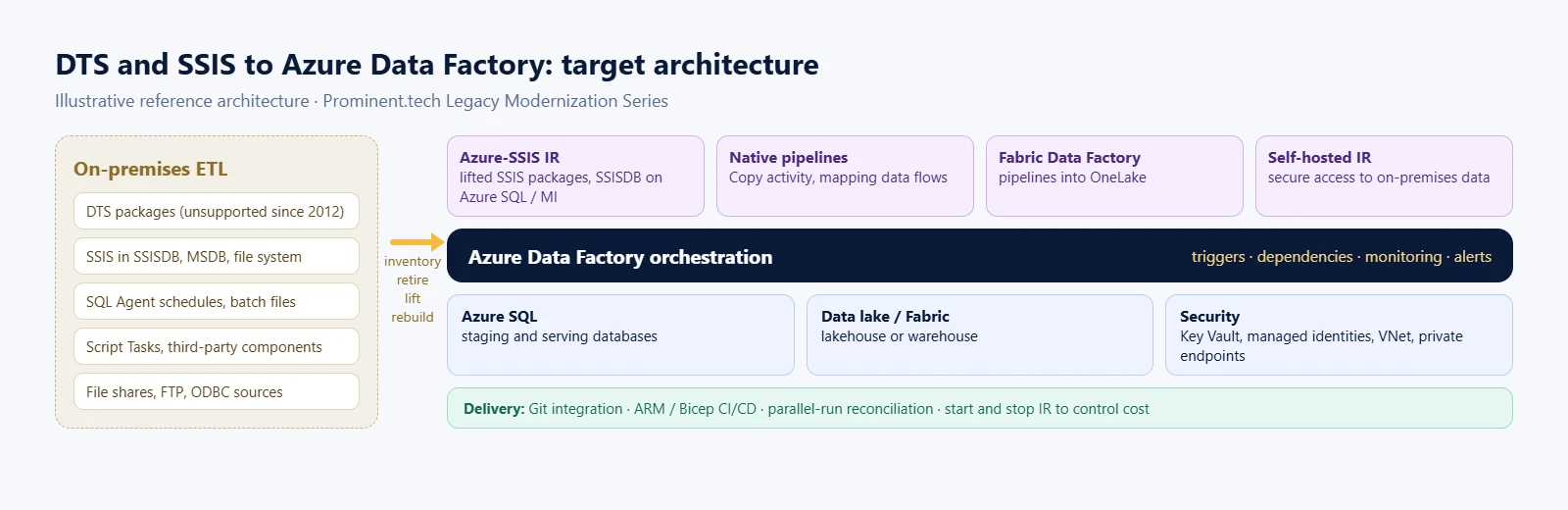
- Azure Data Factory as the orchestrator for both lifted SSIS packages and native pipelines, so there is one place to schedule and monitor.
- Azure-SSIS IR joined to a virtual network for packages that reach on-premises sources; self-hosted IR for native Copy activities against on-premises data.
- SSISDB on Azure SQL Database or Managed Instance, or packages in Azure Files for file-system deployments.
- Landing and serving: Azure SQL, a data lake, or a Fabric lakehouse or warehouse, depending on your analytics platform.
- Key Vault, managed identities and Git integration for secrets, access and CI/CD.
Planning to retire your SSIS servers? Talk to our data engineering team about a package-by-package plan.
Step-by-step migration roadmap
- Inventory (1 to 3 weeks): list packages by storage type (SSISDB, MSDB, file system, Package Store), schedules, sources, destinations, components and last run date. Flag any DTS packages.
- Assess: identify migration blockers such as third-party components, Windows authentication, local file paths and 32-bit drivers.
- Decide per package: lift, rebuild or retire using the decision guide.
- Build the platform: Data Factory, Azure-SSIS IR (sized by node type and count), self-hosted IR, networking, Key Vault, Git.
- Lift first, then rebuild: move stable packages to Azure-SSIS IR to exit servers; rebuild DTS and high-value pipelines natively.
- Parallel run: compare row counts, totals and run times against on-premises for at least one full business cycle.
- Cut over and decommission: switch schedules, disable on-premises jobs, then retire the ETL servers.
Security and networking
- Secrets: move connection strings and passwords from package configurations into Azure Key Vault linked services.
- Identity: use managed identities for Azure SQL, storage and Key Vault; replace Windows authentication where possible.
- Network: join Azure-SSIS IR to a virtual network, use private endpoints, and reach on-premises sources over ExpressRoute or VPN.
- Data protection: encrypt staging data, avoid copying sensitive data to dev, and apply retention on landing zones.
Testing, deployment and support
Testing
- Reconcile row counts, sums and checksums per load between old and new runs.
- Test failure and restart paths, not just successful runs.
- Performance test with production-sized volumes; size Azure-SSIS IR nodes from the results.
Deployment
- Connect Data Factory to Git; promote pipelines with ARM or Bicep templates through dev, test and production.
- Deploy SSIS projects to SSISDB with CI/CD tasks for SSIS.
Support
- Alerts on pipeline failures and long runs; monthly review of IR utilization and cost.
Cost, effort and timeline
The ranges below are indicative planning assumptions, not benchmarks or quotes. Azure consumption, including Azure-SSIS IR hours, is extra.
| Estate profile | Typical scope | Indicative cost (USD) | Indicative duration |
|---|---|---|---|
| Small | Up to 30 packages, mostly lift and shift | $10,000 to $40,000 | 1 to 2 months |
| Medium | 30 to 200 packages, mixed lift and rebuild, on-premises sources | $40,000 to $200,000 | 3 to 6 months |
| Large | 200+ packages, DTS, custom components, CDC, strict SLAs | $200,000 to $700,000+ | 6 to 12+ months |
Cost drivers: number of packages to rebuild, Script Task complexity, third-party components, source system access and test effort. See legacy application modernization cost and ROI.
FAQs
Can DTS packages run in Azure Data Factory?
No. DTS support was discontinued in SQL Server 2012, including the runtime and the migration wizard. DTS packages need to be rebuilt as Data Factory or Fabric pipelines.
Can existing SSIS packages run in Azure without changes?
Often with few changes. The Azure-SSIS Integration Runtime runs packages from any SSIS version and upgrades them automatically, but projects must use the project deployment model, and file paths, drivers and custom components may need work.
Should we lift and shift SSIS or rebuild in Data Factory?
Lift stable, rarely changed packages to exit servers quickly. Rebuild packages you change often, that move cloud data, or that depend on retired components.
Does Microsoft Fabric support SSIS?
Fabric has an Invoke SSIS Package activity in preview. During preview it supports only packages stored in OneLake, with no on-premises data sources and no custom components.
What replaces SSIS Script Tasks?
Azure Function activities, notebooks, stored procedures or, during transition, keeping the package in Azure-SSIS IR.
What happened to the SSIS Oracle connector and Attunity CDC?
They are no longer available in SQL Server 2025 Integration Services. Microsoft recommends the ADO.NET components with an Oracle data provider for SSIS, or Data Factory for new pipelines.
How long does an SSIS to Azure Data Factory migration take?
Small lift-and-shift estates can move in one to two months. Large estates with DTS, custom components and CDC often take six to twelve months.
Conclusion
ETL is often the last thing tying an organization to its old SQL Servers. Rebuild DTS, lift stable SSIS packages into Azure-SSIS IR to get off the servers, and rebuild the pipelines that matter most as native Data Factory or Fabric pipelines, with Key Vault, Git and monitoring in place from the start.
Previous in this series: SQL Server 2008/2012 to Azure SQL. Next: BizTalk Server to Azure Integration Services.
Related services: Microsoft Azure · Microsoft Fabric · Hire ETL Developers · Hire Data Engineers · API & System Integration
Sources
- Microsoft Learn, Discontinued Integration Services functionality in SQL Server 2012
- Microsoft Learn, Lift and shift SQL Server Integration Services workloads to the cloud
- Microsoft Learn, Migrate on-premises SSIS workloads to SSIS in ADF
- Microsoft Learn, Migrate SQL Server Agent jobs to ADF with SSMS
- Microsoft Learn, What’s new in Integration Services in SQL Server 2025
- Microsoft Learn, Invoke SSIS Package activity in Microsoft Fabric
- Microsoft SQL Server Blog, SSIS Microsoft Connector for Oracle deprecation (January 2025)
Plan your SSIS to Azure Data Factory migration
Prominent.tech helps teams retire DTS and SSIS servers by lifting stable packages to the Azure-SSIS Integration Runtime and rebuilding high-value pipelines in Azure Data Factory or Microsoft Fabric. Talk to our data engineering team or explore our Microsoft Azure services.