
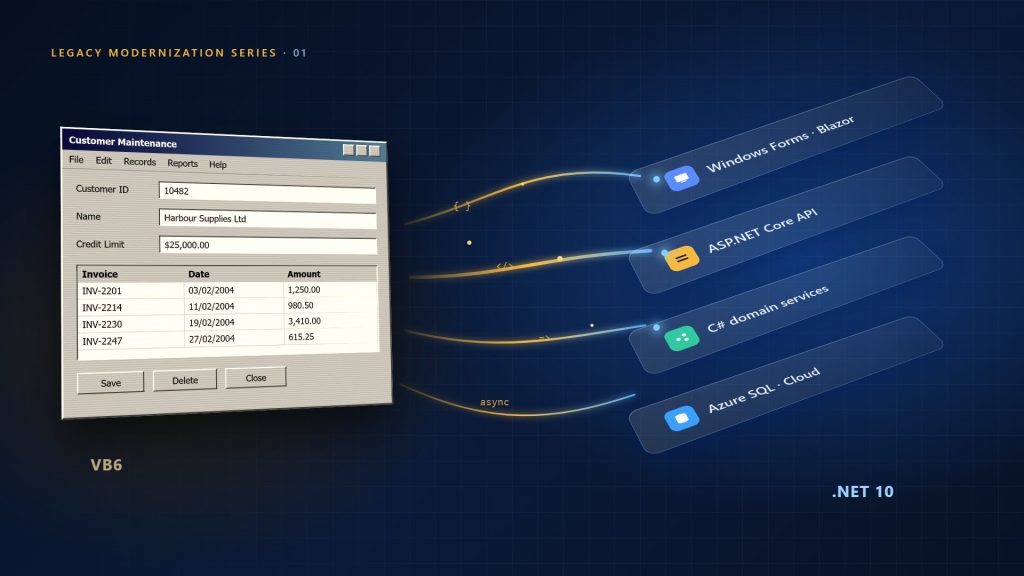
A VB6 to .NET 10 migration moves a 32-bit, COM-based Visual Basic 6.0 application onto .NET 10, Microsoft’s current long-term support (LTS) release, supported until November 14, 2028. There is no supported one-click converter. Successful programmes treat it as a re-engineering project: inventory the code and its COM dependencies, choose a target (Windows Forms, WPF or a web front end on ASP.NET Core), move data access and business rules into tested .NET libraries, and retire the VB6 executable in controlled increments.
Technically reviewed by Harshita Pipaliya.
This guide is written for CIOs, enterprise architects and engineering managers who still run line-of-business software built in VB6 and need a defensible plan, not a sales pitch. It separates what Microsoft documents (with sources) from our recommendations and illustrative examples.
Executive summary
- The VB6 runtime still runs, but the toolchain is frozen. Microsoft supports the VB6 runtime files for the lifetime of supported Windows versions, including Windows 11 and Windows Server 2025, but the VB6 IDE has been unsupported since April 8, 2008, and runtime support is limited to “serious regressions and critical security issues” (Microsoft Learn).
- VB6 is 32-bit only. On 64-bit Windows, VB6 applications and runtime components are supported only under WOW64 emulation (same source).
- .NET 10 is the right landing zone. It is an LTS release (released November 11, 2025; supported to November 14, 2028). .NET 8 and .NET 9 reached end of support on November 10, 2026, and .NET 11 is a shorter-lived STS release (.NET support policy).
- Microsoft’s tooling does not cover VB6. The .NET Upgrade Assistant, now deprecated in favour of the GitHub Copilot modernization agent, targets .NET Framework projects, not VB6 (Microsoft Learn).
- Our recommendation: for most enterprise VB6 estates, translate business logic into C# class libraries on .NET 10, keep a Windows Forms front end where users need desktop speed, and expose the logic through ASP.NET Core Web APIs so a web or mobile front end can follow without a second rewrite.
Where VB6 stands in 2026
Visual Basic 6.0 shipped in 1998 as part of Visual Studio 6.0. Its programming model (forms, ActiveX controls, COM components and ADO data access) dominated Windows line-of-business development for a decade. Microsoft’s current position, from its published support statement, is:
| Component | Status (per Microsoft) |
|---|---|
| VB6 IDE / Visual Studio 6.0 | Not supported since April 8, 2008 |
Core runtime files (e.g. msvbvm60.dll) | Ship in Windows and are supported for the lifetime of supported Windows versions |
“Runtime extended files” (e.g. mscomctl.ocx, comctl32.ocx, msflxgrd.ocx) | Supported, but you must redistribute them with your application |
Some legacy controls (e.g. grid32.ocx, graph32.ocx) | Not supported on Windows |
| 64-bit | Runtime is 32-bit only; supported only under WOW64 on 64-bit Windows |
| Supported OS list | Windows 11, Windows 10, Windows Server 2025, 2022, 2019, 2016 and older; Server Core is not supported |
Source: Support Statement for Visual Basic 6.0 on Windows.
Microsoft describes its goal as “It Just Works” compatibility for existing VB6 applications, and in the same statement “strongly recommends that you replace your applications with modern technology.” Those two sentences sum up the situation: VB6 will keep launching, but nobody is investing in it.
On the target side, .NET 10 is the current LTS release. Windows Forms “is supported on .NET and receives active investment,” and Microsoft notes that Windows desktop apps on .NET “remain Windows only” (Windows Forms migration overview).
Why enterprises still run VB6
VB6 applications survive because they work. The common patterns we see in assessments are:
- Deeply embedded business rules. Pricing engines, underwriting rules, production scheduling and claims logic were written directly into form event handlers. The code is the specification.
- Fast, keyboard-driven desktop UX. Data-entry teams are productive in dense VB6 forms and resist slower web replacements.
- COM integration everywhere. VB6 apps call ActiveX DLLs, Office automation, scanners, label printers and vendor SDKs that only ship 32-bit COM interfaces.
- “Nobody wants to touch it.” The original developers have left, there is no test suite, and every change is risky, so change stops.
- Budget framing. A system that runs is treated as free. Its risk and opportunity costs rarely appear on a balance sheet.
None of these are reasons to stay. They are the constraints your migration plan has to respect.
The real modernization drivers
The drivers that move VB6 modernization from “someday” to a funded programme are usually concrete:
- Skills risk. The pool of engineers who can safely change VB6 shrinks every year, and new hires do not want to learn it.
- Security and audit findings. The VB6 compiler and IDE receive no updates, and legacy ActiveX controls and DAO/RDO data stacks are typical penetration-test and audit findings. Modern identity (Microsoft Entra ID, MFA, conditional access) is hard to retrofit.
- Platform pressure. 32-bit-only components block 64-bit Office, new drivers and some virtual desktop images. Each Windows upgrade becomes a regression-testing exercise.
- Integration demands. Business units want APIs, cloud data, Power BI dashboards and AI features. VB6 has no practical path to REST, OAuth 2.0 or modern JSON tooling.
- Cloud and remote work. Distributing a VB6 client with registered OCX files to remote staff is fragile. Organisations want browser access or managed desktop delivery.
Risks of delaying modernization
- Key-person dependency: one retirement can turn a routine fix into an outage.
- Unpatchable components: third-party OCX vendors from the 2000s are often gone, so vulnerabilities in their controls stay open.
- Compounding cost: every year of delay adds features and integrations to the system you must eventually migrate. We look at this in more depth in the cost of delaying legacy modernization.
- Forced timelines: a failed OS upgrade, an acquisition or a cyber-insurance questionnaire can force a rushed migration, which is the most expensive kind.
VB6 vs .NET 10 comparison
| Capability | VB6 | .NET 10 (C# or VB.NET) |
|---|---|---|
| Vendor support | Runtime only, limited to critical fixes; IDE unsupported since 2008 | LTS, supported to November 14, 2028 |
| Architecture | 32-bit only (WOW64 on 64-bit Windows) | x64, Arm64 and x86 |
| Language | VB6, no new development | C# 14 (active) or Visual Basic (stable, “consumption-only”) |
| Desktop UI | VB6 forms, ActiveX/OCX | Windows Forms, WPF, WinUI 3, Blazor Hybrid |
| Web and API | None practical | ASP.NET Core, Blazor, minimal APIs, gRPC |
| Data access | DAO, RDO, ADO (COM) | Microsoft.Data.SqlClient, EF Core, Dapper |
| Error handling | On Error GoTo | Structured try/catch/finally |
| Identity | Windows login or custom tables | Microsoft Entra ID, OAuth 2.0/OIDC, ASP.NET Core Identity |
| Testing | Manual, few tools | xUnit/NUnit/MSTest, CI pipelines, UI automation |
| Deployment | Setup packages plus COM registration | MSIX, ClickOnce, self-contained builds, containers, Azure App Service |
A note on language choice. Microsoft’s stated Visual Basic strategy is that VB “won’t be extended to new workloads” and will adopt a “consumption-only approach,” while Microsoft continues to invest in core scenarios “such as Windows Forms and libraries” (Visual Basic language strategy). VB.NET on .NET 10 is supported, but for code that will live another 10 to 15 years, and especially for anything web-facing, we recommend C#. Keep VB.NET only where a team’s familiarity clearly outweighs the narrower ecosystem.
Five migration approaches and when to use each
| Approach | What it means | Use it when | Main risk |
|---|---|---|---|
| 1. Rehost (bridge) | Keep VB6 as-is, deliver it through Azure Virtual Desktop or Windows 365 | You need 12 to 24 months of breathing room or must retire on-premises servers first | Buys time only; technical debt remains |
| 2. Automated conversion | Commercial tools translate VB6 to C# or VB.NET Windows Forms | Large, consistent codebase; UI must stay close to the original | Output still needs refactoring; vendor .NET 10 support must be verified |
| 3. Manual rewrite to Windows Forms or WPF | Re-implement forms and logic on .NET 10, module by module | Desktop UX matters; logic is valuable but messy | Effort; requires strong test coverage |
| 4. Re-architect to web (Blazor or a JavaScript front end + ASP.NET Core API) | New web UI, business logic in services | Remote users, multi-site access, integration and cloud goals | Largest UX change; user retraining |
| 5. Replace with SaaS or Power Platform | Retire the app for an off-the-shelf product or low-code apps | The process is not differentiating | Customisation limits; licence costs |
Migration decision matrix (our recommendation):
| If your application… | Start with |
|---|---|
| Is mission-critical, desktop-centric, with heavy keyboard data entry | Approach 3 (Windows Forms on .NET 10) plus an API layer |
| Has 300+ forms with repetitive patterns | Approach 2 to get to .NET quickly, then refactor |
| Serves remote or external users | Approach 4 |
| Runs a commodity process (HR, simple CRM, approvals) | Approach 5 |
| Sits on hardware or a data centre you must exit within months | Approach 1 now, then 3 or 4 |
Most enterprise programmes combine them: rehost to stabilise, convert or rewrite the core, and replace peripheral modules.
Recommended target architecture
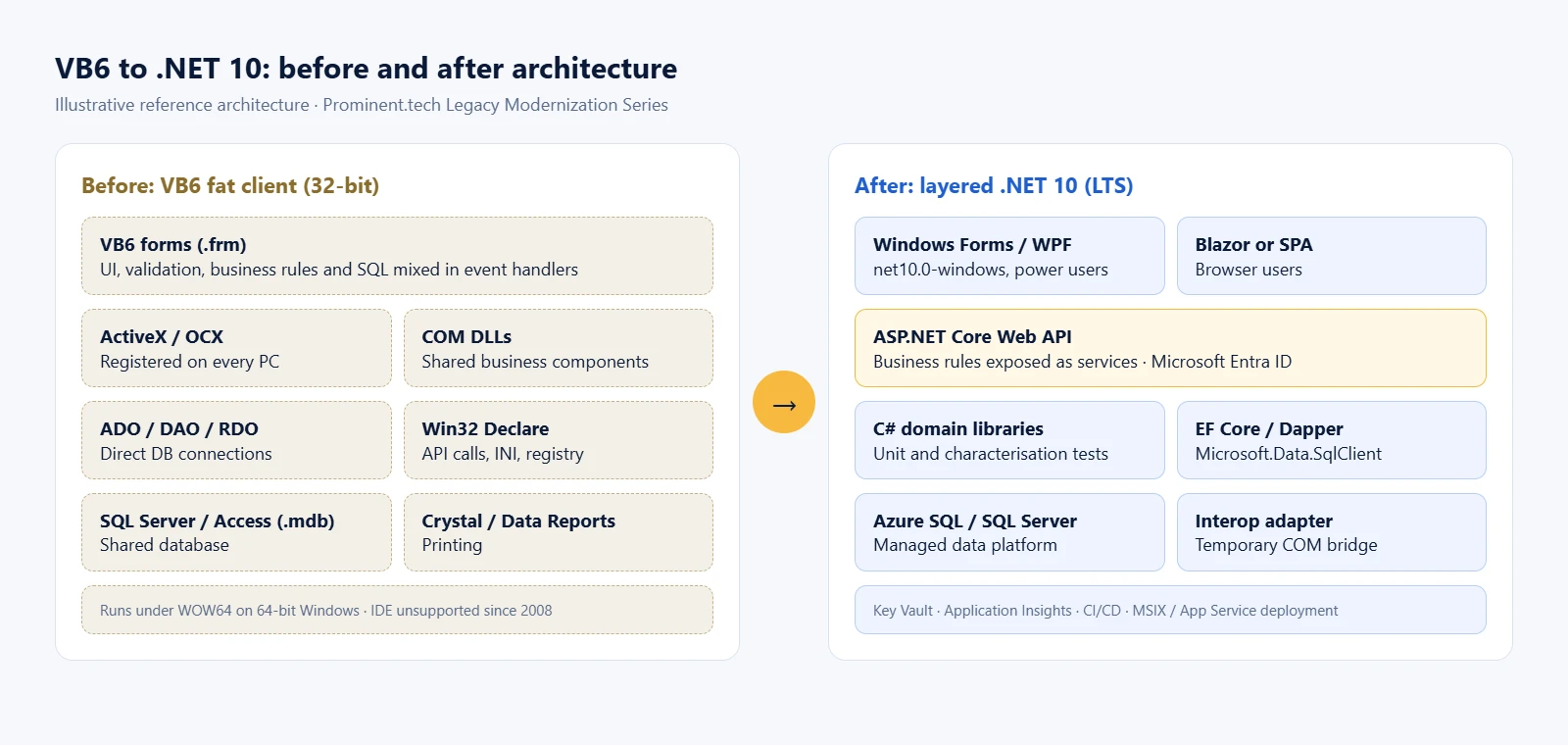
Before (typical VB6): a fat client in which forms contain UI, validation, business rules and SQL. ActiveX DLLs are registered on every PC, ADO connects directly to SQL Server or an Access/Jet database, and reports run through Crystal Reports or the VB6 Data Report designer.
After (recommended .NET 10 target):
- Presentation: Windows Forms or WPF on
net10.0-windowsfor power users; Blazor (or React or Angular) for browser users. Both are thin. - Application services: ASP.NET Core Web API on .NET 10 hosting the business rules extracted from VB6 forms, secured with Microsoft Entra ID.
- Domain and data: C# class libraries for domain logic; EF Core or Dapper over Microsoft.Data.SqlClient; SQL Server or Azure SQL Database.
- Integration: a COM interop boundary for components you cannot yet replace, isolated in one adapter project; message queues (Azure Service Bus) for asynchronous workflows.
- Platform: Azure App Service or containers for APIs, Azure Key Vault for secrets, Application Insights for telemetry, CI/CD via Azure DevOps or GitHub Actions.
The key design decision is moving business rules out of the UI. Once rules live in a tested library behind an API, the front end can change without another migration.
Planning a move like this? Request a Legacy Application Modernization Assessment and our .NET architects will map your VB6 estate to a target architecture.
Step-by-step VB6 to .NET 10 roadmap
Phase 0: Discovery and inventory (2 to 6 weeks)
- Count projects (
.vbp), forms (.frm), modules (.bas), classes (.cls), user controls (.ctl) and lines of code. - List every COM reference and OCX from the
.vbpReference=andObject=lines, and classify each as replace, wrap or retire. - Catalogue Win32
Declarestatements, database connections, file shares, registry use, printers and Office automation. - Find dead code and unused forms. In legacy estates, a meaningful share is often unused; measure it rather than assume it.
- Interview users to identify the 20% of screens that carry most of the business value.
Phase 1: Strategy and target design (2 to 4 weeks)
- Choose the approach per module using the decision matrix.
- Decide language (C# recommended), UI framework, data access and hosting.
- Define the coexistence model: how VB6 and .NET run side by side during transition.
- Agree non-functional requirements: performance baselines, accessibility, security controls and audit logging.
Phase 2: Safety net (overlapping)
- Record characterisation tests: capture inputs and outputs of critical calculations from the running VB6 system, so the .NET version can be proven equivalent.
- Snapshot reference datasets and reports for comparison.
Phase 3: Foundation
- Set up solution structure, CI/CD, code analysis, logging and identity.
- Migrate or modernise the database schema first if it is on Access/Jet or an unsupported SQL Server version.
Phase 4: Incremental migration (the bulk of the work)
- Migrate in vertical slices (for example “customer maintenance” end to end), not layer by layer.
- Extract business logic into C# libraries first, test it against the characterisation suite, then build the new UI on top.
- Use a strangler pattern: the VB6 app keeps running while migrated modules launch from .NET; a .NET COM-visible class or a shared database can bridge them.
Phase 5: Parallel run, cutover and decommission
- Run both systems on the same inputs for an agreed period and reconcile outputs.
- Train users, cut over by department or region, then remove VB6 runtime dependencies and unregister COM components.
Code-level translation: what changes
The examples below are illustrative and simplified.
Data access: VB6 ADO to .NET 10 with Microsoft.Data.SqlClient and Dapper
' VB6: ADO, string-built SQL, On Error GoTo
Private Sub LoadCustomer(ByVal id As Long)
    On Error GoTo ErrHandler
    Dim rs As ADODB.Recordset
    Set rs = New ADODB.Recordset
    rs.Open "SELECT Name, CreditLimit FROM Customers WHERE Id = " & id, gConn
    txtName.Text = rs!Name
    txtLimit.Text = Format$(rs!CreditLimit, "Currency")
    rs.Close
    Exit Sub
ErrHandler:
    MsgBox Err.Description
End Sub
// .NET 10 (C# 14): parameterised query, async, structured errors
public sealed record Customer(string Name, decimal CreditLimit);

public sealed class CustomerRepository(string connectionString)
{
    public async Task<Customer?> GetAsync(int id, CancellationToken ct = default)
    {
        await using var conn = new SqlConnection(connectionString);
        return await conn.QuerySingleOrDefaultAsync<Customer>(
            new CommandDefinition(
                "SELECT Name, CreditLimit FROM Customers WHERE Id = @id",
                new { id }, cancellationToken: ct));
    }
}
The .NET version removes the SQL injection risk, moves data access out of the form, and can be unit tested.
Project file for a Windows Forms front end that still needs a 32-bit COM component:
<Project Sdk="Microsoft.NET.Sdk">
  <PropertyGroup>
    <OutputType>WinExe</OutputType>
    <TargetFramework>net10.0-windows</TargetFramework>
    <UseWindowsForms>true</UseWindowsForms>
    <Nullable>enable</Nullable>
    <!-- Only while a 32-bit COM/OCX dependency remains; remove once it is replaced -->
    <PlatformTarget>x86</PlatformTarget>
  </PropertyGroup>
</Project>
Semantic differences that break naive conversions:
| VB6 behaviour | .NET 10 equivalent | Watch out for |
|---|---|---|
Integer is 16-bit, Long is 32-bit | short / int | Win32 Declare signatures and binary file formats |
Variant | object or, better, specific types | Hidden type coercion in calculations |
Currency | decimal | Rounding rules in financial logic |
Default properties (txtName = "x") | Explicit .Text | Converters must resolve every implicit call |
Arrays with Option Base 1 or custom bounds | Zero-based arrays or collections | Off-by-one errors |
| Control arrays | Event handlers on a list of controls | Shared event logic indexed by Index |
Fixed-length strings, Mid$ assignment | char[] or StringBuilder | Record-based file I/O |
ByRef is the default | ByVal default in VB.NET; explicit ref in C# | Silent changes to caller variables |
Printer object | System.Drawing.Printing or a reporting tool | Pixel-exact forms and labels |
App.Path, INI files, registry | AppContext.BaseDirectory, appsettings.json, Options pattern | Settings scattered across PCs |
Data migration and integration
- Access/Jet (.mdb) back ends: move to SQL Server or Azure SQL Database. Clean data types, add constraints and keys, and plan for queries that relied on Jet-specific SQL.
- Old SQL Server versions: align the database upgrade with the application migration so you test once. Our SQL Server to Azure SQL migration checklist covers the database side.
- DAO/RDO/ADO code: re-implement with EF Core for rich domain models or Dapper for SQL-heavy legacy logic. Do not wrap ADO recordsets through interop in new code.
- Files and batch jobs: replace shared-folder drops and scheduled VB6 executables with .NET worker services, Azure Functions or Azure Data Factory, depending on volume.
- Reports: Crystal Reports and VB6 Data Reports need a planned replacement (SSRS, Power BI paginated reports or a .NET reporting library). Confirm .NET 10 support with any third-party vendor before committing.
- Integration during coexistence: a shared database is the simplest bridge; COM-visible .NET components or a local API are the cleaner long-term options.
Security, compliance and governance
- Identity: replace custom user tables and Windows-only checks with Microsoft Entra ID (MSAL for desktop, OpenID Connect for web) and role-based authorisation.
- Secrets: remove connection strings from INI files and the registry; use Azure Key Vault or managed identities.
- Data protection: encrypt data in transit (TLS 1.2+) and at rest; apply column-level protection for personal data relevant to GDPR, UK GDPR, HIPAA or PCI DSS obligations.
- Supply chain: retire unsupported OCX controls; scan NuGet dependencies; sign binaries and MSIX packages.
- Audit: add structured logging and audit trails that VB6 apps rarely had, which simplifies SOC 2 and ISO 27001 evidence.
- Governance: maintain an architecture decision record per module so auditors and future teams know why each choice was made.
Testing and quality assurance
- Characterisation (golden-master) tests on business calculations, using data captured from VB6.
- Unit tests (xUnit, NUnit or MSTest) on the extracted C# libraries.
- Integration tests against a containerised SQL Server.
- UI automation for critical desktop workflows (for example FlaUI for Windows Forms) or Playwright for web front ends.
- Report and output comparison: byte- or field-level diffing of invoices, exports and printed documents.
- Parallel run in production-like conditions with reconciliation reports signed off by business owners.
- Performance tests against baselines captured from VB6, because users notice if a lookup slows down.
Deployment and post-migration support
- Desktop: MSIX or ClickOnce packages, or self-contained single-file builds that remove the need for PC-wide runtime installs. Manage rollout with Microsoft Intune or Configuration Manager.
- Web and APIs: Azure App Service or Azure Container Apps with staging slots and blue-green releases.
- Observability: Application Insights and OpenTelemetry for errors, performance and usage, which also tells you which old features nobody uses.
- Lifecycle planning: .NET 10 support ends November 14, 2028. Budget a routine upgrade to the next LTS (expected November 2027, per Microsoft’s even-number LTS cadence) rather than letting the new system become the next legacy problem.
- Hypercare: plan 4 to 8 weeks of elevated support after each cutover.
Common challenges and how to handle them
| Challenge | Practical solution |
|---|---|
| Missing source code for some components | Treat as a black box: wrap via COM interop, write characterisation tests, then re-implement |
| Third-party OCX with no .NET equivalent | Find a modern control suite or rebuild; keep an x86 interop bridge only temporarily |
| Business rules nobody can explain | Extract them into named, tested methods; review with business owners using test cases, not code |
| Users resist a new UI | Keep layouts and keyboard shortcuts familiar in phase one; redesign later |
| Scope creep (“while we are at it…”) | Freeze functional scope for the migration; log enhancements for after cutover |
| Converted code is unreadable | Budget refactoring time after automated conversion; enforce analyzers and code review |
| Big-bang cutover fear | Strangler approach and parallel runs by module |
Cost, effort and timeline
Costs depend on code size, number of forms, COM dependencies, data complexity and test coverage. The ranges below are indicative planning assumptions from our own estimating approach, not industry benchmarks or quotes, and assume a blended offshore-onshore team using the manual or assisted rewrite approach.
| Application profile | Indicative size | Indicative cost (USD) | Indicative duration |
|---|---|---|---|
| Small departmental app | Under 50 forms, under 30k lines, few COM dependencies | $40,000 to $120,000 | 3 to 6 months |
| Mid-size line-of-business app | 50 to 200 forms, 30k to 150k lines, several integrations | $120,000 to $450,000 | 6 to 12 months |
| Large mission-critical estate | 200+ forms, 150k+ lines, many COM components and reports | $450,000 to $1.5M+ | 12 to 24+ months |
For how system age affects schedules generally, see modernization timelines by system age, and for building the business case, legacy application modernization cost and ROI.
What moves the number most: the share of logic inside form events, the number of unsupported OCX controls, the database platform, and whether a test baseline already exists. A two-to-four-week assessment typically narrows these ranges considerably.
Best practices and recommendations
- Land on .NET 10 LTS, not an STS release, for a programme of this length.
- Default to C# for new code; reserve VB.NET for teams with a clear reason.
- Separate business logic from UI first; it is what makes every later change cheaper.
- Make tests the contract: characterisation tests before migration, automated tests after.
- Migrate in vertical slices with coexistence, not a single big-bang release.
- Isolate COM interop in one adapter project with a retirement date.
- Measure usage before migrating every screen; retire what nobody uses.
- Plan the next upgrade now, so .NET 10 does not become tomorrow’s VB6.
FAQs
Can VB6 code be converted to .NET 10 automatically?
Partially. Microsoft no longer provides a VB6 converter: the Visual Basic Upgrade Wizard last shipped with Visual Studio 2008, and the current .NET Upgrade Assistant does not support VB6. Commercial tools can translate VB6 to C# or VB.NET, but expect manual work on COM controls, data access, printing and semantic differences.
Will VB6 applications still run on Windows 11?
Yes. Microsoft supports the VB6 runtime on Windows 11 and Windows Server 2025 under its “It Just Works” policy, as 32-bit applications under WOW64. Support is limited to serious regressions and critical security issues, and the IDE is unsupported.
Should we migrate VB6 to VB.NET or C#?
For most enterprises, C#. Visual Basic on .NET is supported but follows a “consumption-only” strategy with no new workloads. C# has the larger talent pool and full access to web, cloud and AI tooling.
Should we target .NET 10 or .NET 11?
.NET 10. It is the current LTS release, supported until November 14, 2028. .NET 11 is an STS release, and multi-year migration programmes benefit from the longer LTS window.
Can .NET 10 use our existing COM and ActiveX components?
Yes, on Windows, through COM interop and ActiveX hosting in Windows Forms. 32-bit components require an x86 process. Treat this as a temporary bridge.
How long does a VB6 to .NET migration take?
From roughly three months for a small departmental application to two years or more for a large estate. Discovery is the only reliable way to narrow the estimate.
Can we move a VB6 application to Azure without rewriting it?
Yes, as a bridge. Azure Virtual Desktop or Windows 365 can deliver the existing application to remote users. It does not remove the technical debt, so treat it as a step towards migration.
Conclusion
VB6 applications will keep starting up on Windows 11, but that is not the same as being supported, secure or able to change. A VB6 to .NET 10 migration succeeds when it is run as an engineering programme: inventory first, tests before translation, business logic extracted into libraries and APIs, and modules retired one slice at a time. Done that way, the result is not just a newer version of the same application but a platform that can take on web, cloud, integration and AI work for the next decade.
Next in this series: VB.NET Legacy Applications to .NET 10: Upgrade Strategy, Challenges and Best Practices.
Related services: Legacy Software Modernization · .NET Development · Microsoft Azure · API and System Integration · Hire .NET Developers
Sources
- Microsoft Learn, Support Statement for Visual Basic 6.0 on Windows: learn.microsoft.com
- Microsoft, .NET and .NET Core Support Policy: dotnet.microsoft.com
- Microsoft Learn, What’s new in .NET 10: learn.microsoft.com
- Microsoft Learn, Windows Forms migration overview: learn.microsoft.com
- Microsoft Learn, Visual Basic language strategy: learn.microsoft.com
- Microsoft Learn, .NET Upgrade Assistant overview: learn.microsoft.com
Plan your VB6 to .NET 10 migration
Bring your application inventory, COM dependencies and target timelines. Request a legacy application modernization assessment and our .NET architects will map a phased, test-first route off VB6.