
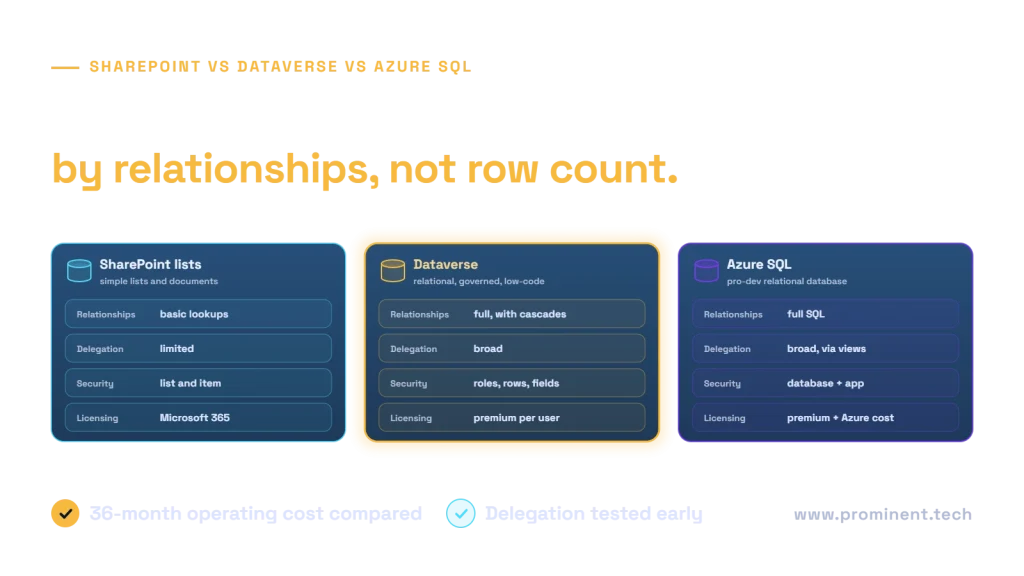
SharePoint vs Dataverse is a business-data and governance decision, not simply a storage comparison. SharePoint Lists can fit relatively simple Microsoft 365 workflows. Dataverse suits Power Platform-native applications with richer relationships, security and lifecycle needs. Azure SQL fits controlled relational workloads and existing SQL estates. Query delegation, backend authorization, actual user entitlements and long-term support determine whether each option is defensible.
Quick decision: which backend should you choose?
| Backend | Starting use case | Advantage | Main constraint |
|---|---|---|---|
| SharePoint | Departmental lists and simple approvals | Familiar Microsoft 365 collaboration | Complex relationships, query patterns and governance |
| Dataverse | Managed business applications | Tables, security and Power Platform lifecycle | Entitlements, capacity and environment administration |
| Azure SQL | Existing relational enterprise data | SQL control, indexes and integration | Connector licenses and database operations |
Begin with the users and transactions rather than an arbitrary row threshold. Specify who can see or change which record, what relationships must remain valid, which queries must be complete, and how updates are deployed. A low subscription increment can be outweighed by custom security, synchronization or recurring operational work. Test the most difficult query and permission boundary before committing.
What is different about these data platforms?
SharePoint Lists organize typed columns, views and list-oriented workflows. Lookup columns can connect related information but should not be treated as a general substitute for a deliberate relational model. SharePoint permissions and document collaboration can fit simple departmental applications; excessive item-level exceptions can create administration that a small pilot never reveals.
Dataverse provides business tables, relationships, roles and platform capabilities used by canvas and model-driven applications. It adds application and governance abstractions beyond storing rows. Solutions and environment strategy support managed delivery. See Why choose Dataverse. Do not assume all features or capacities are included in every entitlement.
Azure SQL is a relational database platform with tables, indexes, queries, views and stored procedures. The database team owns schema, query performance and database authorization, while the app team owns supported connector usage and app behavior. An API-mediated design can be useful when business operations need a controlled contract rather than exposing broad table access directly.
SharePoint vs Dataverse vs Azure SQL: detailed comparison
| Dimension | SharePoint | Dataverse | Azure SQL |
|---|---|---|---|
| Purpose | Collaboration/list data | Managed business application data | General relational database |
| Complexity | Simple list workflows | Richer platform-native business apps | SQL-centered data applications |
| Relationships | Lookups with design limits | Native table relationships | Relational schema and constraints |
| Queries | Connector/formula delegation rules | Connector/formula delegation rules | SQL connector and query design |
| Scaling | Index/view and request patterns | Capacity, requests and data design | Compute, indexes and concurrency |
| Security | Site/list/item permission model | Roles and configured row/column controls | Database principals and configured row-level security |
| Column access | Do not substitute hidden UI fields | Supported column security where configured | Permissions/views/API contracts as designed |
| Audit | Configured Microsoft 365 capabilities | Configured auditing and retention | Configured database and application evidence |
| Workflow | SharePoint/Power Automate | Platform business logic and flows | SQL/API integration and orchestration |
| Model-driven apps | Not the native data foundation | Native foundation | Requires supported integration, not a drop-in replacement |
| Canvas apps | Supported SharePoint connector | Supported Dataverse connector | Supported SQL connector |
| Dynamics integration | Explicit mappings/interfaces | Relevant Dataverse ecosystem | Explicit integration contracts |
| APIs | SharePoint/Graph interfaces as applicable | Dataverse APIs | Connector or secured service APIs |
| ALM | App plus separate list/schema process | Solutions and environments | App plus schema/data deployment |
| Licensing | Evaluate actual standard scenarios | Evaluate premium/eligible entitlements | Evaluate premium connector rights and Azure costs |
| Maintenance | Permissions, schema and flow ownership | Environment/capacity/platform governance | Database/security/performance operations |
| Analytics | List/report limitations and extraction | Governed reporting/integration | SQL/reporting and analytic pipelines |
| Migration | Types/lookups/attachments and access | Business model and identity mapping | Schema, security and connector remapping |
Architecture: how Power Apps reaches each backend


Draw the identity boundary, not just the arrows. Determine whether the backend sees the individual user or a configured shared connection, and what that identity can do outside the intended screen. Review SQL security with Power Apps before sharing an app. Secure implicit connection features and database permissions require configuration; UI obscurity is not protection.
Performance, scalability and Power Apps delegation
A delegable Power Fx expression can be translated into a server-side query. A nondelegable expression can operate over a limited local subset and return an incomplete answer without the user understanding why. The current delegation documentation must be checked for the selected connection, column type and complete formula. Do not publish a universal 2,000-record platform maximum.
The SharePoint 5,000-item list-view threshold is distinct from Power Apps query limits and from how much data a list can store. Index relevant columns and design selective views/queries. Increasing a client-side row setting does not repair an inherently incomplete filter. For SQL, investigate query plans, indexes and returned columns; for Dataverse, review relationship/query shape, security filtering and platform request behavior. See SharePoint connection guidance.
// Illustrative Power Fx; validate delegation for actual connector/column types.
Filter(Orders, StatusText = "Open")
// Review warnings and support rather than assuming a transformed-column expression delegates:
Filter(Orders, Lower(CustomerName) = Lower(SearchBox.Text))
Build a test dataset containing known matching records deliberately beyond the configured nondelegation limit. Compare the app’s result with an authoritative backend query, including sort order and boundary values. Repeat under a normal user’s permissions. Test connector throttling and concurrent writes, not only a gallery populated from a tiny developer dataset. Record the exact formula and schema with the evidence so a later field-type change cannot silently invalidate it.
Licensing and a transparent 36-month TCO
SharePoint’s availability within an eligible Microsoft 365 scenario does not establish rights for every app or connector. Dataverse and SQL paths require their applicable Power Apps entitlements; database/capacity, integration and operating costs remain separate. Consult Power Apps licensing FAQ and the current agreement. Review any announced February 2027 enforcement changes against current official notices before procurement; this draft does not assume unverified future terms.
| Illustrative user population | Calculation to complete | Important assumption |
|---|---|---|
| 25 users | 36 × incremental monthly licenses + 36 × platform costs + implementation/support | Existing rights checked individually |
| 100 users | Same formula with actual licensed roles and capacity | Do not assume every user has identical requirements |
| 500 users | Same formula plus tested capacity, governance and support | Scale changes operations, not just license multiplication |
Use TCO36 = licenses + database/capacity + implementation + integration + security/governance + maintenance + support. Record region, currency, price date, term, capacity and excluded costs. No vendor prices are supplied here. Allocate shared platform costs once, count migration and recovery work, and compare plausible growth scenarios. A cheap first screen can become expensive if data ownership and permissions must be rebuilt later.
Security, compliance and governance
Classify data and test row/column access in the backend. SharePoint membership, Dataverse roles/business units and SQL principals implement different security models; they are not synonyms. Choose connection identity deliberately, apply least privilege, review audit scope and retention, and document who can export or integrate the data. A business rule or hidden control is not a replacement for backend authorization.
Separate environments and version app/configuration changes. Dataverse solutions can help with platform ALM, while list schemas and SQL database changes need their own governed deployment process. Define restore tests, capacity alerts and flow ownership. See Power Platform ALM basics. A cloud service or premium license does not by itself establish regulatory compliance.
Six hypothetical enterprise use cases
| Requirement | Candidate and reason | Limitation and migration trigger |
|---|---|---|
| Departmental leave requests | SharePoint for simple controlled list workflow | Sensitive access or complex accrual rules may justify another model |
| Simple internal approval | SharePoint plus bounded flow | Escalation/history/access requirements can outgrow the initial design |
| Multi-department customer service | Dataverse for related cases/accounts and governed roles | Verify entitlement, capacity and integrations |
| Inspection/case management | Dataverse for rich relationships and controlled records | Field/record access and offline requirements need testing |
| Manufacturing operational app | Azure SQL for existing relational operational data | Network, latency and database/connector rights |
| Enterprise SQL-backed workflow | SQL/API path preserves authoritative enterprise data | Avoid duplicating the same master records in a second backend |
Choose SharePoint when the list model and Microsoft 365 operating model remain sufficient. Choose Dataverse when platform-native relationships, security and lifecycle earn their cost. Choose SQL when existing data architecture and controlled relational operations dominate. Dataset size alone does not make this decision: a small dataset with complex authorization can be harder than a large, well-indexed reference list.
Can the three platforms be used together?
Yes, when each owns a distinct responsibility: for example, SharePoint holds documents, Dataverse manages a case, and SQL remains the source of an operational master record. Define which fields are authoritative, permitted latency and the recovery contract. Avoid bidirectional updates without conflict rules. A successful connector call does not prove the business records are reconciled.
SharePoint-to-Dataverse migration roadmap
- Inventory lists, columns, lookups, attachments, flows, users and downstream dependencies.
- Define record ownership, business rules and target authorization before mapping fields.
- Design target tables/relationships and validate licenses and capacity.
- Clean duplicates, map identities, and migrate a representative slice including attachments and edge cases.
- Rebuild affected formulas, connector references and flows; do not copy permissions blindly.
- Reconcile counts and business totals; test complete queries and denied access under normal roles.
- Rehearse cutover, freeze/redirect writes as required and retain a recoverable source snapshot.
- Monitor synchronization, exceptions, capacity and user acceptance before decommissioning.
Rollback must account for writes made after cutover. A restored app version cannot reverse newly entered data or changed authorization. Decide whether recovery means reversing traffic, replaying a delta or restoring data, and test that route. Keep the source authoritative until the agreed acceptance checks pass; avoid two uncontrolled writers during migration.
Decision matrix, common mistakes and production readiness
| Question | Evidence to obtain | Selection implication |
|---|---|---|
| How rich are relationships? | Model transactions, lookups and constraints | Choose native capabilities over repeated workarounds |
| Who may access each record? | Backend denied-access tests | Reject an insecure design before comparing cost |
| Are results complete? | Large realistic dataset and delegation test | Do not accept a partial-query demo |
| Who operates it? | ALM, restore and support owners | Include lifetime administrative work |
| What will change? | User growth, integration and regulatory needs | Price evolution and migration risk |
- Do not confuse a list-view threshold with storage capacity.
- Do not ignore delegation warnings or hide them with a larger client limit.
- Do not treat all relational backends as identical Power Platform services.
- Do not omit Dataverse entitlements or SQL connector licensing.
- Do not trust client filters for security.
- Do not accumulate uncontrolled lookup and permission exceptions.
- Do not deploy an app without schema, flow and identity change management.
- Do not compare platform fees while excluding recovery and operational support.
Production acceptance requires representative query/load tests, correct user entitlements, denied-access evidence, monitored connectors, a restore rehearsal and a named support owner. Store the architecture decision and its assumptions with the app. Revisit it when a new department, sensitive field or synchronization requirement changes the risk—not only when a record count crosses a convenient number.
Frequently asked questions
Is Dataverse always better than SharePoint?
No. Dataverse can be appropriate for richer business relationships, security and platform lifecycle requirements, while a simple SharePoint-centered workflow may remain sensible. Compare the actual model, queries, permissions and operating responsibilities. Paying for unused capabilities is not automatically better architecture, and avoiding licensing analysis is not a valid reason to stretch a weak design.
Can SharePoint store more than 5,000 items?
The list-view threshold is not a universal storage maximum. Query/view design, indexes, connector behavior and permissions determine whether the application works correctly. Separately assess Power Apps delegation and local query limits. Validate known records beyond those limits against an authoritative backend result rather than relying on a small demonstration.
What is Power Apps delegation?
Delegation means the data source executes a supported query rather than the app evaluating only a local subset. Support depends on connector, column type, operator and formula structure. A nondelegable query can be incomplete. Check the current documentation and test the entire expression with representative data and normal-user access.
Does Azure SQL require premium licensing?
Evaluate the actual SQL connector and Power Apps scenario against current licensing terms; do not assume a Microsoft 365 subscription covers it. Azure database consumption and administration are separate from app-user entitlements. Include both in the cost model and obtain a dated licensing review before production or procurement.
Can model-driven apps use SharePoint as their main database?
Model-driven apps are built around Dataverse. SharePoint documents or external SQL data may participate through supported integration patterns, but they are not interchangeable drop-in foundations for the same application model. Confirm the supported architecture instead of inferring compatibility from the fact that canvas apps can connect to several sources.
Are app filters enough to protect sensitive rows?
No. Backend authorization must enforce access independently of what a screen displays. Review the connection identity and the permissions it actually has, then test unauthorized access and exports. Hiding a field or filtering a gallery does not make an overprivileged shared data connection safe.
When should we migrate SharePoint data to Dataverse?
Consider migration when relationships, access governance, business rules or managed lifecycle requirements outgrow a defensible list design. First test whether query/index and process improvements solve the issue. A migration needs data, attachment, identity, workflow and permission mapping, plus reconciliation and a recoverable cutover; it is not simply changing a connector.
Can SQL and Dataverse coexist?
Yes, if authoritative ownership and integration behavior are explicit. Keep a clear source of truth per record/field, define acceptable delay, and reconcile failures and conflicts. Avoid maintaining two competing copies of the same business state just because both connectors are available. Security and licensing must cover every path.
Which backend is fastest?
There is no useful universal speed ranking. Formula delegation, data shape, indexes, security, network and concurrent workload affect performance. Test the real query and write operations under the required user roles and data volume. A fast response containing an incomplete subset is a correctness defect, not a performance success.
How should we compare total cost?
Use a dated 36-month model with incremental user rights, platform/database capacity, implementation, integration, security, maintenance and support. Include growth and migration scenarios, allocate shared costs once and leave unknown rates explicit. Compare feasible architectures that meet the same business and security requirements rather than subscription prices alone.
Technical references
- Why choose Dataverse
- SQL security with Power Apps
- delegation documentation
- SharePoint connection guidance
- Power Apps licensing FAQ
- Power Platform ALM basics
Technical source review: 1 November 2026. Illustrative architectures, assumptions and examples are not client implementations or measured production results. Deployment-specific verification is required.