
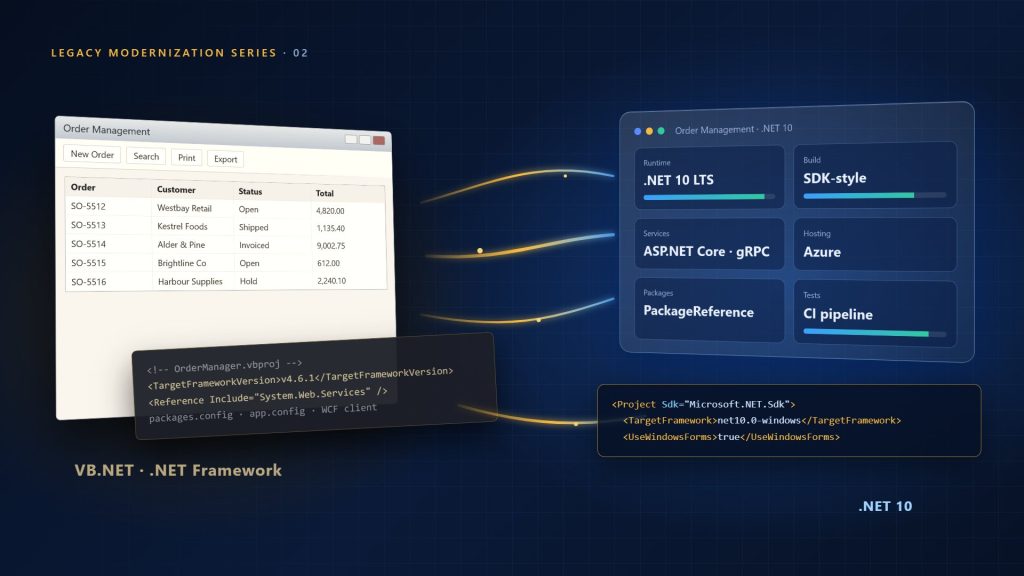
Upgrading a VB.NET application from .NET Framework to .NET 10 is a framework upgrade, not a rewrite. Visual Basic remains a supported language on .NET 10 for Windows Forms, WPF, class libraries, console apps, worker services and Web APIs, and Microsoft’s GitHub Copilot upgrade agent supports Visual Basic projects moving from any .NET Framework version to .NET 8 or later. The hard parts are the pieces .NET 10 does not carry forward (Web Forms, WCF hosting, Remoting, AppDomains, BinaryFormatter) and the decision whether to keep VB or move new work to C#.
Technically reviewed by Harshita Pipaliya.
This is the second article in our Legacy Modernization Series. Blog #1 covered VB6, a different problem: moving off COM and a 32-bit runtime. This guide assumes your code is already VB.NET and focuses on what is specific to Visual Basic estates: language support, the VB-versus-C# decision, My namespace and late-binding issues, and sequencing. For the language-neutral path, including Azure hosting choices and YARP routing in detail, see our guide to migrating a legacy .NET Framework application to .NET and Azure. If you are already on .NET 8, read .NET 10 vs .NET 8 upgrade planning instead.
Executive summary
- .NET Framework is supported but frozen. Versions 4.8.1, 4.8 and 4.7.2 have no announced end date and follow Microsoft’s Component Lifecycle Policy; 4.6.2 reaches end of support in January 2027, and 3.5 SP1 in January 2029 (Microsoft Lifecycle). New platform investment goes into .NET, not .NET Framework.
- .NET 10 is the target. It is the current LTS release, supported until November 14, 2028; .NET 8 and .NET 9 reached end of support on November 10, 2026 (.NET support policy).
- VB.NET can come along. Visual Basic supports Windows Forms, WPF, class libraries, console, worker services and ASP.NET Core Web API on modern .NET (VB team announcement), but Microsoft’s strategy is “consumption-only” with no new workloads (VB language strategy).
- Tooling has changed. The .NET Upgrade Assistant is deprecated; the GitHub Copilot upgrade agent now handles assessment, planning and execution, including for Visual Basic projects (Microsoft Learn).
- Our recommendation: upgrade VB.NET libraries and desktop apps in place to .NET 10, write new modules in C#, and replace Web Forms and WCF server components through incremental, side-by-side migration rather than a single cutover.
Is .NET Framework still supported?
Yes, with important caveats. From Microsoft’s lifecycle page:
| Version | Support status (as listed by Microsoft) |
|---|---|
| .NET Framework 4.8.1 | Supported, no end date listed |
| .NET Framework 4.8 | Supported, no end date listed |
| .NET Framework 4.7.2 | Supported, no end date listed |
| .NET Framework 4.6.2 | End of support January 12, 2027 |
| .NET Framework 4.5.2, 4.6, 4.6.1 | Ended April 26, 2022 |
| .NET Framework 3.5 SP1 | End of support January 9, 2029 |
Source: Microsoft .NET Framework lifecycle.
“Supported” here means security and reliability fixes for an existing platform. The modern runtime, libraries, performance work, C# language versions, ASP.NET Core and most new Azure SDK features target .NET. If your applications are on 4.6.2 or earlier, you have a hard deadline in January 2027 regardless of any longer-term plans.
What Visual Basic can and cannot do on .NET 10
| Workload | VB on modern .NET | Notes |
|---|---|---|
| Class libraries | Yes | The safest place to start |
| Console apps | Yes | |
| Windows Forms | Yes | Including the VB Application Framework (startup form, splash screen, single-instance) |
| WPF | Yes | |
| Worker Service (Windows services) | Yes | Replaces ServiceBase-style projects |
| ASP.NET Core Web API | Yes | Controllers in VB |
| Razor Pages, MVC views, Blazor | No (C# only) | Razor syntax is C# |
| New language features | Consumption only | VB can use new library features but gets little new syntax |
Microsoft states that Visual Basic “won’t be extended to new workloads” and that it will continue to invest in “core Visual Basic scenarios such as Windows Forms and libraries” (VB language strategy). In .NET 10 itself, the VB compiler changes are about consumption: respecting OverloadResolutionPriorityAttribute and enforcing the unmanaged constraint so VB can call newer C# libraries (What’s new in .NET 10).
What that means in practice: a VB.NET Windows Forms or WPF application, its class libraries and its back-office services can move to .NET 10 in VB. A VB.NET web front end cannot stay in VB once it becomes ASP.NET Core with server-rendered UI.
Why upgrade if .NET Framework still works?
- Library ecosystem drift. Many NuGet packages and Azure SDKs now ship only for modern .NET, or ship their newest features there first. Every year on .NET Framework widens the gap.
- Performance and hosting cost. .NET brings a faster runtime, better async I/O, containers, Linux hosting for APIs and Arm64 support. For server workloads that can translate into fewer or smaller servers; measure it for your own workload rather than assuming a figure.
- Security posture. Modern authentication libraries, TLS defaults and dependency scanning are designed around current .NET. Old packages pinned to .NET Framework are a frequent audit finding.
- Talent and tooling. New engineers learn modern .NET. Tooling such as the Copilot upgrade agent, hot reload and current analyzers target SDK-style projects.
- Deadlines you do not control. The 4.6.2 end-of-support date, a vendor dropping .NET Framework support, or a cloud migration programme can force the upgrade at an inconvenient time.
.NET Framework 4.8 vs .NET 10 comparison
| Area | .NET Framework 4.8 / 4.8.1 | .NET 10 |
|---|---|---|
| Lifecycle | Component of Windows; fixes only | LTS to November 14, 2028; yearly releases |
| OS | Windows only | Windows for desktop UI; Windows, Linux and macOS for services and APIs |
| Project format | Verbose .vbproj, packages.config | SDK-style, PackageReference, central package management |
| Web | ASP.NET Web Forms, MVC 5, Web API 2 on IIS/System.Web | ASP.NET Core (Kestrel, IIS, containers) |
| Services | WCF server, Windows services, Remoting | ASP.NET Core Web API, gRPC, CoreWCF, worker services |
| Deployment | Machine-wide framework install | Framework-dependent, self-contained, single-file, containers |
| Configuration | app.config / web.config | appsettings.json, environment variables, Key Vault |
| Dependency injection | Third-party containers | Built in |
| Serialization | BinaryFormatter available | BinaryFormatter removed (throws since .NET 9) |
Keep VB.NET or move to C#?
This is the decision that most shapes cost. Our view:
| Situation | Recommendation |
|---|---|
| Stable desktop app, team fluent in VB, limited new feature work | Upgrade in VB to .NET 10; write new libraries in C# |
| App will gain a web or mobile front end | Keep back-end libraries in VB short term; new UI and APIs in C# |
| Heavy ongoing development, hiring planned | Plan a gradual move to C#, module by module |
| Code quality is poor and needs refactoring anyway | Convert to C# during refactoring rather than as a separate project |
VB and C# projects can coexist in the same solution and reference each other’s assemblies, so this does not have to be a big-bang decision. Avoid converting a working VB codebase to C# only for language preference: it adds risk without adding features. Convert where you are already changing code.
Upgrade approaches by application type
| Application type | Approach | Effort | Notes |
|---|---|---|---|
| Class libraries | In-place upgrade; multi-target net481;net10.0 during transition | Low | Start here; unblock everything above |
| Windows Forms (VB) | In-place upgrade to net10.0-windows | Low to medium | Third-party control suites are the usual blocker |
| WPF (VB) | In-place upgrade | Low to medium | Check designer-dependent custom controls |
| Windows services | Rebuild host as a worker service; reuse logic | Low to medium | Use UseWindowsService() |
| ASP.NET Web API 2 | Port to ASP.NET Core Web API (VB or C#) | Medium | Routing, filters and auth change |
| ASP.NET MVC 5 | Incremental migration to ASP.NET Core MVC (C# views) | Medium to high | Covered in a later guide in this series |
| ASP.NET Web Forms | Re-platform to Blazor or Razor Pages (C#) | High | See how to modernize a legacy ASP.NET Web Forms application |
| WCF services | CoreWCF, ASP.NET Core Web API or gRPC | Medium to high | Covered in a later guide in this series |
For web applications, Microsoft recommends incremental migration, “an implementation of the Strangler Fig pattern”: a new ASP.NET Core application sits in front and proxies unmigrated requests to the original .NET Framework app using YARP, with System.Web adapters helping shared libraries and authentication work across both (Microsoft Learn: incremental migration). The VB-specific point is that the new ASP.NET Core front end will be C# if it uses Razor, while VB controllers and libraries can stay VB.
Weighing VB.NET against a full C# move? Consult our .NET modernization experts for an upgrade assessment of your solution.
Blocking technologies and their replacements
These .NET Framework technologies are not available on .NET 10. The replacements are Microsoft’s documented alternatives (Microsoft Learn) plus our recommendations where Microsoft gives none.
| Technology | Status on .NET 10 | Replacement |
|---|---|---|
AppDomains (CreateDomain) | Throws PlatformNotSupportedException | Separate processes or containers; AssemblyLoadContext for dynamic loading |
| .NET Remoting | Not available | Pipes, MemoryMappedFile or StreamJsonRpc locally; HTTP or sockets across machines |
| Code Access Security | Not available | OS-level boundaries: containers, virtualization, least-privilege accounts |
| WCF server hosting | Not in the box | CoreWCF NuGet packages, or redesign as Web API or gRPC |
| Windows Workflow Foundation | Not available | CoreWF (community), Durable Functions or a workflow engine (our suggestion) |
| System.EnterpriseServices (COM+) | Not available | No direct replacement; redesign transactions and hosting |
| ASP.NET Web Forms / System.Web | Not available | Blazor or Razor Pages, migrated incrementally |
| BinaryFormatter | Removed (throws since .NET 9) | System.Text.Json, XML or protobuf, plus a data migration plan for stored blobs |
Delegate BeginInvoke/EndInvoke | Throws | Task.Run and Async/Await |
| XSLT script blocks | Not supported | Move script logic into extension objects or code |
Run an inventory for these first. In most VB.NET estates we assess, two or three of them account for most of the upgrade risk.
Step-by-step upgrade roadmap
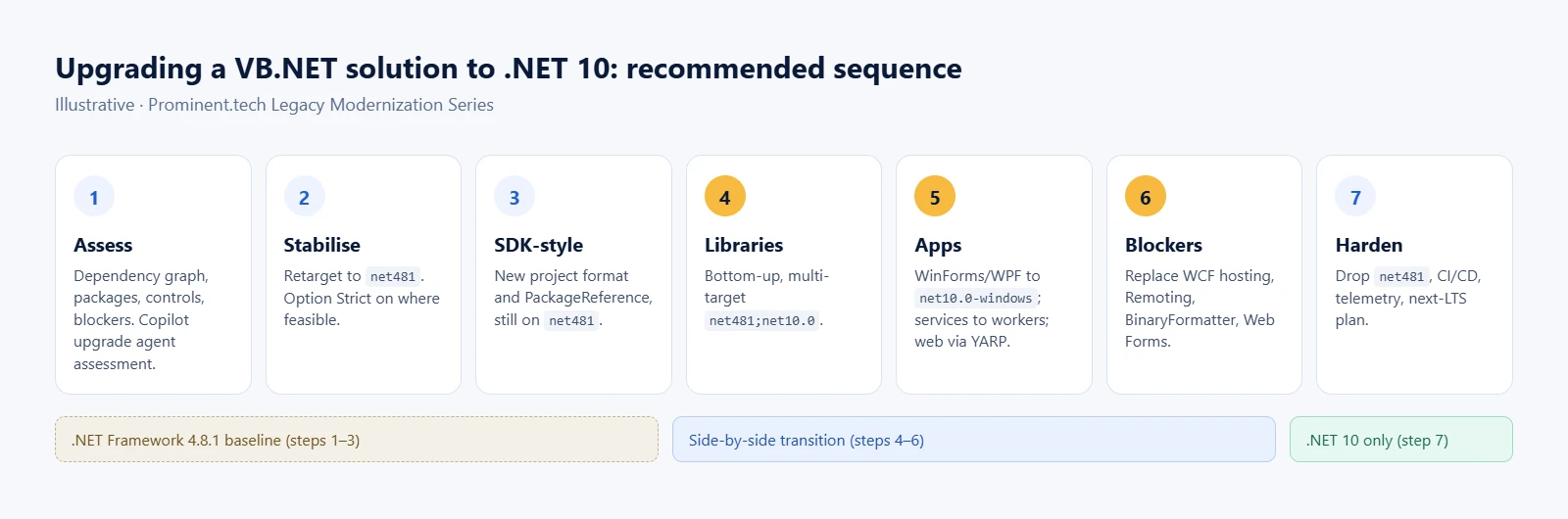
1. Assess (1 to 3 weeks)
- Run the GitHub Copilot upgrade agent’s assessment on each solution, alongside a manual review.
- Map the project dependency graph, NuGet packages, third-party controls (grids, reporting, charting), COM references and P/Invoke calls.
- Flag every blocker from the table above.
2. Stabilise on .NET Framework 4.8.1
- If you are on 4.6.2 or earlier, retarget to 4.8.1 first. It is a low-risk step, removes the January 2027 deadline, and gives you a clean baseline.
- Turn on
Option Strict Onper file or project where feasible; it surfaces late-binding issues early.
3. Convert to SDK-style projects
- Move each
.vbprojto the SDK format andpackages.configtoPackageReference, still targetingnet481. This separates project-format churn from runtime change.
4. Upgrade libraries bottom-up
- Microsoft recommends upgrading libraries in “postorder depth-first” order: leaf libraries first, then the projects that depend on them.
- Multi-target (
net481;net10.0) so both old and new applications can consume them during transition. Use .NET Standard 2.0 only where you must share with very old consumers.
5. Upgrade applications
- Desktop apps: retarget to
net10.0-windows, replace incompatible controls, re-test designers. - Services: move to worker services.
- Web: start the ASP.NET Core front end with YARP proxying, then migrate routes incrementally.
6. Replace blockers and remove old targets
- Re-implement WCF, Remoting, BinaryFormatter and similar dependencies.
- Drop the
net481target once every consumer is on .NET 10.
7. Harden and hand over
- Add CI/CD, analyzers, dependency scanning and telemetry; document the next LTS upgrade path.
VB-specific upgrade issues
Project file before and after (illustrative):
<!-- Before: .NET Framework 4.6.1 (abridged) -->
<Project ToolsVersion="15.0" xmlns="http://schemas.microsoft.com/developer/msbuild/2003">
  <PropertyGroup>
    <OutputType>WinExe</OutputType>
    <TargetFrameworkVersion>v4.6.1</TargetFrameworkVersion>
    <MyType>WindowsForms</MyType>
    <OptionStrict>Off</OptionStrict>
  </PropertyGroup>
  <ItemGroup>
    <Reference Include="System.Web.Services" />
    <Compile Include="MainForm.vb" />
    <!-- ...hundreds of explicit Compile items... -->
  </ItemGroup>
</Project>
<!-- After: .NET 10 SDK-style -->
<Project Sdk="Microsoft.NET.Sdk">
  <PropertyGroup>
    <OutputType>WinExe</OutputType>
    <TargetFramework>net10.0-windows</TargetFramework>
    <UseWindowsForms>true</UseWindowsForms>
    <MyType>WindowsForms</MyType>
    <OptionStrict>On</OptionStrict>
    <OptionInfer>On</OptionInfer>
  </PropertyGroup>
</Project>
Replacing BinaryFormatter (illustrative VB):
' Before (.NET Framework): BinaryFormatter, now removed
' Dim bf As New BinaryFormatter()
' bf.Serialize(stream, order)

' After (.NET 10): System.Text.Json
Imports System.Text.Json

Public Module OrderStore
    Public Async Function SaveAsync(order As Order, path As String) As Task
        Await Using fs = IO.File.Create(path)
        Await JsonSerializer.SerializeAsync(fs, order)
    End Function
End Module
If BinaryFormatter output is stored in a database or files, plan a one-off conversion while the old format can still be read on .NET Framework.
Other VB-specific checks:
| Area | What to check |
|---|---|
Option Strict Off and late binding | Late-bound calls, especially to COM objects, need explicit testing; prefer typed interop |
My namespace | Inventory My.Computer, My.Settings, My.Resources, My.User, My.WebServices usage and test each; My.WebServices depends on ASMX/WCF clients that must be regenerated |
| Application Framework | Startup form, splash screen and single-instance settings work on Windows Forms; re-verify ApplicationEvents.vb |
Microsoft.VisualBasic compatibility functions | Left, Mid, CInt, IIf and file functions still work; plan to retire Microsoft.VisualBasic.Compatibility (VB6 upgrade leftovers) |
| Web service references | ASMX and WCF client proxies must be regenerated with dotnet-svcutil or replaced with HttpClient |
| Event handling | Handles and WithEvents work as before; check designer-generated code after control replacement |
Data, configuration and integration
- SQL Server access: move from
System.Data.SqlClienttoMicrosoft.Data.SqlClient. Note that newer versions encrypt connections by default, so certificates or connection-string settings may need attention. - Entity Framework: EF6 runs on modern .NET, which allows an upgrade without a data-layer rewrite. Move to EF Core later if you need its features.
- Configuration:
System.Configuration.ConfigurationManageris available as a package for a smooth start; migrate toMicrosoft.Extensions.Configurationand the Options pattern over time. - Reporting: Crystal Reports, RDLC/ReportViewer and charting controls are frequent blockers. Confirm each vendor’s .NET 10 support before planning dates.
- Integration: use the upgrade to replace file drops and tightly coupled database integrations with APIs or messaging (Azure Service Bus) where it reduces risk.
Security and governance
- Replace stored credentials with Azure Key Vault or managed identities.
- Move authentication to Microsoft Entra ID with MSAL (desktop) or OpenID Connect (web).
- Enable NuGet vulnerability auditing in builds; remove packages without .NET 10 support.
- Sign assemblies and installers; ship from CI, not developer machines.
- Record an architecture decision for each blocker replacement, so auditors and future teams can follow the reasoning.
Testing and deployment
Testing
- Build a regression suite before changing frameworks: unit tests on libraries, API contract tests, and UI automation on critical desktop flows.
- Compare outputs (reports, exports, calculations) between the .NET Framework and .NET 10 builds on the same data.
- Run performance baselines; most server code gets faster, but verify hotspots such as reflection-heavy or serialization-heavy code.
Deployment
- Desktop: MSIX or ClickOnce, or self-contained builds that avoid a machine-wide runtime install.
- Services and APIs: Azure App Service, Azure Container Apps or Windows containers where a dependency still needs Windows.
- Keep both versions deployable during transition, with feature flags or routing (YARP) to switch traffic.
- Plan the next LTS upgrade (.NET 12, expected November 2027 under Microsoft’s annual cadence) before .NET 10 support ends in November 2028.
Request an estimate
Cost and timeline depend on your application, data and integrations, so we estimate each project individually rather than publish price ranges. The biggest cost drivers are Web Forms screens, WCF server endpoints, unsupported third-party controls and missing tests.
Request an estimate for your application, or read legacy application modernization cost and ROI to build the business case.
Best practices
- Retarget to 4.8.1 first if you are on an older .NET Framework.
- Separate project-format changes from runtime changes; commit each separately.
- Upgrade libraries bottom-up and multi-target during transition.
- Use the Copilot upgrade agent as an accelerator, and review every change it makes.
- Turn on
Option Strictprogressively to catch late-binding problems. - Kill BinaryFormatter early and migrate stored data.
- Write new modules in C#, keep stable VB code as VB.
- Migrate web apps incrementally with YARP rather than freezing features for a rewrite.
FAQs
Is VB.NET supported on .NET 10?
Yes. Visual Basic is supported on .NET 10 for Windows Forms, WPF, class libraries, console apps, worker services and ASP.NET Core Web API. Microsoft does not plan new workloads or significant new syntax for the language.
Can the GitHub Copilot upgrade agent upgrade VB.NET projects?
Yes. Microsoft lists support for C# and Visual Basic projects, including Windows Forms, WPF, class libraries, console apps and ASP.NET projects, from any .NET Framework version to .NET 8 or later. Results still need review and testing.
Should we convert VB.NET to C# during the upgrade?
Not by default. Upgrade VB in place, write new code in C#, and convert modules you are already rewriting. Wholesale conversion adds risk without adding functionality.
Can ASP.NET Web Forms written in VB run on .NET 10?
No. Web Forms is not available on .NET 10. It must be re-platformed to Blazor or Razor Pages, which use C#. Our guide to modernizing a legacy ASP.NET Web Forms application covers the options.
Is .NET Framework 4.8 being retired?
No end date is listed for .NET Framework 4.8 or 4.8.1. They receive fixes but no new platform features. .NET Framework 4.6.2 does have an end date, January 12, 2027.
Should we target .NET 10 or .NET 11?
.NET 10 for most enterprise upgrades: it is the LTS release supported until November 2028. .NET 11 is a shorter-term STS release.
How long does a VB.NET upgrade take?
From about a month for a small desktop app to well over a year for large estates with Web Forms and WCF. A short assessment of the dependency graph and blockers gives a reliable estimate.
Conclusion
A VB.NET application on .NET Framework is not a dead end, but it is on a platform that has stopped moving. Upgrading to .NET 10 is mostly engineering discipline: stabilise on 4.8.1, modernise the project format, upgrade libraries from the bottom up, and replace the handful of technologies that did not make the jump. Keep VB where it works, write new code in C#, and migrate web front ends incrementally. The result is a codebase that can take on cloud, API and AI work, and a predictable path to the next LTS.
Next in this series: Classic ASP to ASP.NET Core: Modernizing Legacy VBScript-Based Web Applications.
Related services: Legacy Software Modernization · .NET Development · Microsoft Azure · Hire .NET Core Developers
Sources
- Microsoft Lifecycle, Microsoft .NET Framework: learn.microsoft.com
- Microsoft, .NET and .NET Core Support Policy: dotnet.microsoft.com
- Microsoft Learn, GitHub Copilot upgrade overview: learn.microsoft.com
- Microsoft Learn, Port from .NET Framework to .NET: learn.microsoft.com
- Microsoft Learn, .NET Framework technologies unavailable on .NET: learn.microsoft.com
- Microsoft Learn, Get started with incremental ASP.NET to ASP.NET Core migration: learn.microsoft.com
- Microsoft Learn, Visual Basic language strategy: learn.microsoft.com
- Microsoft Learn, What’s new in .NET 10: learn.microsoft.com
- .NET Blog (VB team), Visual Basic support planned for .NET 5.0: devblogs.microsoft.com
Plan your VB.NET upgrade to .NET 10
Share your solution structure, blockers and release calendar. Talk to our .NET modernization team about an upgrade assessment and a bottom-up migration plan.