
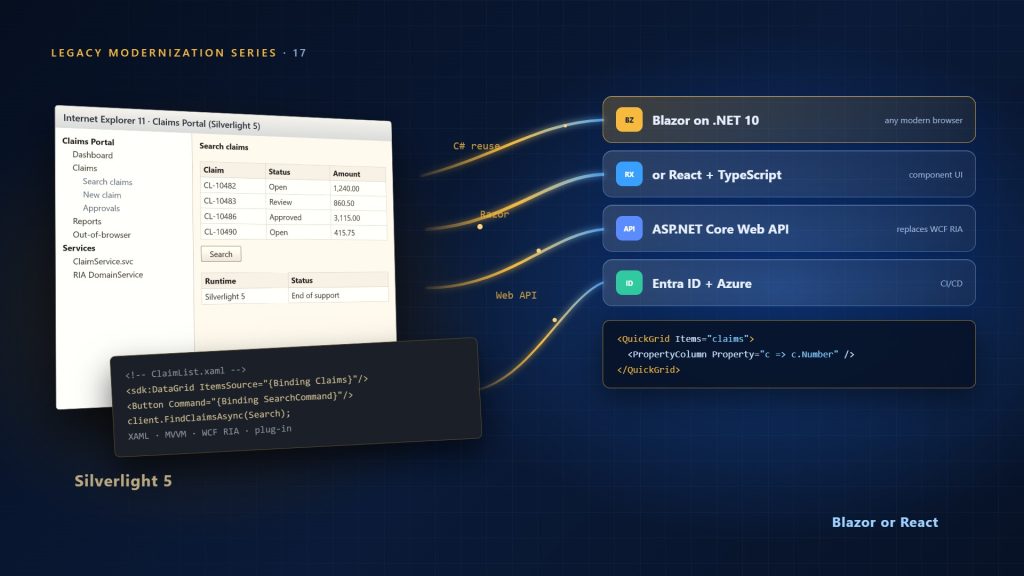
A Silverlight to Blazor migration (or a move to React) replaces a browser plug-in application that Microsoft stopped supporting on 12 October 2021 with a standards-based web front end that runs in every modern browser. Silverlight was only ever supported in Internet Explorer 10 and 11, and Microsoft has retired the Internet Explorer 11 desktop application on most Windows 10 versions, so most Silverlight line-of-business apps now survive on locked-down legacy machines. Because Silverlight apps are written in C# and XAML, much of the business logic can be reused. This guide compares Blazor, React and XAML-compatible options, maps Silverlight concepts to each, and gives a practical roadmap.
Technically reviewed by Harshita Pipaliya.
This is the seventeenth article in our Legacy Modernization Series. It follows AngularJS to Modern Angular, the other common legacy front end, and builds on our Web Forms to Blazor or ASP.NET Core guide.
Executive summary
- Support: Microsoft’s lifecycle announcement states that Silverlight “will reach the end of support on October 12, 2021”, and that it was “only supported on Internet Explorer 10 and Internet Explorer 11”, with no support for Chrome, Firefox or Mac browsers (Microsoft Learn).
- Runtime risk: the plug-in installer is no longer available, no security updates are issued, and the browsers that could host it are themselves retired or unsupported.
- Targets: Blazor on .NET 10 keeps C# end to end; React suits teams standardizing on JavaScript front ends; OpenSilver, an MIT-licensed open-source framework that runs C# and XAML on WebAssembly, can reuse much of the XAML.
- Reuse: view models, validation rules, service contracts and business logic in C# often move with modest changes. The XAML user interface and plug-in-specific features need the most work.
- Our recommendation: Blazor for most .NET organizations, with the back-end services moved to ASP.NET Core Web API at the same time. Consider OpenSilver when the XAML estate is very large and a fast lift matters more than a modern UI. Choose React when your front-end standard is already React.
Silverlight support status
| Item | Status | Date |
|---|---|---|
| Silverlight 5 (final version) | End of support | 12 October 2021 |
| Supported browsers | Internet Explorer 10 and 11 only (IE10 support ended earlier) | IE10: 31 January 2020 |
| Chrome, Firefox, Mac browsers | Not supported | Before end of support |
| Internet Explorer 11 desktop app | Retired on most Windows 10 versions | June 2022 |
| .NET 10 (Blazor target) | Long-term support | Until 14 November 2028 |
Sources: Microsoft Learn Silverlight end-of-support announcement and Microsoft .NET support policy. Check the Internet Explorer and Microsoft Edge lifecycle pages for your Windows versions.
What this means: a Silverlight application now depends on an unsupported plug-in in an unsupported or retired browser. Every month it stays in production increases security and continuity risk.
Why Silverlight applications are a risk
- No patches. New vulnerabilities in the plug-in will not be fixed.
- Frozen desktops. Keeping a Silverlight app working often means keeping old browsers, old Windows images or special exceptions in security policy.
- No mobile access. Silverlight never ran on modern mobile browsers.
- Dead dependencies. WCF RIA Services, Silverlight toolkits and third-party control suites for Silverlight are no longer maintained.
- Hidden knowledge. Many Silverlight apps were built between 2008 and 2014, and the original developers have moved on.
Choosing the target: Blazor, React or XAML-compatible
| Option | What it means | Best for | Trade-offs |
|---|---|---|---|
| Blazor (.NET 10) | Rebuild views as Razor components in C#; reuse C# models and logic | .NET teams, line-of-business apps, data entry and dashboards | New UI layer to build; choose Server, WebAssembly or Auto render modes |
| React + ASP.NET Core API | Rebuild the front end in React and TypeScript; move logic to the API | Organizations standardized on React | C# UI logic must be rewritten in TypeScript |
| OpenSilver | Recompile much of the C# and XAML to run on WebAssembly | Very large XAML estates needing a fast lift | Keeps the Silverlight-era UI patterns; depends on a smaller ecosystem |
| Desktop (WPF or WinUI) | Port to a Windows desktop app | Apps that need deep local device or file access | Not a web app; needs desktop deployment |
Our recommendation: Blazor for most organizations already on .NET, because C# view models and validation can move across and the team keeps one language. Uno Platform is another XAML-based option; evaluate XAML-compatible frameworks with a proof of concept on your hardest screen before committing.
Silverlight concept mapping
| Silverlight | Blazor | React |
|---|---|---|
| XAML pages and user controls | Razor components (.razor) | React components (TSX) |
MVVM view models with INotifyPropertyChanged | Component code or injected view model services | Hooks and state management |
Data binding ({Binding}) | @bind and component parameters | Props and controlled inputs |
ICommand | Event handlers (@onclick) | Event handlers |
Navigation framework (Frame, UriMapper) | Blazor Router (@page) | React Router |
| WCF services, WCF RIA Services | ASP.NET Core Web API or gRPC | Same APIs, called with fetch |
DataGrid, toolkit controls | Blazor component libraries or QuickGrid | React component libraries |
| Styles, resources, templates | CSS, CSS isolation, component templates | CSS modules or a design system |
| Isolated storage | Browser storage or server-side persistence | Browser storage or server-side persistence |
| Out-of-browser and elevated trust | Progressive web app, or a desktop host for local access | Progressive web app or desktop host |
Validation (IDataErrorInfo, data annotations) | Data annotations with EditForm | Form libraries with schema validation |
What can be reused
- Usually reusable: domain models, validation rules (data annotations), calculation logic, enumerations, resource strings and service contracts.
- Reusable with changes: view models (remove Silverlight-specific types and dispatcher calls), async service calls (move from event-based WCF proxies to
HttpClientwithasync/await). - Rewrite: XAML layout, styles, animations, custom controls and anything using elevated trust, COM interop or the local file system.
Move shared C# code into a .NET class library early, so both the old and new user interfaces can be tested against the same logic.
Code patterns: before and after
The examples below are illustrative and simplified.
1. Silverlight XAML view bound to a view model (before):
<UserControl x:Class="Claims.Views.ClaimList">
  <StackPanel>
    <TextBox Text="{Binding Search, Mode=TwoWay}" />
    <Button Content="Search" Command="{Binding SearchCommand}" />
    <sdk:DataGrid ItemsSource="{Binding Claims}" AutoGenerateColumns="False">
      <sdk:DataGrid.Columns>
        <sdk:DataGridTextColumn Header="Claim" Binding="{Binding Number}" />
        <sdk:DataGridTextColumn Header="Amount" Binding="{Binding Amount}" />
      </sdk:DataGrid.Columns>
    </sdk:DataGrid>
  </StackPanel>
</UserControl>
2. Event-based WCF call in the Silverlight view model (before):
var client = new ClaimServiceClient();
client.FindClaimsCompleted += (s, e) => Claims = new ObservableCollection<Claim>(e.Result);
client.FindClaimsAsync(Search);
3. Blazor component with QuickGrid (after):
@page "/claims"
@inject ClaimApi Api

<input @bind="search" placeholder="Search claims" />
<button @onclick="SearchAsync">Search</button>

<QuickGrid Items="claims">
    <PropertyColumn Property="c => c.Number" Title="Claim" />
    <PropertyColumn Property="c => c.Amount" Title="Amount" Format="C" />
</QuickGrid>

@code {
    private string search = "";
    private IQueryable<Claim> claims = Enumerable.Empty<Claim>().AsQueryable();

    private async Task SearchAsync() =>
        claims = (await Api.FindClaimsAsync(search)).AsQueryable();
}
4. Typed API client replacing the WCF proxy:
public class ClaimApi(HttpClient http)
{
    public async Task<List<Claim>> FindClaimsAsync(string search) =>
        await http.GetFromJsonAsync<List<Claim>>($"api/claims?search={Uri.EscapeDataString(search)}") ?? [];
}
5. The same screen in React (TypeScript):
export function ClaimList() {
  const [search, setSearch] = useState("");
  const [claims, setClaims] = useState<Claim[]>([]);
  const find = async () =>
    setClaims(await (await fetch(`/api/claims?search=${encodeURIComponent(search)}`)).json());
  return (
    <>
      <input value={search} onChange={e => setSearch(e.target.value)} />
      <button onClick={find}>Search</button>
      <ClaimTable rows={claims} />
    </>
  );
}
Recommended target architecture
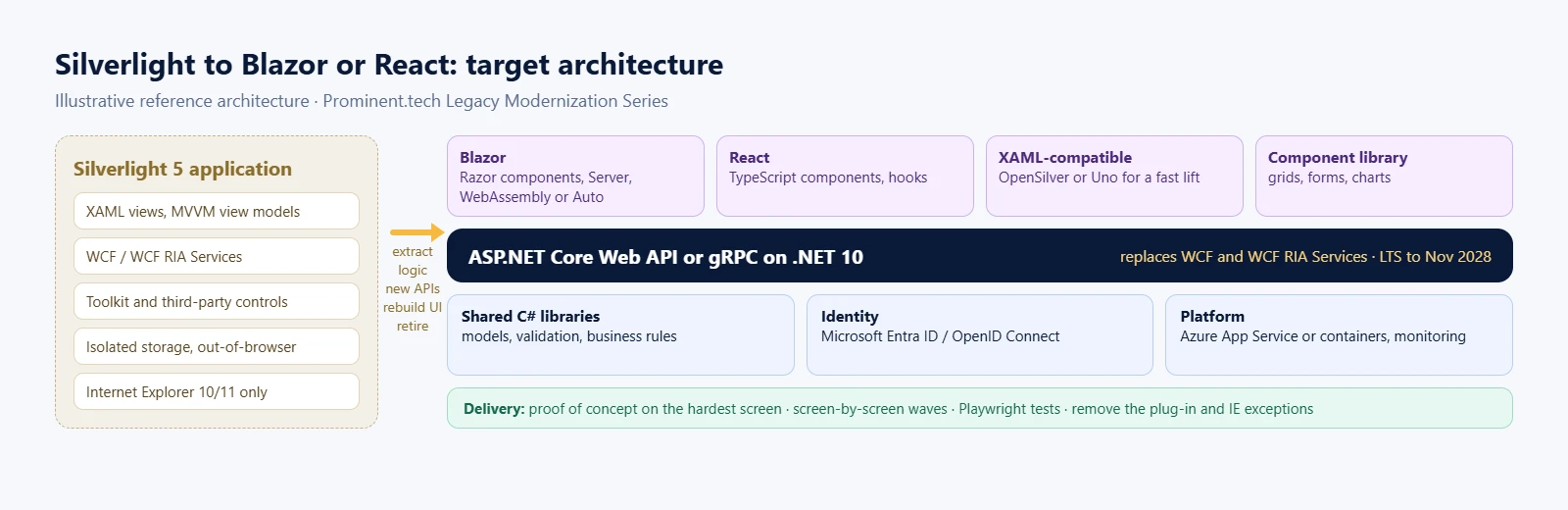
- Front end: Blazor (Server, WebAssembly or Auto render modes) or React with TypeScript, with a component library for grids and forms.
- APIs: ASP.NET Core Web API or gRPC replacing WCF and WCF RIA Services (see our WCF migration guide).
- Shared code: .NET class libraries for models, validation and business rules.
- Identity: Microsoft Entra ID or another OpenID Connect provider, replacing Windows authentication tied to Internet Explorer.
- Platform: Azure App Service or containers, CI/CD and monitoring.
Still keeping Internet Explorer alive for a Silverlight app? Talk to our modernization team about an assessment and a screen-by-screen plan.
Step-by-step migration roadmap
- Inventory (1 to 3 weeks): list screens, user roles, services, third-party controls, out-of-browser and elevated-trust features, and the machines still running the app.
- Contain the risk: restrict which machines and users can run the legacy app while the migration runs.
- Choose the target with a proof of concept on the most complex screen (Blazor, React or XAML-compatible).
- Extract shared logic into .NET class libraries and build or modernize the APIs.
- Rebuild screens in waves, starting with high-use, low-complexity screens; run old and new in parallel for user acceptance.
- Replace plug-in features: printing, file access, offline use and device access through web APIs, PWAs or a desktop host.
- Decommission the Silverlight app, the WCF services and the browser exceptions it required.
Security considerations
- Remove the exception: the biggest gain is removing the old browser and plug-in from user machines and security policy.
- Authentication: move from Windows-integrated auth in Internet Explorer to OpenID Connect; protect APIs with OAuth 2.0 scopes.
- Blazor WebAssembly: code runs in the browser, so keep secrets and authorization checks on the server.
- APIs: validate input, apply rate limits and log access; never expose the old WCF endpoints directly to the internet.
- Data in the browser: store only what is needed in browser storage, and never sensitive data that isolated storage used to hold.
Testing, deployment and support
Testing
- Capture current behaviour with screen recordings and test cases before the old app becomes hard to run.
- Unit test shared C# logic once and reuse the tests for the new front end.
- Use Playwright for end-to-end tests of Blazor or React screens, including keyboard and accessibility checks.
Deployment
- Deploy the new front end and APIs through CI/CD; release screens behind feature flags or menu switches.
- Keep the Silverlight app available read-only for a short period if users need to compare.
Support
- Plan .NET upgrades on the LTS cadence (.NET 10 is supported until November 2028).
- Keep component libraries and npm packages current.
Cost, effort and timeline
The ranges below are indicative planning assumptions, not benchmarks or quotes.
| Application profile | Typical scope | Indicative cost (USD) | Indicative duration |
|---|---|---|---|
| Small | Up to 20 screens, simple forms, few services | $25,000 to $90,000 | 2 to 4 months |
| Medium | 20 to 80 screens, grids, charts, WCF RIA Services | $90,000 to $350,000 | 4 to 9 months |
| Large | 80+ screens, custom controls, out-of-browser features, many integrations | $350,000 to $1M+ | 9 to 18+ months |
Cost drivers: screen count, custom controls, reusable C# logic, service layer changes and testing. See legacy application modernization cost and ROI.
FAQs
When did Silverlight support end?
Microsoft ended Silverlight support on 12 October 2021. It was only supported in Internet Explorer 10 and 11, and not in Chrome, Firefox or Mac browsers.
Can Silverlight apps still run?
Only on machines with the plug-in installed and a browser that can host it. Those environments are unsupported, so treat any remaining Silverlight app as a security and continuity risk.
Should we choose Blazor or React?
Blazor suits .NET teams because C# models, validation and logic can be reused. React suits organizations that already standardize on React and TypeScript for front ends.
Can we reuse our XAML?
Not in Blazor or React, where the user interface is rebuilt. XAML-compatible frameworks such as OpenSilver aim to reuse much of the XAML and C#; test them on your most complex screens first.
What replaces WCF RIA Services?
ASP.NET Core Web API or gRPC services, with shared C# models. Our WCF migration guide covers the service side.
What about out-of-browser features?
Offline use, file access and device access need a new design: progressive web app features, server-side processing or a desktop host for the few functions that need local access.
How long does a Silverlight migration take?
Small applications can move in two to four months. Large applications with custom controls and many integrations often take nine to eighteen months.
Conclusion
Silverlight has been out of support since October 2021, and the browsers that hosted it are retired. Reuse the C# logic, rebuild the user interface in Blazor or React (or lift XAML with a compatible framework when speed matters most), modernize the services alongside, and remove the old browser and plug-in from your estate.
Previous in this series: AngularJS to Modern Angular. Next: PowerBuilder to .NET 10.
Related services: Legacy Software Modernization · Web Application Development · .NET Development · Microsoft Azure · Hire .NET Developers
Sources
- Microsoft Learn, Silverlight end of support
- Microsoft, .NET support policy
- InfoQ, Time is Running out on Silverlight (May 2020)
- OpenSilver, Introducing OpenSilver 3.3 (January 2026)
- Uno Platform, Silverlight to WebAssembly in 2026: your migration options compared (vendor comparison)
Plan your Silverlight migration
Prominent.tech helps teams replace Silverlight applications with Blazor or React front ends and ASP.NET Core APIs, reusing C# logic where it is sound, with automated tests and CI/CD in place. Talk to our modernization team or explore our legacy software modernization services.