
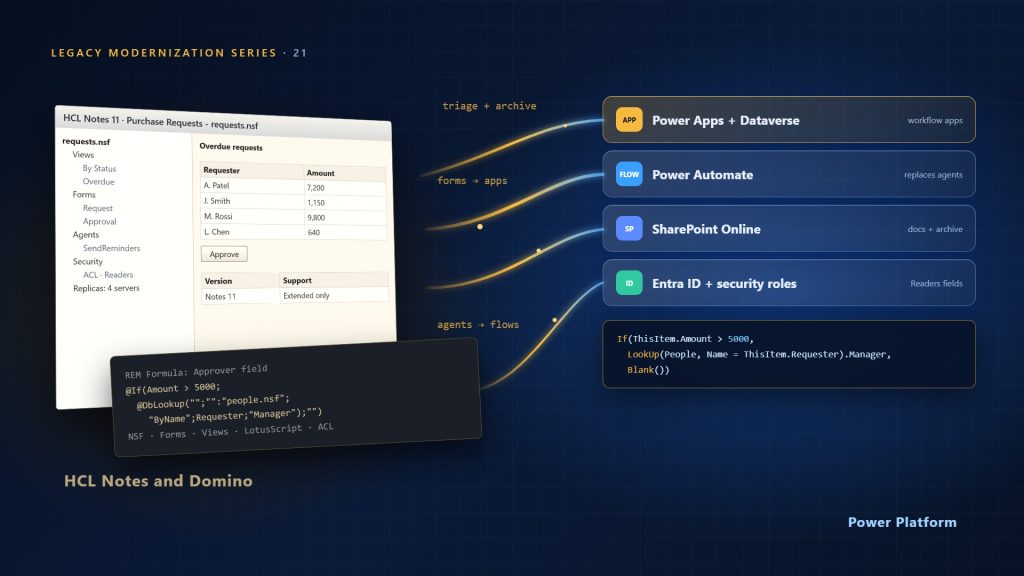
A Lotus Notes migration moves business applications built on HCL Notes and Domino (formerly IBM Lotus Notes) to Microsoft Power Platform, a custom web application, or a current Domino release, usually alongside a separate move of mail to Microsoft 365. Domino is still developed by HCL, so the decision is not forced by a dead product. It is driven by old versions on paid extended support, scarce Notes skills, and the wish to put workflows on the same platform as the rest of the business. This guide covers triage, platform choice, data and security mapping, and a phased plan.
Technically reviewed by Harshita Pipaliya.
This is the twenty-first article in our Legacy Modernization Series. It follows Oracle Forms and Reports to Modern Web Applications. For forms and workflows moving to Power Apps from Microsoft tools, see our InfoPath to Power Apps guide.
Executive summary
- Domino is alive; old versions are not: IBM sold Notes and Domino to HCL (announced December 2018, completed July 2019). HCL launched Domino 14.5 in July 2025 and 14.5.1 (“Domino 2026”) in March 2026.
- 9, 10 and 11 are on extended support only: HCL ended standard support for 9.0.x and 10.0.x on 1 June 2024 and for 11.0.x on 26 June 2025. In September 2025 HCL extended its contracted Extended Support for versions 9, 10 and 11 to 30 June 2030 (HCL).
- Most effort is triage: Notes estates often hold hundreds of databases. Many are unused or are simple document stores that need archiving, not rebuilding.
- Power Platform fits most workflow apps: forms, approvals and lists map well to Power Apps, Dataverse and Power Automate. Complex apps with heavy integration may suit a custom web application instead.
- Our recommendation: inventory and triage every database, archive what is read-only, rebuild active workflow apps in Power Platform (or ASP.NET Core where logic is heavy), and move mail separately. If you stay on Domino, upgrade to 14.5.x rather than relying on extended support.
Notes and Domino support status
| Item | Status | Date |
|---|---|---|
| IBM sale of Notes/Domino to HCL | Announced / completed | December 2018 / July 2019 |
| Notes/Domino 9.0.x and 10.0.x | Standard support ended | 1 June 2024 |
| Notes/Domino 11.0.x | Standard support ended | 26 June 2025 |
| Extended Support for 9, 10 and 11 | Contracted, requires Standard Support | Until 30 June 2030 |
| Domino 14.5 | Released (Domino IQ AI extension, Java 21) | July 2025 |
| Domino 14.5.1 (“Domino 2026”) | Released | March 2026 |
Sources: HCL announcements and blog posts, HCLSoftware press release (July 2025), public record of the IBM sale. Check HCL’s product lifecycle table for the dates that apply to your licences.
What this means: a Notes estate on 9, 10 or 11 is either unsupported or on a paid bridge. Choose between upgrading to 14.5.x and migrating, and do not let extended support become the plan.
Why organizations move off Notes applications
- Platform consolidation: mail and collaboration have already moved to Microsoft 365, leaving Notes only for applications.
- Skills: LotusScript and Formula language developers are increasingly hard to find.
- User experience: Notes client screens feel dated; browser and mobile access needs extra work.
- Integration: Notes data is hard to reach from analytics, APIs and other systems.
- Licensing: paying for a platform that serves a shrinking set of applications.
Triage first: retire, archive, migrate or keep
| Database profile | Typical action |
|---|---|
| Not used in the last 12 months | Retire after owner sign-off |
| Read-only reference or records | Archive to a searchable store (for example SharePoint or a records system) |
| Simple lists and document libraries | Move to SharePoint lists and libraries (see our SharePoint Online migration guide) |
| Forms with approval workflows | Rebuild in Power Apps with Power Automate |
| Complex apps with heavy logic or integration | Rebuild as a custom web application, or keep on Domino 14.5.x for now |
| Mail and calendars | Separate project to Exchange Online |
Use database usage logs, design analysis and owner interviews to place each database. Agree retention rules with records and legal teams before archiving.
Target platforms compared
| Option | Best for | Strengths | Watch-outs |
|---|---|---|---|
| Power Apps + Dataverse + Power Automate | Workflow and approval apps | Low-code, Microsoft 365 integration, Entra ID security | Licensing per user or app; complex logic gets hard |
| SharePoint lists and libraries | Simple lists, documents | Already licensed with Microsoft 365 | Limited security and relational modelling |
| ASP.NET Core or other custom web app | Complex logic, integration, scale | Full control, APIs | Higher build and maintenance effort |
| Upgrade to Domino 14.5.x | Apps that work well and have Domino skills | Lowest change, current support | Keeps the Notes platform and skills dependency |
Notes and Domino to Power Platform concept mapping
| Notes / Domino | Power Platform | Notes |
|---|---|---|
| NSF database | Dataverse tables, or SharePoint list | Normalize; Notes documents are schemaless |
| Form | Power Apps form or screen | |
| View, folder | Dataverse view, gallery, filtered list | |
| Response documents | Related table (one-to-many) | |
| Rich text fields | Rich text column, or file in SharePoint | Embedded objects need extraction |
| Attachments | File columns or SharePoint library | |
Formula language (@DbLookup, @If) | Power Fx (LookUp, If) | |
| LotusScript agents (scheduled, triggered) | Power Automate flows, Azure Functions | |
| Readers and Authors fields | Dataverse security roles, teams, row ownership and sharing | Design carefully; see security |
| ACL roles | Security roles and Entra ID groups | |
| Doc links | Record URLs | |
| Replication, local copies | Cloud service; offline mode in Power Apps where needed |
Code patterns: before and after
The examples below are illustrative and simplified.
1. Notes Formula language (before): a computed field looking up a manager.
@If(Amount > 5000;
    @DbLookup(""; "":"people.nsf"; "ByName"; Requester; "Manager");
    "")
2. The same rule in Power Fx (after):
If(
    ThisItem.Amount > 5000,
    LookUp(People, Name = ThisItem.Requester).Manager,
    Blank()
)
3. A LotusScript scheduled agent (before): reminders for overdue requests.
Dim s As New NotesSession
Dim view As NotesView, doc As NotesDocument
Set view = s.CurrentDatabase.GetView("Overdue")
Set doc = view.GetFirstDocument
Do While Not doc Is Nothing
    Call doc.Send(False, doc.GetItemValue("Approver")(0))
    Set doc = view.GetNextDocument(doc)
Loop
4. The agent as a Power Automate flow (after): described as steps.
Trigger:   Recurrence (daily, 08:00)
Action:    Dataverse - List rows (Requests)
           Filter: statuscode eq 1 and duedate lt utcNow()
Apply to each row:
           Office 365 Outlook - Send an email (V2) to the approver
5. Heavier logic in a custom ASP.NET Core API:
app.MapPost("/requests/{id}/approve", async (int id, AppDb db, ClaimsPrincipal user) =>
{
    var req = await db.Requests.FindAsync(id);
    if (req is null) return Results.NotFound();
    if (req.ApproverUpn != user.Identity?.Name) return Results.Forbid();
    req.Status = RequestStatus.Approved;
    await db.SaveChangesAsync();
    return Results.NoContent();
}).RequireAuthorization();
Recommended target architecture
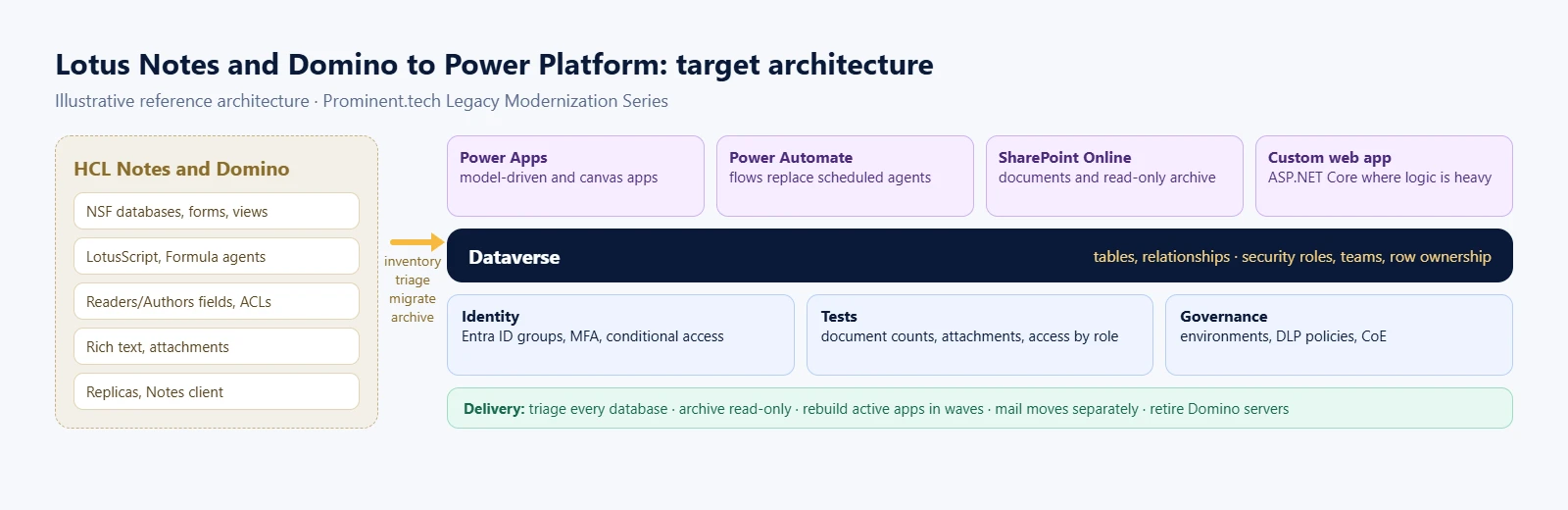
- Apps: Power Apps (model-driven for data-heavy apps, canvas for task apps) on Dataverse.
- Workflow: Power Automate replacing scheduled and triggered agents.
- Documents and archives: SharePoint Online libraries for documents and read-only archives.
- Custom apps: ASP.NET Core APIs and a web UI where logic or integration outgrows low-code.
- Governance: Entra ID groups, Dataverse security roles, environments and data loss prevention (DLP) policies.
Planning a Notes exit? Talk to our modernization team about a database inventory and triage before you choose platforms.
Notes migration steps
- Inventory: list every NSF database with size, last use, owner, design template and agent count.
- Triage: retire, archive, move to SharePoint, rebuild in Power Platform, rebuild as custom, or keep on Domino.
- Design security: map ACL roles, Readers and Authors fields to Entra ID groups and Dataverse roles.
- Model the data: turn forms and response documents into tables and relationships.
- Migrate data with a migration tool or scripts (for example through the Domino REST API or exports), including rich text and attachments.
- Rebuild apps in waves, starting with high-use, simple workflow apps.
- Archive read-only databases with agreed retention rules.
- Decommission Domino servers and Notes clients once the last app moves.
Security considerations
- Readers fields: Notes can hide individual documents from users. Reproduce this with Dataverse row ownership, teams and sharing, and test it explicitly.
- Identity: replace Notes IDs with Microsoft Entra ID, multi-factor authentication and conditional access.
- Data loss prevention: set Power Platform DLP policies to control which connectors can share data.
- Archive access: keep archived records searchable only by people with the right roles.
- Audit: enable Dataverse auditing for sensitive tables.
Testing, deployment and support
Testing
- Reconcile document counts, key field values and attachment counts per database.
- Test access with real user roles, especially documents protected by Readers fields.
- Run each rebuilt app in parallel with the Notes version for a short period.
Deployment
- Use separate development, test and production environments, with solutions and pipelines.
- Set Notes databases to read-only at cutover, then archive.
Support
- Assign an owner per app and a Power Platform centre of excellence for governance.
- If any apps stay on Domino, keep them on a supported 14.5.x release.
Cost, effort and timeline
The ranges below are indicative planning assumptions, not benchmarks or quotes.
| Estate profile | Typical scope | Indicative cost (USD) | Indicative duration |
|---|---|---|---|
| Small | Up to 50 databases, under 15 apps to rebuild | $40,000 to $150,000 | 2 to 5 months |
| Medium | 50 to 300 databases, 15 to 60 apps to rebuild | $150,000 to $600,000 | 5 to 12 months |
| Large | 300+ databases, 60+ apps, complex security and integrations | $600,000 to $2M+ | 12 to 30 months |
Power Platform licences are extra and depend on users and app types. Cost drivers: number of active apps, Readers and Authors complexity, rich text and attachments, integrations and data volume. See legacy application modernization cost and ROI.
FAQs
Is Lotus Notes still supported?
Yes, as HCL Notes and Domino. HCL released Domino 14.5 in 2025 and 14.5.1 in 2026. Standard support for versions 9, 10 and 11 has ended, with contracted Extended Support until 30 June 2030.
Can Notes applications move to Power Apps?
Most workflow and form-based applications can. Complex applications with heavy logic or integrations may fit better as custom web applications.
What happens to Readers and Authors fields?
They are re-implemented with Dataverse security roles, teams, row ownership and sharing, or with permissions in a custom app. Test them carefully.
Do we have to migrate every Notes database?
No. Many databases can be retired or archived. Triage usually leaves a much smaller set to rebuild.
Can mail and applications migrate together?
They are usually separate projects. Mail moves to Exchange Online with mail migration tools; applications need rebuilding.
Should we upgrade to Domino 14.5 instead?
If the applications work well and you have Domino skills, upgrading is a valid choice. If you are consolidating on Microsoft 365, migrate.
How long does a Lotus Notes migration take?
Small estates can move in two to five months. Large estates with hundreds of databases often take more than a year, in waves.
Conclusion
Notes and Domino are still developed, but versions 9, 10 and 11 are now on paid extended support. Inventory and triage every database, archive what is read-only, rebuild active apps in Power Platform or as custom web applications, design security for Readers fields early, and move mail as a separate project.
Previous in this series: Oracle Forms and Reports to Modern Web Applications. Next: COBOL and CICS Mainframe Modernization.
Related services: Legacy Software Modernization · Power Platform · Power Apps · Power Automate · SharePoint · .NET Development
Sources
- HCLSoftware, Extended Support for Domino versions 9, 10 and 11 (September 2025)
- HCL Digital Solutions Community, Domino 9.0.1 end of life date (HCL reply, July 2023)
- HCLSoftware, EOM/EOS for HCL Domino v11.0.x
- HCLSoftware, HCLSoftware launches sovereign AI (Domino 14.5, July 2025)
- HCLSoftware, HCL Domino 2026 (14.5.1) is here
- Microsoft Learn, Modernize applications with Power Platform
Plan your Lotus Notes migration
Prominent.tech helps teams inventory and triage Notes and Domino estates, archive what is read-only and rebuild active applications in Power Platform or as custom web applications, with security designed in from the start. Talk to our modernization team or explore our legacy software modernization services.