
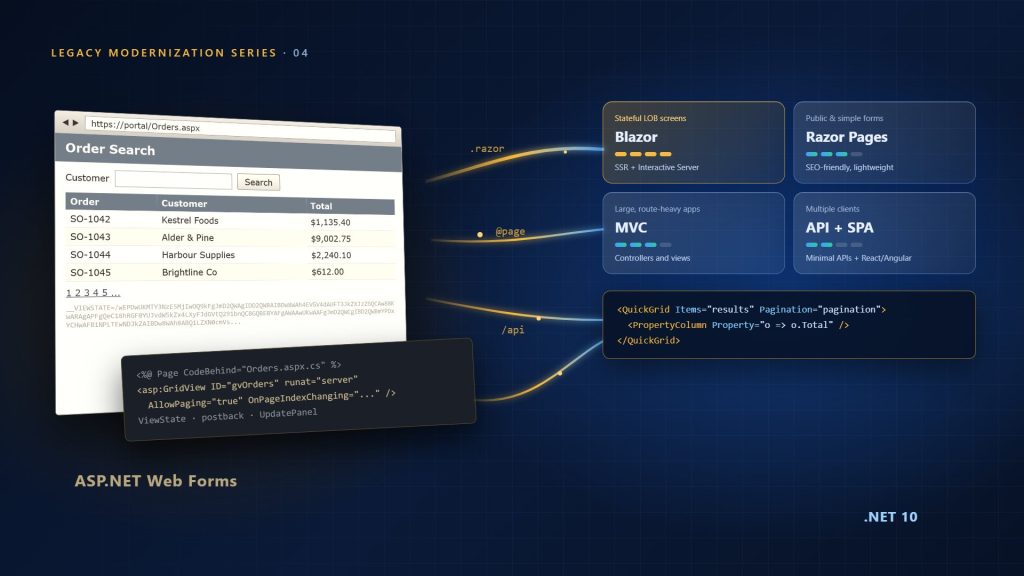
ASP.NET Web Forms does not run on ASP.NET Core, so every Web Forms to Blazor or ASP.NET Core migration rebuilds the user interface while keeping as much business logic as possible. The right target depends on how each part of the application behaves: Blazor fits stateful, control-heavy screens; Razor Pages fits form-and-list pages; MVC fits large, route-heavy applications; and an API plus a JavaScript front end fits products that need a separate client. Most enterprise portfolios end up with a mix, migrated incrementally behind one URL.
Technically reviewed by Harshita Pipaliya.
This is the fourth article in our Legacy Modernization Series. It focuses on choosing the target, with a scoring matrix, control mapping and code patterns. For the delivery process (inventory, regression testing and cutover), see our companion guide to modernizing a legacy ASP.NET Web Forms application.
Executive summary
- Web Forms stays on .NET Framework. It is part of ASP.NET on .NET Framework and is not available on ASP.NET Core. Microsoft’s Blazor guide for Web Forms developers says “ASP.NET Web Forms will continue to be supported for many years” and that migration “is a time-consuming task that requires planning” (Microsoft Learn). .NET Framework 4.8.1 has no announced end date; it follows the Windows lifecycle.
- There is now a Microsoft tool path. Microsoft’s GitHub Copilot app modernization documentation lists a “WebForms-to-Blazor upgrade” scenario that “Upgrades ASP.NET Web Forms applications to Blazor Server” (Microsoft Learn). Treat its output as a draft that needs review and tests; Microsoft’s own FAQ says suggestions “aren’t guaranteed to follow best practices.”
- Target platform: ASP.NET Core on .NET 10 (LTS, supported to November 14, 2028) (.NET support policy).
- Our recommendation: decide per module, not per application. Default to Blazor (static server rendering plus interactive server components where needed) for internal line-of-business screens, and Razor Pages for public, SEO-sensitive or simple form pages. Migrate incrementally with YARP and the System.Web adapters so users keep one site and one login.
Where Web Forms stands in 2026
| Item | Status | Implication |
|---|---|---|
| Web Forms on .NET Framework 4.8.1 | Supported as part of .NET Framework; no announced end date | No forced deadline, but no new investment |
| Web Forms on ASP.NET Core / .NET 10 | Not available | UI must be rebuilt |
| .NET Framework 4.6.2 | Support ends January 12, 2027 | Retarget to 4.8.1 now if you are staying for a while |
| Blazor | Actively developed in each .NET release | Main Microsoft-recommended path for Web Forms developers |
| Copilot app modernization | Lists Web Forms as a supported project type and a Web Forms-to-Blazor Server scenario | Speeds up conversion; does not remove design and testing work |
What we can say and what we can’t. Microsoft has not announced an end of support date for Web Forms. The business case for migrating is about talent, security, cloud hosting and feature velocity, not a published deadline. Anyone who tells you Web Forms “stops working” on a given date is not quoting Microsoft.
Why Web Forms applications are hard to move
- The page lifecycle hides behaviour.
Page_Load, postbacks,IsPostBackchecks and event ordering carry business rules that are not visible in any one method. - ViewState and control state. Pages rely on state round-tripped in hidden fields. Modern targets need explicit state ownership.
- Server controls and third-party suites. GridView, FormView, UpdatePanel and vendor grids, charts and report viewers have no drop-in equivalents.
- System.Web coupling.
HttpContext.Current,Session,Cacheand membership APIs often leak into business libraries. - Master pages, user controls and themes that encode layout and authorization.
Our earlier article on upgrading VB.NET applications to .NET 10 covers the library side; this article focuses on the UI decision.
The four target options
| Target | What it is | Closest to Web Forms in | Biggest change |
|---|---|---|---|
| Blazor | Component model in C# and Razor; static or interactive rendering | Components, events, data binding, code-behind style | Component lifecycle and render modes |
| Razor Pages | Page-focused, request/response model with a handler class per page | One .aspx page becomes one .cshtml page | No postback events or ViewState |
| ASP.NET Core MVC | Controllers, views and models | Large apps with many shared actions | Routing and separation of concerns |
| Web API + SPA | ASP.NET Core API with a React or Angular front end | Little; a new client architecture | Two codebases and JavaScript skills |
Decision matrix: Blazor vs Razor Pages vs MVC vs API + SPA
Score each module, not the whole application. Our recommended weighting is shown; adjust it to your priorities.
| Factor (weight) | Blazor | Razor Pages | MVC | API + SPA |
|---|---|---|---|---|
| Rich, stateful screens: grids, wizards, live updates (25%) | ●●●● | ●● | ●● | ●●●● |
| Familiarity for a C# Web Forms team (20%) | ●●●● | ●●● | ●●● | ● |
| Public SEO and fast first load (15%) | ●●● (static SSR) | ●●●● | ●●●● | ●● |
| Reuse of existing C# logic (15%) | ●●●● | ●●●● | ●●●● | ●●● (in the API) |
| Third-party component availability (10%) | ●●● | ●●● | ●●● | ●●●● |
| Separate mobile or partner consumers (10%) | ●● | ● | ●● | ●●●● |
| Long-term skills market (5%) | ●●● | ●●● | ●●● | ●●●● |
●●●● = strong fit, ● = weak fit. This is our judgment from delivery experience, not a published benchmark.
How we read the matrix in practice:
- Internal line-of-business apps with GridView-heavy screens: Blazor.
- Public or SEO-sensitive pages (catalogue, content, simple forms): Razor Pages, or Blazor static server rendering.
- Large applications with many reusable actions and strict layering: MVC.
- Products that need a separate mobile or partner client: Web API first, with Blazor or a JavaScript front end on top.
- Mixed portfolios: combine them. Razor Pages and Blazor components can live in the same ASP.NET Core app.
Choosing a Blazor render mode
Since .NET 8, Blazor Web Apps choose a render mode per page or component (Microsoft Learn: render modes).
| Render mode | How it runs | Good for | Watch out for |
|---|---|---|---|
| Static server (SSR) | HTML rendered on the server, no persistent connection | Read-mostly pages, public pages, forms | No interactive events without enhancement |
| Interactive Server | Components run on the server over a SignalR circuit | Internal apps, data-heavy grids; closest to Web Forms | Needs a stable connection; server memory per user |
| Interactive WebAssembly | Components run in the browser on .NET WebAssembly | Offline-tolerant or client-heavy UI | Larger download; all data via APIs |
| Interactive Auto | Server first, then WebAssembly after download | Public apps needing interactivity | Two hosting models to test |
Our default for Web Forms migrations: static SSR for most pages, Interactive Server for the complex screens, and WebAssembly only where there is a clear need.
Control and concept mapping
| Web Forms | Blazor | Razor Pages / MVC |
|---|---|---|
.aspx page + code-behind | .razor component with @code or partial class | .cshtml + PageModel or controller |
| Master page | Layout component (MainLayout.razor) | _Layout.cshtml |
User control (.ascx) | Child component | Partial view or view component |
Page_Load, IsPostBack | OnInitializedAsync, OnParametersSetAsync | OnGet / OnPost handlers |
| Button click event | @onclick handler | Form POST to a named handler |
| ViewState | Component fields (Interactive) or explicit form state | Hidden fields, TempData or database |
| GridView / ListView | QuickGrid (Microsoft Learn) or a vendor grid | Table markup, paging via query string |
| Validators | EditForm + DataAnnotations | Tag helpers + DataAnnotations |
| UpdatePanel | Interactive components (built in) | Fetch or HTMX-style partial updates |
Session, Cache | Scoped services, distributed cache | ISession, IDistributedCache |
| Forms or Windows authentication | ASP.NET Core Identity, Entra ID (OpenID Connect), Negotiate | Same |
web.config app settings | appsettings.json, environment variables, Key Vault | Same |
Code translation patterns
The examples below are illustrative and simplified.
Web Forms page with a GridView and a button:
<%@ Page Language="C#" CodeBehind="Orders.aspx.cs" Inherits="Shop.Orders" %>
<asp:TextBox ID="txtCustomer" runat="server" />
<asp:Button ID="btnSearch" runat="server" Text="Search" OnClick="btnSearch_Click" />
<asp:GridView ID="gvOrders" runat="server" AutoGenerateColumns="false" AllowPaging="true">
  <Columns>
    <asp:BoundField DataField="Number" HeaderText="Order" />
    <asp:BoundField DataField="Total" HeaderText="Total" DataFormatString="{0:C}" />
  </Columns>
</asp:GridView>
// Orders.aspx.cs
protected void btnSearch_Click(object sender, EventArgs e)
{
    gvOrders.DataSource = OrderData.Search(txtCustomer.Text); // static helper using HttpContext.Current
    gvOrders.DataBind();
}
Blazor component on .NET 10 (Interactive Server):
@page "/orders"
@rendermode InteractiveServer
@inject IOrderService Orders

<input @bind="customer" placeholder="Customer" />
<button @onclick="SearchAsync">Search</button>

<QuickGrid Items="results" Pagination="pagination">
    <PropertyColumn Property="o => o.Number" Title="Order" Sortable="true" />
    <PropertyColumn Property="o => o.Total" Title="Total" Format="C" />
</QuickGrid>
<Paginator State="pagination" />

@code {
    private string customer = "";
    private IQueryable<OrderRow>? results;
    private readonly PaginationState pagination = new() { ItemsPerPage = 20 };

    private async Task SearchAsync() =>
        results = (await Orders.SearchAsync(customer)).AsQueryable();
}
Razor Pages equivalent (no persistent connection, SEO-friendly):
// Pages/Orders.cshtml.cs
public sealed class OrdersModel(IOrderService orders) : PageModel
{
    [BindProperty(SupportsGet = true)] public string? Customer { get; set; }
    public IReadOnlyList<OrderRow> Results { get; private set; } = [];

    public async Task OnGetAsync() =>
        Results = string.IsNullOrWhiteSpace(Customer) ? [] : await orders.SearchAsync(Customer);
}
The shared service is the part you keep. Move logic out of code-behind into an IOrderService that has no System.Web dependency. It can be multi-targeted (net481;net10.0) and used by the old Web Forms pages and the new UI during the transition.
public interface IOrderService
{
    Task<IReadOnlyList<OrderRow>> SearchAsync(string customer, CancellationToken ct = default);
}
Incremental migration architecture
Microsoft’s incremental migration guidance puts a new ASP.NET Core app in front of the existing ASP.NET Framework app, uses YARP to forward unmigrated routes, and uses the System.Web adapters to share session and authentication between the two (Microsoft Learn: incremental migration).
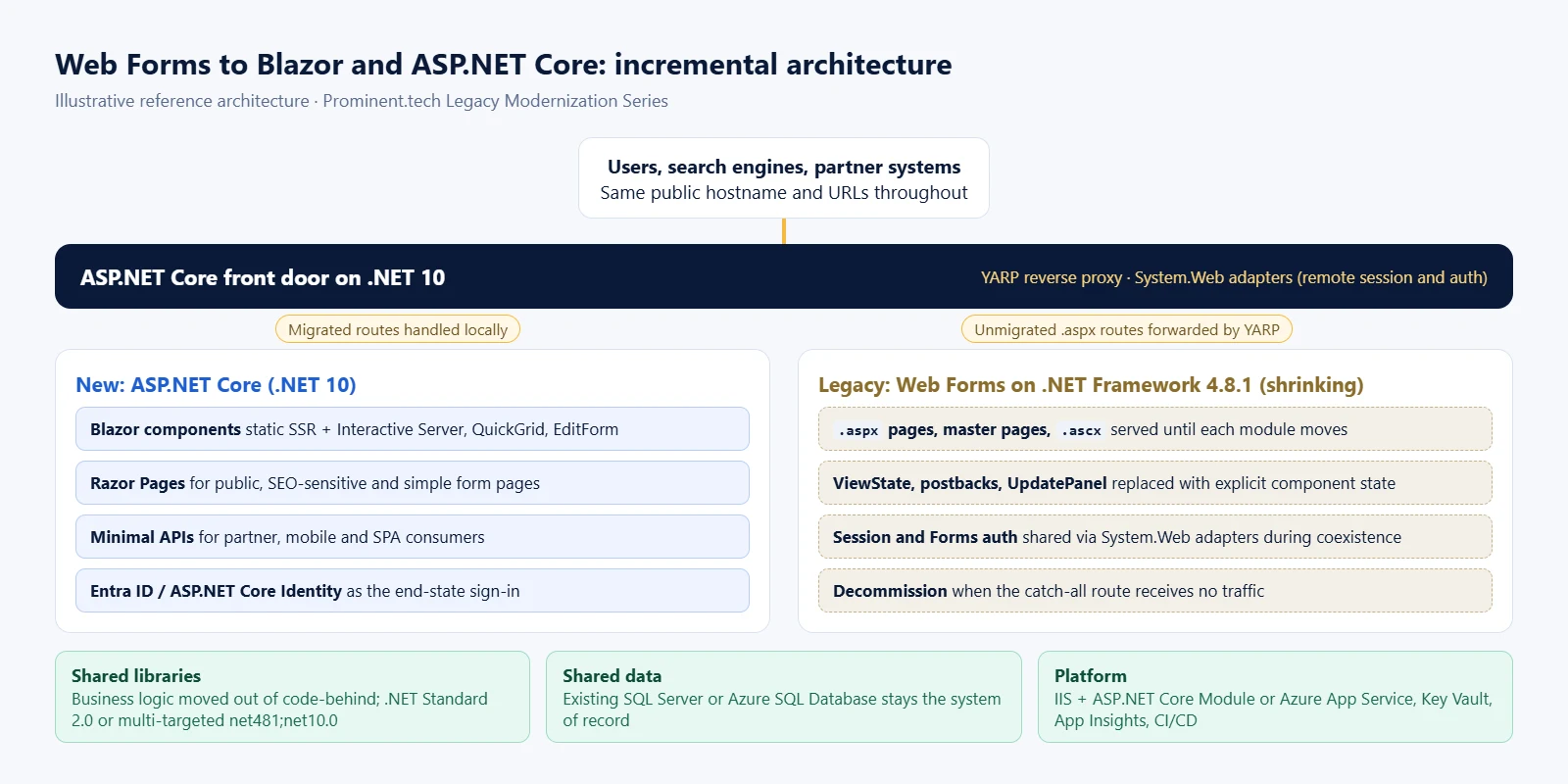
- Front door: ASP.NET Core on .NET 10 owns the hostname. Migrated routes are served locally; YARP forwards the rest to Web Forms.
- Shared state: System.Web adapters remote app session and remote authentication let the new app read the legacy session and sign-in while both run.
- Shared libraries: business logic extracted from code-behind, targeting .NET Standard 2.0 or multi-targeted, used by both apps.
- Data: the existing database stays the system of record during coexistence.
- Identity end state: move to Microsoft Entra ID or ASP.NET Core Identity; see our guide to secure authentication with ASP.NET Core and Entra ID.
Unsure which target fits each module? Book a Web Forms migration assessment and we will score your screens against this matrix.
Tooling, including AI-assisted upgrades
| Tool | Use it for | Limits |
|---|---|---|
| GitHub Copilot app modernization | Assessment; Web Forms-to-Blazor Server scenario; ASP.NET (MVC, Web API) to ASP.NET Core | Needs a local Git repository; migrations from .NET Framework require Windows; output needs review (FAQ) |
| System.Web adapters | Running .NET Framework and ASP.NET Core side by side, sharing session and auth | Transitional; plan to remove them |
| YARP | Routing traffic between old and new apps | Adds a network hop |
| Community Web Forms component libraries for Blazor | Faster first conversion by mimicking asp: controls | Can carry Web Forms patterns into the new code; review before adopting |
| Vendor UI suites | Replacing commercial grids, charts and report viewers | Licensing and different APIs |
We treat AI-generated conversions as a fast first draft: they reduce typing, not the need for architecture decisions, test coverage and code review. For AI-assisted workflows, see OpenAI Codex for legacy .NET modernization.
Step-by-step roadmap
- Assess (2 to 4 weeks): inventory pages, user controls, third-party controls,
System.Webusage in libraries, session keys and authentication. Score each module with the decision matrix. - Stabilise: retarget to .NET Framework 4.8.1; move logic out of code-behind into services; add characterization tests.
- Stand up the front door: ASP.NET Core on .NET 10 with YARP, System.Web adapters, CI/CD and telemetry. Go live with zero migrated pages.
- Migrate module by module: start with a valuable but bounded module. Build in the chosen target, test, then route its URLs to the new app.
- Replace platform features: authentication, file handling, reporting, email and scheduled jobs.
- Decommission: when proxy traffic to Web Forms reaches zero, remove YARP routes, adapters and the old app.
For regression testing and cutover detail, see our Web Forms modernization guide.
Security, performance and hosting
- Security: ASP.NET Core adds anti-forgery, output encoding and Data Protection by default. Replace Forms authentication and the membership provider with Entra ID or ASP.NET Core Identity, and move secrets to Azure Key Vault.
- Blazor Server capacity: each interactive user holds a circuit in server memory. Load test with realistic concurrency and configure Azure SignalR Service or sticky sessions when scaling out.
- Hosting: IIS with the ASP.NET Core Module, Azure App Service or containers. Linux hosting is possible once Windows-only dependencies are gone.
- Performance: measure first-load and interaction latency for your actual users; static SSR pages are usually lightest.
Cost, effort and timeline
The ranges below are indicative planning assumptions, not benchmarks or quotes.
| Application profile | Typical scope | Indicative cost (USD) | Indicative duration |
|---|---|---|---|
| Small | Under 40 pages, few third-party controls | $30,000 to $100,000 | 2 to 4 months |
| Medium | 40 to 200 pages, vendor grids, reports, Forms auth | $100,000 to $400,000 | 4 to 10 months |
| Large | 200+ pages or several apps, complex workflows and integrations | $400,000 to $1.5M+ | 10 to 24 months |
The biggest cost drivers are third-party controls, logic in code-behind, session coupling and the absence of tests. For budgeting, see legacy application modernization cost and ROI.
FAQs
Can Web Forms run on .NET 10?
No. Web Forms is part of ASP.NET on .NET Framework and is not available on ASP.NET Core. The user interface has to be rebuilt; business libraries can often be reused after removing System.Web dependencies.
Is Blazor the official replacement for Web Forms?
Microsoft publishes a Blazor guide for Web Forms developers, and its Copilot app modernization tooling includes a Web Forms-to-Blazor Server scenario. Razor Pages and MVC remain fully supported alternatives.
Is Web Forms still supported?
Yes, as part of .NET Framework 4.8.1, which has no announced end date. Microsoft says Web Forms “will continue to be supported for many years”, but it receives no new features.
Should we choose Blazor Server or Blazor WebAssembly?
For most migrated internal apps, start with static server rendering plus Interactive Server components. Use WebAssembly only when you need client-side execution or reduced server load per user.
Can GitHub Copilot convert Web Forms to Blazor automatically?
It can generate a first conversion of pages, controls and code-behind into Blazor components. Plan for review, refactoring and testing; Microsoft states its suggestions are not guaranteed to follow best practices.
Can Web Forms and Blazor run side by side?
Yes. Use an ASP.NET Core front door with YARP and the System.Web adapters to share session and authentication while modules move.
Should we migrate to MVC 5 first?
No. MVC 5 is also on .NET Framework. Go directly to ASP.NET Core on .NET 10.
Conclusion
A Web Forms to Blazor or ASP.NET Core migration is a series of decisions, not a single conversion. Score each module, use Blazor where Web Forms-style interactivity matters, Razor Pages where simplicity and SEO matter, and an API where other clients need the same logic. Move incrementally behind one front door, keep business logic in shared services, and use AI tooling to speed up conversion without skipping tests.
Previous in this series: Classic ASP to ASP.NET Core. Next: ASP.NET MVC 5 to ASP.NET Core MVC: A Practical Enterprise Upgrade Guide.
Related services: Legacy Software Modernization · .NET Development · Web Development · Microsoft Azure · Hire .NET Core Developers
Sources
- Microsoft Learn, Migrate from ASP.NET Web Forms to Blazor
- Microsoft Learn, GitHub Copilot app modernization: scenarios and skills
- Microsoft Learn, GitHub Copilot app modernization FAQ
- Microsoft Learn, Tooling for ASP.NET Framework to ASP.NET Core migration
- Microsoft Learn, Incremental ASP.NET to ASP.NET Core migration
- Microsoft Learn, ASP.NET Core Blazor render modes
- Microsoft Learn, ASP.NET Core Blazor QuickGrid component
- .NET Blog, Modernize .NET Anywhere with GitHub Copilot (March 12, 2026)
- Microsoft, .NET and .NET Core Support Policy
Plan your Web Forms migration
Prominent.tech helps teams score each Web Forms module, choose between Blazor, Razor Pages, MVC and an API-first design, and migrate incrementally to ASP.NET Core on .NET 10 with one site and one login throughout. Talk to our modernization team or explore our legacy software modernization services.