
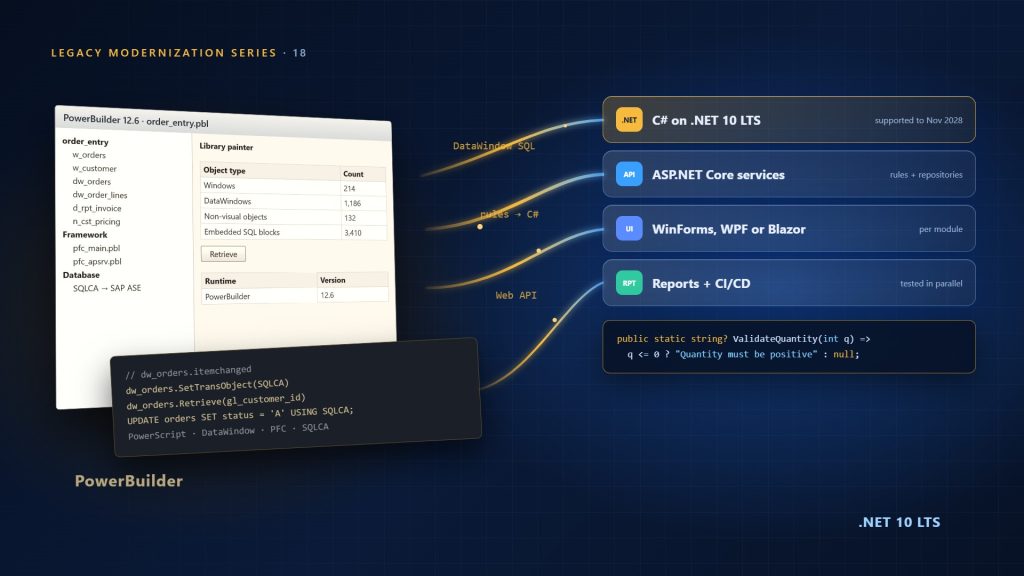
A PowerBuilder to .NET migration moves client/server business applications built on PowerScript and DataWindows to C# on .NET 10, the current long-term support release. Unlike most platforms in this series, PowerBuilder is still sold and supported: Appeon develops it under a 2016 agreement with SAP and released PowerBuilder 2025 R2 in June 2026. So the real question is not “is it dead?” but “upgrade or migrate?”. This guide explains when each makes sense, how the DataWindow (the hardest part) can be handled, and how to plan a migration without losing decades of business rules.
Technically reviewed by Harshita Pipaliya.
This is the eighteenth article in our Legacy Modernization Series. It follows Silverlight to Blazor or React. For the general desktop-to-.NET roadmap (assessment, approaches, testing and deployment), see our VB6 to .NET 10 migration guide; this article focuses on what is specific to PowerBuilder.
Executive summary
- PowerBuilder is alive, old versions are not: Appeon released PowerBuilder 2025 R2 on 3 June 2026, with “support for .NET 10” in its runtime and .NET integration features (Appeon). Older releases are a different story: PowerBuilder 2019 R3 (English) passed end of mainstream maintenance on 22 January 2026, and SAP/Sybase-era versions such as 12.x predate Appeon’s current release line, so fixes and new platform support arrive only on current Appeon releases.
- Two valid paths: upgrade to a current PowerBuilder release (and optionally PowerServer for cloud deployment), or migrate to C# on .NET 10. The right choice depends on skills, strategy and how much the application must change.
- The DataWindow is the crux: it combines SQL, data buffers, validation, presentation and printing in one object. Every migration plan stands or falls on how DataWindows are replaced.
- Tooling has shifted: Appeon’s notice states “The PowerScript Migrator will be discontinued in version 2025”, so code conversion to C# now relies on other tools, Appeon’s .NET DataStore for DataWindow logic, or AI-assisted rewriting.
- Our recommendation: if the team and roadmap are PowerBuilder-centric, upgrade to the current LTS or latest release first. If the organization is standardizing on .NET, migrate in phases: extract business rules and SQL into C# services on .NET 10, then rebuild the user interface (WinForms, WPF or Blazor) module by module.
PowerBuilder support status in 2026
| Release | GA date | Status (26 November 2026) |
|---|---|---|
| PowerBuilder 2025 R2 | 3 June 2026 | Current release, .NET 10 support |
| PowerBuilder 2025 | 7 May 2025 | Supported |
| PowerBuilder 2022 R3 (LTS) | 8 January 2024 | Supported; Appeon’s recommended LTS path |
| PowerBuilder 2019 R3 (LTS, English) | 22 January 2021 | Past end of mainstream maintenance (22 January 2026); end of life 22 January 2028 |
| PowerBuilder 2017 R3 and earlier Appeon releases | 2017 to 2018 | Check Appeon’s notices; plan to upgrade |
| SAP / Sybase PowerBuilder 12.x and earlier | Before 2016 | Predates Appeon releases; confirm your support status |
Sources: Appeon release history, Appeon end-of-life notice for 2019 R3 and Appeon end-of-life policy. Appeon’s policy gives LTS versions “a minimum period of 60 months” of standard support, with end of life generally 24 months after end of mainstream maintenance for LTS versions and 12 months for others.
What this means: an application on PowerBuilder 12.x, 2017 or 2019 R3 is on an old or soon-unsupported version whatever you decide next. Staying on PowerBuilder still means an upgrade project.
Upgrade PowerBuilder or migrate to .NET?
| Factor | Upgrade to current PowerBuilder | Migrate to C# on .NET 10 |
|---|---|---|
| Effort | Lower; mostly compatibility fixes | Higher; rewrite of UI and DataWindows |
| Skills | Keeps PowerScript skills; small talent pool | Uses widely available C# and .NET skills |
| Business rules | Stay in PowerScript and DataWindows | Move into testable C# services |
| Web and cloud | Possible with PowerServer and Appeon’s cloud tier | Native ASP.NET Core, Blazor, Azure and containers |
| Licensing | Appeon subscription (CloudPro tier for 2025 R2) | .NET is free and open source; tooling costs vary |
| Long-term risk | Depends on one vendor’s roadmap | Mainstream Microsoft platform with LTS releases |
Our recommendation: upgrade when the application is stable, the PowerBuilder team is strong and there is no strategic push to change platform. Migrate when you are consolidating on .NET, need a web or API-first architecture, or struggle to hire PowerBuilder developers. Many organizations do both: upgrade now to get onto a supported version, then migrate in phases.
What makes PowerBuilder migrations different
- DataWindows everywhere: a typical application has hundreds or thousands of DataWindow objects holding SQL, validation, computed fields and report layouts.
- Embedded SQL in PowerScript:
SELECT INTO, cursors and stored procedure calls mixed with UI events. - Frameworks: many applications are built on the PowerBuilder Foundation Class (PFC) library or a home-grown framework with inheritance-heavy windows.
- Event-driven logic: business rules hide in
itemchanged,clicked,ue_user events and windowopenscripts. - Database-centric design: logic often lives in the database as well, in SQL Server, Oracle, SAP ASE (Sybase) or SQL Anywhere stored procedures.
PowerBuilder to .NET concept mapping
| PowerBuilder | .NET 10 | Notes |
|---|---|---|
| PowerScript | C# | Event scripts become methods and services |
| Window, user object (visual) | WinForms or WPF form, Blazor component | Choose desktop or web per module |
| Non-visual object (NVO) | C# class or service | Good candidates to extract first |
| DataWindow (data and SQL) | Repository using EF Core or Dapper, or Appeon .NET DataStore | See the DataWindow section |
| DataWindow (presentation) | Data grid and form components | Third-party grids are common |
| DataWindow (reports, printing) | Reporting tool (for example SSRS, Power BI paginated reports or a .NET reporting library) | Rebuild layouts |
| DataStore | Service or repository returning typed lists | |
Transaction object (SQLCA) | DbConnection / DbContext with dependency injection | Connection per unit of work |
| Embedded SQL, cursors | Parameterized queries, LINQ or stored procedure calls | |
| PFC services | .NET libraries and patterns (logging, security, validation) | |
| PBL libraries | .NET projects and NuGet packages in Git |
Handling the DataWindow
| Option | How it works | Fits when |
|---|---|---|
| Re-implement | Rewrite SQL into repositories (EF Core or Dapper), validation into C#, layout into grids and forms | You want a clean .NET design and can afford the effort |
| Appeon .NET DataStore | Run DataWindow-style data access in C# using Appeon’s .NET DataStore library | You want to reuse DataWindow SQL and logic in .NET services, with an ongoing Appeon dependency |
| Automated converters | Commercial tools translate PowerScript and DataWindows to C# | Large estates; review generated code carefully |
| Hybrid | Keep PowerBuilder UI temporarily while moving rules and SQL into .NET Web APIs it calls | Phased migration with business continuity |
Start by classifying DataWindows: data entry, lookup, list and report. Lists and lookups are usually simple to re-implement; complex data entry DataWindows with many computed columns and itemchanged rules need the most care.
Code patterns: before and after
The examples below are illustrative and simplified.
1. PowerScript with a DataWindow and embedded SQL (before):
// w_orders.open
dw_orders.SetTransObject(SQLCA)
dw_orders.Retrieve(gl_customer_id)

// dw_orders.itemchanged
IF dwo.name = "quantity" THEN
   IF Long(data) <= 0 THEN
      MessageBox("Order", "Quantity must be positive")
      RETURN 1
   END IF
END IF

// cb_approve.clicked
UPDATE orders SET status = 'A' WHERE order_id = :ll_order_id USING SQLCA;
IF SQLCA.SQLCode = 0 THEN COMMIT USING SQLCA;
2. Repository and validation in C# (after):
public record OrderLine(int OrderId, string Product, int Quantity, decimal Price);

public class OrderRepository(SqlConnection db)
{
    public Task<IEnumerable<OrderLine>> GetForCustomerAsync(int customerId) =>
        db.QueryAsync<OrderLine>(
            "SELECT order_id AS OrderId, product AS Product, quantity AS Quantity, price AS Price " +
            "FROM order_lines WHERE customer_id = @customerId", new { customerId });

    public Task<int> ApproveAsync(int orderId) =>
        db.ExecuteAsync("UPDATE orders SET status = 'A' WHERE order_id = @orderId", new { orderId });
}
3. The itemchanged rule as a testable validator:
public static class OrderRules
{
    public static string? ValidateQuantity(int quantity) =>
        quantity <= 0 ? "Quantity must be positive" : null;
}
4. Expose the rules as an API so the PowerBuilder UI can call them during a hybrid phase:
app.MapPost("/api/orders/{id:int}/approve", async (int id, OrderRepository repo) =>
    await repo.ApproveAsync(id) == 1 ? Results.NoContent() : Results.NotFound());
Recommended target architecture
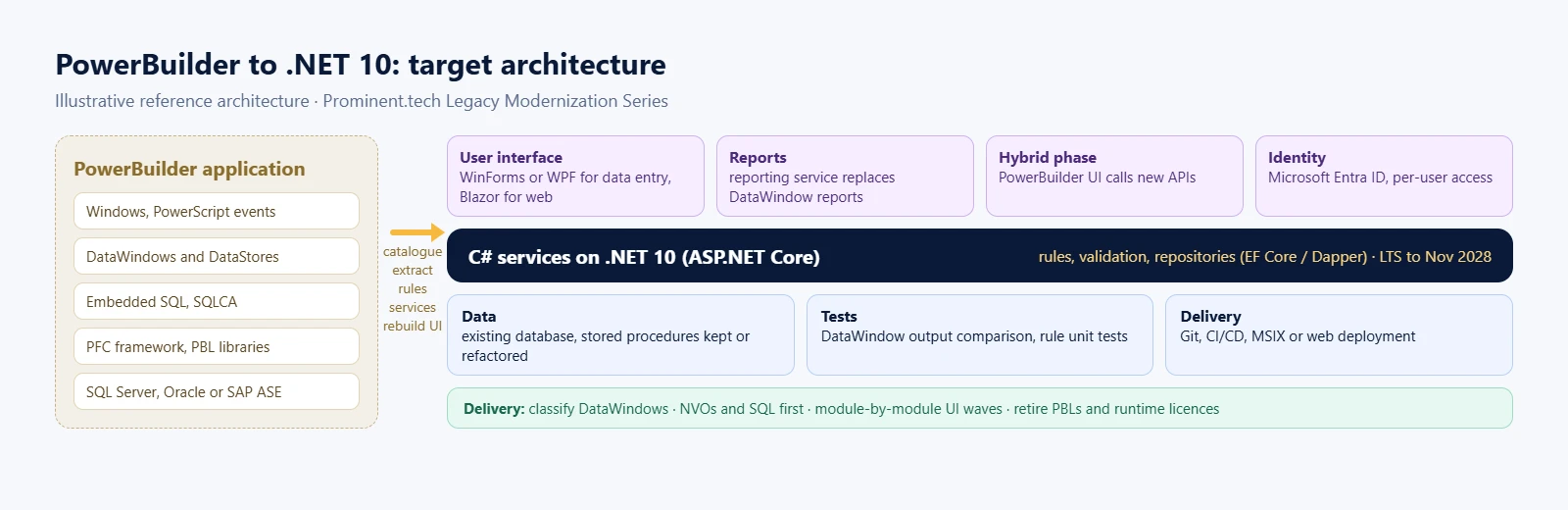
- Services: business rules, validation and data access in C# class libraries and ASP.NET Core Web APIs on .NET 10.
- User interface: WinForms or WPF for dense desktop data entry, Blazor for web access; chosen per module.
- Data: the existing database, with stored procedures kept or refactored; migration to Azure SQL if the platform is moving (see our SQL Server to Azure SQL guide).
- Reporting: a reporting tool or library to replace DataWindow reports and print layouts.
- Delivery: Git, CI/CD, automated tests and centralized identity.
Weighing a PowerBuilder upgrade against a .NET migration? Talk to our modernization team about an assessment of your DataWindows and business rules.
PowerBuilder-specific migration steps
These steps add to the general roadmap in our VB6 to .NET 10 guide:
- Export and inventory PBLs: count windows, user objects, NVOs and DataWindows; extract all DataWindow SQL and embedded SQL into a catalogue.
- Classify DataWindows by type and complexity, and flag shared ones used across many windows.
- Map business events: list
itemchanged,clicked,ue_andopenscripts that contain business rules. - Get onto a supported PowerBuilder version if the migration will take more than a year.
- Extract NVOs and SQL first into C# services, and let the PowerBuilder UI call them where practical.
- Rebuild the UI by module, starting with list and lookup screens, then complex data entry, then reports.
- Retire PowerBuilder runtime deployment, PBLs and licences once the last module moves.
Security considerations
- Parameterize all SQL: dynamic SQL built from DataWindow modify strings or string concatenation should become parameterized queries.
- Remove shared database logins: many PowerBuilder apps use one database account in
SQLCA; move to per-user identity at the API layer. - Secrets: take connection strings out of INI files and the registry; use a secret store.
- Executable hardening: if you stay on PowerBuilder, current releases add executable security mitigations; if you migrate, sign and harden .NET builds.
- Audit: log data changes at the service layer rather than relying on client-side scripts.
Testing, deployment and support
Testing
- Capture DataWindow outputs (retrieved rows, computed fields and report totals) from the old system and compare with the new services.
- Turn every extracted business rule into a unit test.
- Use parallel runs for financial and operational reports before switching.
Deployment
- Ship .NET services through CI/CD; deploy desktop clients with MSIX or ClickOnce, or move modules to Blazor.
- Keep PowerBuilder and .NET modules working against the same database during the transition.
Support
- Plan .NET LTS upgrades (.NET 10 is supported until 14 November 2028).
- If PowerBuilder stays for a period, track Appeon’s maintenance dates for the version you use.
Cost, effort and timeline
The ranges below are indicative planning assumptions, not benchmarks or quotes.
| Application profile | Typical scope | Indicative cost (USD) | Indicative duration |
|---|---|---|---|
| Small | Up to 50 windows, under 200 DataWindows, little PFC | $50,000 to $175,000 | 3 to 6 months |
| Medium | 50 to 250 windows, 200 to 1,000 DataWindows, PFC, reports | $175,000 to $700,000 | 6 to 14 months |
| Large | 250+ windows, 1,000+ DataWindows, multiple databases and integrations | $700,000 to $2.5M+ | 14 to 30+ months |
An upgrade to a current PowerBuilder release usually costs a fraction of these ranges. Cost drivers: DataWindow count and complexity, PFC usage, embedded SQL, reports and test coverage. See legacy application modernization cost and ROI.
FAQs
Is PowerBuilder still supported?
Yes. Appeon develops and supports PowerBuilder; version 2025 R2 was released in June 2026. Older versions such as 2019 R3 have passed end of mainstream maintenance, and new fixes and platform support arrive only on current releases.
Should we upgrade PowerBuilder or migrate to .NET?
Upgrade if the application and team are stable and there is no platform change planned. Migrate if you are standardizing on .NET, need web and API access, or can’t staff PowerBuilder development.
What happens to DataWindows in a .NET migration?
They are re-implemented as repositories, validation rules, grids and reports, or their data logic is reused through Appeon’s .NET DataStore. Classifying DataWindows early drives the plan.
Can PowerScript be converted to C# automatically?
Partly. Commercial converters exist, and Appeon’s PowerScript Migrator was discontinued in PowerBuilder 2025. Generated code needs review, and UI and DataWindow logic usually need redesign.
Can we migrate in phases?
Yes. Move business rules and SQL into .NET services first, let the PowerBuilder UI call them, then rebuild the UI module by module.
Desktop or web for the new UI?
Use WinForms or WPF for heavy keyboard-driven data entry, and Blazor where users need browser access. Mixing per module is common.
How long does a PowerBuilder to .NET migration take?
Small applications can move in three to six months. Large applications with thousands of DataWindows often take more than a year, in phases.
Conclusion
PowerBuilder is still supported, but older versions are not, and many organizations want their business rules on a mainstream platform. Decide upgrade versus migrate deliberately, treat the DataWindow as the centre of the plan, move rules and SQL into tested C# services on .NET 10, and rebuild the user interface module by module.
Previous in this series: Silverlight to Blazor or React. Next: Visual FoxPro to .NET and SQL Server.
Related services: Legacy Software Modernization · .NET Development · Microsoft Azure · Hire .NET Developers
Sources
- Appeon, PowerBuilder 2025 R2 now available (June 2026)
- Appeon, PowerBuilder release history
- Appeon, End of Life Notice for PowerBuilder 2019 R3
- Appeon, End-of-life policy
- Appeon, Obsolete and discontinued features in PowerBuilder 2025
- Appeon, .NET DataStore API reference
- Microsoft, .NET support policy
Plan your PowerBuilder modernization
Prominent.tech helps teams decide between a PowerBuilder upgrade and a .NET 10 migration, then move DataWindow logic and business rules into tested C# services and rebuild the user interface module by module. Talk to our modernization team or explore our legacy software modernization services.