
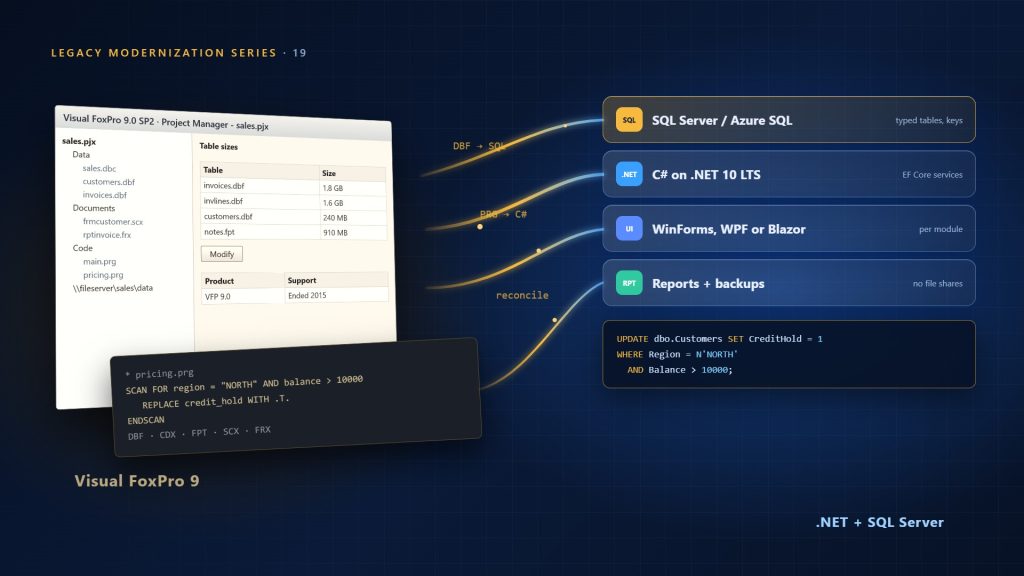
A Visual FoxPro to .NET migration replaces a desktop database application whose last version, Visual FoxPro 9.0, left Microsoft’s extended support in January 2015, with C# on .NET 10 and a SQL Server or Azure SQL database. Visual FoxPro combined a language, a user interface designer and its own DBF database engine in one tool, so the migration is two projects in one: moving the data out of DBF tables, and moving the logic out of PRG code and forms. This guide focuses on what is specific to FoxPro, especially the data, and links to our general desktop roadmap for the rest.
Technically reviewed by Harshita Pipaliya.
This is the nineteenth article in our Legacy Modernization Series. It follows PowerBuilder to .NET 10. For the general desktop-to-.NET approach (assessment, migration approaches, testing and deployment), see our VB6 to .NET 10 migration guide.
Executive summary
- Support ended in 2015: Microsoft’s lifecycle page lists Visual FoxPro 9.0 mainstream support ending in January 2010 and extended support in January 2015, under the Fixed Lifecycle Policy (Microsoft Learn).
- No successor: Microsoft’s FAQ states “There will not be another major release of Visual FoxPro”, and that Visual FoxPro “will remain 32-bit”. Its guidance for new development pointed to .NET languages and SQL Server (Microsoft FAQ).
- Data first: DBF tables have a 2 GB per-table limit, weak data typing by modern standards and file-based sharing over network drives. Moving them into SQL Server is usually the first and most valuable step.
- Logic second: PRG programs, form methods (SCX), reports (FRX) and menus need re-implementing in C#; there is no supported automatic converter.
- Our recommendation: migrate the data to SQL Server or Azure SQL first, with the FoxPro application temporarily pointed at it where practical, then rebuild the application in C# on .NET 10 (WinForms or WPF for desktop, Blazor for web) module by module.
Visual FoxPro support status
| Item | Status | Date |
|---|---|---|
| Visual FoxPro 9.0 (final version) | Released | December 2004 |
| Visual FoxPro 9.0 SP2 (final service pack) | Released | October 2007 |
| Mainstream support | Ended | January 2010 |
| Extended support | Ended | January 2015 |
| Further versions | None (“no VFP 10”, announced March 2007) | March 2007 |
| .NET 10 (target) | Long-term support | Until 14 November 2028 |
Sources: Microsoft Learn lifecycle page and Visual FoxPro FAQ; release history from public records; .NET support policy.
What this means: a FoxPro application has had no security fixes for more than a decade. It may still run on current Windows as a 32-bit program, but no one guarantees it.
Why FoxPro applications are a risk
- No fixes, no vendor: problems with new Windows releases, printers or security policies have no official resolution.
- File-share databases: DBF tables are opened directly over network shares, which is fragile over slow links and difficult to secure.
- Size and reliability limits: the 2 GB per-table limit, index corruption after crashes and limited transactional guarantees.
- Skills: few developers maintain FoxPro code, and the original authors are often retired or gone.
- Integration: modern systems expect APIs, identity and cloud data, not DBF files.
What makes FoxPro migrations different
- Language and database in one: commands such as
SCAN,REPLACE,SEEKandSET RELATIONwork directly on open tables, so data access is spread through all of the code. - Free tables and database containers: applications may use free tables or a DBC with stored procedures, triggers, rules and views.
- Forms with code inside: business rules sit in form and control methods (
Valid,When,Click,Init). - Report Writer: FRX reports often carry calculations and grouping logic.
- Cursors and buffering: local cursors,
SQL SELECT ... INTO CURSORand table buffering behave differently from modern data access.
Visual FoxPro to .NET concept mapping
| Visual FoxPro | .NET 10 and SQL Server | Notes |
|---|---|---|
| DBF tables, CDX indexes, FPT memo files | SQL Server tables, indexes, nvarchar(max) / varbinary(max) | Proper types, constraints and keys |
| Database container (DBC) rules and triggers | Constraints, triggers or C# validation | Decide where each rule belongs |
| PRG programs and procedures | C# classes and services | |
SCAN ... ENDSCAN, REPLACE, SEEK | Set-based SQL, LINQ with EF Core, or Dapper | Prefer set-based updates |
Cursors (INTO CURSOR) | Query results as lists or DTOs | |
| Forms (SCX) and classes (VCX) | WinForms, WPF or Blazor components | |
| Form and control methods | Event handlers calling services | Move rules into services |
| Reports (FRX) | Reporting tool or .NET reporting library | Rebuild layouts and totals |
| Menus (MNX) | Application shell navigation | |
Table buffering, TABLEUPDATE() | Unit of work, transactions | |
SET PATH, SET DEFAULT, file shares | Connection strings and configuration |
Moving DBF data to SQL Server
The data move is where FoxPro migrations succeed or fail.
| Issue | What to do |
|---|---|
Empty dates ({}) and blank values | Convert to NULL or agreed defaults; document each rule |
| Code pages and characters | Read each table with its code page and convert to Unicode (nvarchar) |
| Trailing spaces in character fields | Trim on load where meaning allows |
| Deleted-but-not-packed records | Decide whether to drop or archive them |
| Memo and general fields | Move to nvarchar(max) or varbinary(max); extract embedded objects |
| Missing keys and duplicates | Add surrogate keys, clean duplicates, then add constraints |
| Numeric precision | Map N(10,2) and similar to matching decimal types |
Visual FoxPro is a 32-bit product, and its data access components date from that era, so plan extraction tools and jobs to run as 32-bit processes. Run the load repeatedly in test, reconcile row counts and totals per table, and keep the scripts for the final cutover.
Code patterns: before and after
The examples below are illustrative and simplified.
1. FoxPro record-by-record update (before):
USE customers IN 0 SHARED
SELECT customers
SCAN FOR region = "NORTH" AND balance > 10000
   REPLACE credit_hold WITH .T., hold_date WITH DATE()
ENDSCAN
USE IN customers
2. The same rule as one set-based SQL statement (after):
UPDATE dbo.Customers
SET    CreditHold = 1, HoldDate = CAST(SYSDATETIME() AS date)
WHERE  Region = N'NORTH' AND Balance > 10000;
3. A typed table replacing the DBF:
CREATE TABLE dbo.Customers (
    CustomerId  int IDENTITY PRIMARY KEY,
    LegacyCode  nvarchar(10) NOT NULL UNIQUE,
    Name        nvarchar(100) NOT NULL,
    Region      nvarchar(10) NOT NULL,
    Balance     decimal(12,2) NOT NULL DEFAULT 0,
    CreditHold  bit NOT NULL DEFAULT 0,
    HoldDate    date NULL
);
4. A form Valid rule moved into a C# service:
public class CustomerService(AppDbContext db)
{
    public async Task<int> PlaceCreditHoldsAsync(string region, decimal threshold) =>
        await db.Customers
            .Where(c => c.Region == region && c.Balance > threshold)
            .ExecuteUpdateAsync(s => s
                .SetProperty(c => c.CreditHold, true)
                .SetProperty(c => c.HoldDate, DateOnly.FromDateTime(DateTime.Today)));
}
5. Reconciliation query after each load:
SELECT COUNT(*) AS RowsLoaded, SUM(Balance) AS TotalBalance
FROM dbo.Customers;
-- Compare with COUNT() and SUM(balance) from the source DBF
Recommended target architecture
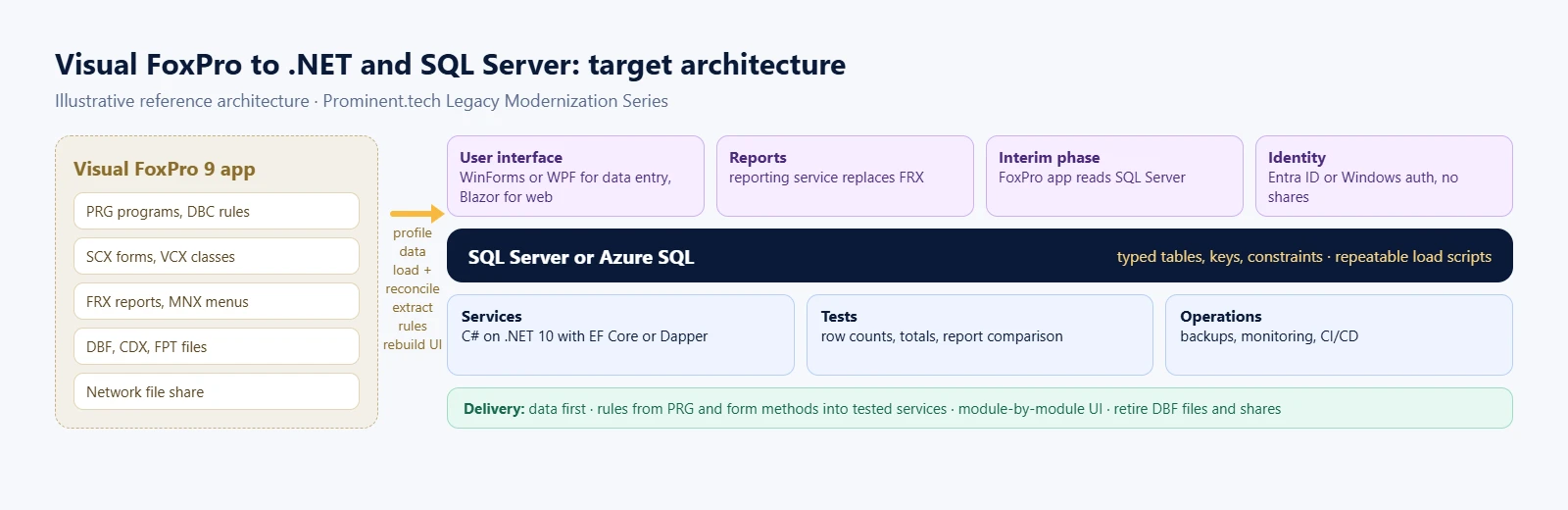
- Database: SQL Server or Azure SQL with typed columns, keys, constraints and indexes (see our SQL Server to Azure SQL guide).
- Services: C# on .NET 10 with EF Core or Dapper, holding the business rules from PRG code and form methods.
- User interface: WinForms or WPF for fast keyboard data entry; Blazor where browser access matters.
- Reporting: a reporting tool or library replacing FRX reports.
- Operations: backups, monitoring, CI/CD and identity-based access instead of shared folders.
Still running a FoxPro application on a shared drive? Talk to our modernization team about moving the data to SQL Server first and the code next.
FoxPro-specific migration steps
These steps add to the general roadmap in our VB6 to .NET 10 guide:
- Inventory: list tables (free or DBC), sizes, indexes, PRG files, forms, class libraries, reports and menus; note which tables are near the 2 GB limit.
- Profile the data: empty dates, code pages, duplicates, deleted records and orphaned rows.
- Design the SQL schema with proper types and keys, and write repeatable load scripts.
- Move the data first where practical, pointing the FoxPro application at SQL Server through remote views or SQL pass-through, so users keep working while the new app is built.
- Extract business rules from PRG code, DBC rules and form methods into C# services with tests.
- Rebuild the UI and reports module by module.
- Retire the DBF files, file shares and FoxPro runtime once the last module moves.
Security considerations
- Close the file shares: DBF tables on shared folders give every user direct file access; SQL Server enforces permissions per user or role.
- Encryption: use encrypted connections and encryption at rest in SQL Server or Azure SQL.
- Least privilege: the application connects through a service identity; users authenticate with Microsoft Entra ID or Windows authentication.
- Audit: enable SQL Server auditing or temporal tables for sensitive data.
- Backups: replace file copies with database backups and tested restores.
Testing, deployment and support
Testing
- Reconcile row counts, sums and key business totals for every table after each trial load.
- Compare report outputs from FoxPro and the new system for the same period.
- Unit test every rule extracted from PRG code and form methods.
Deployment
- Run trial loads until they are repeatable, then freeze FoxPro data for a short cutover window.
- Keep a read-only copy of the DBF data for audit and comparison.
Support
- Plan .NET LTS upgrades (.NET 10 is supported until 14 November 2028) and keep SQL Server on a supported version.
- Document data conversion rules for future auditors.
Cost, effort and timeline
The ranges below are indicative planning assumptions, not benchmarks or quotes.
| Application profile | Typical scope | Indicative cost (USD) | Indicative duration |
|---|---|---|---|
| Small | Up to 30 forms, under 50 tables, few reports | $30,000 to $110,000 | 2 to 5 months |
| Medium | 30 to 150 forms, 50 to 200 tables, DBC rules, many reports | $110,000 to $450,000 | 5 to 12 months |
| Large | 150+ forms, 200+ tables, multiple apps sharing data, integrations | $450,000 to $1.5M+ | 12 to 24+ months |
Cost drivers: data quality, number of tables and reports, logic in forms, integrations and test coverage. See legacy application modernization cost and ROI.
FAQs
Is Visual FoxPro still supported?
No. Microsoft’s lifecycle page shows extended support for Visual FoxPro 9.0 ended in January 2015, and Microsoft said there would be no further major release.
Will Visual FoxPro run on Windows 11?
Many FoxPro applications still run as 32-bit programs on current Windows, but Microsoft does not support it. Treat it as a risk, not a plan.
What should replace Visual FoxPro?
C# on .NET 10 for the application, and SQL Server or Azure SQL for the data. Microsoft’s own guidance pointed FoxPro developers to .NET and SQL Server.
Can we migrate the data before the code?
Usually yes. Moving DBF data into SQL Server first removes the 2 GB and file-share risks, and the FoxPro app can often keep working against SQL Server while the new application is built.
Can FoxPro code be converted automatically?
Not reliably. FoxPro mixes data commands, UI and logic. Tools and AI assistants can help draft code, but plan a re-implementation with tests.
What happens to FoxPro reports?
They are rebuilt in a reporting tool or library. Compare outputs with the old reports for the same data before switching.
How long does a Visual FoxPro migration take?
Small applications can move in two to five months. Large estates with many shared tables and reports often take a year or more.
Conclusion
Visual FoxPro has been out of support since 2015 and has no successor. Move the data out of DBF files into SQL Server with repeatable, reconciled loads, extract the business rules into tested C# services on .NET 10, and rebuild the forms and reports module by module.
Previous in this series: PowerBuilder to .NET 10. Next: Oracle Forms and Reports to Modern Web Applications.
Related services: Legacy Software Modernization · .NET Development · Microsoft Azure · Hire .NET Developers
Sources
- Microsoft Learn, Microsoft Visual FoxPro 9.0 lifecycle
- Microsoft Learn, Visual FoxPro frequently asked questions
- Microsoft, .NET support policy
Plan your Visual FoxPro migration
Prominent.tech helps teams move Visual FoxPro applications to SQL Server and C# on .NET 10, starting with repeatable, reconciled data loads and moving business rules into tested services. Talk to our modernization team or explore our legacy software modernization services.