
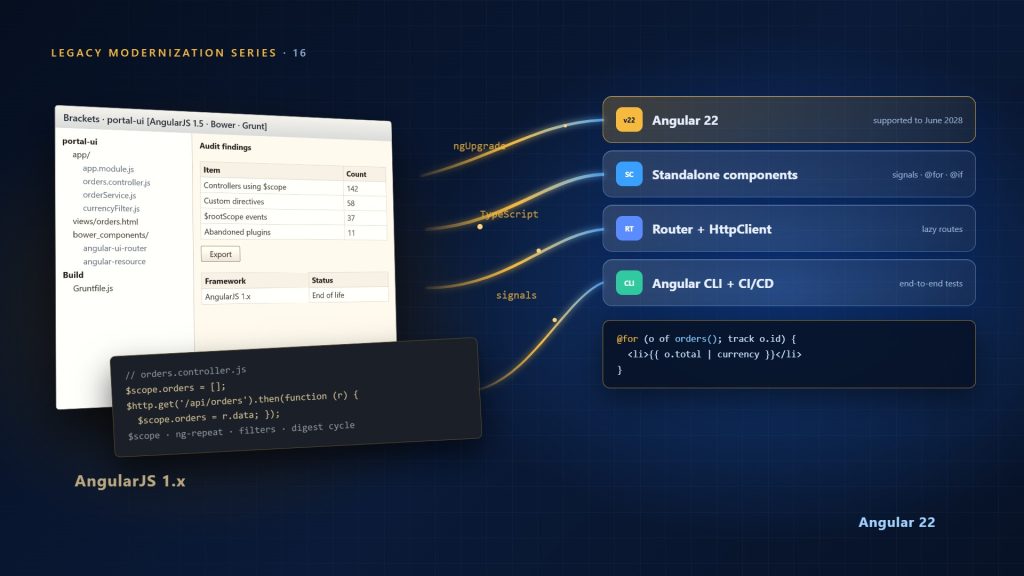
An AngularJS to Angular migration moves a front end off AngularJS 1.x, which Google stopped supporting on 31 December 2021, onto a current Angular release such as Angular 22, with TypeScript, standalone components, signals and an active support window. AngularJS and Angular share a name but not an architecture, so the move is a re-implementation of components, services and routing. It can still be done incrementally: the @angular/upgrade package lets AngularJS and Angular run in one hybrid application while you migrate screen by screen. This guide covers support status, concept mapping, migration strategies, code patterns and a practical roadmap.
Technically reviewed by Harshita Pipaliya.
This is the sixteenth article in our Legacy Modernization Series. It follows Apache Struts to Spring Boot, and many Struts and Java back ends were paired with AngularJS front ends.
Executive summary
- AngularJS is unsupported: Google ended AngularJS long-term support on 31 December 2021. Its GitHub repositories are archived read-only and the npm package is marked deprecated with the message “AngularJS support has officially ended” (Angular blog).
- Angular’s cadence changed: Angular now plans “a major release every 12 months”, and major releases are “typically supported for 24 months” (12 months active, 12 months LTS). Angular 22 was released on 3 June 2026 and is supported until June 2028 (angular.dev).
- Incremental path still exists:
@angular/upgradeis still published with each Angular release (version 22.3.0 on npm in November 2026), including thestaticentry point used for hybrid applications. - It is a rewrite, not an upgrade: controllers,
$scope, directives and filters become components, services and pipes in TypeScript. Business rules and API contracts can usually be kept. - Our recommendation: for large applications, run a hybrid application and migrate feature by feature to the current Angular release; for small ones, or where the user experience needs redesign, rebuild in one go. Choose the target framework (Angular, or React or Vue if you are switching) before you start.
AngularJS and Angular support status in 2026
| Version | Released | Status (26 November 2026) | Support ends |
|---|---|---|---|
| AngularJS 1.x (final 1.8.3) | 2010 to 2022 | Unsupported | 31 December 2021 |
| Angular 2 to 19 | 2016 to 2024 | Unsupported | Ended |
| Angular 20 | 28 May 2025 | LTS | 28 November 2026 |
| Angular 21 | 19 November 2025 | LTS | June 2027 |
| Angular 22 | 3 June 2026 | Active | June 2028 (active until June 2027) |
| Angular 23 | Planned around June 2027 | Planned | Not yet published |
Source: angular.dev releases page; AngularJS dates from the Angular blog and npm. Angular states that schedule dates “are offered as general guidance and are subject to change”.
What this means: an AngularJS application receives no fixes from Google. Target the current Angular major (22 today) so you start with the longest support window, and plan a yearly upgrade from then on.
Angular 22 requires TypeScript 6.0 and Node.js 22.22.3, 24.15.0 or 26 or later for builds, according to angular.dev’s version compatibility table.
Why AngularJS applications are a risk
- No security fixes. New vulnerabilities in AngularJS or its ecosystem will not be fixed by Google. Commercial extended support exists, but it buys time rather than a future.
- Ecosystem decay. Many AngularJS plugins, UI kits and build tools (Bower, Grunt, Gulp-era pipelines) are abandoned.
- Compliance findings. Security scanners and audits flag end-of-life JavaScript libraries.
- Skills. New front-end developers learn Angular, React or Vue, not AngularJS.
- Performance and UX limits. Digest-cycle performance, large watcher counts and dated UI patterns are hard to fix in place.
AngularJS to Angular concept mapping
| AngularJS 1.x | Modern Angular | Notes |
|---|---|---|
Controllers and $scope | Standalone components with signals | State lives in the component or a service |
| Directives (element, attribute) | Components and attribute directives | Component directives (.component()) map most directly |
| Services, factories, providers | @Injectable services | TypeScript classes with dependency injection |
$http, $resource | HttpClient | Returns observables; interceptors replace $httpProvider interceptors |
$q promises | Observables (RxJS) or async/await | |
ngRoute, UI-Router | Angular Router | Lazy-loaded routes per feature |
| Filters | Pipes | Pure pipes for formatting |
ng-repeat, ng-if, ng-switch | @for, @if, @switch built-in control flow | |
ng-model | Template-driven or reactive forms | Reactive forms suit complex validation |
$rootScope events | Services with signals or observables | |
| Karma and Protractor tests | Angular’s current unit test tooling, Playwright or Cypress for end to end | Protractor is deprecated |
| Bower, Grunt, Gulp | Angular CLI build |
Migration strategies compared
| Strategy | What it means | Best for | Risk |
|---|---|---|---|
| Big-bang rewrite | Build the new Angular app in parallel and switch at once | Small or medium apps, or apps needing a UX redesign | Feature freeze and one large cutover |
Hybrid with @angular/upgrade | Run AngularJS and Angular in one app; downgrade new Angular components into AngularJS and upgrade old services as needed | Large apps that must keep shipping features | Hybrid complexity, two change detection systems for a while |
| Route-level strangler | Serve migrated routes from a new Angular app and the rest from AngularJS, behind one domain and login | Apps with clearly separated sections | Shared layout, session and navigation must be handled |
| Angular Elements | Package new Angular components as custom elements used inside AngularJS pages | Gradual widget-level replacement | Bundle size and styling isolation |
Our recommendation: the hybrid or route-level approach for large business applications, because the application keeps shipping while it is migrated. Keep the hybrid period short, migrate shared services first, then leaf components, then routes, and remove AngularJS as soon as the last route moves.
Preparing an AngularJS codebase
Preparation shortens every strategy:
- Move to AngularJS 1.8.x if you are on an older 1.x release, and switch on
strictDi. - Adopt
.component()in place of controllers bound in templates, with one-way (<) bindings and outputs (&). - Introduce TypeScript and a module bundler so code can be shared with Angular.
- Remove
$scopeand$rootScopedependencies where possible, and move logic into services. - Add end-to-end tests on critical journeys so the old and new versions can be compared.
Code patterns: before and after
The examples below are illustrative and simplified.
1. AngularJS component and service (before):
angular.module('legacyApp')
  .factory('orderService', function ($http) {
    return { list: () => $http.get('/api/orders').then(r => r.data) };
  })
  .component('orderList', {
    template: '<ul><li ng-repeat="o in $ctrl.orders">{{ o.id }} · {{ o.total | currency }}</li></ul>',
    controller: function (orderService) {
      const ctrl = this;
      ctrl.$onInit = () => orderService.list().then(data => ctrl.orders = data);
    }
  });
2. Angular standalone component with a signal and built-in control flow (after):
@Injectable({ providedIn: 'root' })
export class OrderService {
  private http = inject(HttpClient);
  list() { return this.http.get<Order[]>('/api/orders'); }
}

@Component({
  selector: 'app-order-list',
  imports: [CurrencyPipe],
  template: `
    <ul>
      @for (o of orders(); track o.id) {
        <li>{{ o.id }} · {{ o.total | currency }}</li>
      }
    </ul>`
})
export class OrderListComponent {
  orders = toSignal(inject(OrderService).list(), { initialValue: [] });
}
3. Hybrid bootstrap with @angular/upgrade/static:
@NgModule({ imports: [BrowserModule, UpgradeModule] })
export class AppModule {
  constructor(private upgrade: UpgradeModule) {}
  ngDoBootstrap() {
    this.upgrade.bootstrap(document.body, ['legacyApp'], { strictDi: true });
  }
}
platformBrowserDynamic().bootstrapModule(AppModule);
4. Use a new Angular component inside AngularJS templates:
angular.module('legacyApp')
  .directive('appOrderList', downgradeComponent({ component: OrderListComponent }));
5. HTTP interceptor (replaces $httpProvider.interceptors):
export const authInterceptor: HttpInterceptorFn = (req, next) =>
  next(req.clone({ setHeaders: { Authorization: `Bearer ${inject(AuthService).token()}` } }));
Recommended target architecture
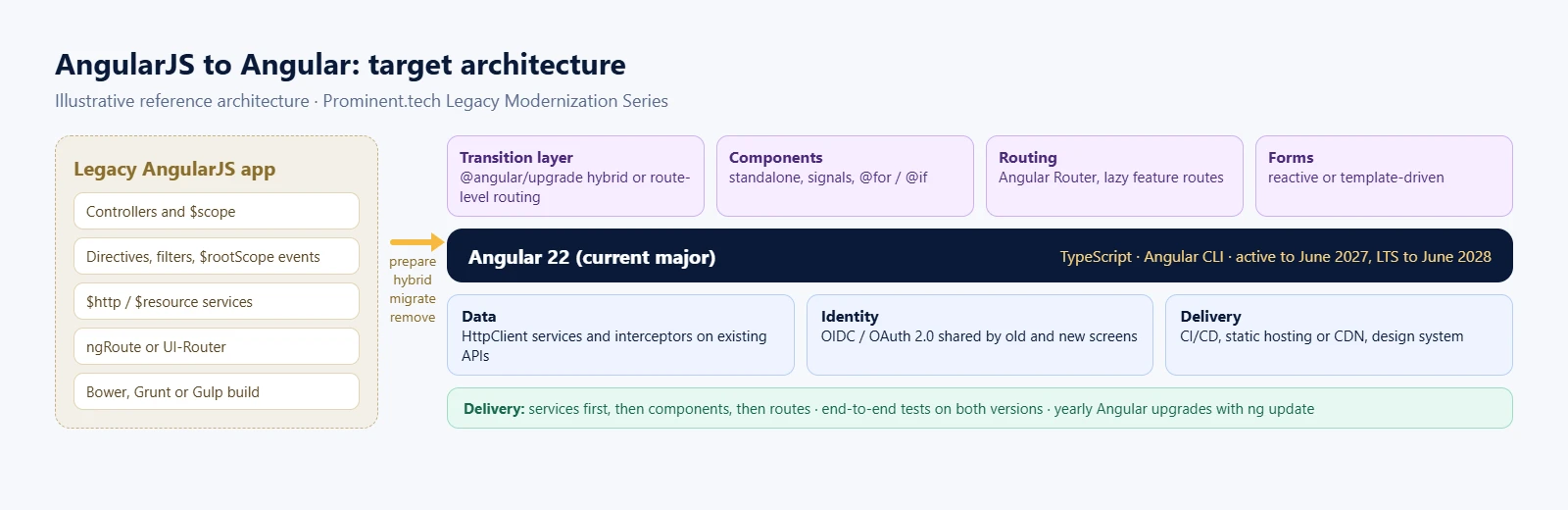
- Application shell: current Angular release with standalone components, lazy-loaded feature routes and a shared design system.
- State and data: signals for component and shared state;
HttpClientservices and interceptors for the existing APIs. - Transition layer:
@angular/upgradehybrid bootstrap or route-level routing, removed when AngularJS is gone. - Identity: OpenID Connect or OAuth 2.0 with the same identity provider for old and new screens.
- Delivery: Angular CLI builds, CI/CD, end-to-end tests and static hosting or a CDN.
Still running AngularJS in production? Talk to our modernization team about an assessment and a feature-by-feature plan.
Step-by-step migration roadmap
- Inventory (1 to 3 weeks): list modules, components, directives, services, routes, third-party plugins and test coverage; rank features by usage and change frequency.
- Decide the target: Angular for most AngularJS teams; React or Vue only with a clear reason, since that rules out the hybrid route.
- Prepare: AngularJS 1.8.x,
strictDi,.component(), TypeScript and a bundler; add end-to-end tests on critical paths. - Set up the platform: Angular CLI workspace, design system, linting, CI/CD and hybrid bootstrap or proxy routing.
- Migrate services first, then leaf components, then whole routes; keep each wave releasable.
- Replace plugins: swap AngularJS UI libraries for maintained Angular equivalents.
- Remove AngularJS: drop the hybrid layer, AngularJS packages and the old build; then plan yearly Angular upgrades.
Security considerations
- Templates: Angular sanitizes values bound into the DOM by default; avoid bypassing it with
bypassSecurityTrust*unless the content is trusted. - Remove legacy patterns: AngularJS expression injection risks disappear with AngularJS, but only once all AngularJS templates are gone.
- Tokens: use an HTTP interceptor and short-lived tokens; do not keep tokens in global scope.
- Content Security Policy: plan a CSP for the new app; Angular’s build output is easier to cover with a strict policy than AngularJS templates.
- Dependencies: remove Bower and abandoned plugins; scan npm dependencies in CI.
Testing, deployment and support
Testing
- Write end-to-end tests (Playwright or Cypress) for critical journeys before migrating, and run them against both versions.
- Unit test new components and services with Angular’s testing utilities.
- Test the hybrid boundary: inputs, outputs and services shared across frameworks.
Deployment
- Release each wave behind feature flags or route switches so rollback is quick.
- Watch bundle size while both frameworks are loaded.
Support
- Plan one Angular major upgrade a year with
ng updateand the Angular Update Guide. - Track Angular’s active and LTS dates in your platform roadmap.
Cost, effort and timeline
The ranges below are indicative planning assumptions, not benchmarks or quotes.
| Application profile | Typical scope | Indicative cost (USD) | Indicative duration |
|---|---|---|---|
| Small | Up to 30 screens, few plugins, logic in services | $25,000 to $90,000 | 2 to 4 months |
| Medium | 30 to 120 screens, UI-Router, several plugins, some tests | $90,000 to $350,000 | 4 to 9 months |
| Large | 120+ screens, heavy $scope logic, custom directives, little test coverage | $350,000 to $1.2M+ | 9 to 18+ months |
Cost drivers: screen count, logic in controllers and templates, third-party plugins, test coverage and UX redesign decisions. See legacy application modernization cost and ROI and our legacy modernization timeline by system age.
FAQs
Is AngularJS still supported?
No. Google ended AngularJS long-term support on 31 December 2021. The repositories are archived and the npm package is deprecated. Commercial extended support is available from third parties.
Can AngularJS be upgraded to Angular automatically?
No. Angular is a different framework, so components, services and templates are re-implemented. @angular/upgrade lets both run together while you migrate, and AI assistants can draft code, but each change needs review and tests.
Which Angular version should we target?
The current major release, Angular 22 at the time of writing, which is supported until June 2028. Angular now releases one major version a year.
Is ngUpgrade still available?
Yes. @angular/upgrade, including the static entry point for hybrid apps, is still published with current Angular releases (22.3.0 in November 2026).
Should we move to React or Vue instead of Angular?
It depends on your team and product plans. Angular is usually the shortest path for AngularJS teams and allows a hybrid migration. React or Vue means a full rewrite of the front end.
Can we keep our back-end APIs?
Usually yes. Most AngularJS apps call REST APIs that the new Angular front end can reuse unchanged, which keeps the migration focused on the user interface.
How long does an AngularJS to Angular migration take?
Small applications can move in two to four months. Large applications with heavy $scope logic and little test coverage often take nine to eighteen months in waves.
Conclusion
AngularJS has been unsupported since the end of 2021, while Angular now offers yearly majors with 24-month support. Prepare the AngularJS code, choose a hybrid, route-level or rebuild strategy, migrate services and features in waves with end-to-end tests, and remove AngularJS as soon as the last screen moves.
Previous in this series: Apache Struts to Spring Boot. Next: Silverlight to Blazor or React.
Related services: Web Application Development · Legacy Software Modernization · DevOps Services · Microsoft Azure · Hire .NET Developers
Sources
- Angular blog, Discontinued Long Term Support for AngularJS (January 2022)
- Angular, Versioning and releases
- Angular, Version compatibility
- npm, @angular/upgrade
- npm, angular (AngularJS)
- angular.love, Angular’s new release cycle explained (August 2026)
Plan your AngularJS to Angular migration
Prominent.tech helps teams move AngularJS front ends to current Angular, feature by feature, with hybrid or route-level migration, end-to-end tests and CI/CD in place. Talk to our modernization team or explore our web application development services.