
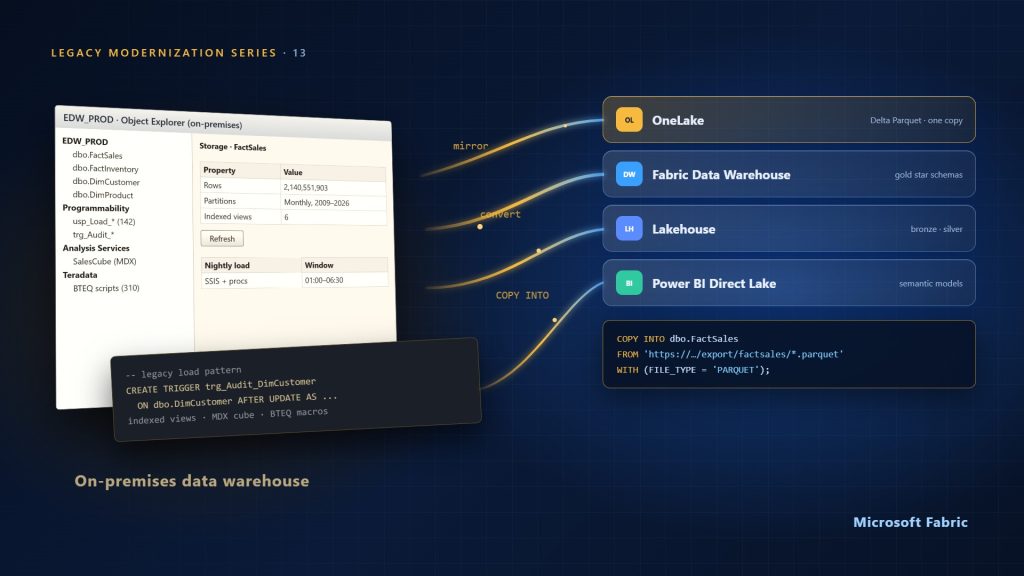
A data warehouse to Microsoft Fabric migration moves an on-premises SQL Server, Oracle or Teradata warehouse, plus the ETL and reports around it, onto Fabric’s unified platform of OneLake storage, Fabric Data Warehouse, lakehouses, Data Factory and Power BI. Fabric now includes a Migration Assistant that converts SQL Server and Synapse schemas, with Teradata metadata support in preview, and mirroring that replicates operational databases such as Oracle into OneLake. This guide covers the target design, the T-SQL gaps to plan for, and a phased migration that keeps reports running.
Technically reviewed by Harshita Pipaliya.
This is the thirteenth article in our Legacy Modernization Series. It follows our SSIS to Azure Data Factory guide, since warehouse loads usually move at the same time. For lake-first designs, see our data warehouse to data lake migration guide.
Executive summary
- Migration Assistant: Fabric’s built-in Migration Assistant “copies metadata and data from the source database”, converting schemas from Azure Synapse dedicated SQL pools and SQL Server, with Teradata metadata in preview. It migrates tables, views, functions, stored procedures and security objects, and offers Copilot help to fix scripts that fail conversion (Microsoft Learn).
- T-SQL gaps: Fabric Data Warehouse doesn’t support triggers, materialized views, recursive queries, synonyms or
FOR XML, and primary, unique and foreign keys areNOT ENFORCED. Identity columns,MERGE,TRUNCATEand session temp tables are supported (Microsoft Learn). - Oracle sources: Fabric mirroring supports “Oracle versions 10 and above with LogMiner enabled”, replicating into OneLake with no charge for replication compute or OneLake storage for the mirror (Microsoft Learn).
- Our recommendation: use a medallion design in OneLake, put curated star schemas in Fabric Data Warehouse when your team is T-SQL-centric, migrate subject area by subject area, and rebuild reports on Power BI semantic models with Direct Lake where it fits.
Why legacy warehouses are being replaced
- Ageing platforms. SQL Server 2012 to 2016 warehouses are out of support, and appliance-based platforms need costly hardware refreshes.
- Fixed capacity. On-premises servers are sized for month-end peaks and idle the rest of the time.
- Fragmented tooling. Separate ETL, warehouse, cube and reporting servers, each with its own security model.
- New demands. Near-real-time data, semi-structured data, data science and AI workloads that a classic warehouse handles poorly.
Fabric building blocks
| Component | Role |
|---|---|
| OneLake | Single logical data lake for the tenant; Delta Parquet format shared by all engines |
| Fabric Data Warehouse | T-SQL warehouse with full read/write, transactions and SQL security |
| Lakehouse | Spark-based tables and files, with a read-only SQL analytics endpoint |
| Data Factory in Fabric | Pipelines, Dataflow Gen2 and copy jobs for ingestion and orchestration |
| Mirroring | Continuous replication of operational databases into OneLake |
| Power BI | Semantic models, Direct Lake mode and reports |
| Purview integration | Sensitivity labels, lineage and data catalog |
Choosing Warehouse or Lakehouse
| If your team and workload… | Choose | Why |
|---|---|---|
| Are T-SQL-centric, with stored procedures and star schemas | Fabric Data Warehouse | Familiar T-SQL with multi-table transactions |
| Are Spark and Python-centric, with semi-structured data | Lakehouse | Notebooks, Delta tables, flexible schemas |
| Need both | Lakehouse for bronze/silver, Warehouse for gold | Each engine where it is strongest, on the same OneLake data |
This guide is our recommendation. For a deeper comparison see our Fabric Data Factory vs Azure Data Factory guide for orchestration choices.
Source-specific considerations
| Source | Schema conversion | Data movement | Watch out for |
|---|---|---|---|
| SQL Server warehouse | Migration Assistant (DACPAC, scripts or live connection) | Copy job, pipelines, or export to Parquet then COPY INTO | Triggers, NOT ENFORCED keys, cross-database queries, SSAS cubes |
| Azure Synapse dedicated SQL pool | Migration Assistant | Data Factory with partitioning, CETAS to Parquet then COPY INTO | Distribution and index options that no longer apply |
| Teradata | Migration Assistant metadata support (preview), or manual conversion of BTEQ and DDL | Export to files, then pipelines or COPY INTO | Teradata SQL extensions, macros, QUALIFY usage, set tables |
| Oracle | Manual or tool-assisted conversion of PL/SQL to T-SQL or Spark | Mirroring (LogMiner) for replication; pipelines for bulk history | PL/SQL packages, sequences, data types |
| Netezza and other appliances | Manual conversion | Export to files, then load | Appliance-specific SQL and distribution keys |
T-SQL compatibility in Fabric Data Warehouse
| Legacy feature | Fabric status | Remediation |
|---|---|---|
| Triggers | Not supported | Move logic to load procedures or pipelines |
| Materialized / indexed views | Not supported | Persisted gold tables refreshed by pipelines |
| Recursive CTEs | Not supported | Loops in stored procedures or Spark |
| Synonyms | Not supported | Views or fully qualified names |
FOR XML | Not supported | FOR JSON or app-tier formatting |
| Enforced PK / FK / UNIQUE | NOT ENFORCED only | Validate keys in load processes and tests |
ALTER TABLE ... ALTER COLUMN | Preview | Plan schema changes as new tables or columns |
Identity columns, MERGE, TRUNCATE, #temp tables | Supported | Keep, test behaviour |
| SSAS multidimensional cubes and MDX | Not a Fabric feature | Rebuild as Power BI semantic models with DAX |
Status from Microsoft’s T-SQL surface area in Fabric page (updated September 2026); check it before migrating, as the list changes often.
Code translation patterns
The examples below are illustrative and simplified.
1. Bulk load history exported as Parquet into Fabric Data Warehouse:
COPY INTO dbo.FactSales
FROM 'https://mystorage.dfs.core.windows.net/export/factsales/*.parquet'
WITH (FILE_TYPE = 'PARQUET');
2. Replace an audit trigger with logic in the load procedure:
CREATE PROCEDURE etl.LoadDimCustomer AS
BEGIN
    MERGE dbo.DimCustomer AS t
    USING stg.Customer AS s ON t.CustomerKey = s.CustomerKey
    WHEN MATCHED AND t.RowHash <> s.RowHash THEN
        UPDATE SET t.Name = s.Name, t.Segment = s.Segment, t.RowHash = s.RowHash, t.UpdatedAt = SYSUTCDATETIME()
    WHEN NOT MATCHED THEN
        INSERT (CustomerKey, Name, Segment, RowHash, UpdatedAt)
        VALUES (s.CustomerKey, s.Name, s.Segment, s.RowHash, SYSUTCDATETIME());

    -- Formerly done by an AFTER UPDATE trigger
    INSERT INTO audit.LoadLog (TableName, LoadedAt, RowsInStaging)
    SELECT 'DimCustomer', SYSUTCDATETIME(), COUNT(*) FROM stg.Customer;
END;
3. Replace an indexed view with a persisted gold table rebuilt after each load:
DROP TABLE IF EXISTS gold.SalesByMonth;
CREATE TABLE gold.SalesByMonth AS
SELECT d.YearMonth, p.Category, SUM(f.Amount) AS Amount
FROM dbo.FactSales f
JOIN dbo.DimDate d ON d.DateKey = f.DateKey
JOIN dbo.DimProduct p ON p.ProductKey = f.ProductKey
GROUP BY d.YearMonth, p.Category;
4. Keys are informational, so test them:
SELECT CustomerKey, COUNT(*) AS Duplicates
FROM dbo.DimCustomer
GROUP BY CustomerKey
HAVING COUNT(*) > 1;
Recommended target architecture
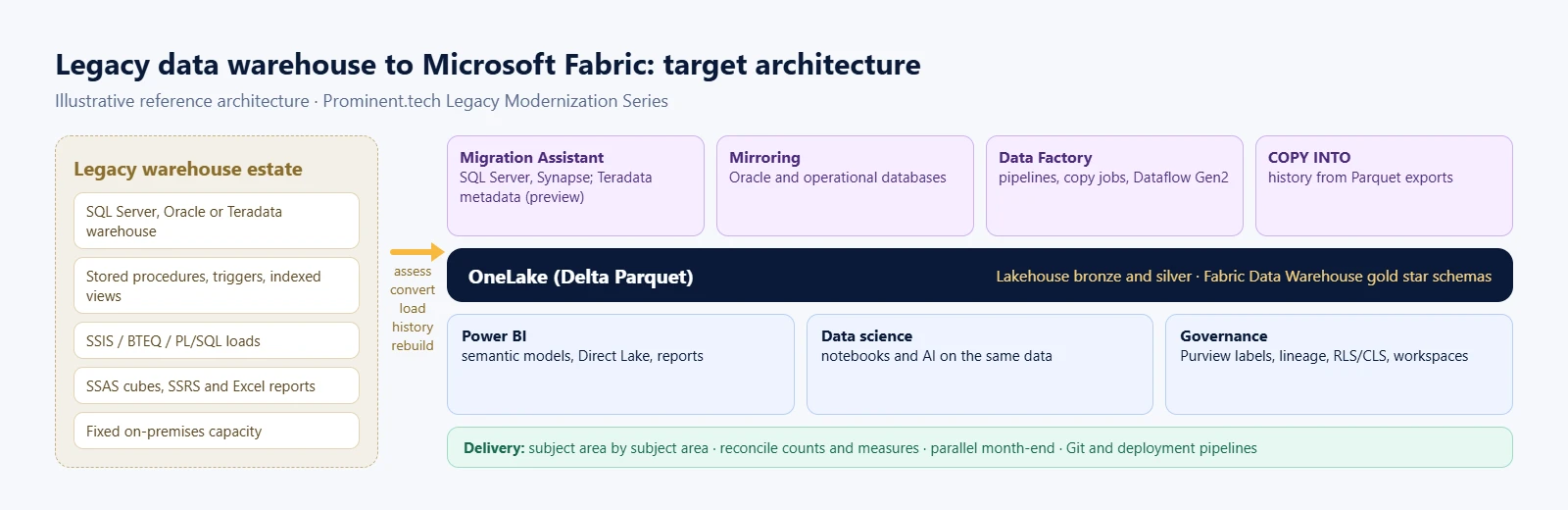
- Ingestion: mirroring for supported operational databases; Data Factory pipelines and copy jobs for files, SaaS and batch history; the on-premises data gateway for private sources.
- Bronze and silver in a lakehouse: raw and cleaned Delta tables in OneLake.
- Gold in Fabric Data Warehouse: star schemas, conformed dimensions and T-SQL load procedures.
- Semantic layer: Power BI semantic models, using Direct Lake where suitable, replacing SSAS cubes.
- Governance: workspaces per domain, deployment pipelines or Git integration, Purview sensitivity labels and lineage.
Planning to retire an on-premises warehouse? Talk to our data platform team about a subject-area migration plan.
Step-by-step migration roadmap
- Assess (2 to 4 weeks): inventory schemas, ETL jobs, reports, cubes, users and data volumes; profile query workloads and SLAs.
- Design: medallion layers, Warehouse vs Lakehouse per layer, workspace and capacity plan, security model.
- Convert schema: run the Migration Assistant for SQL Server or Synapse sources; convert Teradata or Oracle code with tooling plus review.
- Migrate history: export to Parquet and load with
COPY INTOor pipelines; validate counts and totals. - Rebuild loads: move ETL to Data Factory pipelines, Dataflow Gen2 or notebooks; replace triggers and indexed views.
- Rebuild the semantic layer and reports by subject area; run old and new side by side.
- Cut over and decommission: switch report sources, freeze the old warehouse, archive, then retire servers.
Security and governance
- Access: workspace roles plus SQL permissions, row-level and column-level security, and dynamic data masking in the warehouse.
- Identity: Microsoft Entra ID; SQL-authenticated users from legacy systems need redesign, as Microsoft notes for the Migration Assistant.
- Data protection: Purview sensitivity labels, private links where required, and customer-managed keys if your policy demands them.
- Lineage and catalog: Purview and Fabric lineage views for impact analysis.
Testing, cutover and support
Testing
- Reconcile row counts, sums and key business measures per table and per report.
- Compare report outputs between old and new for a full month-end cycle.
- Performance test peak queries and concurrent users against your Fabric capacity size.
Cutover
- Freeze changes on the old warehouse, run final incremental loads, switch report connections, keep the source read-only for an agreed period.
Support
- Monitor capacity usage with the Fabric Capacity Metrics app; right-size capacity after the first month.
Cost, effort and timeline
The ranges below are indicative planning assumptions, not benchmarks or quotes. Fabric capacity and storage costs are extra.
| Estate profile | Typical scope | Indicative cost (USD) | Indicative duration |
|---|---|---|---|
| Small | One SQL Server warehouse, under 1 TB, up to 50 reports | $40,000 to $150,000 | 2 to 4 months |
| Medium | 1 to 20 TB, SSIS loads, SSAS cubes, 50 to 300 reports | $150,000 to $600,000 | 4 to 10 months |
| Large | 20 TB+, Teradata or Oracle, many subject areas and consumers | $600,000 to $2.5M+ | 10 to 24+ months |
Cost drivers: source platform, stored procedure and ETL volume, cube and report count, data volumes and testing. See legacy application modernization cost and ROI.
FAQs
Can Microsoft Fabric replace an on-premises SQL Server data warehouse?
Yes, for most analytical workloads. Fabric Data Warehouse supports T-SQL with transactions, and the Migration Assistant converts SQL Server schemas. Plan for unsupported features such as triggers and materialized views.
Is there a migration tool for Teradata to Fabric?
The Fabric Migration Assistant supports Teradata metadata in preview, from uploaded SQL or BTEQ files. Expect manual conversion work and testing, and move the data separately.
Should we use Fabric Warehouse or Lakehouse?
Use Warehouse for T-SQL-centric star schemas and stored procedures, Lakehouse for Spark and semi-structured data, or both on the same OneLake data in a medallion design.
What happens to SSAS cubes?
Rebuild them as Power BI semantic models. Multidimensional cubes and MDX need redesign in DAX; tabular models usually move more easily.
Can we replicate Oracle into Fabric?
Yes. Fabric mirroring supports Oracle 10 and above with LogMiner enabled, through an on-premises data gateway, creating a mirrored database in OneLake.
Do primary keys work in Fabric Data Warehouse?
They can be defined only as NOT ENFORCED. Validate uniqueness and referential integrity in your load processes and tests.
How long does a data warehouse to Fabric migration take?
Small SQL Server warehouses can move in two to four months. Large Teradata or Oracle estates with many subject areas often take a year or more.
Conclusion
Fabric gives legacy warehouses a single platform for storage, warehousing, integration and BI. The migration succeeds when you design the layers first, plan around T-SQL gaps, move one subject area at a time, and rebuild the semantic layer alongside the data so every report is proven before the old warehouse switches off.
Previous in this series: BizTalk Server to Azure Integration Services. Next: Java 6/7/8 to Java 25 LTS.
Related services: Microsoft Fabric · Microsoft Azure · Hire Data Engineers · Hire Power BI Developers · Legacy Software Modernization
Sources
- Microsoft Learn, Migration Assistant for Fabric Data Warehouse
- Microsoft Learn, T-SQL surface area in Fabric Data Warehouse
- Microsoft Learn, Limitations of Fabric Data Warehouse
- Microsoft Learn, Mirroring Oracle databases in Microsoft Fabric
- Microsoft Learn, Migration methods for Synapse dedicated SQL pool to Fabric
Plan your move to Microsoft Fabric
Prominent.tech helps teams move SQL Server, Oracle and Teradata warehouses to Microsoft Fabric, with medallion design, schema conversion, history loads, rebuilt pipelines and Power BI semantic models. Talk to our data platform team or explore our Microsoft Fabric services.