
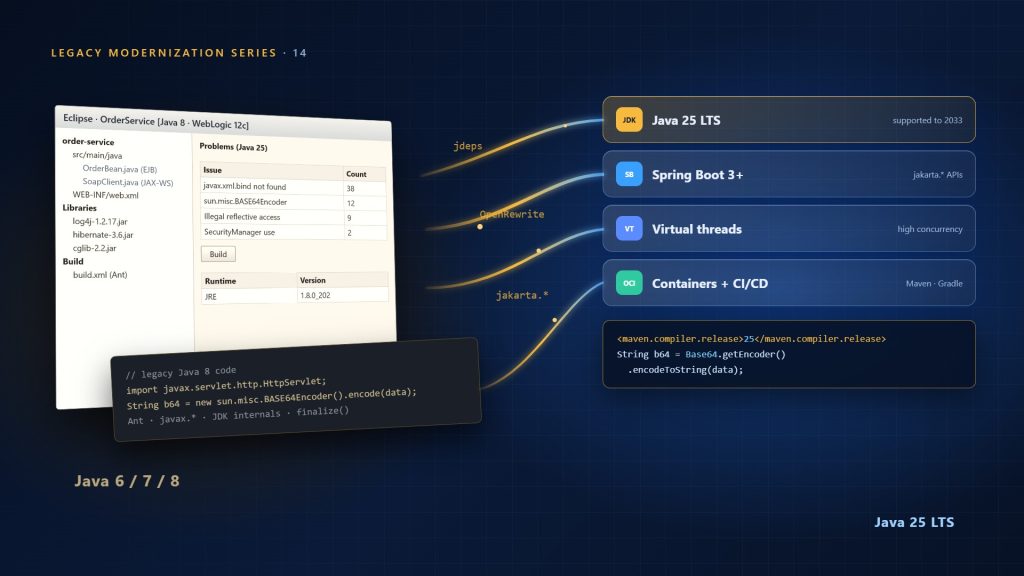
A Java 8 to Java 25 migration (or a move from Java 6 or 7) takes enterprise applications from runtimes that are out of support, or close to it, onto the current long-term support release. Java 25 reached general availability in September 2025, and Oracle lists Premier Support until September 2030 and Extended Support until September 2033. The language and JVM changes since Java 8 are large: removed Java EE modules, strong encapsulation of JDK internals, the javax to jakarta namespace change in the frameworks around Java, and a permanently disabled Security Manager. This guide shows what breaks, which tools help, and how to plan the upgrade.
Technically reviewed by Harshita Pipaliya.
This is the fourteenth article in our Legacy Modernization Series and the first in its Java section. The next article covers Apache Struts to Spring Boot, which often travels with a Java upgrade.
Executive summary
- Support: Oracle’s support roadmap lists Java 8 Extended Support until December 2030, Java 11 until January 2032, Java 17 until September 2029, Java 21 until September 2031 and Java 25 until September 2033. Java 6 and 7 are past the end of Oracle Extended Support (Oracle Java SE Support Roadmap).
- Cadence: Oracle “intends to make future LTS releases every two years”, and names Java 29 in September 2027 as the next LTS.
- Breaking changes: the Java EE and CORBA modules were removed from the JDK in Java 11, JDK internals are strongly encapsulated since Java 17, the Security Manager was permanently disabled in JDK 24 (JEP 486), and the 32-bit x86 port was removed in JDK 25 (JEP 503) (OpenJDK).
- Automation: OpenRewrite’s
UpgradeToJava25recipe “will upgrade your Java 8, 11, or 17 projects to Java 25”, chaining the 8 to 11, 11 to 17 and 17 to 21 migrations (OpenRewrite). - Our recommendation: upgrade the build and dependencies first, move frameworks to Jakarta-based versions (for example Spring Boot 3 or later), then switch the runtime to Java 25. Use automated recipes for the mechanical changes and a strong regression suite for the rest. Java 6 and 7 applications usually need a staged path through Java 8.
Java support status in 2026
| Release | GA | Oracle Premier Support until | Oracle Extended Support until |
|---|---|---|---|
| Java 8 (LTS) | March 2014 | March 2022 | December 2030 |
| Java 11 (LTS) | September 2018 | September 2023 | January 2032 |
| Java 17 (LTS) | September 2021 | September 2026 | September 2029 |
| Java 21 (LTS) | September 2023 | September 2028 | September 2031 |
| Java 25 (LTS) | September 2025 | September 2030 | September 2033 |
Source: Oracle Java SE Support Roadmap (updated October 2026). Other OpenJDK distributions (for example Eclipse Temurin, Microsoft Build of OpenJDK, Amazon Corretto and Red Hat build of OpenJDK) publish their own support timelines, so check the one you use.
What this means: Java 8 can still be covered by paid Oracle support until 2030, but most frameworks and libraries have moved on. Spring Boot 3 and later require Java 17, and many libraries now target 17 or 21, so staying on Java 8 increasingly means staying on unsupported frameworks.
What changed between Java 8 and Java 25
| Change | Release | Impact on legacy applications |
|---|---|---|
| Module system (JPMS) and CLDR locale data by default | 9 | Reflection warnings; date and number formats can change |
Java EE and CORBA modules removed (JAXB, JAX-WS, JAF, javax.annotation) | 11 | Compile and runtime errors; add the libraries as dependencies |
Java Web Start and the javaws tool removed | 11 | Desktop apps delivered by JNLP need a new delivery model |
| Nashorn JavaScript engine removed | 15 | Embedded JavaScript stops working |
| Strong encapsulation of JDK internals | 17 | Libraries using internal APIs fail unless updated or opened with --add-opens |
| UTF-8 as the default charset | 18 | File and network code that relied on the platform charset may change behaviour |
| Finalization deprecated for removal | 18 | finalize() methods should be replaced |
| Virtual threads | 21 | New option for high-concurrency server code |
| Security Manager permanently disabled | 24 | Applications that call System.setSecurityManager fail |
| 32-bit x86 port removed (Windows 32-bit removed in 24) | 25 | 32-bit runtimes and native libraries need 64-bit replacements |
Warnings for sun.misc.Unsafe memory access and JNI use | 24 | Warnings now, restrictions later; update libraries that rely on them |
JDK 25 also finalizes useful features for modernized code, including scoped values, flexible constructor bodies, module import declarations, compact source files and compact object headers.
Why Java 6 and 7 applications are harder
- Old build tooling. Ant scripts, old Maven plugins and checked-in JARs with no version information.
- Ancient libraries. Hibernate 3, Spring 2.5 or 3, Axis 1, old Log4j 1.x and Commons libraries that have no Java 25-compatible version.
- Application servers. WebLogic, WebSphere or JBoss versions that only certify Java 6 or 7.
- Bytecode tricks. Old versions of bytecode libraries (ASM, cglib, Javassist) that can’t read newer class files.
- Desktop delivery. Applets and Java Web Start clients that have no equivalent in modern Java.
Java 6 and 7 code usually compiles on Java 8 with few changes, so moving to Java 8 first is a low-risk way to modernize the build before the bigger jump.
Framework and platform dependencies
The Java version is rarely the hardest part. The frameworks around it usually are.
| Dependency | Typical legacy version | Target | Watch out for |
|---|---|---|---|
| Spring Framework / Spring Boot | Spring 3 to 5, Boot 1.x or 2.x | Spring Boot 3 or later (Java 17+) | javax to jakarta imports, Spring Security configuration changes |
| Java EE | Java EE 5 to 8 (javax.*) | Jakarta EE 10 or 11 (jakarta.*) | Package renames across servlet, persistence, validation, JAX-RS |
| Hibernate / JPA | Hibernate 3 to 5 | Hibernate 6 or later | Query and type mapping changes |
| Application server | WebLogic, WebSphere, JBoss EAP 6/7 | Supported server release, or embedded Tomcat or Jetty in Spring Boot | Server-specific APIs, JNDI, EJB |
| Build | Ant, Maven 2/3, old Gradle | Current Maven or Gradle | Plugin versions that understand Java 25 class files |
| Logging | Log4j 1.x, commons-logging | SLF4J with Logback or Log4j 2 | Configuration format changes |
| Web framework | Struts 1/2, JSF 1.x | Spring MVC, Spring Boot or modern JSF | See the next article on Struts |
The javax to jakarta change affects Java EE APIs such as javax.servlet and javax.persistence. Java SE packages such as javax.sql and javax.crypto keep their names.
Migration strategy: one jump or staged hops
| Approach | What it means | Best for | Risk |
|---|---|---|---|
| Single jump | Move the build, dependencies and runtime from 8 straight to 25 | Well-tested Spring Boot or plain Java services | Many changes land at once |
| Staged hops | Compile and test on 11, 17 and 21 in CI on the way to 25, deploying only the final target | Large monoliths, Java 6/7 sources | Longer, but each failure is easier to diagnose |
| Strangler with rewrite | Upgrade the core, and rewrite parts tied to dead frameworks as new services | Applications on Struts 1, applets or EJB 2 | Most effort |
Our recommendation: treat the hops as CI checkpoints, not production releases. Run the build on each LTS in turn, fix what breaks, and release once on Java 25. For Java 6 and 7, get to a clean Java 8 build first.
Tools for the upgrade
| Tool | What it does |
|---|---|
jdeps --jdk-internals | Finds use of internal JDK APIs that strong encapsulation blocks |
jdeprscan --release 25 | Lists use of deprecated and removed APIs |
OpenRewrite UpgradeToJava25 | Automated recipe for build files, deprecated APIs and common migrations from Java 8, 11 or 17 |
| OpenRewrite Jakarta and Spring Boot recipes | Rewrite javax imports and Spring Boot upgrades |
| Maven / Gradle dependency reports | Find libraries with no Java 25-compatible release |
| AI coding assistants | Help with leftover compile errors and test fixes; review every change |
OpenRewrite’s documentation now describes rewrite-migrate-java as a “Moderne source-available recipe module”, with binaries served from an authenticated repository. Check the current access and licence terms before building it into your pipeline.
Code and configuration patterns
The examples below are illustrative and simplified.
1. Set the target release in Maven:
<properties>
  <maven.compiler.release>25</maven.compiler.release>
</properties>
2. Add back the Java EE APIs removed from the JDK (JAXB example):
<dependency>
  <groupId>jakarta.xml.bind</groupId>
  <artifactId>jakarta.xml.bind-api</artifactId>
  <version>4.0.2</version>
</dependency>
<dependency>
  <groupId>org.glassfish.jaxb</groupId>
  <artifactId>jaxb-runtime</artifactId>
  <version>4.0.5</version>
</dependency>
Pick versions that match your Jakarta EE level.
3. Find blockers before changing code:
jdeps --multi-release 25 --jdk-internals -R --class-path 'lib/*' app.jar
jdeprscan --release 25 app.jar
4. Run the automated upgrade recipe (Maven):
mvn -U org.openrewrite.maven:rewrite-maven-plugin:run \
  -Drewrite.recipeArtifactCoordinates=org.openrewrite.recipe:rewrite-migrate-java:RELEASE \
  -Drewrite.activeRecipes=org.openrewrite.java.migrate.UpgradeToJava25
Review the result with git diff and fix what the recipe can’t.
5. Namespace change after moving to Jakarta-based frameworks:
// Before (Java EE / Spring Boot 2)
import javax.persistence.Entity;
import javax.servlet.http.HttpServletRequest;

// After (Jakarta EE / Spring Boot 3+)
import jakarta.persistence.Entity;
import jakarta.servlet.http.HttpServletRequest;
6. Replace a thread-per-request pool with virtual threads where it fits:
try (var executor = Executors.newVirtualThreadPerTaskExecutor()) {
    orders.forEach(order -> executor.submit(() -> invoiceService.send(order)));
}
7. Make charset assumptions explicit (UTF-8 has been the default since Java 18):
// Before: relied on the platform default charset
Reader reader = new FileReader(file);

// After: explicit, and the same on every platform
Reader reader = Files.newBufferedReader(file.toPath(), StandardCharsets.UTF_8);
Recommended target architecture
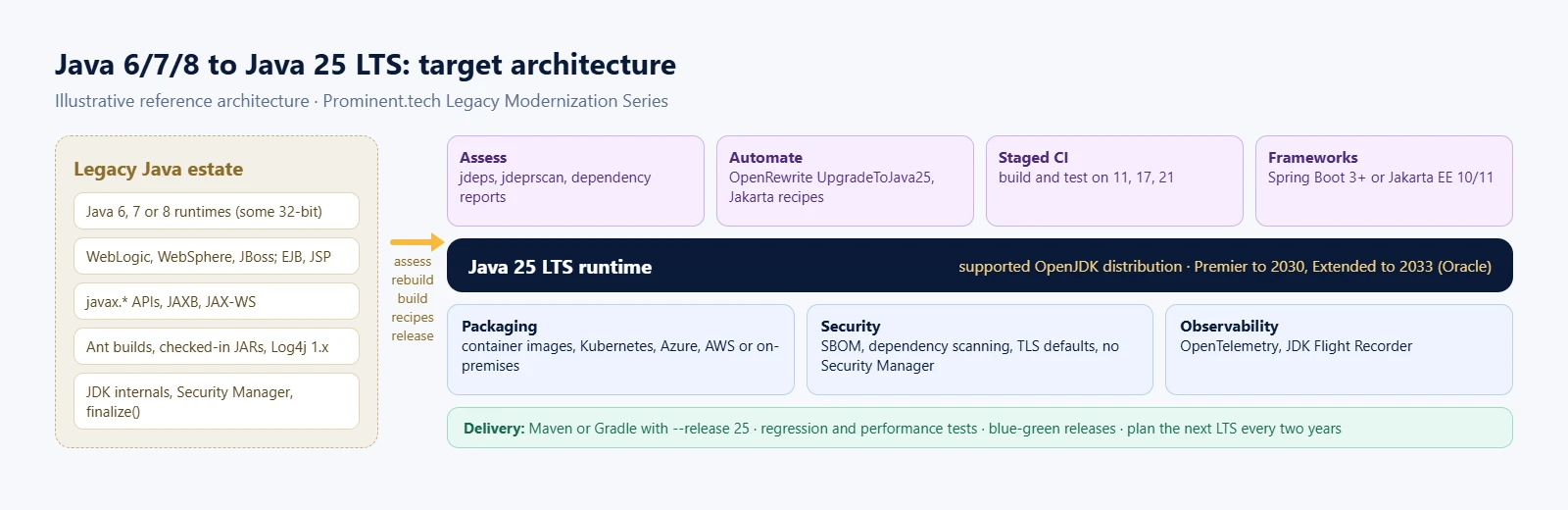
- Runtime: a supported Java 25 distribution, chosen for its support timeline and licence terms.
- Frameworks: Spring Boot 3 or later, or a Jakarta EE 10 or 11 server, with
jakarta.*APIs. - Build: current Maven or Gradle with
--release 25, dependency management and reproducible builds. - Packaging: container images (or a modern app server where needed), deployed through CI/CD to Kubernetes, Azure, AWS or on-premises.
- Observability: structured logs, metrics and traces (for example OpenTelemetry) and JDK Flight Recorder for performance work.
Planning a Java upgrade across many applications? Talk to our modernization team about an assessment and a staged plan.
Step-by-step migration roadmap
- Inventory (1 to 3 weeks): list applications, Java versions, build tools, frameworks, app servers and native libraries; run
jdepsandjdeprscan. - Stabilize the build: move Ant or old Maven builds to current Maven or Gradle; replace checked-in JARs with managed dependencies.
- Raise test coverage on the riskiest paths: integration, serialization, date and number formatting, file encoding and security.
- Upgrade dependencies: move logging, ORM and web frameworks to versions that support Java 17 or later; plan the
jakartaswitch. - Run automated recipes and fix remaining compile errors; build and test on each LTS in CI.
- Performance and security testing on Java 25 with production-like data; tune GC and memory settings.
- Release and decommission: deploy on Java 25, retire old runtimes and app servers, and set a policy for the next LTS upgrade.
Security, licensing and runtime choice
- Security Manager: it can’t be enabled on JDK 24 or later. Replace in-process sandboxing with container isolation, OS permissions and code review.
- TLS and crypto: newer JDKs disable old protocols and weak algorithms by default; test connections to legacy partners and databases early.
- Licensing: Oracle’s roadmap notes Oracle JDK 25 is under a free-use licence, while Oracle JDK 21 updates from October 2026 fall under the OTN licence. Choose your distribution with legal and procurement input.
- Supply chain: generate an SBOM, scan dependencies and remove abandoned libraries such as Log4j 1.x.
Testing, deployment and support
Testing
- Run unit, integration and end-to-end tests on each LTS hop in CI.
- Add tests for date, time, locale and number formatting, which changed with CLDR locale data in Java 9.
- Load test virtual threads or GC changes before relying on them.
Deployment
- Build container images from a supported base image; use blue-green or canary releases.
- Keep the old version deployable until the new one has run through a full business cycle.
Support
- Plan LTS upgrades every two years, and apply quarterly security updates.
- Track framework support dates alongside the JDK.
Cost, effort and timeline
The ranges below are indicative planning assumptions, not benchmarks or quotes.
| Estate profile | Typical scope | Indicative cost (USD) | Indicative duration |
|---|---|---|---|
| Small | 1 to 3 Java 8 services, Spring Boot 2, good tests | $15,000 to $60,000 | 1 to 2 months |
| Medium | 5 to 30 applications, mixed frameworks, app servers, some Java 6/7 | $60,000 to $300,000 | 3 to 8 months |
| Large | 30+ applications, EJB, Struts, native libraries, weak tests | $300,000 to $1.2M+ | 8 to 18+ months |
Cost drivers: test coverage, framework age, app server dependencies, internal API use and the number of applications. See legacy application modernization cost and ROI and our legacy modernization timeline by system age.
FAQs
Can we upgrade directly from Java 8 to Java 25?
Yes. Many teams move the runtime in one release, but build and test on Java 11, 17 and 21 in CI along the way so each breaking change is easier to find. OpenRewrite’s UpgradeToJava25 recipe chains those steps.
How long is Java 25 supported?
Oracle lists Premier Support for Java 25 until September 2030 and Extended Support until September 2033. Other OpenJDK distributions set their own timelines.
Is Java 8 still supported?
Oracle lists Java 8 Extended Support until December 2030, but many frameworks, including Spring Boot 3 and later, require Java 17 or newer.
What breaks most often when leaving Java 8?
Removed Java EE modules such as JAXB and JAX-WS, libraries that use internal JDK APIs, old bytecode libraries, the Security Manager, and charset or locale assumptions.
Do we need to change javax imports to jakarta?
Only when you move to Jakarta EE 9 or later, or to frameworks built on it such as Spring Boot 3. The Java SE javax packages, such as javax.sql, don’t change.
Should we migrate Java 6 or 7 applications at all?
Usually yes, but check the frameworks first. If an application depends on Struts 1, applets or EJB 2, a partial rewrite may cost less than a pure upgrade.
How long does a Java 8 to Java 25 migration take?
Small, well-tested services can move in one to two months. Large estates with app servers, old frameworks and weak tests often take eight to eighteen months.
Conclusion
Java 25 gives legacy applications a supported runtime into the 2030s and a modern platform for new features such as virtual threads. The upgrade succeeds when you fix the build and dependencies first, let automation handle the mechanical changes, test each LTS step in CI, and release once on Java 25 with a plan for the next LTS.
Previous in this series: Legacy Data Warehouse to Microsoft Fabric. Next: Apache Struts to Spring Boot.
Related services: Legacy Software Modernization · DevOps Services · Microsoft Azure · AWS · Hire DevOps Engineers
Sources
- Oracle, Oracle Java SE Support Roadmap
- OpenJDK, JEPs in JDK 25 integrated since JDK 21
- OpenJDK, JEP 503: Remove the 32-bit x86 Port
- OpenJDK, JEP 486: Permanently Disable the Security Manager
- OpenJDK, JEP 320: Remove the Java EE and CORBA Modules
- OpenJDK, JEP 403: Strongly Encapsulate JDK Internals
- OpenJDK, JEP 400: UTF-8 by Default
- OpenRewrite, Migrate to Java 25
Plan your Java 25 upgrade
Prominent.tech helps teams move Java 6, 7 and 8 applications to Java 25 LTS, with dependency and framework upgrades, automated refactoring, staged CI testing and container-based delivery. Talk to our modernization team or explore our legacy software modernization services.