
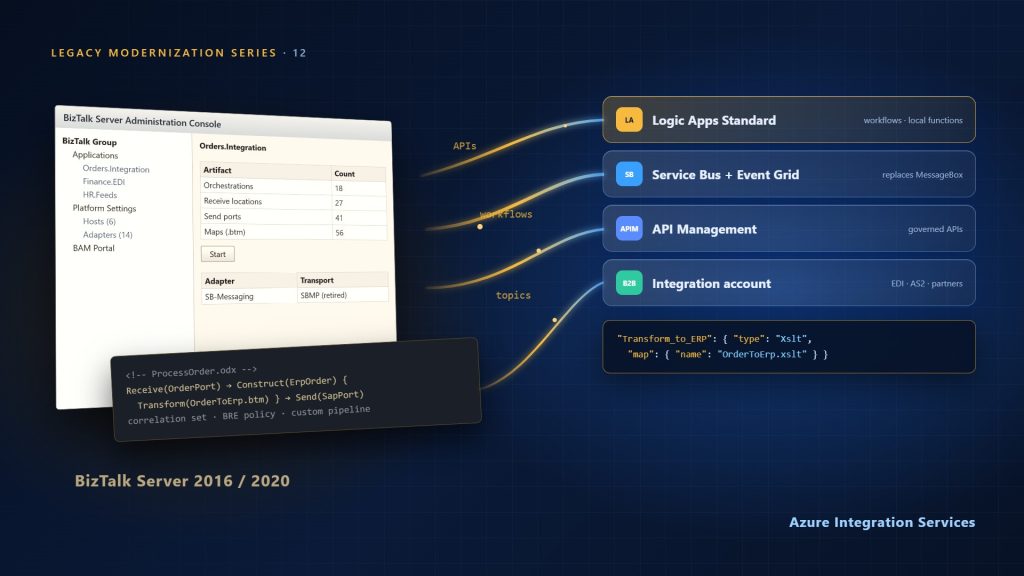
A BizTalk to Azure Integration Services migration replaces BizTalk Server orchestrations, pipelines, maps and adapters with Azure Logic Apps Standard workflows, Azure Service Bus messaging, API Management and related services. Microsoft has confirmed that “BizTalk Server 2020 is the final release of BizTalk Server”, with sales ending March 31, 2027 and mainstream support ending in April 2028. That gives most organizations a defined window to plan, rather than an emergency. This guide covers the mapping, the tooling and a migration sequence that keeps interfaces running.
Technically reviewed by Harshita Pipaliya.
This is the twelfth article in our Legacy Modernization Series. It builds on our WCF to Web API and gRPC guide, since many BizTalk solutions expose or call WCF endpoints, and on our SSIS to Azure Data Factory guide for batch data movement.
Executive summary
- Lifecycle: BizTalk Server 2020 is the final version. Sales end March 31, 2027; mainstream support runs to April 2028, with optional paid extended-mainstream support from April 2028 to April 2030 “subject to final eligibility, coverage, pricing, and purchasing terms”. Extended support also ends in April 2030 (Microsoft Learn, Microsoft Lifecycle).
- Capabilities not carried forward: Microsoft expects BAM, the ESB Toolkit, legacy enterprise adapters and Visual Studio versions after 2022 to be excluded or redesigned.
- Primary target: Azure Logic Apps Standard, with Service Bus, API Management and Event Grid added “only when the refactored solution requires” them, and .NET local functions for custom code.
- Tooling: Microsoft’s open-source, AI-assisted Logic Apps Migration Agent for Visual Studio Code supports BizTalk Server 2016 and 2020 artifacts, including orchestrations, schemas, maps, pipelines, bindings and business rules (Microsoft Learn).
- Urgent item: Azure Service Bus retired the SBMP protocol on September 30, 2026. BizTalk 2020 SB-Messaging adapters need hotfix KB5091379 and AMQP; Microsoft staff indicated no fix for BizTalk 2016 (Microsoft Tech Community).
- Our recommendation: inventory and rationalize interfaces now, move by business domain rather than by artifact type, and keep BizTalk running in parallel until each interface is proven on Azure.
BizTalk Server lifecycle in 2026
| Item | Date or status |
|---|---|
| BizTalk Server 2020 sales end | March 31, 2027 |
| BizTalk Server 2020 mainstream support end | April 2028 (extended from January 2024) |
| Optional paid extended-mainstream support | April 2028 to April 2030, terms to be confirmed |
| BizTalk Server 2020 extended support end | April 2030 |
| BizTalk Server 2016 | Security-update-only support until 2027, according to Microsoft staff |
| Service Bus SBMP protocol | Retired September 30, 2026; SB-Messaging adapter must use AMQP |
| Future BizTalk versions | None; BizTalk Server 2020 is the final release |
Why BizTalk migrations are hard
- Hundreds of interfaces. Large estates have hundreds of receive locations, send ports and orchestrations, often with poor documentation.
- Implicit behaviour. The MessageBox provides durable publish-subscribe routing, correlation and retries that are easy to overlook.
- Custom code. Pipeline components, helper assemblies, functoids and custom adapters.
- B2B and EDI. Trading partner agreements, X12 and EDIFACT schemas, AS2 certificates and acknowledgements.
- Operational tooling. BAM dashboards, tracking queries and monitoring scripts that operations teams depend on.
Target platform: Azure Integration Services
| Service | Role in a BizTalk replacement |
|---|---|
| Azure Logic Apps Standard | Workflows that replace orchestrations, pipelines and most adapters; single-tenant hosting with VNet integration |
| Integration account | Schemas, maps, partners and agreements for B2B and EDI |
| Azure Service Bus | Durable queues and topics replacing MessageBox publish-subscribe where needed |
| Azure API Management | Secure, governed APIs in front of workflows and back-end services |
| Azure Event Grid | Event routing for reactive, event-driven integrations |
| Azure Functions / .NET local functions | Custom code from pipeline components and helper libraries |
| Azure Monitor, Application Insights | Run history, tracked properties and end-to-end telemetry |
Hosting options for Logic Apps Standard include the Workflow Service Plan, App Service Environment v3 and hybrid deployment for workloads that must run on-premises.
BizTalk to Azure component mapping
| BizTalk Server | Azure target (per Microsoft’s migration guidance) |
|---|---|
| Orchestrations | Stateful or stateless Logic Apps Standard workflows |
| Pipelines and helper code | Workflow actions, .NET local functions, inline code, custom connectors |
| MessageBox routing | Service Bus topics and subscriptions, or workflow routing |
| Schemas and maps | XSLT maps, Liquid templates and Data Mapper |
| Business Rules Engine | Azure Logic Apps Rules Engine |
| EDI and B2B | Standard workflows, connectors and integration accounts |
| Adapters | Built-in, managed or custom connectors and APIs |
| BAM | Azure Business Process Tracking (Azure-hosted only) or a custom observability design |
| Tracking and monitoring | Run history, tracked properties, Azure Monitor, Application Insights, OpenTelemetry |
Source: Microsoft Learn, Why move from BizTalk Server to Azure Logic Apps Standard.
Migration approaches
| Approach | What it means | Best for | Risk |
|---|---|---|---|
| Rehost on BizTalk 2020 | Upgrade older BizTalk to 2020 to buy time | Estates on 2013 R2 or 2016 that can’t move by 2027 | Extra project with no long-term future |
| Interface-by-interface migration | Rebuild each interface on Logic Apps and cut over individually | Most estates | Long coexistence period |
| Domain-by-domain migration | Move a business domain (orders, finance, HR) together | Estates with clear domain boundaries | Larger cutovers |
| Redesign | Replace batch and polling interfaces with APIs and events | Interfaces that need change anyway | Most effort, most value |
Our recommendation: migrate domain by domain, starting with a low-risk domain to establish patterns (naming, error handling, monitoring and CI/CD), then scale. Use the Migration Agent to accelerate conversion, and treat its output as a first draft to review.
Code translation patterns
The examples below are illustrative and simplified. Check the current Logic Apps Standard schema for your extension version.
1. Receive from a Service Bus queue and transform with an XSLT map (replacing a receive port, pipeline and map):
{
  "definition": {
    "triggers": {
      "When_order_arrives": {
        "type": "ServiceProvider",
        "inputs": {
          "parameters": { "queueName": "orders-in" },
          "serviceProviderConfiguration": {
            "connectionName": "serviceBus",
            "operationId": "receiveQueueMessages",
            "serviceProviderId": "/serviceProviders/serviceBus"
          }
        }
      }
    },
    "actions": {
      "Transform_to_ERP": {
        "type": "Xslt",
        "inputs": {
          "content": "@triggerBody()?['contentData']",
          "map": { "source": "LogicApp", "name": "OrderToErp.xslt" }
        }
      }
    }
  }
}
2. Move pipeline component or helper logic into a .NET local function:
public class OrderRules
{
    [FunctionName("CalculateDiscount")]
    public Task<decimal> Run([WorkflowActionTrigger] decimal orderTotal, string customerTier)
    {
        var rate = customerTier switch { "Gold" => 0.10m, "Silver" => 0.05m, _ => 0m };
        return Task.FromResult(Math.Round(orderTotal * rate, 2));
    }
}
3. Correlation and retries: replace orchestration correlation sets with Service Bus sessions or a correlation ID in message properties, and replace send port retries with workflow retry policies plus dead-letter queues.
Recommended target architecture
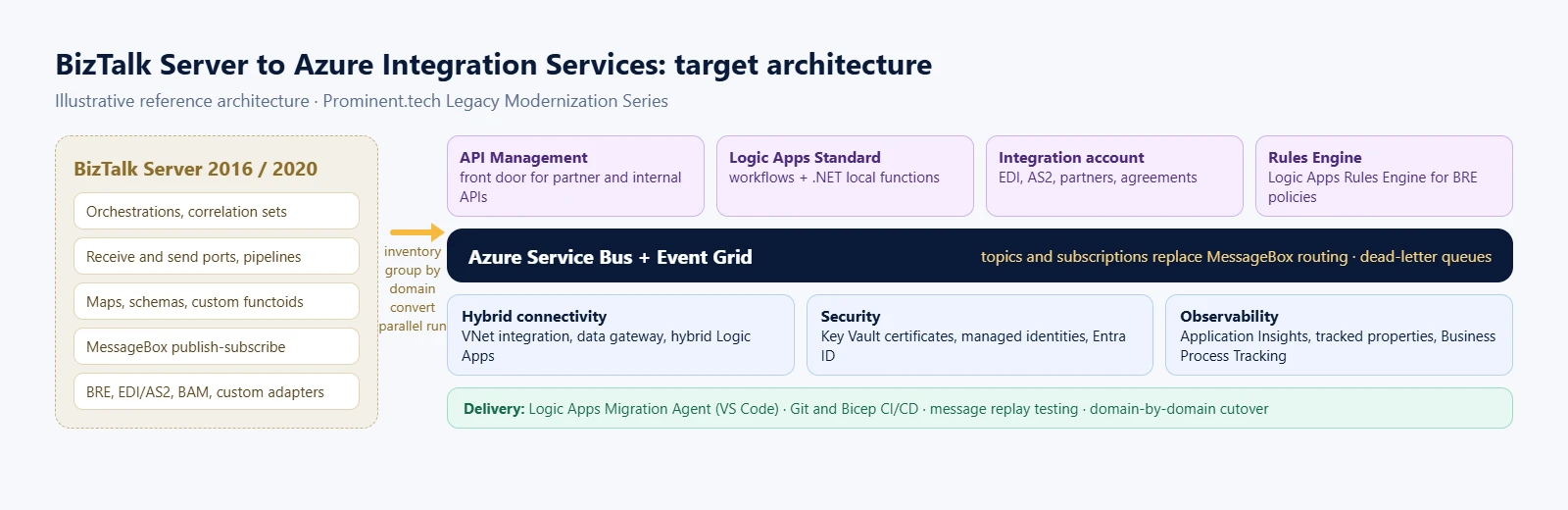
- API Management as the front door for synchronous partner and internal APIs.
- Logic Apps Standard workflows grouped by business domain, with .NET local functions for custom logic.
- Service Bus topics and subscriptions for decoupled, durable messaging; Event Grid for events.
- Integration account for EDI and B2B partners and agreements.
- Hybrid connectivity through VNet integration, on-premises data gateway or hybrid Logic Apps for systems that stay on-premises.
- Observability with Application Insights, tracked properties and Business Process Tracking where supported.
Planning your exit from BizTalk Server? Talk to our integration team about an inventory and domain-by-domain plan.
Step-by-step migration roadmap
- Inventory (2 to 4 weeks): export bindings and list applications, receive locations, send ports, orchestrations, maps, pipelines, adapters, partners and BAM usage; record message volumes.
- Rationalize: retire unused interfaces; group the rest by business domain and complexity.
- Fix urgent risks: apply the SBMP-to-AMQP change for BizTalk 2020 Service Bus adapters, or move those interfaces first.
- Build the landing zone: Logic Apps Standard hosting, networking, Service Bus, API Management, Key Vault, monitoring and CI/CD.
- Pilot a domain: convert with the Migration Agent where it helps, then review, test and run in parallel.
- Migrate in waves: domain by domain, switching endpoints and partners on agreed dates.
- Decommission: remove BizTalk applications as traffic reaches zero; retire the BizTalk group before support ends.
Security and networking
- Identity: managed identities for Service Bus, storage and Key Vault; Microsoft Entra ID or OAuth 2.0 for APIs.
- Secrets and certificates: AS2, partner and TLS certificates in Key Vault; no credentials in workflow definitions.
- Network: VNet integration and private endpoints for Logic Apps Standard and Service Bus; private connectivity to on-premises systems.
- API protection: API Management policies for authentication, rate limiting and IP restrictions.
- Data protection: secure inputs and outputs in run history for sensitive payloads.
Testing, deployment and support
Testing
- Capture real messages from BizTalk tracking and replay them against new workflows, comparing outputs.
- Unit test maps and local functions; test error, retry and dead-letter paths.
- Load test peak volumes and large messages.
Deployment
- Logic Apps Standard projects in Git, deployed with pipelines and infrastructure as code (Bicep or Terraform).
- Separate environments with parameterized connections.
Support
- Alerts on failed runs and dead-lettered messages; runbooks for resubmission; regular review of Logic Apps and connector updates.
Cost, effort and timeline
The ranges below are indicative planning assumptions, not benchmarks or quotes. Azure consumption is extra.
| Estate profile | Typical scope | Indicative cost (USD) | Indicative duration |
|---|---|---|---|
| Small | Up to 25 interfaces, few orchestrations, no EDI | $30,000 to $120,000 | 2 to 4 months |
| Medium | 25 to 150 interfaces, orchestrations, custom pipelines, some EDI | $120,000 to $500,000 | 4 to 12 months |
| Large | 150+ interfaces, heavy EDI/B2B, BAM, custom adapters, multiple BizTalk groups | $500,000 to $2M+ | 12 to 24+ months |
Cost drivers: interface count, orchestration complexity, custom components, EDI partners, testing and partner coordination. See legacy application modernization cost and ROI.
FAQs
When does BizTalk Server support end?
BizTalk Server 2020 mainstream support ends in April 2028 and extended support ends in April 2030. Sales end on March 31, 2027, and there will be no newer version.
What replaces BizTalk Server in Azure?
Microsoft’s migration guidance centres on Azure Logic Apps Standard, with Azure Service Bus, API Management, Event Grid and integration accounts added where the solution needs them.
Can BizTalk orchestrations be converted automatically?
Partly. Microsoft’s Logic Apps Migration Agent for Visual Studio Code uses AI to discover, plan and convert BizTalk 2016 and 2020 artifacts into Standard workflows. Review, refactor and test the output.
What happens to BizTalk maps?
XSLT maps can usually be reused in Logic Apps Standard. Maps with custom functoids or scripting need refactoring, and Data Mapper or Liquid templates suit new transformations.
What replaces BAM?
Azure Business Process Tracking for supported Azure-hosted solutions, or a custom observability design with Application Insights and tracked properties.
Do we need to act on the Service Bus SBMP retirement?
Yes, if you use the SB-Messaging adapter. SBMP was retired on September 30, 2026; BizTalk 2020 needs the AMQP hotfix (KB5091379), and BizTalk 2016 users should move those interfaces.
How long does a BizTalk migration take?
Small estates can move in two to four months. Large estates with EDI, BAM and hundreds of interfaces often take one to two years, which is why planning should start well before 2028.
Conclusion
BizTalk Server has a known end. With sales closing in 2027 and mainstream support in 2028, the practical path is to inventory now, fix the Service Bus protocol issue, build a Logic Apps Standard landing zone, and migrate domain by domain with BizTalk running alongside until each interface is proven.
Previous in this series: DTS/SSIS to Azure Data Factory. Next: Legacy Data Warehouse to Microsoft Fabric.
Related services: API & System Integration · Microsoft Azure · Legacy Software Modernization · Hire Azure Architects · Hire .NET Developers
Sources
- Microsoft Learn, Why move from BizTalk Server to Azure Logic Apps Standard?
- Microsoft Lifecycle, BizTalk Server 2020
- Microsoft Learn, Logic Apps Migration Agent overview
- Microsoft Tech Community, Service Bus SBMP retirement: what BizTalk Server 2020 customers need to know
- Microsoft Tech Community, BizTalk Server 2020 end of sale announcement
- Microsoft Learn, BizTalk Server migration approaches
Plan your BizTalk migration
Prominent.tech helps teams move BizTalk Server interfaces to Azure Logic Apps Standard, Service Bus and API Management, domain by domain, with message replay testing, CI/CD and monitoring in place. Talk to our integration team or explore our API and system integration services.