
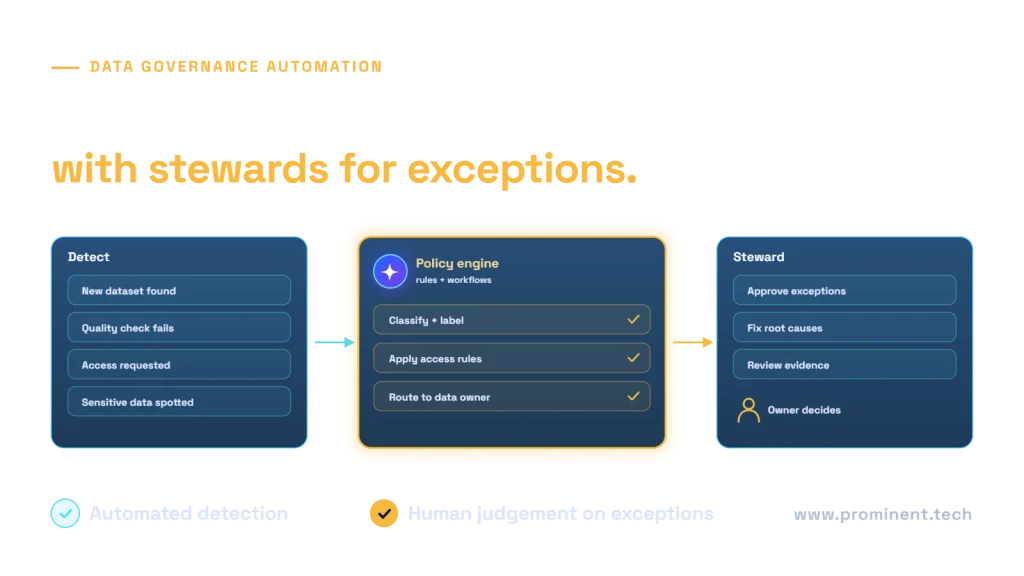
Data governance automation uses tools and workflows to apply data policies continuously instead of by manual review: automatically discovering and classifying data, applying access and retention rules, running quality checks, capturing lineage, and routing exceptions such as access requests, quality failures or sensitive data findings to the right data owner or steward for a decision. The aim is not to remove people from governance but to let them focus on judgement calls while routine checks and evidence collection happen automatically.
Key takeaways
- Automate detection and evidence; keep people for exceptions and policy decisions.
- Policies must be written precisely enough to be executed as rules.
- Stewardship workflows need owners, service levels and escalation paths.
- Start with high-value controls: classification, access requests and quality gates.
- Measure exception volumes and resolution times, not just policies written.
What data governance tasks can be automated?
| Governance task | Automated part | Human part |
|---|---|---|
| Data discovery and cataloguing | Scanning sources, registering assets, capturing schema | Adding business context and ownership |
| Classification | Detecting personal and sensitive data, applying labels | Confirming uncertain classifications |
| Access management | Request forms, policy-based approval, time-limited grants | Approving non-standard requests |
| Data quality | Rule checks in pipelines, alerts, quarantine | Fixing root causes, changing rules |
| Lineage | Capturing source-to-report lineage from pipelines | Reviewing impact before changes |
| Retention and deletion | Applying retention labels, scheduling disposal | Approving holds and exceptions |
| Evidence and reporting | Control dashboards and audit logs | Interpreting results, acting on gaps |
Reference architecture
Most organizations combine a data catalog and classification service, quality checks in their pipelines, an identity platform for access, and a workflow tool for approvals. In the Microsoft ecosystem, Microsoft Purview covers cataloguing, classification and lineage, and Power Automate can run approval workflows; see Fabric governance with Purview and Power Automate approval workflows.
Stewardship workflows
- Access request: the user requests a dataset, policy decides automatically for standard roles, and the owner approves anything else with a time limit.
- Quality failure: a pipeline check fails, data is quarantined, the steward is notified with the failing rows and the issue is tracked to closure; see data quality frameworks compared.
- New sensitive data: a scan finds personal data in an unexpected place, labels it and asks the owner to confirm or remediate.
- Schema change: lineage shows affected reports and owners are notified before deployment; see data pipeline observability.
Handling exceptions well
Exceptions are where governance succeeds or fails. Each one needs a named owner, a deadline, a record of the decision and its reason, and an expiry for temporary approvals. Recurring exceptions are a signal to change the rule or fix the source. AI can help summarize exception context for stewards, but the decision and accountability stay with people.
Implementation roadmap
- Agree policies and owners for your most important data domains.
- Catalogue and classify priority sources automatically.
- Automate access requests with policy-based approval and expiry.
- Add quality gates to critical pipelines with steward alerts.
- Report on controls with dashboards of exceptions and resolution times.
- Extend to retention, lineage-based change review and more domains.
Industry examples: healthcare data governance and the AI-ready data playbook. The DAMA Data Management Body of Knowledge is a widely used reference for governance roles and practices.
Common questions
What is data governance automation?
Using tools and workflows to apply data policies continuously, such as classification, access control, quality checks and lineage, with exceptions routed to data owners and stewards.
Can data governance be fully automated?
No. Detection, enforcement of clear rules and evidence collection can be automated; policy decisions and exceptions need accountable people.
Which tools are used?
Typically a data catalog and classification tool such as Microsoft Purview, quality checks in pipelines, identity and access management, and a workflow tool such as Power Automate.
What should we automate first?
Classification of sensitive data, access request workflows and quality gates on critical pipelines usually give the fastest value.
How do we measure success?
Coverage of classified and owned data, access request turnaround, quality incidents caught before use and exception resolution time.
Automate your data governance
Our data engineering team implements catalogues, classification, quality gates and stewardship workflows that make governance part of everyday data work.