
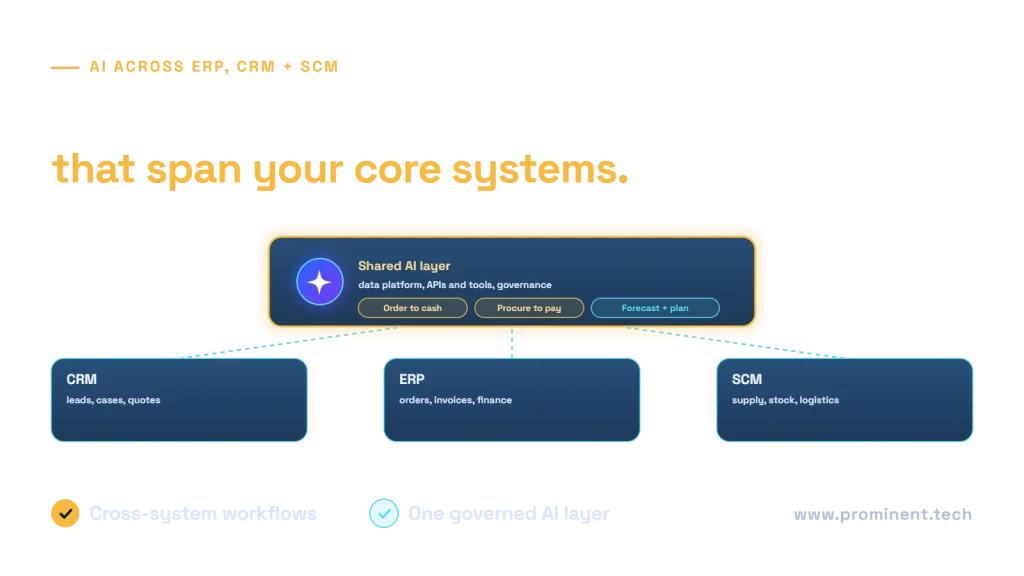
AI integration with ERP, CRM and supply chain (SCM) systems delivers the most value when AI works across them, not inside each one alone: forecasting demand from CRM pipeline and order history, matching invoices to purchase orders and receipts, flagging at-risk orders, drafting customer updates from ERP and logistics data, and assisting planners with supply decisions. The practical architecture combines the AI features built into each platform with a shared AI layer: a data platform that unifies records, governed APIs and agent tools that read and act across systems, and controls for permissions, approvals and audit. This guide maps the use cases, integration patterns and governance.
Key takeaways
- Use built-in copilots for tasks inside one system; build a shared AI layer for cross-system processes.
- The highest-value use cases follow end-to-end processes such as order-to-cash and procure-to-pay.
- A unified data platform is the foundation for forecasting, analytics and retrieval.
- Expose system actions as governed APIs or tools, with approvals for financial and customer-facing changes.
- Master data quality across ERP, CRM and SCM decides how far AI can be trusted.
AI use cases across ERP, CRM and SCM
| System | Use cases |
|---|---|
| CRM | Lead and opportunity scoring, meeting and case summaries, reply drafting, next best action |
| ERP | Invoice capture and three-way matching, cash-flow forecasting, anomaly detection in transactions, procurement assistants |
| SCM | Demand forecasting, inventory optimisation, supplier risk signals, delivery time prediction |
| Across systems | Order-to-cash exception handling, procure-to-pay automation, sales and operations planning support, customer order status assistants |
For forecasting, see AI demand forecasting; for process automation, see AI agents for business process automation.
Built-in copilots or a shared AI layer?
Major platforms now include AI features, such as Copilot in Dynamics 365. These are the fastest route for tasks within a single application. Cross-system processes, custom logic, proprietary models and consistent governance usually need a shared AI layer that you control. Most organisations use both, guided by the build vs buy AI framework.
Integration architecture for AI across ERP, CRM and SCM
- Data platform: replicate ERP, CRM and SCM data into a governed lakehouse for forecasting, analytics and retrieval. See ERP, MES, IoT and Fabric integration.
- Integration layer: APIs and events keep systems in sync; see integrating Salesforce, Dynamics 365 and ERP and Business Central API integration.
- Agent tools: selected actions exposed as governed tools, for example with the Model Context Protocol.
- Controls: permissions, approvals for financial changes and audit trails.
An order-to-cash example
An AI assistant watches for exceptions across the order-to-cash process: an order at risk because stock is short, an invoice disputed by the customer, or a payment overdue. It gathers context from CRM, ERP and logistics, drafts the next action, such as a revised delivery date or a reminder, and routes it to the responsible person for approval. Legacy systems can join through a bridge; see adding AI to legacy systems.
Governance and data quality
- Master data: customers, products and suppliers must match across systems.
- Permissions: AI should see only what the requesting user can see in each system.
- Approvals: price changes, credit decisions and supplier orders need human approval.
- Audit: every AI suggestion and action recorded.
- Evaluation: measure forecast accuracy, match rates and time saved.
Where to start
- Pick one end-to-end process with measurable pain, such as invoice exceptions or late orders.
- Map the systems and data involved.
- Use built-in AI where it covers the need; build the cross-system piece.
- Pilot with approvals, measure and expand.
Common questions
How can AI be integrated with ERP and CRM systems?
Through built-in AI features for in-application tasks, plus a shared AI layer that uses a unified data platform, governed APIs and agent tools for processes that span systems.
What are the best AI use cases for ERP?
Invoice capture and matching, cash-flow forecasting, transaction anomaly detection and procurement assistance are common, measurable starting points.
Should AI be allowed to update ERP records?
For low-risk updates, with validation and audit. Financial and customer-impacting changes should be drafted by AI and approved by people.
Do we need a data platform for AI across systems?
For forecasting, analytics and retrieval across systems, yes. Simple in-app tasks can work without one.
How long does an ERP and CRM AI project take?
A focused pilot on one process typically takes two to four months, depending on data readiness and integration.
Connect AI to the processes that run your business
Share the process you want to improve and the systems involved. Our enterprise AI integration and API and system integration teams will design the cross-system AI layer and pilot it with measurable outcomes.