
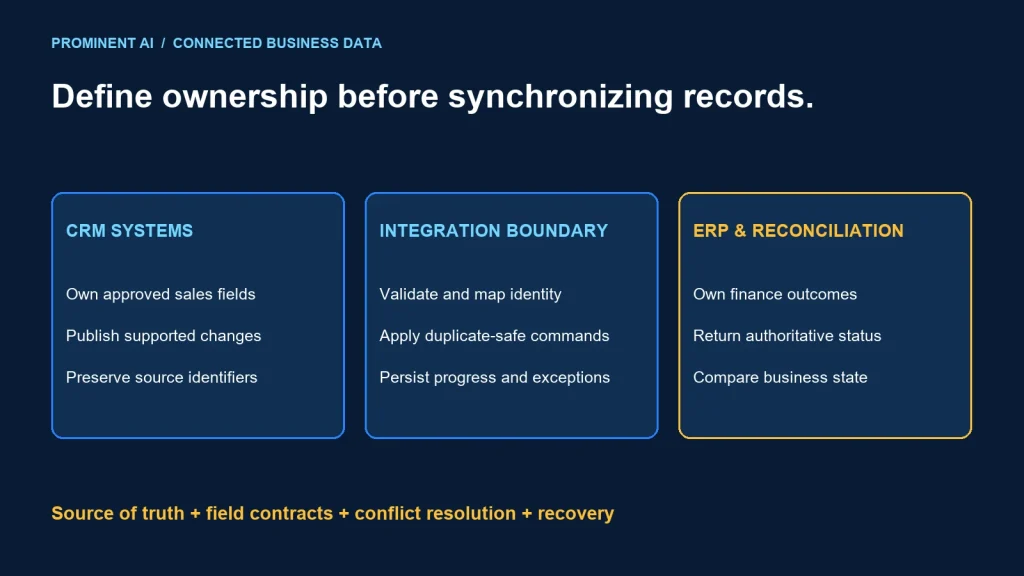
Reliable CRM–ERP integration begins with field ownership, stable identifiers and a recovery contract. Salesforce, Dynamics 365 and an ERP should not all overwrite the same customer or order fields without explicit rules. Choose events, delta queries or scheduled exchange according to the product API, freshness target and supported replay behavior.
Key takeaways
- Assign a source of truth by business entity and field.
- Distinguish customer identity from each system’s local record ID.
- Use duplicate-safe writes, durable progress and reconciliation.
- Resolve conflicts by business policy rather than assuming last-write-wins is correct.
Define source of truth before connecting APIs
In a fictional sales-to-finance process, CRM might own opportunity stage and sales contact preferences, while ERP owns invoice status and credit-account state. A shared customer display name may need a master-data process rather than unrestricted edits in every system.
Dynamics 365 is a product family, not one universal API. Identify the specific application and data platform: a Dataverse-based CRM application, Business Central and Finance/Supply Chain integrations have different contracts. Verify supported entities and operations for the actual product.
| Data | Illustrative owner | Integration rule |
|---|---|---|
| Sales opportunity stage | CRM | Publish approved state changes to downstream consumers |
| Invoice settlement status | ERP | CRM receives a projection; does not overwrite finance status |
| Customer cross-reference | Owned integration/master-data process | Preserve system IDs and reviewed identity mapping |
| Customer legal details | Explicit business owner | Use validation and approval where the organization requires it |
This table is an example, not a universal recommendation for every organization. Confirm ownership with sales, finance and data stewards. An integration engineer should not silently decide which department’s record wins.
Maintain a cross-reference between each system’s identifiers and an approved business identity. Avoid matching customers solely by company name or email. Names change, records merge and one customer can have several legal or trading entities.
Define mandatory fields, allowed values, null semantics, units, timezone and currency treatment. A blank field can mean unknown, intentionally cleared or not supplied; collapsing those states can erase valid data.
A reference CRM–ERP integration architecture
Salesforce / specific Dynamics 365 application
        ↓ supported API, event or delta extraction
Durable integration boundary
  validate → resolve identifiers → map owned fields → apply policy
        ↓ duplicate-safe command / supported upsert
ERP application → business validation → authoritative outcome
        ↓
Status projection back to CRM + reconciliation ledger

Control plane: identities, contracts, checkpoints, exceptions and audit
The integration boundary can use a managed platform or owned application services. Keep authoritative business validation in the responsible system. The integration layer should not fabricate an accepted order merely because a transport request succeeded.
Separate initial load, ongoing changes and recovery. They have different volume and checkpoint requirements. A successful initial import does not prove the ongoing process handles deletions, retries or missed events.
Use a versioned mapping contract. A new ERP required field or CRM enumeration can break a previously working workflow. Test schema and connector changes with representative records before broad rollout.
Choose the synchronization pattern
Salesforce’s change-event delivery guidance describes temporary event storage and replay identifiers. Treat retention as bounded and maintain a recovery strategy for a subscriber that falls outside the available history.
Dataverse synchronization guidance describes change tracking and record integration capabilities. Verify that the chosen tables, keys and synchronization operations support the contract you need. Do not assume a capability of one Dynamics product applies to every other product.
| Pattern | Useful when | Recovery responsibility |
|---|---|---|
| Change events | Supported changes need prompt processing | Checkpoint, duplicates, retention gaps and reconciliation |
| Delta/change tracking API | Source supports incremental state retrieval | Persist supported cursor and handle expiry/reset |
| Scheduled batch | Freshness is relaxed and bulk exchange is appropriate | Manifest, validation, partial failure and safe restart |
| Synchronous command | Caller needs an immediate authoritative answer | Timeout, uncertain result and duplicate-safe retry |
These patterns can coexist. A customer update may arrive through an event, while a scheduled reconciliation identifies missed or inconsistent projections. Use reconciliation to detect drift, not as permission to overwrite every target field.
Preserve ordering only where the business requires it. If a later version of a customer record is already applied, an older update should not blindly replace it. Use source-supported versions or an explicit transition rule rather than comparing unrelated machine clocks.
Resolve conflicts and prevent feedback loops
Start with one-way ownership where possible. If both systems can change a field, specify conflict detection, precedence and a review path. Last-write-wins can discard a finance correction because a delayed CRM update arrived later.
A two-way integration needs to recognize its own updates. Use supported origin/version metadata or compare meaningful state so an ERP projection does not trigger an endless CRM-to-ERP echo. Do not suppress all changes merely because they came through an integration account; legitimate downstream updates may use that account.
Record which fields were actually changed. Sending a full stale record can overwrite fields the source did not intend to modify. Use the target’s supported partial-update semantics and concurrency controls where appropriate.
Handle merges and deletions as explicit business events. A CRM merge may require updating cross-references; deleting a projection may not authorize deleting an ERP financial record. Distinguish archive, deactivate and erase behavior according to the organization’s policy.
For a rejected record, retain a safe reference, validation category and intended correction path. Do not repeatedly submit a known-invalid command and consume the destination’s rate limit.
Recovery, retries and reconciliation
Persist an operation identifier across retries. A lost response after a successful create must not become a new order on the next attempt. Use the exact target’s supported idempotency, unique-key or lookup/reconciliation mechanism.
Separate transport success from business completion. An accepted asynchronous job may still reject a record later. Track submitted, processing and final outcome states according to the API contract, and expose unresolved work to the operations owner.
Reconciliation should compare approved business keys, relevant field versions and expected status. Row counts alone cannot reveal that the wrong customer received an invoice projection. Sample or fully compare according to consequence and volume.
Plan a retention-gap recovery. If a source cursor or replay position is no longer usable, use the supported resynchronization procedure with duplicate-safe application. Do not guess the next position or skip missing work silently.
Bound concurrency and retries. A destination outage should create a visible backlog rather than an uncontrolled retry storm. Prioritize interactive business operations separately from large historical repair jobs where needed.
Protect data in execution history and support tools. CRM and ERP payloads can contain personal or commercially sensitive information. Use least-privileged integration identities and give operators the references they need without unnecessary full-payload logging.
A practical delivery checklist
- Identify exact products, entities and supported APIs.
- Approve field ownership and identity cross-reference rules.
- Document mappings, validation and partial-update behavior.
- Build an initial load with a controlled changeover boundary.
- Implement ongoing extraction and durable checkpoints.
- Test duplicate, delayed, missing and conflicting changes.
- Reconcile outcomes and exercise retention-gap recovery.
- Assign exception ownership, access review and change control.
Use a fictional test set containing duplicate names, missing identifiers, merged accounts, rejected orders, stale updates and a lost create response. This is a proposed test plan, not a claim of a completed client integration.
Measure completion age, business rejections, unresolved conflicts and reconciliation differences. A green workflow run does not prove that sales and finance now agree on the underlying business state.
See the integration architecture guide, delivery-pattern comparison and idempotency design for related decisions.
Common questions
How can you synchronize CRM and ERP records reliably?
Define ownership and stable identity, use supported incremental extraction, apply duplicate-safe writes and reconcile business outcomes.
Should CRM or ERP be the source of truth?
Assign ownership by entity and field. Sales state and finance state often have different owners; approve the rule with the business.
Can we match customer records by name?
Names alone are unreliable. Maintain reviewed cross-references and stable system/business identifiers.
Is bidirectional synchronization always necessary?
No. One-way field ownership is often simpler. Two-way edits require conflict rules, loop prevention and recovery.
Does a successful connector run prove synchronization is complete?
No. Verify the destination’s business outcome and reconcile the approved fields and identities.
Connect CRM and ERP around clear business ownership
Bring the product inventory, entities and reconciliation challenges. Request an API integration architecture review to define mappings, synchronization and recovery.