
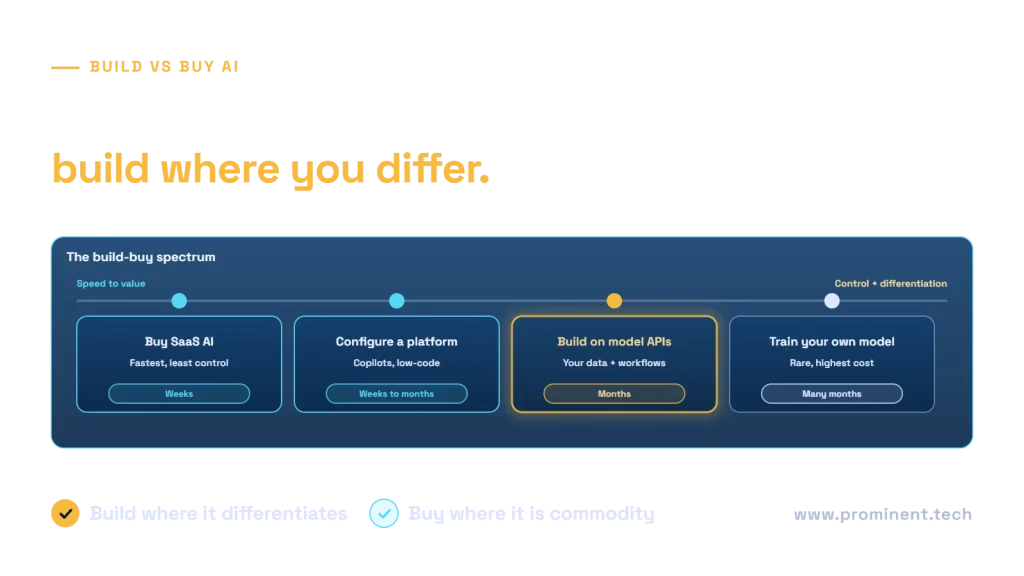
Buy AI when the capability is a commodity, works well with your data and workflows out of the box, and speed matters more than control; build AI when it differentiates your business, depends on proprietary data or deep integration with your own systems, or must meet control and compliance requirements a product cannot. Most organisations land in the middle: they buy or configure an AI platform and build the parts that make them different on top of it. The decision should be made per use case, using differentiation, integration depth, data sensitivity, three-year total cost, time to value and lock-in risk. This framework walks CTOs and product leaders through it.
Key takeaways
- “Build vs buy AI” is a spectrum: buy a SaaS feature, configure a platform, build on model APIs, or train your own models.
- Building on foundation model APIs is now the usual meaning of “build”. Training your own model is rarely justified.
- Compare three-year total cost, not licence price against development cost.
- Buying can still need significant integration and data work to deliver value.
- Protect your options: keep data, prompts and evaluation sets portable, whichever route you choose.
The build vs buy AI spectrum
| Option | What it means | Typical time to value | Control |
|---|---|---|---|
| Buy a SaaS AI product | Use AI features inside a product, such as a CRM assistant or a meeting summariser | Days to weeks | Low |
| Configure an AI platform | Assemble copilots or agents on a low-code platform with your content and connectors | Weeks to a few months | Medium |
| Build on model APIs | Develop your own application using hosted foundation models, your data and your workflows | Two to six months | High |
| Train or fine-tune your own model | Create or adapt a model for a specialised task | Many months | Highest |
For Microsoft-centred organisations, the configure and build options often map to Copilot Studio vs Azure AI Foundry. For model customisation, see RAG vs fine-tuning vs prompt engineering.
Build vs buy AI decision criteria
- Differentiation. Does this capability set you apart from competitors, or is it something every company needs?
- Integration depth. Must the AI read from and act in your own systems and workflows?
- Data sensitivity. Can your data be processed by the vendor under acceptable terms and in acceptable regions?
- Fit. How much of the product’s behaviour matches your process without workarounds?
- Time to value. How quickly must results appear?
- Three-year total cost. Licences, usage, integration, change management and support.
- Control and lock-in. Can you change models, export data and move to another provider?
- Skills. Do you have, or can you access, the engineering capacity to build and run it?
- Compliance. Do regulations such as the EU AI Act or sector rules require controls a product cannot provide?
A build vs buy AI decision matrix
Plot each use case by how much it differentiates your business and how deeply it must integrate with your systems and data. Generic, lightly integrated needs, such as meeting notes, are clear buys. Differentiating, deeply integrated capabilities, such as an AI agent that runs your unique fulfilment process, are clear builds. The other two quadrants usually call for configuring a platform or building a focused layer on top of a bought product.
Comparing three-year cost
Bought AI looks cheaper at first because there is no development cost, but per-user licences grow with adoption and integration work is often still needed. Built AI has a larger upfront cost but can be cheaper at scale and creates an asset you own. Compare like for like over three years, including:
- Licences or subscriptions, and how they scale with users or usage.
- Model usage costs for built solutions.
- Integration, data preparation and security work for both options.
- Change management, training and support.
- The cost of switching later if the choice proves wrong.
Our guides to custom AI integration cost and AI agent development cost provide indicative figures for the build side.
Evaluating AI vendors before you buy
| Question | Why it matters |
|---|---|
| Is our data used to train the vendor’s models? | Protects confidential information and competitive advantage |
| Where is data processed and stored? | Data protection and residency obligations |
| Does it respect our existing access permissions? | Prevents users seeing content they should not |
| Can we measure its accuracy on our own cases? | Demos rarely reflect your real data |
| What APIs and export options exist? | Integration and exit options |
| How are model changes communicated? | Behaviour can change without your involvement |
| What security testing and certifications are available? | Assurance against risks such as prompt injection |
Test the product with 50 to 100 of your own real cases before committing, and apply the same security expectations you would to a built system, using references such as the OWASP Top 10 for LLM Applications and the NIST AI Risk Management Framework.
Buy the platform, build the edge
The most common winning pattern combines both:
- Buy productivity AI for generic work, such as writing, meetings and email.
- Configure a platform for departmental assistants over your content. See Copilot Studio knowledge sources.
- Build on model APIs for the processes and products that differentiate you, with your own data, integrations and controls.
Keep a shared foundation across all three, including identity, data governance, evaluation and cost tracking, so you can move a use case between options as products and needs change.
Common questions
Should we build or buy AI?
Buy for commodity capabilities that fit your process; build for capabilities that differentiate your business, use proprietary data or require deep integration and control. Many organisations do both.
Is building AI more expensive than buying?
Upfront, usually yes. Over three years it depends on licence growth, usage, integration effort and the value of owning the capability. Compare total cost, not headline price.
Do we need to train our own AI model?
Rarely. Most business needs are met by hosted foundation models combined with your data through retrieval, prompts and tools. Fine-tuning helps in specific, well-evaluated cases.
How do we avoid vendor lock-in with AI?
Keep your data, prompts and evaluation sets in formats you control, use an abstraction layer for model calls, and confirm export and API options before buying.
How long does it take to build a custom AI solution?
Typically two to six months for a production solution built on model APIs, depending on data readiness and integration. See our guide to AI development timelines.
Get an independent build vs buy recommendation
Bring your shortlist of use cases and any products you are evaluating. Our enterprise AI integration and software development teams will assess each one against these criteria and recommend where to buy, configure or build. For timelines, see how long AI development takes.