
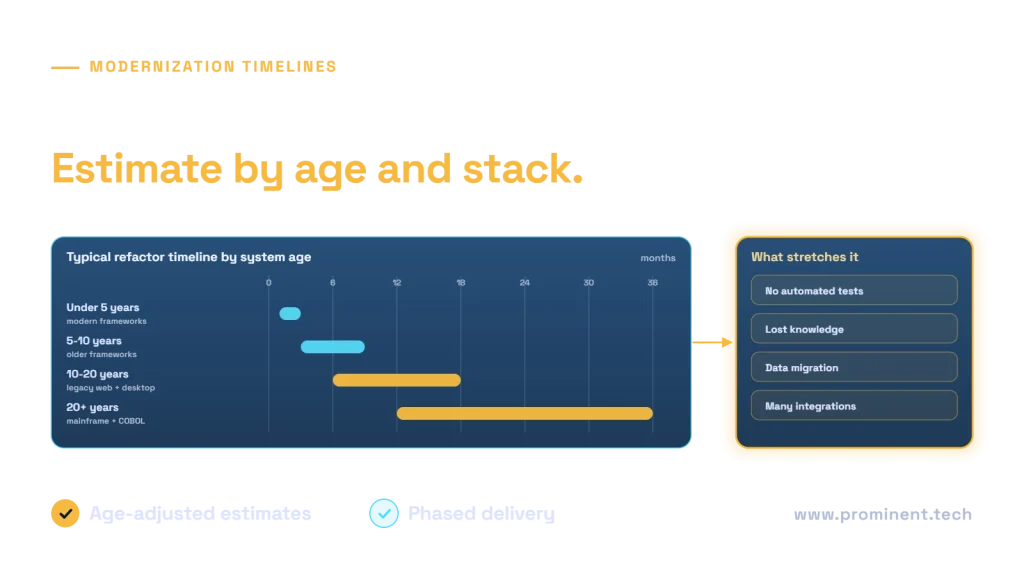
Legacy modernization timelines grow with system age: a refactor or upgrade of a system built in the last five years on current frameworks typically takes 1 to 3 months, a 5 to 10 year old system on older frameworks 3 to 9 months, a 10 to 20 year old legacy web or desktop application 6 to 18 months, and a mainframe or COBOL system over 20 years old 12 to 36 months or more. Age is a proxy for the real drivers: how far the technology is from today’s platforms, how much knowledge and documentation survives, how much test coverage exists, and how much data and integration has accumulated. Estimating with those factors, and delivering in phases, produces timelines you can rely on.
Key takeaways
- System age predicts modernization effort because technology gaps, lost knowledge and data all grow with time.
- Estimate per component with age-adjusted ranges, not one number for the whole system.
- Test coverage and documentation can halve or double a timeline.
- Phase delivery so value arrives within months even on multi-year programmes.
- AI-assisted tooling shortens some steps, but review and testing still set the pace.
Legacy modernization timeline by system age
| System age | Typical technology | Typical refactor or upgrade timeline | Main challenge |
|---|---|---|---|
| Under 5 years | Supported .NET, Java, Node.js, modern front ends | 1 – 3 months | Keeping pace with version upgrades |
| 5 – 10 years | .NET Framework 4.x, Java 8, AngularJS, older SPAs | 3 – 9 months | Framework migration and dependency upgrades |
| 10 – 20 years | ASP.NET Web Forms, classic ASP, VB6, PowerBuilder, thick clients | 6 – 18 months | Architecture change, UI rebuild, missing tests |
| 20+ years | Mainframe, COBOL, proprietary 4GLs | 12 – 36+ months | Knowledge loss, data conversion, business rule extraction |
Ranges are for a typical mid-market application with a dedicated team. Very large estates run longer and are usually split into several programmes. Platform support dates, such as the .NET support policy, often set the deadline.
Why older systems take longer to modernize
- Technology distance. The further a stack is from current platforms, the more must be rewritten rather than upgraded.
- Knowledge loss. Original developers have left; business rules live only in code.
- Test gaps. Older systems rarely have automated tests, so each change needs manual verification.
- Data accumulation. More data, more formats and more quality issues to migrate.
- Integration sprawl. Years of point-to-point connections that must be found and preserved.
Timelines by modernization strategy
| Strategy | Newer systems | Older systems |
|---|---|---|
| Rehost | 2 – 6 weeks | 1 – 3 months |
| Replatform | 1 – 3 months | 3 – 6 months |
| Refactor | 2 – 6 months | 6 – 18 months |
| Rebuild | 4 – 9 months | 9 – 24+ months |
For cost by strategy, see legacy application modernization cost. For specific .NET paths, see migrating .NET Framework to .NET and Azure and modernizing ASP.NET Web Forms.
How to estimate an age-adjusted timeline
- Break the system into components: UI, business logic, integrations, data, reports.
- Record each component’s technology, size and test coverage.
- Choose a strategy per component.
- Apply a baseline duration, then adjust for age-related factors such as documentation and tests.
- Add data migration, cutover, training and stabilisation.
- Sequence components into phases that each deliver value.
What shortens or stretches a modernization timeline
| Shortens | Stretches |
|---|---|
| Characterization tests written first | No tests and no documentation |
| Access to people who know the system | Key experts unavailable |
| Automated upgrade tools and AI assistants under review | Heavily customised or generated code |
| Incremental strangler approach | Big-bang rewrite |
| Clean, well-understood data | Complex data conversion |
| Fast business decisions | Scope changes mid-programme |
AI coding assistants can speed up code upgrades and test writing; see OpenAI Codex for legacy .NET modernization. Waiting has its own cost, explained in the cost of delaying modernization.
Common questions
How long does legacy modernization take?
From one to three months for recent systems to one to three years or more for mainframe systems, depending on age, technology, test coverage, data and strategy.
Why does system age affect the timeline?
Older systems are further from current technology, have less documentation and fewer tests, and carry more data and integrations, all of which add effort.
Can we modernize a 20-year-old system faster?
Yes, by modernizing incrementally, writing tests first, extracting business rules early, using automation and delivering in phases rather than a single rewrite.
Should we rebuild very old systems instead of refactoring?
Sometimes, when the code cannot be safely changed or the business process has changed. Rebuilding still requires extracting the existing rules and migrating data.
How accurate are modernization estimates?
Initial estimates are ranges. A short assessment of the codebase, tests and data narrows them; phased delivery lets you refine as you go.
Get an age-adjusted modernization timeline
Share your system’s technology, size and history. Our legacy software modernization and project management teams will assess it and give you a phased timeline with clear milestones.