
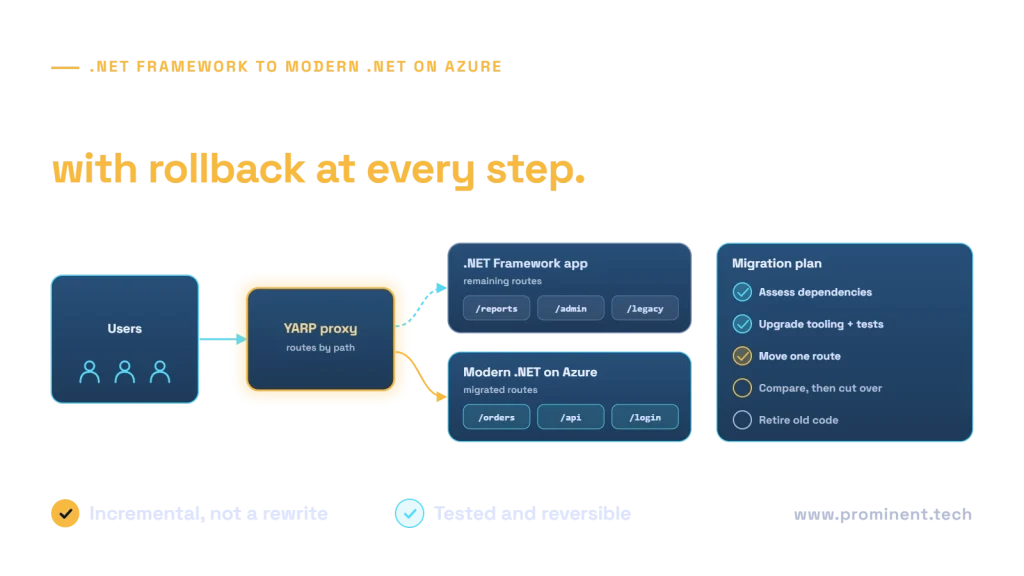
Migrate a legacy .NET Framework application by assessing dependencies, selecting a supported target, establishing regression tests and moving manageable slices into modern .NET. Rehosting on Azure can be a useful interim step, but it does not convert the runtime. Web Forms requires a UI migration strategy; Windows-specific components may need to remain isolated. Choose an incremental approach when a big-bang rewrite would put business continuity at risk.
Key takeaways
- Separate hosting migration, runtime modernization and architectural redesign.
- Use a supported target with enough lifecycle runway; verify it again before implementation.
- Inventory Windows, System.Web, WCF, data and authentication dependencies early.
- Keep the old and new routes behind a controlled boundary during incremental migration.
- Treat database compatibility and rollback as first-class release requirements.
- AI-assisted code changes still require compilation, tests and expert review.
Why modernize—and why not rewrite everything?
Business reasons include unsupported dependencies, difficult releases, constrained hosting, slow change delivery and operational risk. Record which of those problems actually applies. A stable application on a supported Windows and .NET Framework combination is not automatically unsupported simply because it is old. Conversely, a supported runtime cannot compensate for abandoned libraries or an unpatched operating system. Modernization should target the relevant risks and business constraints.
A full rewrite can erase valuable behavior that is poorly documented. Reports, billing rules, authorization exceptions and batch jobs may be discovered only after cutover. Prefer an assessment and representative migration slice before making a whole-program estimate. Keep genuinely useful architecture decisions separate from fashion: moving every module into microservices is not a prerequisite. See microservices versus monolithic architecture for that separate decision.
| Dimension | .NET Framework | Modern .NET migration implication |
|---|---|---|
| Hosting | Windows-based runtime | Cross-platform is possible only when dependencies permit |
| Web framework | System.Web, MVC 5, Web API 2, Web Forms | ASP.NET Core has different request and hosting abstractions |
| Configuration | Often web.config and machine settings | Explicit configuration providers and environment settings |
| Dependency injection | Frequently custom or external container | Built-in hosting patterns require registration review |
| UI compatibility | Web Forms server controls and page lifecycle | Not a direct ASP.NET Core port |
| Support | Version and Windows lifecycle matter | Track target runtime and hosting support policy |
Application types and likely migration complexity
| Application type | Main discovery work | Likely strategy |
|---|---|---|
| Class library | Unsupported APIs and NuGet dependencies | Port independently where practical |
| MVC 5 or Web API 2 | Routing, filters, auth, serialization and HttpContext | Migrate routes and contracts in slices |
| Web Forms | Server controls, postbacks and business logic in pages | Retain legacy UI while replacing selected journeys |
| WCF service | Bindings, security and client contracts | Assess CoreWCF subset or redesign explicit interfaces |
| Windows service | Scheduling, identity and OS integrations | Worker service or suitable managed host |
| Desktop application | UI technology and local integrations | Separate desktop modernization from web migration |
| COM or native integration | Bitness, licensing and Windows dependencies | Isolate or retain Windows hosting until replaced |

Choose the migration strategy
| Strategy | Use when | Trade-off |
|---|---|---|
| Rehost | Infrastructure is the immediate constraint | Retains runtime and application debt |
| Replatform | Managed hosting fits with limited changes | Hosting compatibility still needs proof |
| Incremental refactor | Continuity matters and boundaries can be introduced | Two estates and routing must be operated temporarily |
| Replace a component | A supported product fits a non-distinctive function | Data and process transition still required |
| Rewrite | Existing structure prevents necessary change and evidence supports replacement | Highest behavior-discovery and cutover risk |

Step 1: assess the actual application
Inventory projects, runtime versions, dependencies, scheduled tasks, integrations, file access, session use, authentication and deployment procedures. Map business-critical journeys to components and data stores. Capture baseline response times, error rates and batch completion behavior with a defined workload. Identify the owners of shared databases and APIs. Create a reproducible build before changing code; an application that cannot be reliably built is not ready for automated migration.
Step 2: use current tools as assistants, not evidence
Microsoft now marks .NET Upgrade Assistant as deprecated and directs users to the GitHub Copilot modernization chat agent in supported Visual Studio versions. Verify the current tool and project support in the official modernization tooling guidance. Generated changes are proposals: inspect diffs, compile, run regression tests and validate runtime behavior. Do not describe the deprecated assistant as the recommended new starting point.
Combine dependency scanning, static analysis, package vulnerability checks and hosting assessment. A hosting assessment does not necessarily evaluate business behavior or runtime portability. Capture tool versions and limitations in the assessment report. Do not claim that a scanner has proved the application secure or that automated code edits eliminate migration risk.
Step 3: select a target with lifecycle runway
As checked on 1 November 2026, Microsoft lists .NET 10 LTS support through November 2028, while .NET 8 and .NET 9 reach the end of support in November 2026. Therefore, a new long-running migration should not default to .NET 8 simply because an older tutorial uses it. Confirm the exact current policy, SDK, hosting runtime and dependency compatibility in .NET releases and support.
Modern .NET and .NET Framework have different lifecycle policies. Check the .NET Framework lifecycle listing and the supported Windows combination for the retained estate. Do not claim a blanket end-of-support date for all .NET Framework 4.8 installations. Document patch ownership for both old and new hosts throughout coexistence.
Step 4: design a target architecture around boundaries
Separate the web or API boundary, business behavior, data access and background processing. Keep the first target deployable and observable without forcing a complete domain redesign. Use explicit interfaces around legacy dependencies. Preserve request identifiers across old and new services so incidents can be traced through a mixed estate. Establish secrets management and identity before introducing production traffic.

Step 5: choose Azure hosting deliberately
| Host | Potential fit | Check first |
|---|---|---|
| App Service | Web applications with a managed hosting preference | Runtime, Windows dependencies, networking and deployment slots |
| Container Apps | Containerized services with suitable operating needs | State, scaling, cold-start tolerance and environment design |
| AKS | A justified Kubernetes operating model | Cluster ownership, policies and operational cost |
| Virtual machines | Retained Windows or specialized dependencies | Patching, backup and recovery ownership |
| Functions | Bounded event-driven workloads | Execution model, time limits and idempotency |
A Windows-based rehost can reduce infrastructure risk while leaving the runtime unchanged. Containers do not remove Windows dependencies or license constraints. Avoid choosing Kubernetes solely because it appears more modern; its operational requirements must be justified. Validate the hosting candidate with the application’s actual workload and integrations.
Step 6: migrate MVC and Web API behavior
Review routing, model binding, validation, filters, exception handling, serialization and response contracts. Replace System.Web assumptions with appropriate ASP.NET Core abstractions. Test status codes and JSON shape against existing clients. Authentication middleware order and forwarded headers matter behind a proxy. Do not silently change date formats, null behavior or authorization while performing a runtime migration.
// Illustrative ASP.NET Core endpoint; the service implementation is omitted.
var builder = WebApplication.CreateBuilder(args);
builder.Services.AddControllers();
builder.Services.AddHealthChecks();
var app = builder.Build();
app.UseHttpsRedirection();
app.MapHealthChecks("/health");
app.MapControllers();
app.Run();
// Add and test the application's real authentication/authorization policy
// before exposing protected business endpoints.
Step 7: give Web Forms its own UI strategy
Web Forms does not run directly on ASP.NET Core. Identify business logic embedded in page events, view state, server controls and third-party UI libraries. Extract testable behavior behind interfaces, then replace selected user journeys with an appropriate supported UI. Retain untouched pages behind the legacy boundary while their replacements are validated. Avoid promising that a project-file conversion will preserve the page lifecycle.
Step 8: route incrementally with YARP
Microsoft’s incremental ASP.NET migration guidance describes a new ASP.NET Core application that can proxy requests to the original application. New routes are handled locally; retained routes go to the legacy host. Authentication and session coexistence need a deliberate design, potentially using suitable System.Web adapters where supported. Neither shared cookies nor shared session should be assumed to work automatically.

// Routing design pseudocode, not a complete YARP configuration.
if request.path belongs_to migrated_routes:
    authorize_and_handle_in_modern_application(request)
else:
    proxy_to_allowlisted_legacy_origin(request)
# Test route precedence, cookies, redirects, headers and authorization.
# Never accept a user-supplied upstream URL.
Step 9: address WCF, Windows services and jobs
Assess each WCF contract and binding. CoreWCF may support a suitable subset, but it is not a promise of parity with every WCF feature. A new HTTP or messaging interface can be appropriate where clients can change. Preserve contract tests for clients that cannot. For Windows services, separate job behavior from hosting and examine a worker-service or managed execution model. Durable queues, retries and deduplication are still needed when jobs move into a cloud host.
Step 10: separate data migration from runtime migration
Moving from EF6 to EF Core is a separate decision with query and behavior differences. An application may temporarily retain a supported data-access approach while other boundaries change. Assess SQL features, stored procedures, collation, transaction behavior and connection resilience. Azure SQL Database, Managed Instance and SQL Server on a VM are different compatibility and operating choices. Test the chosen destination rather than assuming the database can move unchanged.
Use additive schema changes during coexistence where practical: introduce a new column or table, support both application versions, migrate data with reconciliation, then retire old structures after rollback is no longer needed. A database restore is not a trivial rollback if legitimate new transactions have already occurred. Document how those writes will be preserved or reconciled.
Step 11: modernize configuration, identity and secrets
Move secrets out of source and uncontrolled configuration files. Use appropriate managed identity or a secure credential store where supported. Revalidate user and service authorization, session timeout, CSRF protection, cookie settings and redirect behavior. Test privileged operations independently of login success. A successful sign-in does not prove a migrated user has the correct business permissions.
Step 12: establish a repeatable release pipeline
Build and test from clean source; scan dependencies; package an immutable artifact; provision infrastructure through reviewed code; deploy to a test environment; then promote the same artifact through approval gates. Keep environment configuration separate and capture release versions. Use Bicep or Terraform where it fits the team’s tooling, with reviewed state and secret handling. Do not introduce a manual production-only fix that the pipeline cannot reproduce.

Step 13: test business behavior and operations
Create characterization tests for existing behavior before replacing it. Add API contract, integration, authorization, accessibility and performance tests. Include batch processing, exports, timezone boundaries, large uploads and partial outages. Compare a defined workload with the baseline. Test recovery and deployment procedures as well as happy-path functionality. A compiler-success report is not a migration acceptance report.
Step 14: cut over with explicit stop and rollback criteria
Choose a low-risk slice, rehearse traffic switching and verify monitoring. Agree on acceptable errors, latency and reconciliation differences before release. Name the release authority and rollback owner. Freeze incompatible schema changes during the rollback window. After cutover, inspect background jobs and integrations for duplicate processing. Retire the legacy route only after behavior and operational evidence meet the agreed criteria.
Cost, timeline and three planning scenarios
| Scenario | Main effort drivers | Estimate after |
|---|---|---|
| Small MVC application | Packages, auth and limited integration | A representative endpoint and deployment test |
| Mid-sized API estate | Client contracts, jobs and database dependencies | Contract inventory and integration spike |
| Large Web Forms estate | UI behavior, shared session, native components and reports | Journey mapping and an incremental replacement slice |
Do not price the whole program from source lines or a generic “weeks per application” figure. Estimate assessment, remediation, UI work, data transition, tests, parallel operations and support separately. Include temporary coexistence cost. A rehost may have a shorter delivery scope than a runtime and UI migration, but it also leaves more debt. Compare the recurring operating model and lifecycle work, not only the initial project invoice.
18 common migration risks and responses
| Risk | Response |
|---|---|
| Unavailable package | Replace, isolate or retain behind a boundary |
| Web Forms coupling | Extract behavior and replace journeys incrementally |
| WCF feature gap | Validate bindings and client contracts |
| Native/COM dependency | Test Windows isolation and licensing |
| Authentication regression | Role and privilege regression tests |
| Session incompatibility | Explicit coexistence and expiry strategy |
| JSON contract changes | Consumer contract tests |
| SQL behavior differences | Representative query and transaction tests |
| EF query changes | Evaluate independently of runtime move |
| File-system assumptions | Externalize durable files and permissions |
| Duplicate jobs | Single owner and idempotent execution |
| Time-zone errors | Explicit UTC and business-zone tests |
| Proxy redirect loops | Trusted forwarded headers and route tests |
| Secret exposure | Secure configuration and rotation |
| Insufficient telemetry | Cross-estate correlation and baseline |
| Database rollback loss | Compatible schemas and reconciliation |
| Unsupported retained host | Patch and lifecycle ownership |
| Scope expansion | Business-priority slices and acceptance gates |
Enterprise decision examples
| Context | Illustrative first slice |
|---|---|
| Finance | A read-only reporting endpoint with audited access |
| Healthcare | An administrative portal journey with validated identity |
| Manufacturing | An integration endpoint isolated from machine control |
| Retail | A catalog API with consumer contract tests |
| Logistics | A tracking query with legacy-system reconciliation |
| Professional services | A document workflow with unchanged permissions |
| SaaS | A tenant-aware API with isolation regression tests |
These examples are discovery patterns, not completed client projects. The first slice should exercise a meaningful architectural boundary without risking the most consequential transaction. Avoid a full rewrite when behavior is uncertain, the business needs continuous delivery or an incremental route can retire the same risk more safely.
Production-readiness checklist
- Supported runtime, operating system and hosting combination recorded
- Reproducible build and dependency inventory
- Business-critical characterization and contract tests
- Explicit identity, session and authorization design
- Compatible schema and data reconciliation plan
- Reviewed infrastructure and secret handling
- Observable jobs and idempotent integrations
- Tested performance and accessibility
- Cutover authority, stop criteria and rollback rehearsal
- Legacy retirement and support ownership
Frequently asked questions
Does Azure hosting convert .NET Framework to modern .NET?
No. Rehosting changes infrastructure, not necessarily the runtime or application framework. A supported Windows host can be an interim step. Runtime modernization requires compatibility work, tests and a separate target decision.
Which .NET version should a new migration target?
Select a currently supported version with sufficient runway and compatible dependencies. At the review date, .NET 10 LTS has a longer support horizon than .NET 8 or 9. Verify the current policy and hosting support before implementation.
Is .NET Framework 4.8 already unsupported?
Do not assume that. .NET Framework follows its own lifecycle and supported Windows combinations matter. Check the exact runtime, operating system and dependency policies. Unsupported application libraries can still create risk on a supported runtime.
Is Upgrade Assistant still the recommended tool?
Microsoft marks it deprecated and points to current GitHub Copilot modernization tooling in supported Visual Studio versions. Verify project support and review generated changes. Tools can assist analysis and edits, but they do not replace regression testing.
Can Web Forms run on ASP.NET Core?
Not directly. Its server controls, page lifecycle and System.Web dependencies require a UI migration strategy. Business logic can be extracted while selected journeys are replaced and retained pages remain behind a controlled legacy boundary.
Must MVC 5 be rewritten completely?
Not necessarily. Assess routing, filters, model binding, authentication and data dependencies. An incremental route-based migration may preserve behavior while moving manageable slices. The effort depends on the actual coupling and quality of existing tests.
Can YARP run old and new routes together?
It can support a proxy-based incremental pattern. Route ownership, authentication, session, headers and redirects must be explicitly configured and tested. The old and new applications are alternative handlers for selected requests, not automatically compatible runtimes.
Is CoreWCF a complete WCF replacement?
Do not assume feature parity. Check the required bindings, security features, contracts and client behavior. Some services may fit CoreWCF; others need an interface redesign or temporary retention behind a compatibility boundary.
Must EF6 be replaced with EF Core immediately?
No. Evaluate the supported data-access path separately. Changing the runtime and ORM simultaneously can expand the regression surface. Test query translation, transactions and database behavior before approving an ORM change.
Is Kubernetes required?
No. Select hosting from workload and operating requirements. App Service, Container Apps, virtual machines or other appropriate services may fit. Kubernetes requires a justified operating model and a team able to maintain it.
How are Windows dependencies handled?
Inventory native libraries, COM, registry access, services and filesystem assumptions. Replace or isolate them where practical. Retaining supported Windows hosting may be appropriate until a dependency can be removed safely.
Can a database be moved unchanged?
Only after compatibility testing establishes that the selected destination supports the required behavior. SQL features, collation, jobs, cross-database assumptions and transaction patterns matter. The database destination is a separate architectural choice.
How long will migration take?
A defensible estimate follows assessment and a representative migration slice. UI replacement, integrations, test coverage and parallel operations drive effort. Avoid treating a generic duration or source-code size as a reliable project commitment.
What determines migration cost?
Assessment, dependency remediation, UI changes, data transition, testing, infrastructure and coexistence all contribute. Estimate them separately and include ongoing support. Compare alternatives against the risks and debt each one actually removes.
Can AI tools perform the migration?
They can assist with analysis and code edits, but generated changes need review, compilation and behavior tests. Incorrect authorization, serialization or database behavior can remain even when the code builds successfully.
What should be tested first?
Capture critical existing behavior and external contracts before changing them. Include authorization, financial or operational rules, batch jobs and failure recovery. A representative test slice should exercise the target hosting and integration model.
How can rollback preserve new transactions?
Design compatible schemas and a reconciliation process before cutover. Restoring an old database backup can discard legitimate writes. Define how both application versions handle data during the rollback window and rehearse the procedure.
When is a full rewrite justified?
When a documented assessment shows that retaining the structure prevents necessary change and replacement has a credible behavior, data and cutover plan. It should be a deliberate business decision, not the default response to an older framework.
Should microservices be introduced during migration?
Only where independent boundaries and operating needs justify them. Runtime migration can succeed with a modular application. Introducing distribution at the same time increases integration and operational work, so assess it separately.
When can the old application be retired?
After migrated behavior, data, jobs and integrations meet acceptance criteria and the rollback window closes. Remove unused routes, credentials and infrastructure through a controlled retirement plan while preserving required records and support evidence.
Technical references
- official modernization tooling guidance
- .NET releases and support
- .NET Framework lifecycle listing
- incremental ASP.NET migration guidance
Technical source review: 1 November 2026. Illustrative architectures, assumptions and examples are not client implementations or measured production results. Deployment-specific verification is required.