
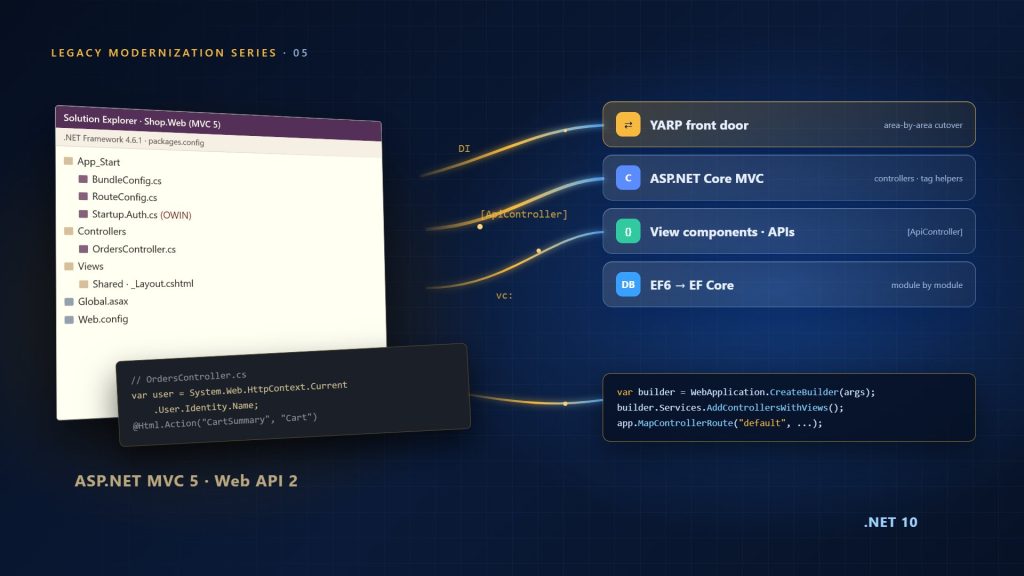
An ASP.NET MVC to ASP.NET Core migration moves controllers, views and models from System.Web on .NET Framework to ASP.NET Core on .NET 10, Microsoft’s current long-term support release. The programming model looks familiar, so much of the code carries over, but the hosting, startup, configuration, dependency injection, authentication and request pipeline are new. Microsoft recommends in-place migration only for small applications and an incremental, side-by-side approach for most production applications.
Technically reviewed by Harshita Pipaliya.
This is the fifth article in our Legacy Modernization Series. It is the most mechanical of the web migrations, which makes it a good candidate for tooling, provided you plan for the parts no tool converts.
Executive summary
- No in-place framework switch exists. ASP.NET MVC 5 depends on
System.Web, which is not part of ASP.NET Core. Controllers and Razor views port with edits; startup, pipeline and platform services are rewritten. - Microsoft’s guidance: in-place migration “can work for sufficiently small applications”, while incremental migration, an implementation of the Strangler Fig pattern, is “the preferred approach for most production applications” (Microsoft Learn).
- Tooling: Microsoft points to the GitHub Copilot app modernization extension to upgrade ASP.NET Framework apps (MVC, Web API and Web Forms) to ASP.NET Core (Microsoft Learn).
- Target: ASP.NET Core MVC on .NET 10 (LTS, supported to November 14, 2028) (.NET support policy).
- Our recommendation: stabilise on .NET Framework 4.8.1, move class libraries to .NET Standard 2.0 or multi-target, then migrate controllers area by area behind a YARP front door. Use in-place migration only for small apps with light
System.Webuse.
MVC 5 in 2026: what is and isn’t changing
| Item | Status |
|---|---|
| ASP.NET MVC 5 / Web API 2 | Run on .NET Framework; no new feature development |
| .NET Framework 4.8.1 | Supported with Windows; no announced end date |
| .NET Framework 4.6.2 | Support ends January 12, 2027 |
| ASP.NET Core MVC on .NET 10 | Current LTS, supported to November 14, 2028 |
The urgency is not a hard end date for MVC 5. It is the widening gap: new Azure SDKs, identity libraries, performance work, container support and developer tooling target modern .NET first. If your MVC 5 app is still on .NET Framework 4.6.2 or earlier, retargeting to 4.8.1 is the immediate step.
What carries over and what doesn’t
| Usually carries over with edits | Must be rewritten or replaced |
|---|---|
| Controllers and action methods | Global.asax and App_Start (replaced by Program.cs) |
| Models and view models | web.config app settings and custom sections (to appsettings.json and options) |
| Razor views and layouts (with syntax fixes) | OWIN/Katana middleware (to ASP.NET Core middleware) |
| DataAnnotations validation | System.Web.Optimization bundling (to build-time bundling or a static asset pipeline) |
| Attribute routing | HttpContext.Current, HttpModule, HttpHandler |
| Business logic in class libraries | Child actions (Html.Action) |
| Filters (with interface changes) | ASP.NET Identity 2 / membership (to ASP.NET Core Identity or Entra ID) |
| Web API 2 controllers (merged into MVC) | Third-party DI container wiring (to built-in DI or the container’s ASP.NET Core integration) |
In-place or incremental?
| Factor | In-place | Incremental (side by side) |
|---|---|---|
| App size | Small (tens of controllers) | Medium to large |
System.Web coupling in libraries | Light | Heavy |
| Delivery pressure | Can pause features briefly | Must keep shipping |
| Risk tolerance | One cutover | Area-by-area cutover with rollback |
| Infrastructure | Simple | Front door (YARP), shared auth/session during transition |
Microsoft’s migration overview frames the same choice: large production apps and heavy System.Web use point to incremental migration; small apps with minimal dependencies can go in place.
Concept mapping: MVC 5 to ASP.NET Core MVC
| MVC 5 | ASP.NET Core MVC (.NET 10) |
|---|---|
Global.asax, RouteConfig, FilterConfig, BundleConfig | Program.cs (builder.Services, middleware, MapControllerRoute) |
System.Web.Mvc.Controller / ApiController | Microsoft.AspNetCore.Mvc.Controller / ControllerBase with [ApiController] |
ActionResult, JsonResult, HttpStatusCodeResult | IActionResult, ActionResult<T>, Ok(), NotFound(), StatusCode() |
Html.Action child actions | View components |
@Html.ActionLink, @Html.BeginForm | Tag helpers (asp-action, asp-controller) or the HTML helpers that remain |
[ValidateAntiForgeryToken] | Same attribute, plus global AutoValidateAntiforgeryToken |
AuthorizeAttribute with roles | Policy-based authorization ([Authorize(Policy = "...")]) |
IDependencyResolver + Unity/Autofac/Ninject | Built-in DI (AddScoped, AddSingleton) |
ConfigurationManager.AppSettings | IConfiguration, IOptions<T> |
HttpContext.Current | Injected HttpContext / IHttpContextAccessor |
Session, Cache | ISession with distributed cache, IMemoryCache, IDistributedCache |
HttpModule / HttpHandler | Middleware and endpoints |
| OWIN cookie and OpenID Connect middleware | AddAuthentication().AddCookie().AddOpenIdConnect() or Microsoft.Identity.Web |
~/Content, ~/Scripts | wwwroot static files |
The child action to view component mapping, and the bundling replacement, are our recommended equivalents; Microsoft’s migration pages do not prescribe a single replacement for every MVC 5 feature.
Code translation patterns
The examples below are illustrative and simplified.
MVC 5 startup (Global.asax and App_Start):
public class MvcApplication : System.Web.HttpApplication
{
    protected void Application_Start()
    {
        AreaRegistration.RegisterAllAreas();
        FilterConfig.RegisterGlobalFilters(GlobalFilters.Filters);
        RouteConfig.RegisterRoutes(RouteTable.Routes);
        BundleConfig.RegisterBundles(BundleTable.Bundles);
        DependencyResolver.SetResolver(new UnityDependencyResolver(UnityConfig.Container));
    }
}
ASP.NET Core on .NET 10 (Program.cs):
var builder = WebApplication.CreateBuilder(args);

builder.Services.AddControllersWithViews(o =>
    o.Filters.Add(new AutoValidateAntiforgeryTokenAttribute()));
builder.Services.AddScoped<IOrderService, OrderService>();
builder.Services.Configure<ShopOptions>(builder.Configuration.GetSection("Shop"));

var app = builder.Build();
app.UseStaticFiles();
app.UseRouting();
app.UseAuthentication();
app.UseAuthorization();
app.MapControllerRoute("areas", "{area:exists}/{controller=Home}/{action=Index}/{id?}");
app.MapControllerRoute("default", "{controller=Home}/{action=Index}/{id?}");
app.Run();
Controller: from HttpContext.Current and static helpers to injected services:
// MVC 5
public class OrdersController : Controller
{
    public ActionResult Details(int id)
    {
        var user = System.Web.HttpContext.Current.User.Identity.Name;
        var order = OrderRepository.Get(id, user);           // static, hard to test
        if (order == null) return HttpNotFound();
        return View(order);
    }
}
// ASP.NET Core MVC (.NET 10)
public sealed class OrdersController(IOrderService orders) : Controller
{
    public async Task<IActionResult> Details(int id, CancellationToken ct)
    {
        var order = await orders.GetAsync(id, User.Identity!.Name!, ct);
        return order is null ? NotFound() : View(order);
    }
}
Child action to view component:
// MVC 5: @Html.Action("CartSummary", "Cart")  with [ChildActionOnly]
// ASP.NET Core: a view component
public sealed class CartSummaryViewComponent(ICartService carts) : ViewComponent
{
    public async Task<IViewComponentResult> InvokeAsync() =>
        View(await carts.GetSummaryAsync(UserClaimsPrincipal));
}
// In the view: <vc:cart-summary></vc:cart-summary>
Web API 2 controller to ASP.NET Core (Microsoft’s Web API migration tutorial says to “Change ApiController to ControllerBase”):
[ApiController]
[Route("api/[controller]")]
public sealed class ProductsController(IProductService products) : ControllerBase
{
    [HttpGet("{id:int}")]
    public async Task<ActionResult<ProductDto>> Get(int id) =>
        await products.FindAsync(id) is { } p ? p : NotFound();
}
Recommended target architecture
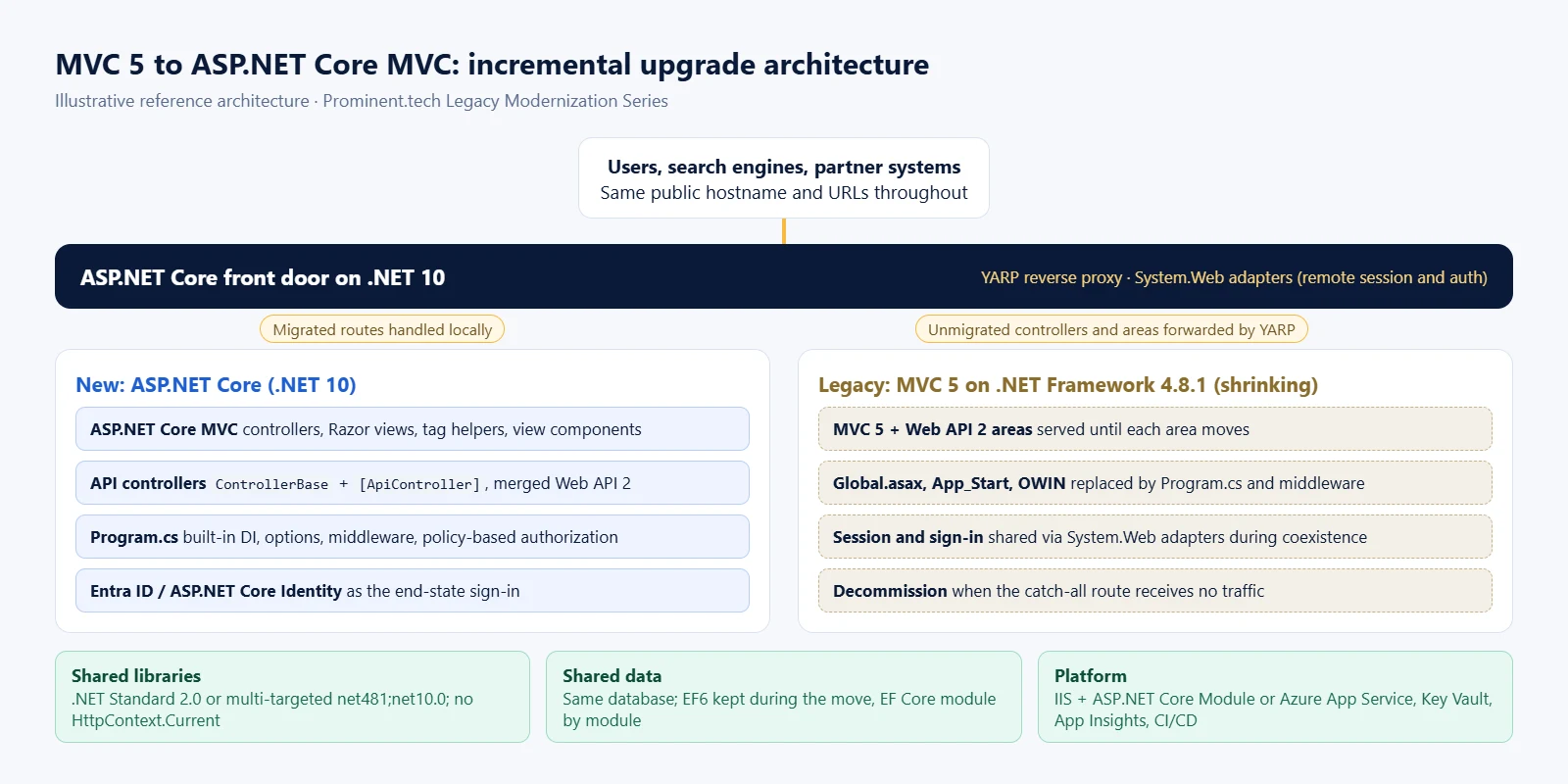
- Front door: ASP.NET Core MVC on .NET 10 with YARP forwarding unmigrated routes to the MVC 5 app. Microsoft’s incremental migration guide describes this setup and the System.Web adapters that support it.
- Shared libraries: domain and data libraries on .NET Standard 2.0 or multi-targeted
net481;net10.0, used by both apps. - Identity: one sign-in across both apps during transition, then ASP.NET Core Identity or Microsoft Entra ID. See our guide to authentication with ASP.NET Core and Entra ID.
- Platform: Azure App Service, IIS with the ASP.NET Core Module, or containers; Key Vault, Application Insights or OpenTelemetry, CI/CD.
Planning an MVC 5 upgrade across several apps? Get an ASP.NET Core upgrade assessment with a dependency map and an area-by-area plan.
Step-by-step upgrade roadmap
- Assess (1 to 3 weeks): run the Copilot app modernization assessment; inventory
System.Webuse in libraries, OWIN middleware, HTTP modules, child actions, bundling, auth, session and third-party packages without .NET 10 support. - Stabilise on .NET Framework 4.8.1: retarget, update NuGet packages, convert to
PackageReference, add characterization tests for key controllers. - Move libraries: convert to SDK-style projects; target .NET Standard 2.0 or multi-target. Remove
HttpContext.Currentfrom business code by passing values in. - Choose the path: in-place for small apps; otherwise create the ASP.NET Core front door with YARP and go live with zero migrated routes.
- Migrate area by area: controllers, views, filters, then view components and tag helpers. Route each area to the new app when tests pass.
- Replace platform services: authentication, session, caching, configuration, logging, bundling, background jobs.
- Decommission: remove YARP routes, System.Web adapters and the MVC 5 app; drop
net481targets.
Our article on upgrading VB.NET applications to .NET 10 covers the library and SDK-style project steps in more detail.
Data access: EF6 or EF Core?
| Option | When it fits | Watch out for |
|---|---|---|
| Keep EF6 on .NET 10 | Large EDMX or code-first models; you want to limit change | EF6 receives minimal new investment; EDMX designer tooling is limited on modern .NET |
| Move to EF Core | New development, performance and modern features matter | Behaviour differences (lazy loading, query translation, many-to-many, inheritance); needs tests |
| Dapper for hot paths | Reporting or high-volume reads | Hand-written SQL to maintain |
Our default: keep EF6 during the framework migration if the model is large, then move to EF Core module by module. Changing the web framework and the ORM at the same time doubles the regression surface.
Authentication and identity
- Forms authentication / ASP.NET Membership: migrate users to ASP.NET Core Identity (plan password-hash compatibility and a re-hash on next login) or move to Microsoft Entra ID / Entra External ID.
- ASP.NET Identity 2 (OWIN): ASP.NET Core Identity uses a different schema; plan a schema migration.
- Windows authentication: supported in ASP.NET Core on IIS and with the Negotiate handler.
- During coexistence: share a single sign-in between the two apps (System.Web adapters remote authentication, or a shared cookie configured with supported guidance). Never hand-roll cookie decryption.
Tooling and automation
| Tool | Use it for | Limits |
|---|---|---|
| GitHub Copilot app modernization | Assessment and conversion of MVC and Web API projects | Requires a local Git repository; migrations from .NET Framework require Windows; output needs review |
| System.Web adapters | Running MVC 5 and ASP.NET Core side by side; shared session and auth | Transitional; remove after cutover |
| YARP | Routing between the two apps | Extra hop; monitor latency |
Analyzers and dotnet-outdated style tools | Finding obsolete APIs and package gaps | Do not catch behaviour changes |
For a wider view of AI-assisted modernization, see OpenAI Codex for legacy .NET modernization.
Testing, deployment and support
Testing
- Characterization tests on the MVC 5 app before changing it, then the same tests against ASP.NET Core using
WebApplicationFactory. - Compare JSON responses for APIs (casing, dates, null handling): System.Text.Json defaults differ from Newtonsoft.Json. Use
AddNewtonsoftJson()temporarily if clients depend on the old format. - Browser tests for key journeys across migrated and unmigrated routes.
Deployment
- Blue-green or slot deployments per area; ability to route an area back to MVC 5.
- Observe error rates and latency per route before expanding.
Support: schedule the move to the next .NET LTS before November 2028 and keep dependencies current.
Request an estimate
Cost and timeline depend on your application, data and integrations, so we estimate each project individually rather than publish price ranges. Cost drivers: System.Web coupling in libraries, authentication changes, EF6 vs EF Core decisions, test coverage and third-party packages.
Request an estimate for your application, or read legacy application modernization cost and ROI to build the business case.
FAQs
Can MVC 5 code run on ASP.NET Core without changes?
No. Controllers and views are similar, but namespaces, startup, configuration, filters, authentication and many helpers change. Expect edits in most files and rewrites of the platform code.
Is ASP.NET MVC 5 still supported?
It runs on .NET Framework 4.8.1, which is supported with Windows and has no announced end date, but it receives no new features. ASP.NET Core is where Microsoft invests.
Should we do an in-place or incremental migration?
Microsoft says in-place migration can work for sufficiently small applications and recommends incremental migration for most production applications. Use the size and System.Web coupling of your app to decide.
What replaces child actions in ASP.NET Core?
View components are the usual replacement for Html.Action child actions, with tag helpers and partial views for simpler cases.
Can we keep Entity Framework 6?
Often, yes, during the framework migration. Many teams then move to EF Core module by module so they are not changing the web stack and the ORM at once.
Do Web API 2 controllers need a separate migration?
They move into ASP.NET Core MVC: ApiController becomes ControllerBase with [ApiController] and attribute routing. Check JSON serialization differences.
Can GitHub Copilot do the migration for us?
Microsoft’s tooling can assess the solution and generate much of the conversion. Plan for review, refactoring and tests, especially around authentication, configuration and middleware.
Conclusion
An ASP.NET MVC to ASP.NET Core migration is the most approachable of the legacy web moves: the concepts carry over, and tooling now handles much of the mechanical work. The risk sits in the platform: startup, authentication, System.Web coupling and data access. Stabilise on 4.8.1, free your libraries, choose in-place or incremental honestly based on size, and migrate area by area with tests.
Previous in this series: ASP.NET Web Forms to ASP.NET Core or Blazor. Next: WCF to ASP.NET Core Web API and gRPC: Modernizing Legacy Communication Services.
Related services: Legacy Software Modernization · .NET Development · API & System Integration · Microsoft Azure · Hire .NET Core Developers
Sources
- Microsoft Learn, Migrate from ASP.NET Framework to ASP.NET Core
- Microsoft Learn, Use tooling to help migrate ASP.NET Framework to ASP.NET Core
- Microsoft Learn, Migrate from ASP.NET Web API to ASP.NET Core
- Microsoft Learn, Get started with incremental ASP.NET to ASP.NET Core migration
- Microsoft, .NET and .NET Core Support Policy
Plan your MVC 5 to ASP.NET Core upgrade
Prominent.tech helps teams upgrade ASP.NET MVC 5 and Web API 2 applications to ASP.NET Core on .NET 10, in place or area by area, with authentication, data access and deployments planned up front. Talk to our .NET modernization team or explore our legacy software modernization services.