
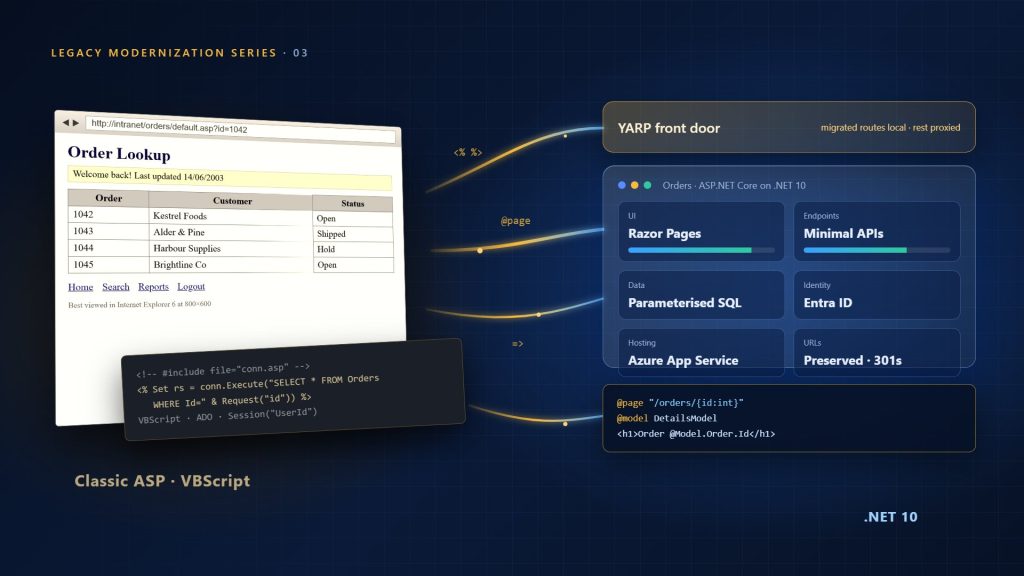
A Classic ASP to ASP.NET Core migration replaces .asp pages written in VBScript, running inside IIS, with an ASP.NET Core application on .NET 10, Microsoft’s current long-term support release. There is no converter and no in-place upgrade path: Classic ASP and ASP.NET Core share almost nothing except HTTP. Successful migrations put ASP.NET Core in front of the old site as a reverse proxy, rebuild pages and business logic module by module (usually as Razor Pages), move session and login state somewhere both systems can read, and retire .asp URLs with permanent redirects.
Technically reviewed by Harshita Pipaliya.
This is the third article in our Legacy Modernization Series. Classic ASP is older than ASP.NET Web Forms and sits on a scripting engine Microsoft has started to deprecate, so the risk profile and the migration mechanics are different from a .NET Framework upgrade.
Executive summary
- Classic ASP is supported only as part of IIS, and its scripting engine is being deprecated. Microsoft states that ASP “is currently supported in all supported versions of IIS” and that ASP and IIS support lifetimes “are tied to the support lifecycle of the host operating system” (Microsoft Q&A, Microsoft staff answer). Separately, Microsoft has announced a three-phase deprecation of VBScript, the language most Classic ASP code is written in (Windows IT Pro Blog).
- The VBScript timeline: VBScript became a Feature on Demand, enabled by default, in Windows 11 version 24H2; “around 2027” it will no longer be enabled by default; in a later phase its DLLs “will be removed” and “projects that rely on VBScript will stop functioning” (same source). Microsoft has not published a specific statement on how this affects Classic ASP on Windows Server, which is itself a planning risk.
- Target: ASP.NET Core on .NET 10 (LTS, supported to November 14, 2028), hosted on IIS, Azure App Service or containers (.NET support policy).
- Our recommendation: use Razor Pages for page-centric ASP sites, put YARP (Microsoft’s reverse proxy library) in front of the legacy site so you can migrate one section at a time, and fix security debt (SQL injection, plain-text credentials) as part of the move rather than after it.
Where Classic ASP stands in 2026
Active Server Pages shipped with IIS in 1996. Pages mix HTML with server-side VBScript (occasionally JScript) between <% %> tags, use built-in objects such as Request, Response, Session, Application and Server, and typically call ADO for data and COM components through Server.CreateObject.
| Item | Current status |
|---|---|
| Classic ASP in IIS | Supported in all supported IIS versions; lifecycle tied to the host Windows version (Microsoft staff answer, Microsoft Q&A) |
| Installation | Not installed by default in IIS 7 and later; added as an IIS role feature (Microsoft Learn) |
| VBScript | Deprecated: Feature on Demand from Windows 11 24H2; not enabled by default around 2027; removal in a later Windows release (Windows IT Pro Blog) |
| New features | None for many years |
| Tooling | No current first-party IDE support, debugger or test framework for Classic ASP |
What we can and cannot say about VBScript and Classic ASP. Microsoft’s deprecation post names ASP as one of the technologies VBScript is “commonly used in conjunction with”, but it does not say when or whether IIS’s ASP feature on Windows Server will lose VBScript. Until Microsoft publishes that, treat it as an open risk with a plausible horizon of the next Windows Server releases, not as a fixed date.
Why Classic ASP applications are still running
- They are small, fast and paid for. Many are intranet tools, partner portals, order-entry screens or reporting pages that have worked for twenty years.
- Business logic lives in the pages. Pricing, eligibility and workflow rules are spread across hundreds of
.aspfiles and shared#includefiles. - COM dependencies. Custom VB6 or C++ COM components, CDO for email and third-party upload or PDF components are hard to replace one by one.
- Nobody owns them. The original developers are gone, so changes are rare and risky.
Modernization drivers and the cost of waiting
- Platform risk: the VBScript deprecation and the need for 32-bit application pools for old COM components put every Windows Server upgrade at risk.
- Security exposure: string-concatenated SQL, unencoded output (XSS), custom authentication and secrets in
global.asaor include files are common in Classic ASP code we review. - Compliance: modern requirements for MFA, audit logging and data protection (GDPR, UK GDPR, HIPAA, PCI DSS) are hard to meet with custom ASP login code.
- Skills: VBScript web developers are increasingly scarce.
- Integration and UX: no practical route to modern APIs, responsive front ends, Single Sign-On or cloud hosting.
The cost of waiting compounds; we cover that in the cost of delaying legacy modernization.
Classic ASP vs ASP.NET Core comparison
| Area | Classic ASP | ASP.NET Core (.NET 10) |
|---|---|---|
| Language | VBScript (interpreted, late-bound) | C# (compiled, strongly typed) |
| Hosting | IIS on Windows only | Kestrel behind IIS, Azure App Service, Linux, containers |
| Page model | Inline script in .asp files, #include |
Razor Pages, MVC, Blazor, minimal APIs |
| State | In-process Session/Application objects |
Stateless by default; distributed cache, cookies, database |
| Data access | ADO via COM | EF Core, Dapper, Microsoft.Data.SqlClient |
| Error handling | On Error Resume Next |
Structured exceptions, global error handling, logging |
| Security | Hand-written | Built-in anti-forgery, output encoding, Data Protection, OpenID Connect |
| Testing | Manual | Unit, integration (WebApplicationFactory) and browser tests |
| Lifecycle | Tied to IIS/Windows; language deprecated | LTS supported to November 14, 2028; annual releases |
Migration approaches
| Approach | Description | When it fits | Watch out for |
|---|---|---|---|
| Incremental (strangler fig) with YARP | ASP.NET Core app becomes the front door; unmigrated URLs are proxied to the Classic ASP site | Most business-critical sites | Shared login and session need design up front |
| Big-bang rewrite | Build the new site in full, switch over on a date | Small sites (under ~30 pages) with low change rates | Feature freeze and cutover risk |
| Rehost as a bridge | Keep Classic ASP on a supported Windows Server or Azure VM while migrating | Data-centre exit or OS deadline | Buys time only |
| Replace | SaaS, Power Apps or a CMS for simple forms and content | Commodity forms, approvals, content | Licence costs; customisation limits |
For most enterprises, the incremental approach is the safest because users keep one URL, one login and continuous service while sections move.
Choosing the ASP.NET Core programming model
| Model | Best for | Why |
|---|---|---|
| Razor Pages | Page-per-file Classic ASP sites, forms and CRUD screens | Closest mental model to .asp files: one page, one handler class |
| MVC | Larger apps with shared controllers, complex routing or many views per entity | Clear separation, good for teams used to MVC |
| Blazor | Highly interactive internal tools, dashboards | Rich UI in C#; larger change for users and developers |
| Minimal APIs + SPA | Sites becoming API-first with a React or Angular front end | Clean separation; two codebases to maintain |
Our default: Razor Pages for the user interface plus minimal APIs for any endpoints other systems call. It maps well to existing page structure and keeps the learning curve short.
Recommended target architecture
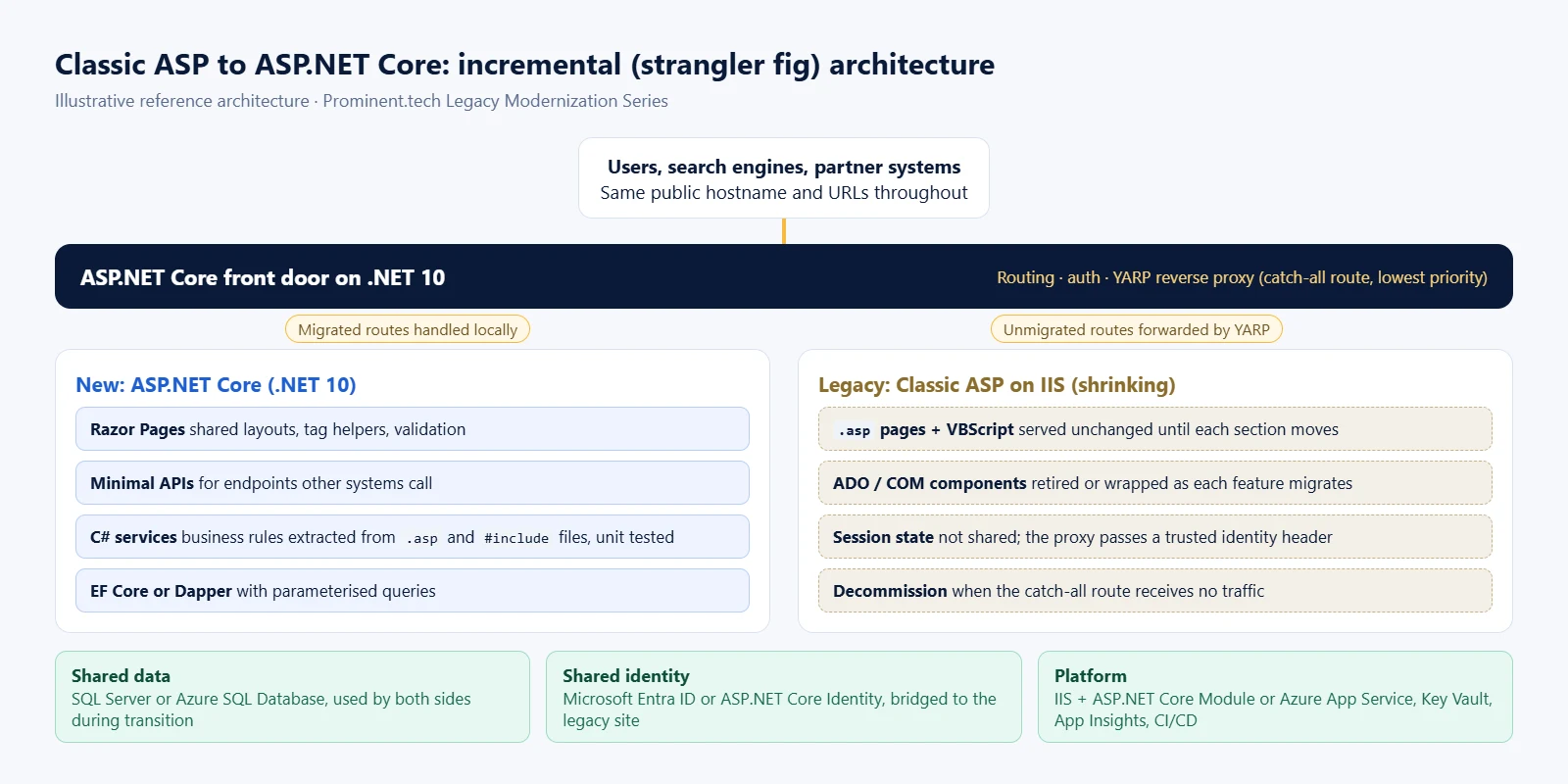
- Front door: an ASP.NET Core application on .NET 10 that owns the public hostname. Migrated routes are handled locally; everything else is forwarded to the legacy site by YARP.
- Presentation: Razor Pages with shared layouts and tag helpers; static assets served by ASP.NET Core.
- Application and domain: C# services with business rules extracted from
.aspfiles and includes, covered by unit tests. - Data: EF Core or Dapper over SQL Server or Azure SQL Database; the legacy site keeps using the same database during transition.
- Identity: Microsoft Entra ID (workforce) or Entra External ID / ASP.NET Core Identity (customers), with a bridge so the legacy site trusts the same login.
- Platform: IIS with the ASP.NET Core Module or Azure App Service, Azure Key Vault, Application Insights and CI/CD.
Step-by-step migration roadmap
Phase 1: Discovery (2 to 4 weeks)
- Inventory
.aspfiles, includes,global.asa, COM components (Server.CreateObjectcalls), database connections and scheduled tasks. - Pull IIS logs to rank URLs by traffic and find pages nobody uses.
- Map Session and Application variables: they are the hidden coupling between pages.
Phase 2: Foundations (2 to 4 weeks)
- Create the ASP.NET Core front door with YARP, logging and CI/CD; deploy it in front of the legacy site with zero pages migrated, then confirm nothing changed for users.
- Decide the shared-login and shared-session approach (see below).
Phase 3: Migrate by section
- Pick a vertical slice (for example “order history”), rebuild it as Razor Pages and services, write tests, then route its URLs to the new app.
- Add 301 redirects from old
.aspURLs to new routes where paths change. - Repeat, prioritising high-risk pages (login, payments, admin) and high-traffic pages.
Phase 4: Decommission
- When traffic to the legacy site reaches zero (monitor proxy logs), remove the YARP route, uninstall the ASP role feature and retire COM components.
Code translation patterns
The examples are illustrative and simplified.
Classic ASP (VBScript):
<%
Dim conn, rs, id
id = Request.QueryString("id")
Set conn = Server.CreateObject("ADODB.Connection")
conn.Open Application("ConnStr")
Set rs = conn.Execute("SELECT Name, Email FROM Customers WHERE Id = " & id)
%>
<h1><%= rs("Name") %></h1>
<p><%= rs("Email") %></p>
This page is open to SQL injection and cross-site scripting, and the connection string lives in an application variable.
ASP.NET Core Razor Page (.NET 10):
// Pages/Customers/Details.cshtml.cs
public sealed class DetailsModel(IDbConnection db) : PageModel
{
    public CustomerView? Customer { get; private set; }

    public async Task<IActionResult> OnGetAsync(int id)
    {
        Customer = await db.QuerySingleOrDefaultAsync<CustomerView>(
            "SELECT Name, Email FROM Customers WHERE Id = @id", new { id });
        return Customer is null ? NotFound() : Page();
    }
}
@* Pages/Customers/Details.cshtml — Razor encodes output by default *@
@page "/customers/{id:int}"
@model DetailsModel
<h1>@Model.Customer!.Name</h1>
<p>@Model.Customer.Email</p>
YARP front door that forwards anything not yet migrated:
// Program.cs
var builder = WebApplication.CreateBuilder(args);
builder.Services.AddRazorPages();
builder.Services.AddReverseProxy()
    .LoadFromConfig(builder.Configuration.GetSection("ReverseProxy"));

var app = builder.Build();
app.MapRazorPages();          // migrated pages win
app.MapReverseProxy();        // everything else goes to Classic ASP
app.Run();
"ReverseProxy": {
  "Routes": {
    "legacy": {
      "ClusterId": "classicAsp",
      "Order": 1000,
      "Match": { "Path": "{**catch-all}" }
    }
  },
  "Clusters": {
    "classicAsp": {
      "Destinations": { "iis": { "Address": "http://localhost:8081/" } }
    }
  }
}
Common translations:
| Classic ASP | ASP.NET Core |
|---|---|
Request.QueryString("x"), Request.Form("x") |
Model binding to handler parameters or [BindProperty] |
Response.Write, <%= %> |
Razor @expression (HTML-encoded) |
<!--#include file="..."--> |
Layouts, partial views, view components, tag helpers |
Session("x") |
ISession with distributed cache, or claims/cookies |
Application("x") |
Configuration, IMemoryCache or singleton services |
global.asa events |
Program.cs startup, middleware, hosted services |
Server.CreateObject("ADODB...") |
EF Core, Dapper, Microsoft.Data.SqlClient |
Server.CreateObject("CDO.Message") |
An email service or API client |
On Error Resume Next |
try/catch plus global exception handling and logging |
Server.MapPath |
IWebHostEnvironment.ContentRootPath / WebRootPath |
Sessions, logins and coexistence
This is where incremental migrations succeed or fail.
- Classic ASP sessions cannot be shared directly. They live in the IIS worker process of the legacy site. Before migrating pages that depend on session values, move those values to a database table keyed by a cookie both systems can read, or replace them with claims.
- Login bridge options (recommended order):
- Move authentication to ASP.NET Core first (Entra ID or ASP.NET Core Identity). YARP forwards an authenticated user identifier to the legacy site in a header over a private connection, and the legacy site trusts it only from the proxy.
- Issue a signed, short-lived cookie that both sides validate (requires a small COM or script helper on the ASP side).
- Never trust identity headers from the internet. Strip incoming copies at the proxy and restrict the legacy site to accept traffic only from the proxy.
- Character encoding: many Classic ASP sites use Windows-1252 code pages. Normalise on UTF-8 and test names, addresses and currency symbols on both sides.
For the authentication design itself, see our guide to multi-tenant authentication with ASP.NET Core and Microsoft Entra ID.
Running a Classic ASP site with a login, payments or partner access? Discuss your application migration and we will map a coexistence plan before any page moves.
Data, COM components and integrations
- Databases: keep the existing SQL Server schema during coexistence. Move Access (
.mdb) back ends to SQL Server or Azure SQL first. - COM components: classify each as replace with a .NET library, wrap behind an API, or retire. ASP.NET Core on Windows can call COM through interop, but a 32-bit component forces a 32-bit process; treat that as temporary.
- File uploads and generation: replace third-party upload/PDF components with maintained .NET libraries and blob storage.
- Email: replace CDO/CDONTS with an authenticated email API or SMTP relay with modern TLS.
- Batch scripts:
.vbsscheduled tasks share the VBScript risk; move them to .NET worker services, Azure Functions or PowerShell.
Security and compliance
- Parameterise every query; Razor output encoding removes most XSS by default.
- Enable anti-forgery tokens on all forms (on by default for Razor Pages).
- Move secrets to Azure Key Vault or protected configuration.
- Use the Data Protection API for cookies and tokens; enforce HTTPS and HSTS.
- Add audit logging for logins, admin changes and data exports.
- Run OWASP ZAP or an equivalent scan on both legacy and new routes during coexistence.
SEO and URL preservation
Public Classic ASP sites often have years of search equity in .asp URLs.
- Keep high-value URLs where possible (ASP.NET Core routing can serve
/products.asp?id=12patterns) or issue 301 redirects to new clean URLs. - Map every indexed URL before migration using Search Console and server logs; avoid redirect chains.
- Preserve titles, meta descriptions and structured content; update internal links and XML sitemaps when each section moves.
Testing, deployment and support
Testing
- Record request/response pairs from the legacy site for key journeys and compare HTML fragments and data with the new pages.
- Integration tests with
WebApplicationFactory; browser tests with Playwright across both legacy and migrated routes. - Load test the proxy path; YARP adds a hop, so measure latency.
Deployment
- IIS with the ASP.NET Core Module (in-process hosting) is the lowest-change option on existing servers; Azure App Service for managed hosting.
- Blue-green or slot deployments; feature flags to route a section back to legacy if needed.
- Monitor proxy traffic per route to know when the legacy site can be switched off.
Support: plan hypercare after each section goes live and schedule the move to the next .NET LTS before November 2028.
Request an estimate
Cost and timeline depend on your application, data and integrations, so we estimate each project individually rather than publish price ranges. Cost drivers: the amount of logic in include files, session coupling between pages, COM components without source code, and whether there are any automated tests.
Request an estimate for your application, or read legacy application modernization cost and ROI to build the business case.
FAQs
Can Classic ASP be converted to ASP.NET Core automatically?
No reliable converter exists. VBScript is late-bound and mixed with HTML, so pages are rebuilt in C#, usually as Razor Pages. AI coding assistants can speed up translation of individual pages, but every result needs review and tests.
Is Classic ASP still supported by Microsoft?
ASP is supported as part of IIS in all supported IIS versions, with its lifecycle tied to the host Windows version. VBScript, the language most ASP code uses, is deprecated and will stop being enabled by default around 2027 on Windows client, with later removal.
Will Classic ASP stop working when VBScript is removed?
Microsoft has not published a specific statement for Classic ASP on Windows Server. Because ASP pages are usually written in VBScript, plan as if a future Windows Server release could break them, and migrate before your next server upgrade.
Should we migrate Classic ASP to Razor Pages, MVC or Blazor?
Razor Pages is the closest fit for page-based ASP sites. Choose MVC for large apps with complex routing, and Blazor only when you want a highly interactive UI and accept a bigger change.
Can Classic ASP and ASP.NET Core run side by side?
Yes. Put ASP.NET Core in front with YARP and forward unmigrated URLs to the Classic ASP site. Shared login and session data need a deliberate design, because Classic ASP session state cannot be read by ASP.NET Core.
Should we skip ASP.NET Web Forms or MVC 5 as an interim step?
Yes. Migrating to Web Forms or MVC 5 would move you onto .NET Framework technologies that themselves need migrating. Go straight to ASP.NET Core on .NET 10.
Can we host the new application on Linux?
Yes, if it no longer depends on COM components or Windows-only APIs. Many teams keep Windows hosting during coexistence and move to Linux App Service or containers afterwards.
Conclusion
Classic ASP sites have outlived most of the technology around them, but the ground under them is moving: VBScript is on a published deprecation path, and every Windows Server upgrade is now a risk event. A Classic ASP to ASP.NET Core migration does not need a risky big bang. Put ASP.NET Core in front, solve login and session sharing early, rebuild one section at a time as Razor Pages, and retire .asp URLs with proper redirects. The end state is a secure, testable application on a supported LTS platform.
Previous in this series: VB.NET Legacy Applications to .NET 10. Next: ASP.NET Web Forms to ASP.NET Core or Blazor: Choosing the Right Migration Path.
Related services: Legacy Software Modernization · .NET Development · Microsoft Azure · Web Development · Hire .NET Core Developers
Sources
- Microsoft Q&A (Microsoft staff answer), Classic ASP will also be abandoned?
- Microsoft Windows IT Pro Blog, VBScript deprecation: Timelines and next steps
- Microsoft Learn, Classic ASP is not installed by default on IIS 7.0 and above
- Microsoft, .NET and .NET Core Support Policy
Plan your Classic ASP to ASP.NET Core migration
Prominent.tech helps teams move Classic ASP applications to ASP.NET Core on .NET 10 one section at a time, with URLs, logins and data kept working throughout. Talk to our modernization team or explore our legacy software modernization services.