
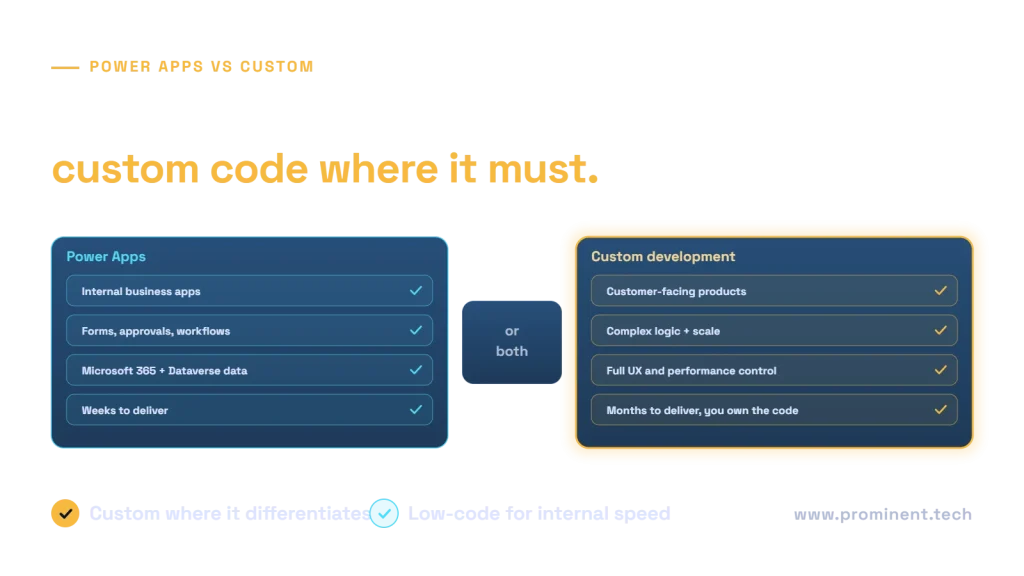
Choose Power Apps when you need an internal business application, such as forms, approvals, inspections or case tracking, built quickly on Microsoft 365, Dataverse or SharePoint data, for a known number of licensed users; choose custom development when the application faces customers or partners at scale, has complex logic or performance needs, needs a fully tailored user experience, or must avoid per-user licensing. Many organisations use both: Power Apps for internal processes and custom .NET or web applications for products, with shared APIs between them. The decision should weigh user type and volume, complexity, integration, licensing cost over three years, governance and who will maintain the app.
Key takeaways
- Power Apps excels at internal, process-driven apps on Microsoft data, delivered in weeks.
- Custom development suits customer-facing, high-scale, complex or highly tailored applications.
- Compare three-year cost: Power Platform licences per user versus build and hosting cost.
- Low-code still needs governance: environments, ALM, data policies and ownership.
- Hybrid designs, with Power Apps front ends over custom APIs, often give the best of both.
Power Apps vs custom development at a glance
| Factor | Power Apps | Custom development (.NET, web, mobile) |
|---|---|---|
| Typical users | Employees in your Microsoft tenant | Employees, customers, partners, the public |
| Time to first release | Days to weeks | Weeks to months |
| User experience | Good, within platform patterns | Fully tailored |
| Complex logic and performance | Limited; delegation and connector limits apply | Unlimited, engineered for the need |
| Data | Dataverse, SharePoint, SQL and many connectors | Any database or service |
| Licensing | Per user or per app licences | No per-user platform fee; pay for hosting |
| Who maintains it | Makers and a platform team | Software engineers |
| Lock-in | Tied to Power Platform | Portable code you own |
Microsoft’s Power Apps overview describes the platform’s capabilities, and our guides cover canvas vs model-driven apps and choosing a backend for Power Apps.
When Power Apps is the right choice
- Internal processes such as approvals, inspections, requests, onboarding and asset tracking.
- Users already licensed for Microsoft 365 and, where needed, Power Apps.
- Data in Dataverse, SharePoint, SQL or systems with standard connectors.
- Moderate data volumes and straightforward logic.
- A need to deliver quickly and iterate with business users.
Watch for platform limits early, such as delegation with large data sets. See Power Apps delegation explained.
When custom development is the right choice
- Customer-facing or partner portals with many external users.
- Complex business rules, heavy calculations or high transaction volumes.
- Strict performance, offline or device integration needs.
- A distinctive user experience that is part of your brand or product.
- A need to avoid per-user licences or keep full ownership of the code.
For modern custom stacks, see clean architecture vs vertical slice in ASP.NET Core and .NET 10 vs .NET 8.
Comparing three-year cost
Power Apps usually wins for small internal user groups because build effort is low. As user numbers grow, licences can overtake the cost of a custom build and its hosting. Check current plans in the Power Platform licensing documentation, include premium connectors and Dataverse capacity, and compare with the build, hosting and maintenance cost of a custom application over three years.
Hybrid patterns: low-code front ends, custom back ends
- Custom APIs behind Power Apps. Complex logic lives in a .NET API exposed through a custom connector, while Power Apps provides the interface.
- Power Apps for staff, custom portal for customers. Both share the same back-end services and data.
- Start low-code, graduate to custom. Prove the process in Power Apps, then rebuild as custom when scale or complexity demands it.
- Power Automate for orchestration. Workflows connect custom systems and Microsoft 365. See Power Automate vs Logic Apps.
Governance for low-code applications
Low-code apps become business-critical quickly. Treat them as software: separate development, test and production environments, solutions and pipelines for releases (see Power Platform ALM explained), data loss prevention policies, named owners and documentation. Microsoft’s CoE Starter Kit helps monitor and govern the estate.
Common questions
Is Power Apps cheaper than custom development?
Usually for internal apps with a modest number of users. For large or external user bases, per-user licences can make custom development cheaper over three years.
Can Power Apps handle enterprise applications?
Yes, for many internal enterprise processes, especially model-driven apps on Dataverse with proper ALM and governance. Very complex, high-volume or customer-facing systems usually suit custom development.
Can we combine Power Apps with custom code?
Yes. Custom APIs and connectors let Power Apps use complex logic built in .NET or other languages, and Power Automate can orchestrate between systems.
How quickly can a Power App be built?
Simple apps take days; typical departmental apps take a few weeks including testing and deployment.
When should we move from Power Apps to custom development?
When you hit platform limits on performance or complexity, need many external users, or licensing costs exceed what a custom application would cost to run.
Choose the right build approach for each app
Share the applications on your roadmap. Our Power Apps and custom software development teams will recommend low-code, custom or hybrid for each, with a three-year cost comparison.