
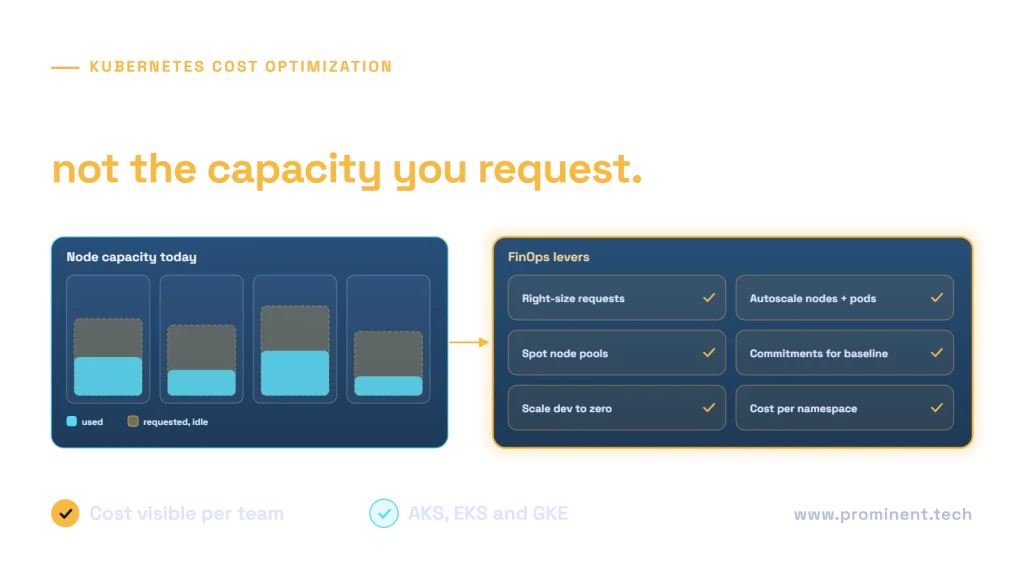
Kubernetes cost optimization starts with visibility, because most Kubernetes waste comes from capacity that is requested but not used: oversized pod requests, nodes kept running for peaks that rarely arrive, idle development clusters and expensive node types for interruptible work. A FinOps approach allocates cost to teams by namespace and labels, right-sizes requests from real usage, autoscales pods and nodes, moves suitable workloads to spot capacity, buys commitments only for the steady baseline and scales non-production to zero outside working hours. Many teams find savings of 20 to 40 percent from these steps, although results depend on how the cluster is run today. The same practices apply to AKS, EKS and GKE.
Key takeaways
- You pay for nodes, but waste hides in pod requests; right-sizing requests unlocks node savings.
- Allocate cost by namespace and labels so teams see and own their spend.
- Combine pod autoscaling with node autoscaling so capacity follows demand.
- Use spot or preemptible nodes for stateless, interruptible and batch workloads.
- Commit only to the steady baseline, and shut down non-production when idle.
Where Kubernetes cost goes
The scheduler places pods based on their resource requests, so requests, not actual usage, decide how many nodes you need. Kubernetes documents how this works in resource management for pods and containers.
Cost visibility and allocation
Label workloads by team, application and environment, then allocate node, storage and network cost to namespaces and labels. Open-source OpenCost works across clouds, and providers offer native views such as AKS cost analysis. Publish monthly reports per team and include idle and shared costs so nothing is hidden.
Ten Kubernetes cost optimization levers
| Lever | How it saves | Watch out for |
|---|---|---|
| Right-size requests | Fewer nodes needed for the same work | Base on observed usage percentiles; keep headroom |
| Horizontal pod autoscaling | Replicas follow demand | Meaningful metrics and warm-up time |
| Node autoscaling | Nodes added and removed with demand | Pod disruption budgets and scale-down settings |
| Efficient provisioning | Tools such as Karpenter pick right-sized nodes | Instance type constraints |
| Spot or preemptible nodes | Large discounts for interruptible work | Handle evictions; not for stateful critical pods |
| Commitments | Lower rates for steady baseline capacity | Commit only to proven baseline |
| Bin packing and node sizes | Less unused space per node | Balance with resilience |
| Scale to zero | Event-driven workloads cost nothing when idle | Cold start latency |
| Non-production schedules | Dev and test clusters off outside hours | Agree schedules with teams |
| Storage, network and logs | Right storage classes, less egress, lower log volume | Retention requirements |
Autoscaling details are covered in Kubernetes autoscaling explained. If a managed container platform would be simpler, see AKS vs Container Apps vs App Service.
An illustrative saving
Illustrative, fictional example: a production AKS cluster costing US$18,000 a month.
| Action | Assumption | Monthly saving (USD) |
|---|---|---|
| Right-size requests | Average requests reduced from 3x to 1.6x actual usage | $3,600 |
| Spot node pool for batch jobs | 30% of compute moved to spot | $2,200 |
| Commitments for baseline | Baseline covered by a one-year commitment | $1,500 |
| Dev cluster schedule | Off 14 hours a day and at weekends | $900 |
| Total | About 46% lower | $8,200 |
Results vary widely; measure before and after each change.
Making Kubernetes savings stick with FinOps
- Show cost per team every month, alongside reliability metrics.
- Set budgets and alerts per namespace.
- Add request and limit checks to deployment pipelines.
- Review commitments and node types quarterly.
- Follow the FinOps Foundation practices for shared accountability.
Provider-level guidance: Azure cost optimization and AWS cost optimization.
Common questions
How can we reduce Kubernetes costs?
Allocate cost by team, right-size pod requests, autoscale pods and nodes, use spot nodes for interruptible work, commit to the steady baseline and shut down idle non-production clusters.
Why is our Kubernetes cluster so expensive?
Usually because pod requests are much higher than actual usage, so nodes sit partly idle, plus always-on non-production clusters and expensive node types.
Is it safe to run production on spot nodes?
For stateless, replicated workloads that tolerate interruption, often yes, with enough on-demand capacity as a fallback. Avoid spot for critical stateful workloads.
How much can Kubernetes cost optimization save?
It varies with the starting point. Many teams find 20 to 40 percent; well-tuned clusters see less.
What tools show Kubernetes cost by team?
Open-source OpenCost and cloud-native cost views, such as AKS cost analysis, allocate cost to namespaces and labels.
Cut your Kubernetes bill without risking reliability
Share your clusters and current spend. Our cloud and DevOps team will set up cost allocation, find the biggest savings and implement them safely.