
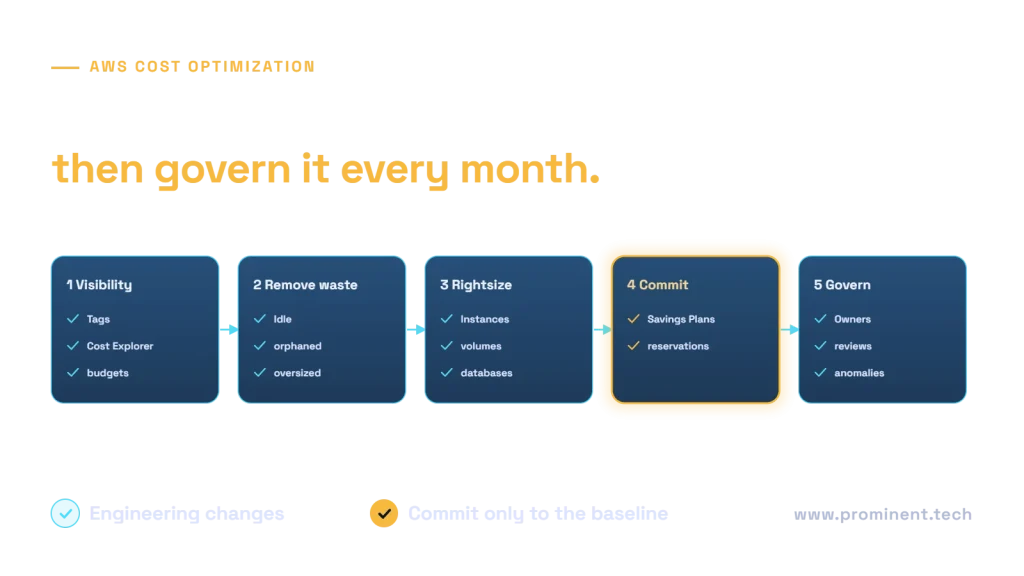
AWS cost optimization works best in a fixed order: get visibility with tagging, Cost Explorer and budgets; remove waste such as idle instances, unattached volumes and old snapshots; rightsize compute, storage and databases; then commit to your steady baseline with Savings Plans or Reserved Instances; and finally govern costs continuously with owners, monthly reviews and anomaly alerts. The largest savings usually come from rightsizing and commitments for compute, storage tiering, and reducing data transfer and NAT gateway charges, which are often overlooked. Committing before cleaning up locks in waste.
Key takeaways
- You cannot optimize what you cannot attribute: tag everything to an owner and product.
- Remove waste and rightsize before buying Savings Plans or reservations.
- Data transfer, NAT gateways and logs are common hidden costs.
- Use Spot capacity for fault-tolerant workloads and scale non-production down out of hours.
- Make cost a monthly engineering metric, not a yearly finance surprise.
The five-step AWS cost optimization framework
This order follows the principles in the AWS Well-Architected cost optimization pillar. Use AWS Cost Explorer for visibility and AWS Compute Optimizer for rightsizing recommendations.
Compute: rightsizing, Savings Plans and Spot
- Rightsize instances using real utilization over several weeks, including memory, not just CPU.
- Modernize instance families: newer generations, including AWS Graviton (Arm) instances, often give better price performance; test your workload first.
- Savings Plans and Reserved Instances: commit to a steady baseline of usage for one or three years in exchange for lower rates. See AWS Savings Plans for current discount levels.
- Spot Instances: spare capacity at large discounts for interruption-tolerant work such as batch, CI and stateless services; see Amazon EC2 Spot.
- Schedule non-production: stop development and test environments outside working hours.
- Containers: pack workloads efficiently and autoscale; see Kubernetes cost optimization.
Storage
- Move EBS volumes from gp2 to gp3 and size IOPS and throughput to actual need.
- Delete unattached volumes and old snapshots, and set lifecycle rules for backups.
- Use S3 lifecycle policies and storage classes such as Intelligent-Tiering for data with changing access patterns.
- Check for incomplete multipart uploads and old object versions.
Data transfer and networking
Data transfer is often the least understood line on the bill. Traffic between availability zones, out to the internet and through NAT gateways is charged. Use VPC endpoints for S3 and other AWS services so traffic does not pass through NAT gateways, keep chatty services in the same zone where resilience allows, and use a CDN for content served to users. Check current rates on the EC2 pricing page.
Databases, logs and other services
- Rightsize RDS and Aurora instances; consider Aurora Serverless or scheduled scaling for variable load.
- Review provisioned capacity for DynamoDB versus on-demand based on traffic patterns.
- Set CloudWatch Logs retention periods and reduce verbose logging.
- Find idle load balancers, Elastic IPs and unused resources in every region.
- For AI workloads, control inference and GPU costs; see cloud infrastructure for scalable AI.
An illustrative example in USD
The following example is illustrative and fictional. A SaaS company spends about $60,000 per month on AWS. Actual results depend entirely on your architecture and usage.
| Action | Illustrative monthly saving (USD) |
|---|---|
| Remove idle and orphaned resources | $2,000 to $5,000 |
| Rightsize EC2 and RDS | $4,000 to $9,000 |
| Schedule non-production | $2,000 to $4,000 |
| Savings Plans on the remaining baseline | $5,000 to $10,000 |
| Storage tiering and gp3 | $1,000 to $3,000 |
| VPC endpoints and data transfer fixes | $1,000 to $3,000 |
Savings are not additive in a simple way: rightsizing reduces the baseline that commitments then cover. For the Azure equivalent, see our Azure cost optimization guide.
Cost governance
- Tag policies and account structure that map costs to products and owners.
- AWS Budgets and Cost Anomaly Detection alerts sent to the owning team.
- A monthly review of top changes, commitments coverage and actions.
- Unit cost metrics, such as cost per customer or per transaction.
- Cost checks in architecture reviews and infrastructure-as-code pipelines.
The FinOps Framework describes the roles and practices in more detail.
Common questions
What is the fastest way to reduce AWS costs?
Remove idle and orphaned resources and schedule non-production environments. Both are quick, low-risk and do not require commitments.
Should I choose Savings Plans or Reserved Instances?
Compute Savings Plans are the most flexible across instance families and services; Reserved Instances can still suit specific services such as some databases. Commit only to your steady baseline after rightsizing.
Why is my AWS data transfer bill so high?
Common causes are cross-zone traffic, NAT gateway processing and internet egress. VPC endpoints, architecture changes and a CDN often reduce it.
How much can AWS cost optimization save?
It varies widely. Environments that have never been optimized often have significant waste; well-run ones gain less. Measure your own baseline first.
Who should own cloud costs?
The engineering teams that create them, with finance and a FinOps function providing visibility, targets and commitment management.
Get an AWS cost review
Our cloud and DevOps engineers review your AWS estate, implement rightsizing and commitments, and set up the governance that keeps costs down.