
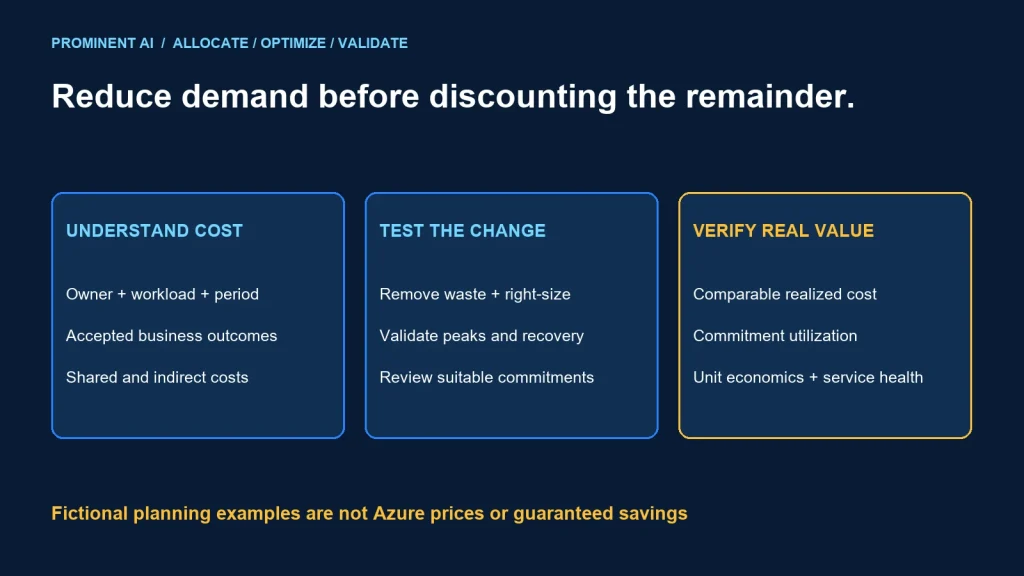
Reduce Azure cost by removing unnecessary demand, right-sizing the remaining workload and only then evaluating suitable commitment discounts. Preserve availability, security and business throughput. A lower bill is not an improvement if the system stops meeting its purpose or simply moves cost into another service.
Key takeaways
- Attribute cost to an accountable workload and a useful business unit.
- Validate utilization across representative peaks and operating cycles.
- Commitment discounts and resource optimization are separate decisions.
- Compare realized, amortized cost and accepted workload outcomes after a change.
Establish a cost baseline before changing resources
Choose one currency, billing basis and period. Separate actual billed cost, amortized commitments and list-price estimates. They answer different questions and should not be mixed into a single unexplained “savings” figure.
Map spending to a workload owner, environment and purpose. Identify shared platform costs and agree on allocation. Include compute, storage, network processing, transfers, backups, diagnostics, security services and support where relevant. A VM-only comparison misses meaningful system cost.
Define a useful denominator: cost per accepted order, successful pipeline run or supported active workload. A falling bill during an outage is not evidence of efficiency. Keep service objectives and business volume alongside the cost trend.
Remove waste and right-size safely
Start with resources that have a confirmed owner and no continuing purpose. Investigate unattached storage, unused environments and duplicated processing, but check retention and recovery obligations before deleting anything.
Azure Advisor’s VM recommendations provide evidence for reviewing underutilized resources. Treat a recommendation as an input to engineering review, not permission to stop a production dependency. Low average CPU can be intentional for burst demand or recovery capacity.
- Examine memory, I/O, network and application latency as well as CPU.
- Include peak periods, end-of-month processing and recovery scenarios.
- Check the candidate size’s limits and feature compatibility.
- Test representative load and rollback before broad rollout.
- Compare the whole application cost after the change.
For nonproduction schedules, confirm working hours, timezones, build dependencies and exception ownership. Stopping compute may leave storage and other costs. An automatic shutdown that interrupts a long-running test can create more waste through retries.
Consider workload design as well. Reducing repeated full scans, unnecessary polling or oversized payloads can avoid demand rather than discount it. Measure correctness and end-to-end throughput after the change.
Reservations vs savings plans
Azure Reservations documentation describes billing discounts applied to matching resource usage. They do not alter runtime behavior. Evaluate eligible resource attributes, scope and expected stable usage against current terms.
Savings-plan documentation describes an hourly spend commitment and eligible usage within its scope. Unused hourly commitment does not roll forward. Confirm the specific product offer, eligibility and current rates rather than assuming every Azure charge is covered.
Right-size first so the commitment reflects the demand you expect to keep. Separate a stable baseline from uncertain growth or a near-term migration. Review utilization and coverage over time; a favorable discount percentage can still produce poor economics when the commitment is underused.
Purchasing a commitment is a commercial decision with an accountable approver. Check the actual agreement, cancellation/exchange conditions, licensing eligibility and any existing benefits. Do not stack discounts arithmetically unless the billing rules permit that combination.
A transparent planning model and downloadable calculator
Download the offline Azure cost planning calculator (ZIP). It contains a Python standard-library script, fictional JSON inputs and a README. It does not connect to Azure, collect credentials, obtain prices or change cloud resources.
Baseline period cost = baseline units × pay-as-you-go rate
                     + other baseline costs

Candidate recurring cost = full period commitment cost
                         + uncovered candidate units × candidate rate
                         + other candidate costs

First-period difference = baseline − candidate − one-time change cost
The model caps covered units at the smaller of candidate usage and the supplied coverage estimate. It includes the full commitment cost even when usage is zero. It is period-level planning arithmetic, not an Azure billing engine: it does not simulate hourly matching, SKU eligibility, benefit stacking, taxes, exchange rates or contract-specific terms. Validate hourly utilization separately before relying on a commitment estimate.
| Input | Fictional value | Meaning |
|---|---|---|
| Baseline units/rate | 1,000 × 1 | Illustrative usage and currency units |
| Candidate units/rate | 700 × 1 | After a hypothetical demand/size change |
| Estimated covered units | 600 | Assumed compatible usage for this simplified model |
| Full commitment cost | 420 | Payable period cost in the scenario |
| Other costs | 200 baseline; 220 candidate | Include additional system costs |
| One-time change cost | 100 | Scenario implementation effort |
For these invented inputs, the baseline is 1,200, candidate recurring cost is 740, recurring difference is 460 and first-period difference after change cost is 360. These are not Azure prices, measured savings or a customer result.
python azure-cost-planner.py sample-azure-cost-inputs.jsonLocal tests verified the example arithmetic, the zero-usage case where commitment remains payable, and rejection of negative, infinite and Boolean numeric inputs. The calculator’s tests establish arithmetic behavior only, not the accuracy of a proposed cloud estimate.
A practical FinOps operating cycle
| Step | Decision | Evidence |
|---|---|---|
| Allocate | Who owns the cost? | Workload and shared-cost mapping |
| Understand | What demand caused the change? | Usage, service outcome and billing basis |
| Prioritize | Which improvement has justified value and risk? | Candidate model and engineering review |
| Implement | How is the change released safely? | Test, approval and rollback plan |
| Validate | Did unit economics improve? | Comparable realized costs and accepted outcomes |
Use budgets and alerts to route review to the owner. Microsoft’s budget documentation states that notifications do not automatically stop consumption. Keep automated actions explicitly approved and aware of the workload’s operational risk.
Review unusual changes and recurring opportunities on a defined cadence. Give each candidate a status, owner, expected effect and verification date. Avoid counting an unimplemented recommendation as realized savings.
Validate savings without hiding trade-offs
Compare equivalent workload periods and explain changes in volume, seasonality and service level. Include migration overlap, retried work, logs and any replacement service. Distinguish one-time credits from repeatable operating improvements.
- Record baseline and candidate configurations and effective dates.
- Use a consistent actual/amortized accounting basis.
- Check accepted throughput, latency, availability and recovery.
- Review commitment utilization and uncovered usage.
- Subtract implementation and ongoing maintenance where relevant.
- State uncertainty instead of promising a universal savings percentage.
Use the landing-zone checklist for ownership and governance. For database changes, use the Azure SQL migration guide to keep performance and recovery requirements in scope.
Common questions
How can enterprises reduce Azure cloud costs?
Attribute costs, remove unnecessary demand, right-size against representative workload evidence and then evaluate suitable commitments. Validate realized cost and service outcomes afterward.
Should reservations be purchased before rightsizing?
Review the optimized demand first so a commitment does not lock in assumptions based on avoidable usage.
Does a low average CPU prove a VM can be reduced?
No. Check memory, I/O, peaks, feature limits and recovery responsibilities before testing a smaller configuration.
Is the calculator an Azure quote?
No. It is offline period-level planning arithmetic with fictional sample inputs. Supply reviewed estimates and validate actual hourly billing rules separately.
Do budget alerts impose a hard spending cap?
No. They notify owners; any operational response needs an explicit design and approval.
Make cloud efficiency measurable
Bring workload demand, cost allocation and candidate changes to a review. Discuss a cloud architecture and cost review to prioritize changes and define how their value will be verified.