
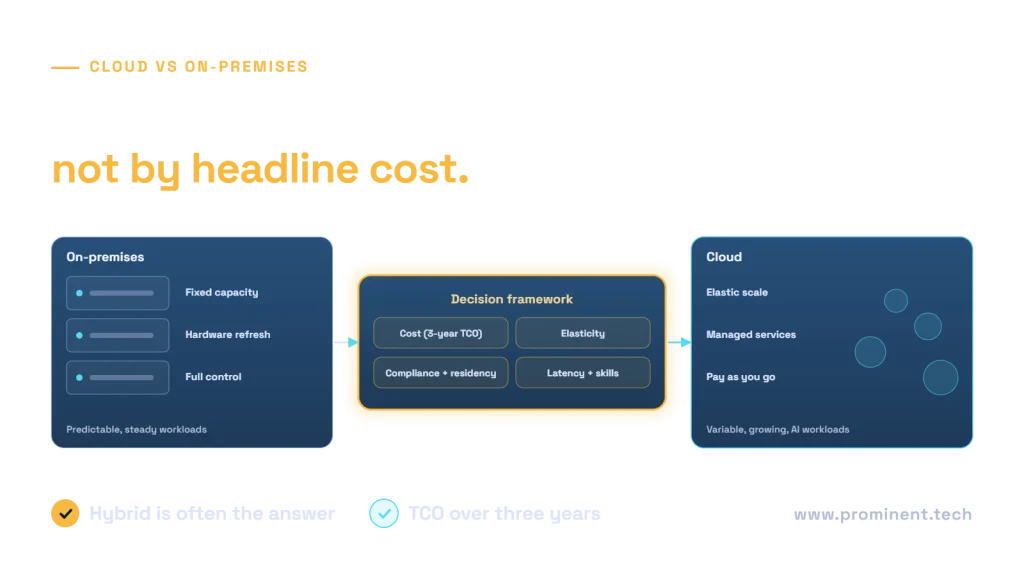
Cloud migration is usually the better choice for workloads with variable or growing demand, a need for managed services such as AI and analytics, or ageing hardware due for replacement; staying on-premises can be the better choice for steady, predictable workloads on hardware with years of life left, systems with strict latency or data-sovereignty constraints, and applications that cannot run efficiently in the cloud without significant rework. Most mid-market organisations end up hybrid. The right answer comes from assessing each workload on three-year total cost of ownership, elasticity, compliance, latency, skills and strategic value, not from a single company-wide decision. This framework shows how.
Key takeaways
- Decide per workload, not per company. A hybrid estate is a normal, deliberate outcome.
- Compare three-year total cost of ownership, including hardware refresh, facilities, licences, staff time and downtime risk.
- Rehosting without optimisation often costs more in the cloud than on-premises. Plan to right-size and use managed services.
- Compliance does not automatically mean on-premises; many regulated workloads run in approved cloud regions with the right controls.
- AI and advanced analytics strongly favour cloud access, even if core systems stay on-premises.
Cloud migration vs on-premises at a glance
| Factor | Cloud | On-premises |
|---|---|---|
| Cost model | Operating expense; pay for what you use; can be optimised continuously | Capital expense; hardware refresh every few years; cheaper once paid for if fully used |
| Elasticity | Scale up and down in minutes | Fixed capacity sized for peak demand |
| Speed of change | New environments and services on demand | Procurement and installation lead times |
| Managed services | Databases, AI, analytics, backup and security as services | Built and run by your own team |
| Control | Shared responsibility with the provider | Full control of hardware and network |
| Compliance | Provider certifications plus your controls; region choice | Your own controls and audits for everything |
| Latency | Depends on region and connectivity | Lowest for local users and equipment |
| Skills | Cloud architecture, FinOps, security | Infrastructure, hardware, data centre operations |
A cloud vs on-premises decision framework for each workload
Score each workload on six criteria from 1 (favours on-premises) to 5 (favours cloud), then weight them by what matters to your business:
- Three-year TCO. Which option costs less over three years once everything is counted?
- Demand variability. Does usage spike, grow quickly or vary by season?
- Compliance and residency. Can the workload’s regulatory needs be met in an approved cloud region?
- Latency and dependencies. Does it need to sit close to factory equipment, other on-premises systems or local users?
- Cloud readiness. Will it run efficiently in the cloud as is, or does it need rework? See legacy modernization cost.
- Strategic value. Would managed AI, analytics or global reach unlock new value?
The Microsoft Cloud Adoption Framework provides a fuller structure for building the business case and governance around these decisions.
Comparing total cost of ownership honestly
On-premises cost is easy to under-estimate because many items sit in different budgets. Include:
- Hardware purchase and refresh, typically every four to six years.
- Data centre space, power, cooling and connectivity.
- Software licences and support contracts.
- Staff time for patching, backups, monitoring and hardware maintenance.
- Disaster recovery capacity, often an idle second site.
- The business cost of outages and slow provisioning.
Cloud cost is easy to over- or under-estimate depending on optimisation. Model it with the provider’s tools, such as the Azure TCO calculator or the AWS Pricing Calculator, then apply right-sizing, reserved capacity and autoscaling. FinOps practices from the FinOps Foundation and our Azure cost optimization guide keep it under control after migration.
When staying on-premises makes sense
- Hardware was recently refreshed and the workload is steady and fully utilised.
- Equipment integration or latency requires local processing, such as manufacturing control systems.
- A regulation or contract explicitly requires on-premises hosting.
- The application would need extensive rework to run efficiently in the cloud, and it is nearing retirement.
- Very large, constant data volumes would make data transfer or storage costs disproportionate.
Even then, plan the next decision point, such as the next hardware refresh, and consider which surrounding services could still benefit from the cloud.
The hybrid middle ground
Hybrid architectures keep some systems on-premises while using the cloud for others, connected securely. Common patterns include:
- Core ERP on-premises, with data replicated to a cloud data platform for analytics and AI. See adding AI to legacy systems.
- Production on-premises, with disaster recovery in the cloud.
- Steady workloads on-premises, with burst capacity in the cloud.
- New customer-facing applications in the cloud, integrated with existing back-office systems through APIs.
Hybrid needs consistent identity, networking, security policies and monitoring across both environments, so plan those as shared services.
Next steps for CTOs
- Inventory workloads with their dependencies, utilisation, hardware age and compliance needs.
- Score each workload with the framework and estimate three-year TCO for both options.
- Group workloads into migrate, modernize, retain and retire.
- Start with a low-risk, high-value wave to build skills and prove the cost model.
- Set up FinOps and governance before the first production move.
When moving databases, see our SQL Server to Azure SQL migration checklist.
Common questions
Is cloud cheaper than on-premises?
It depends on the workload. Variable or growing workloads and those that benefit from managed services are often cheaper in the cloud. Steady, fully used workloads on recently purchased hardware can be cheaper on-premises.
What is the biggest mistake in cloud migration decisions?
Comparing cloud bills with on-premises hardware costs alone, ignoring facilities, staff time, licences, refresh cycles and downtime, or rehosting without optimising afterwards.
Can regulated workloads move to the cloud?
Often yes. Major providers offer compliant regions and certifications, but you remain responsible for configuring and operating controls. See our guide to GDPR-compliant cloud architecture.
Should we move everything at once?
No. Migrate in waves, starting with lower-risk workloads, and keep some systems on-premises where the framework favours them.
How long does a cloud migration take?
Individual applications can move in weeks; a mid-market estate typically takes 6 to 18 months in planned waves.
Make the cloud decision with evidence
Our cloud and DevOps team can assess your workloads, model three-year TCO for each option and plan migration waves that make sense for your business, including the systems that should stay where they are. For privacy controls in the cloud, see GDPR-compliant cloud architecture.