
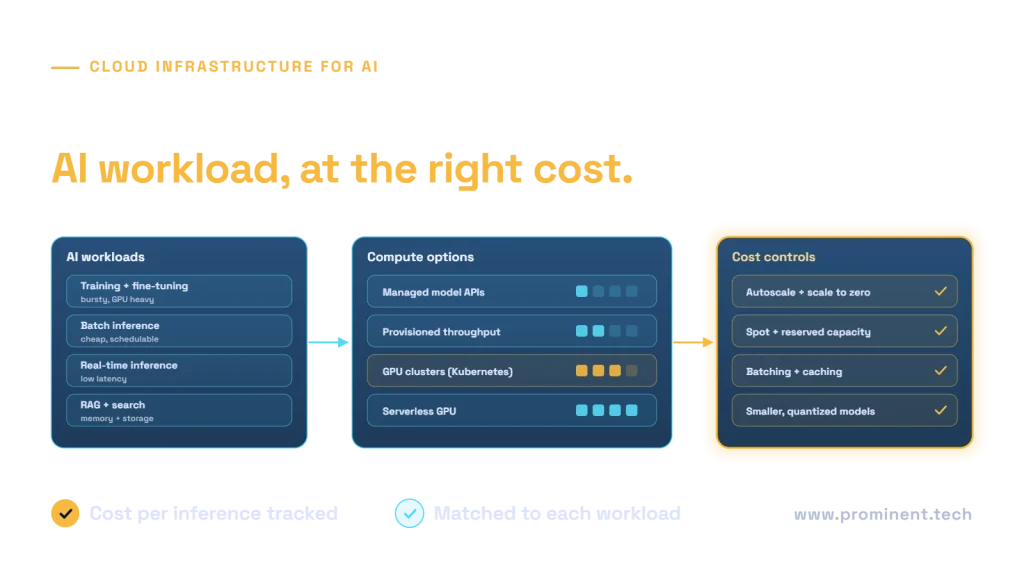
Cloud infrastructure for scalable AI matches each AI workload to the right compute and serving model: managed model APIs or provisioned throughput for most generative AI, GPU clusters on Kubernetes for self-hosted or fine-tuned models, scheduled batch capacity for offline inference, and serverless or autoscaling GPU for spiky demand. Around that sit fast storage and vector search for retrieval, networking that keeps data close to compute, MLOps pipelines and observability. Cost control comes from autoscaling and scale-to-zero, spot and reserved capacity, batching and caching, and using the smallest model that meets the quality bar. This guide explains each choice; for a broader introduction, see how cloud computing powers scalable AI.
Key takeaways
- Different AI workloads need different infrastructure; do not size everything for real-time GPU inference.
- Managed model APIs remove most infrastructure work for generative AI; self-hosting pays off at high, steady volume or for custom models.
- GPU capacity is scarce and expensive: plan quotas, reservations and fallbacks early.
- Inference, not training, usually dominates long-run AI infrastructure cost.
- Track cost per inference and per task alongside latency and quality.
AI workload types and their infrastructure needs
| Workload | Pattern | Infrastructure priority |
|---|---|---|
| Training and fine-tuning | Bursty, long-running, GPU-heavy | GPU availability, fast storage, checkpointing |
| Batch inference | Large volumes, flexible timing | Cheapest compute, scheduling, throughput |
| Real-time inference | Spiky, latency-sensitive | Autoscaling, low latency, warm capacity |
| Retrieval (RAG) and search | Read-heavy, memory-intensive | Vector search, caching, data locality |
| Agents | Multi-step, long-running tasks | Queues, orchestration, model quotas |
Choosing compute for AI workloads
- Managed model APIs are the default for generative AI: no GPUs to manage, pay per token.
- Provisioned throughput reserves model capacity for predictable latency at steady volume; see Azure OpenAI provisioned throughput.
- GPU clusters on Kubernetes suit self-hosted open models, fine-tuned models and custom ML at scale. Review the cloud’s GPU virtual machine families for memory and interconnect.
- Serverless GPU and scale-to-zero platforms suit intermittent workloads.
- CPU inference remains right for many classical ML and small models.
Choosing between hosted and self-hosted models also depends on data, control and cost; see small vs large language models and fine-tuning with LoRA and QLoRA.
A reference cloud architecture for scalable AI
Build on a governed foundation with networking, identity and policy in place; see the Azure landing zone checklist. Keep data stores, vector indexes and compute in the same region to reduce latency and egress.
Serving models at scale
- Inference servers such as vLLM or NVIDIA Triton provide continuous batching and efficient GPU use for self-hosted models.
- Autoscaling on queue depth or request rate, for example with KEDA; see Kubernetes autoscaling explained.
- A model gateway for quotas, routing and fallback across deployments; see multi-agent systems at scale.
- Warm capacity for latency-sensitive endpoints; scale-to-zero for the rest.
Controlling AI infrastructure cost
| Lever | How it saves |
|---|---|
| Right-size models | Smaller or quantized models need less GPU memory and compute |
| Batching and caching | More requests per GPU; repeated answers served from cache |
| Autoscaling and scale to zero | Pay only when there is work |
| Spot capacity for training and batch | Large discounts for interruptible work with checkpointing |
| Reservations for steady load | Lower unit price for predictable capacity |
| Routing by difficulty | Cheap models for simple requests, capable models for hard ones |
Practical techniques are in LLM inference cost optimization and the Azure cost optimization guide.
Operating AI infrastructure
- Monitor GPU utilisation, latency, throughput, errors and cost per inference.
- Automate deployment of models and infrastructure; see MLOps vs DevOps.
- Plan quotas and capacity with your provider ahead of launches.
- Keep fallbacks: alternate regions, deployments or smaller models.
- Secure model endpoints with private networking, identity and rate limits.
Common questions
What cloud infrastructure does AI need?
It depends on the workload: managed model APIs or provisioned throughput for most generative AI, GPU clusters for self-hosted models and training, batch compute for offline inference, plus vector search, storage, networking and MLOps.
Should we self-host models or use managed APIs?
Managed APIs are simplest and usually cheapest at low to medium volume. Self-hosting can pay off at high steady volume, for custom models or where data must stay in your environment.
What drives AI infrastructure cost most?
Inference volume and model size usually dominate over time, followed by GPU capacity left idle. Training costs are significant but episodic.
How do we scale AI inference?
Use autoscaling on request or queue metrics, efficient inference servers with batching, caching and a gateway that routes across deployments.
How do we get GPU capacity?
Request quotas early, consider reservations for steady workloads, use spot capacity for interruptible jobs and keep alternative regions or SKUs as fallbacks.
Design AI infrastructure that scales economically
Share your AI workloads, volumes and latency needs. Our cloud AI integration and cloud and DevOps teams will design the compute, serving and cost controls for each workload.