
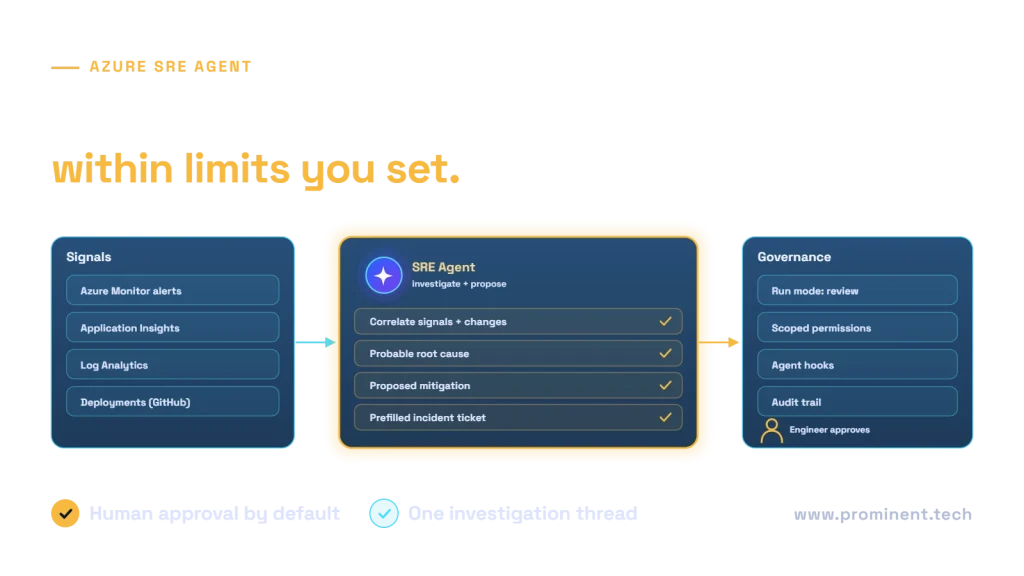
Azure SRE Agent is Microsoft’s AI-powered operations assistant for Azure environments: it connects to your Azure resources, monitoring tools, incident platforms and source code, investigates incidents by correlating signals and recent changes, identifies probable causes, and suggests mitigations or, when you configure it to, runs them within the permissions, run modes and policies you set. It can also run scheduled operational checks and answer natural-language questions about your environment. Used well, it shortens triage and root cause analysis; used carelessly, it could act on production without enough oversight. This guide explains how it works, based on Microsoft’s official documentation, and how to adopt it safely. Features evolve quickly, so check the current documentation before you plan.
Key takeaways
- The agent gathers context from alerts, telemetry, deployments and tickets into one investigation.
- Whether it acts automatically or waits for approval depends on the run mode you configure.
- It can be extended with skills, custom agents, Python tools, MCP connectors and hooks.
- Start in review mode with narrow permissions and expand only after it proves reliable.
- Good monitoring, runbooks and deployment history make the agent far more useful.
What Azure SRE Agent does
Microsoft describes three patterns of work:
| Pattern | What happens |
|---|---|
| Automate incidents | On an alert, the agent queries monitoring tools, correlates signals, identifies a probable root cause and proposes mitigations |
| Automate scheduled workflows | Proactive health checks, compliance sweeps and routine tasks, with results sent to your incident platform or channel |
| Investigate and advise | Natural-language questions such as “what changed in the last hour?”, answered with cited sources |
How Azure SRE Agent works
According to Microsoft’s documentation, the agent connects to Azure Monitor, Application Insights and Log Analytics, incident platforms such as ServiceNow and PagerDuty, and code repositories such as GitHub and Azure DevOps. It can be extended through five points:
- Skills: discrete capabilities such as runbooks and Azure CLI scripts.
- Custom agents: purpose-built agents for specific operational domains.
- Python tools: custom logic and API integrations.
- MCP servers: connectors to other observability platforms or custom tools via the Model Context Protocol; see MCP explained.
- Agent hooks: event-triggered automations that can enforce policies or integrate approval workflows.
The Azure SRE Agent documentation covers setup, connectors, roles, auditing and pricing.
An incident walkthrough
Microsoft’s own example describes a memory-related incident: the agent finds a memory trend in Application Insights that began before the alert, links it to a recent deployment, proposes a mitigation such as restarting a pod or adjusting autoscaling, and prefills an incident ticket. In review mode, an administrator approves the action. For autoscaling context, see Kubernetes autoscaling explained.
Governance and safety
- Permissions: grant only the Azure roles the agent needs, scoped to specific resources.
- Run modes: start with review mode so a person approves actions.
- Hooks: add checkpoints that allow or block actions, for example outside change windows.
- Audit: review agent actions regularly through its audit capabilities.
- Runbooks: encode approved procedures as skills rather than letting the agent improvise.
These mirror the controls we recommend for any agent; see AI agent security threats and human-in-the-loop agents.
Adopting Azure SRE Agent step by step
- Start read-only: use it to investigate and advise on a non-critical environment.
- Connect telemetry and code: monitoring, logs, deployments and your incident platform.
- Add runbooks as skills for your most common incidents.
- Enable review mode for mitigations on selected services.
- Measure: time to triage, time to mitigate, accuracy of root cause suggestions.
- Expand carefully: allow automatic actions only for low-risk, well-tested mitigations.
Getting your environment ready
- Consistent resource tagging and naming.
- Meaningful alerts with clear thresholds, not noise.
- Application telemetry with traces and dependencies; see observability for AI agents.
- Deployment history linked to code changes.
- Documented runbooks and service ownership.
- A governed foundation; see the Azure landing zone checklist.
The service-level thinking in the Google SRE book still applies: define what reliability means before automating responses.
Common questions
What is Azure SRE Agent?
An AI-powered operations assistant from Microsoft that investigates incidents across Azure resources, monitoring, incident platforms and code, identifies probable causes and proposes or, when configured, runs mitigations.
Can Azure SRE Agent change production automatically?
Only if you configure it to. Run modes, permissions and hooks control whether actions need human approval.
Which tools does it integrate with?
Microsoft documents integrations with Azure Monitor, Application Insights, Log Analytics, incident platforms such as ServiceNow and PagerDuty, and repositories such as GitHub and Azure DevOps, plus MCP connectors for other tools.
Does it replace SRE engineers?
No. It reduces investigation and routine toil; engineers still own reliability, approve risky actions and improve systems.
How should we start?
In a non-critical environment, read-only or in review mode, with good telemetry and runbooks connected, then measure results before expanding.
Prepare your Azure operations for AI assistance
Our cloud and DevOps team can prepare your monitoring, runbooks and permissions, pilot Azure SRE Agent safely and measure its impact on incident response.