
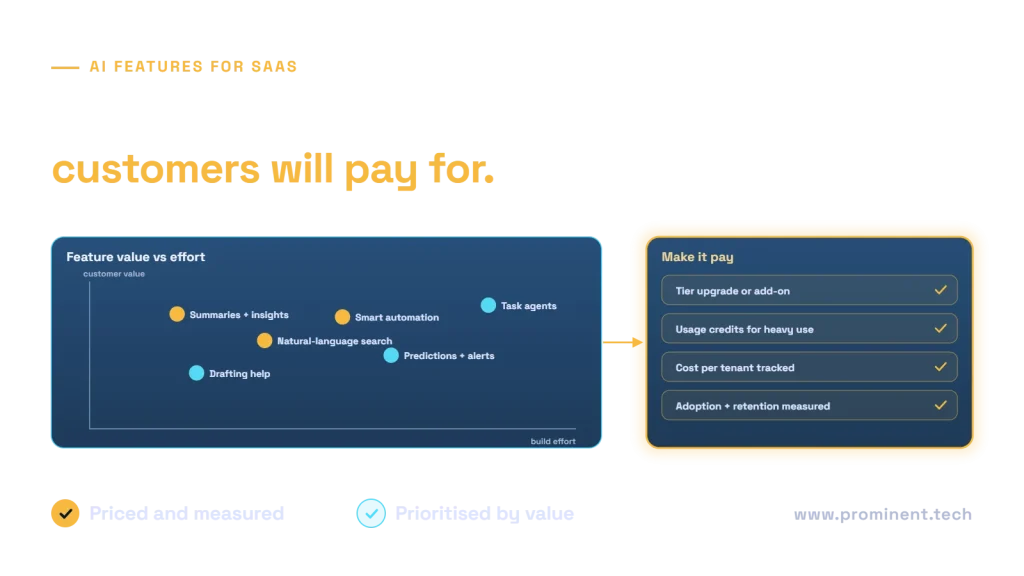
The AI features SaaS customers most consistently value, and pay for, are ones that save time inside work they already do in your product: summaries and insights over their own data, natural-language search and questions, smart automation of repetitive steps, drafting help, predictions and alerts, and, increasingly, agents that complete well-defined tasks. Features that feel like a separate chatbot bolted onto the product rarely drive revenue. Prioritise by customer value, frequency of use, feasibility with your data and the trust the feature needs, then price AI as part of a higher tier, an add-on or usage credits, and track cost per tenant so margins stay healthy.
Key takeaways
- Embed AI in existing workflows. Customers pay for outcomes inside the product, not for access to a model.
- Start with high-value, low-effort features such as summaries and natural-language search.
- Price AI deliberately: tier upgrade, add-on or usage credits, with limits that protect margins.
- Track model cost per tenant and per feature from day one.
- Measure adoption, retention and expansion revenue, not just usage counts.
Six AI features SaaS customers value
| Feature | Example | Why customers value it | Typical effort |
|---|---|---|---|
| Summaries and insights | Summarise a customer’s account activity or a long ticket thread | Saves reading time every day | Low |
| Natural-language search and Q&A | “Which invoices are overdue for more than 60 days?” | Answers without learning filters or reports | Low to medium |
| Smart automation | Auto-categorise, route and tag incoming items | Removes repetitive manual steps | Medium |
| Drafting help | Draft replies, descriptions or reports in the product | Faster first drafts in context | Low |
| Predictions and alerts | Churn risk, late payment risk, anomaly alerts | Acts before problems happen | Medium to high |
| Task agents | Agent that prepares a renewal quote across modules | Completes multi-step work | High |
How to prioritise AI features for your SaaS product
Score each candidate feature on four questions:
- Value. How much time or money does it save, or how much revenue does it create for the customer?
- Frequency. How often would a typical user rely on it? Daily features build habit and retention.
- Feasibility. Do you have the data, permissions and integration points it needs? See AI-ready data.
- Trust required. Can users easily check the output? Features with reviewable outputs ship sooner than those that act automatically.
Validate the top candidates with customers before building, ideally with a clickable prototype and a handful of real accounts.
Pricing and packaging AI features
| Model | How it works | Best when |
|---|---|---|
| Included in all plans | AI is part of the core product | Low-cost features that drive adoption and retention |
| Higher tier | AI features unlock in premium plans | Features with clear value for power users |
| Add-on | Separately priced AI package | High-value features used by some customers |
| Usage credits | Allowance of AI actions, with top-ups | Costly features with very uneven use |
Whatever the model, set fair-use limits, show customers their usage and keep model costs well below the revenue each feature earns. Techniques in LLM inference cost optimization help protect margins.
Multi-tenant AI architecture for SaaS
- Tenant isolation. Retrieval and prompts must only ever include the current tenant’s data. See multi-tenant SaaS architecture.
- User permissions. Within a tenant, AI answers respect each user’s role.
- Quotas and cost tracking. Meter usage per tenant and feature to support pricing and protect margins.
- Guardrails. Filter inputs and outputs and defend against prompt injection from customer content, using the OWASP Top 10 for LLM Applications.
- Feature flags. Roll features out by plan, tenant or beta group. See adding AI to existing software.
- Data terms. Be explicit in your terms about whether customer data is used to improve models.
Measuring the return on AI features
- Adoption. Share of active users using the feature weekly.
- Task impact. Time saved or tasks completed per user.
- Retention. Churn among accounts using AI features versus those not using them.
- Expansion. Upgrades and add-on revenue attributed to AI.
- Gross margin. Feature revenue minus model and infrastructure cost per tenant.
- Quality. Accept, edit and reject rates for AI outputs.
Mistakes to avoid with SaaS AI features
- A generic chatbot that does not know the product or the customer’s data.
- Shipping without per-tenant cost tracking, then discovering negative margins.
- Automatic actions before users trust the outputs.
- Leaking data between tenants through shared indexes or caches.
- Measuring clicks instead of outcomes.
Common questions
Which AI features should a SaaS product build first?
Usually summaries, natural-language search and drafting help inside existing workflows. They are relatively quick to build, easy to verify and used often.
Should AI features be free or paid?
Low-cost features that improve retention are often included. Higher-value or costly features fit premium tiers, add-ons or usage credits with fair-use limits.
How do we stop AI features from hurting margins?
Meter cost per tenant and feature, route simple requests to cheaper models, cache repeated results and set usage limits by plan.
How do we keep customer data separate in AI features?
Filter retrieval by tenant and user permissions on every request, avoid shared caches across tenants and test isolation as part of the release process.
Should we build AI features or integrate a third-party product?
Build features that differentiate your product; integrate commodity capabilities. See our build vs buy AI framework.
Add AI features your customers will pay for
Share your product, your customers’ biggest time sinks and your data model. Our software development and generative AI integration teams will help you prioritise, build and price the first AI features. See also build vs buy AI.