
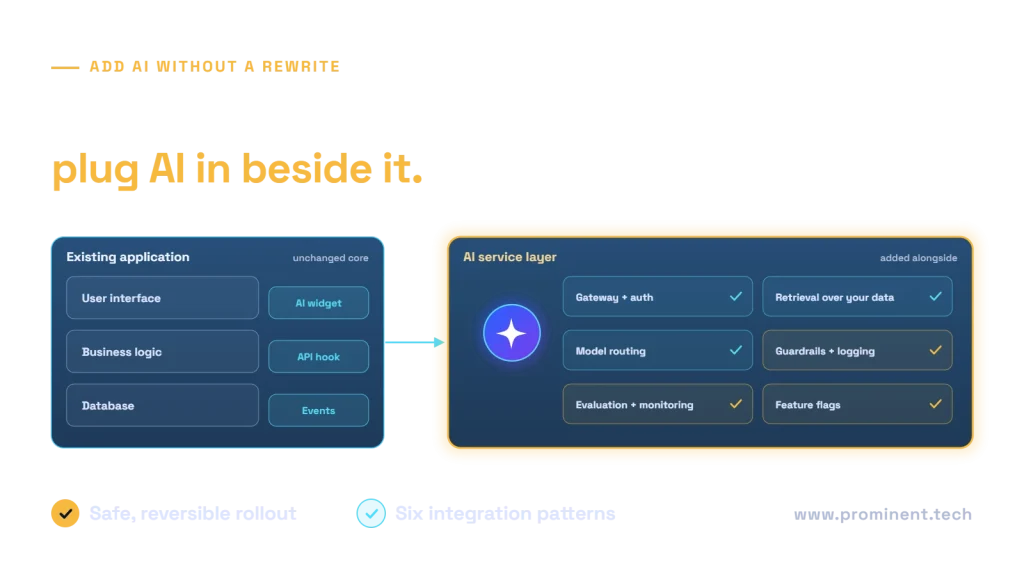
You can add AI to existing software without a rewrite by placing a separate AI service layer beside the application and connecting it through the interfaces the application already has: an embedded UI assistant, an API call from existing code, event-driven processing, scheduled batch enrichment, a gateway facade or agent tools built on existing APIs. The core application keeps running unchanged while AI features are introduced behind feature flags, measured with real users and expanded or rolled back safely. This guide explains the six integration patterns, when each fits and the architecture that keeps them secure and maintainable.
Key takeaways
- A rewrite is rarely needed to add AI. Most applications already expose the APIs, events or data access an AI layer can use.
- Keep AI logic in its own service layer so models, prompts and providers can change without touching the core application.
- Choose the integration pattern by two questions: does the user need the result in real time, and how much existing code can you change?
- Release AI features behind feature flags, measure them and keep a fallback to the existing behaviour.
- Security, permissions and logging belong in the shared AI layer, not in each feature.
Why a rewrite is usually the wrong first step
Rewriting a working application to “make it AI-native” delays value by months and puts stable business logic at risk. Most AI use cases, such as summarising records, classifying requests, drafting replies, extracting data from documents or answering questions over internal content, only need access to data and a place to show or store the result. An existing application can usually provide both through its current interfaces.
A rewrite becomes worth considering only when the application has no way to expose data or accept results, or when it already needs modernising for other reasons. In that case, see our legacy software modernization approach and monolith to microservices migration patterns.
Six patterns to add AI to existing software
| Pattern | How it works | Typical use | Change to existing code |
|---|---|---|---|
| 1. Embedded assistant | A chat or side panel added to the UI calls the AI layer with the current record as context | Answer questions, summarise a case, draft a reply | Low |
| 2. API call from existing code | Existing business logic calls an AI endpoint and uses the result | Classify a ticket on creation, suggest a product code | Medium |
| 3. Event-driven enrichment | The AI layer listens to events or webhooks and writes results back asynchronously | Extract invoice fields, tag documents, score leads | Low |
| 4. Scheduled batch enrichment | A job processes records overnight and stores AI outputs | Clean product descriptions, summarise case history | Very low |
| 5. Gateway facade | An API gateway or backend-for-frontend adds AI to responses without changing the core service | Smart search, natural-language queries over existing APIs | Low |
| 6. Agent tools on existing APIs | Existing APIs are exposed as controlled tools that an AI agent can call | Multi-step tasks such as preparing an order or updating a case | Low to medium |
1. Embedded assistant
The quickest visible win. A panel inside the existing screen sends the user’s question plus the current record to the AI layer and shows the answer. Because it only reads data, it is low risk. Use the user’s own identity so the assistant never sees more than the user can.
2. API call from existing code
Where AI should influence a business step, such as routing a ticket, the existing code calls an AI endpoint and acts on the response. Keep the call behind an interface with a timeout and a fallback, so the application still works if the AI service is slow or unavailable.
3. Event-driven enrichment
The AI layer subscribes to events, such as “document uploaded” or “order created”, processes them and writes the result back through an API. The user experience is unchanged until the result arrives. This decoupling suits slow or expensive AI work. See webhook vs polling vs event streaming.
4. Scheduled batch enrichment
For data that does not need instant results, a nightly or hourly job reads records, enriches them with AI and stores the outputs in new fields. It needs almost no change to the application and is cheaper because batch processing can use lower-cost model options.
5. Gateway facade
An API gateway or backend-for-frontend sits in front of existing services and adds AI, for example by turning a natural-language question into structured API calls. The core services are untouched, which mirrors the strangler fig idea of growing new capability around an existing system.
6. Agent tools on existing APIs
Existing APIs are wrapped as well-defined tools, often with the Model Context Protocol, so an AI agent can complete multi-step tasks. Each tool enforces permissions and validation, and risky actions wait for human approval. See how to build a secure MCP server for enterprise APIs.
How to choose the right pattern
Two questions narrow the choice quickly. First, does the user need the AI result immediately while they work? Second, how easily can the existing code be changed? Patterns that need no code change, such as events and batch jobs, are the fastest to start. Patterns inside the user’s workflow deliver the most visible value but need more care with latency and fallbacks.
The AI service layer architecture
Whatever pattern you use, put the shared concerns in one AI service layer rather than in each feature:
- Gateway and authentication. One entry point that checks identity, applies quotas and routes requests. Cloud gateways such as Azure API Management’s AI gateway capabilities provide this.
- Retrieval. Permission-aware search over the application’s data and documents.
- Model routing. Send each request to the most suitable and economical model, so providers can change without application changes.
- Guardrails and logging. Input and output checks, plus a record of prompts, responses and tool calls. See LLM guardrails explained.
- Evaluation and monitoring. Automated quality tests and live metrics for accuracy, latency and cost.
A safe rollout plan
- Pick one feature with a measurable outcome, such as minutes saved per ticket.
- Build it behind a feature flag so it can be switched on for a small group and off instantly. Feature toggles are a well-established technique for this.
- Keep the existing path as the fallback whenever the AI service fails or times out.
- Measure against the baseline with real users for a few weeks.
- Expand, adjust or remove based on the results, then reuse the AI layer for the next feature.
Pitfalls when adding AI to existing software
- Calling model APIs directly from many places in the code. It scatters keys, prompts and costs. Route everything through the AI layer.
- Blocking the user on slow AI calls. Use asynchronous patterns or streaming where responses take more than a second or two.
- Using a shared service account for retrieval. It can expose data users should not see. Pass the user’s identity through.
- No fallback. The application must keep working when the AI is unavailable.
- Skipping evaluation. Without a test set, a prompt or model change can quietly reduce quality.
For budgeting these features, see custom AI integration cost.
Common questions
Can we add AI to software without changing the code?
Often yes. Event-driven enrichment, scheduled batch jobs and gateway facades can add AI with little or no change to the application itself.
What is the fastest way to add AI to an existing application?
An embedded read-only assistant or a batch enrichment job, because both need minimal change and carry low risk. They also prove value quickly.
Do we need to move to the cloud first?
Not necessarily. An on-premises application can call a cloud AI service through a secure gateway, subject to your data protection rules. Some use cases can also run models within your own environment.
How do we keep AI features secure?
Centralise authentication, permission-aware retrieval, guardrails and logging in a shared AI layer, and pass each user’s identity through so AI never sees more than the user may.
What if the AI service fails?
Design every AI feature with a timeout and a fallback to the existing behaviour, and release it behind a feature flag so it can be switched off instantly.
Add AI to your application without the risk of a rewrite
Tell us about your application and the task you want AI to help with. Our AI/ML integration services team will recommend the right pattern, build the AI service layer and roll out the first feature behind a flag.