
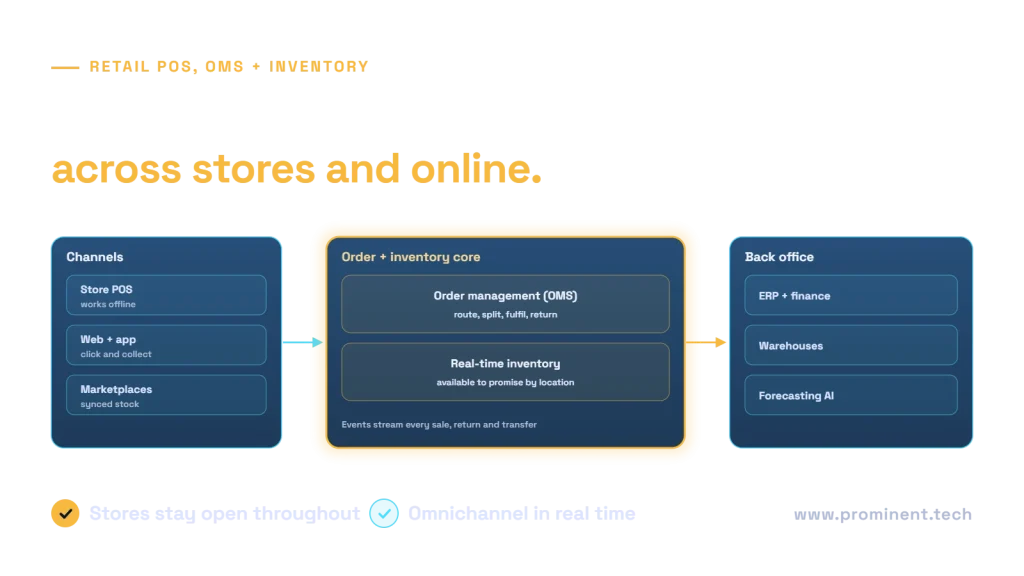
Modernizing retail POS, order management (OMS) and inventory systems means replacing store-by-store servers and overnight stock syncs with a connected platform: cloud-managed POS that keeps working offline, an OMS that routes and fulfils orders across stores, warehouses and online channels, and a real-time inventory service that shows what is available to promise at each location. Because stores must keep trading, the modernization runs in waves: integrate first, pilot in a few stores, roll out by region outside peak seasons, and keep fallback procedures ready. Done well, it enables click-and-collect, ship-from-store and accurate online stock without disrupting the checkout.
Key takeaways
- Real-time inventory is the foundation for every omnichannel promise.
- Put the OMS at the centre of order routing, splitting, fulfilment and returns.
- Design POS to work offline and sync when connectivity returns.
- Roll out in waves with pilot stores, avoiding peak trading periods.
- Keep payment security, including PCI DSS scope, at the centre of POS design.
Why retailers modernize POS, OMS and inventory together
- Customers expect accurate online stock, click-and-collect and easy returns anywhere.
- Overnight batch syncs leave inventory hours out of date, causing oversells and cancellations.
- Store servers and custom POS code are expensive to maintain and slow to change.
- New channels, such as marketplaces and social commerce, need fast integration.
These systems are tightly linked: modernizing one without the others moves the bottleneck rather than removing it.
Target architecture for retail POS, OMS and inventory
An event-driven design publishes every sale, return, receipt and transfer as an event, so inventory, OMS, ERP and analytics stay in step. The event-driven architecture style explains the pattern, and our guide to integration architectures compares options.
Getting real-time inventory right
| Concept | What it means |
|---|---|
| On hand | Physical stock at a location |
| Allocated | Reserved for confirmed orders |
| Safety stock | Buffer held back to avoid overselling |
| Available to promise | What can be sold now, per location and channel |
| In transit | Stock moving between locations, with expected dates |
Accuracy depends on store processes as much as software: receiving, cycle counts and returns must be recorded promptly. Idempotent event handling prevents double counting when messages are retried; see idempotency in distributed systems.
Modernizing without disrupting stores
- Integrate first. Connect legacy POS to the new inventory and OMS through adapters before replacing POS.
- Pilot stores. Choose stores that represent different formats and volumes.
- Offline first. Test outages deliberately: POS must sell, take payments where permitted, and sync later.
- Avoid peaks. Freeze changes before major trading periods.
- Train and support. Store staff need simple training and on-site or remote support during cutover.
- Keep fallbacks. Documented procedures for store teams if systems are unavailable.
The same principles as zero-downtime migration apply: gradual cutover, monitoring and a rollback path.
Payments and security
POS systems handle cardholder data, so design to reduce scope under PCI DSS, for example with validated point-to-point encryption and tokenisation so card data never reaches store systems in clear text. Manage devices centrally, patch promptly and segment store networks.
Data and AI opportunities
- Demand forecasting by store and product. See AI demand forecasting.
- Smart replenishment and allocation using real-time stock and forecasts.
- Fulfilment optimisation choosing the best location to fulfil each order.
- Product discovery online with accurate availability. See vector search for e-commerce.
Common questions
Should we modernize POS or OMS first?
Usually inventory and OMS first, integrated with existing POS through adapters. This delivers omnichannel value early and makes POS replacement lower risk.
How do cloud POS systems handle internet outages?
Good designs work offline, storing transactions locally and syncing when connectivity returns, with clear rules for payments and returns during outages.
How long does retail systems modernization take?
Typically 12 to 24 months for a multi-store retailer, in waves: integration, pilot stores, then regional rollouts outside peak seasons.
How do we keep inventory accurate in real time?
Publish every stock movement as an event, process events idempotently, and keep store processes such as receiving and cycle counts disciplined.
Can we keep our ERP?
Often yes. The OMS and inventory service integrate with the ERP for finance, purchasing and master data.
Modernize your retail systems without closing a till
Share your store estate, channels and current systems. Our retail and e-commerce and integration teams will design the target architecture and a rollout plan that keeps stores trading.