
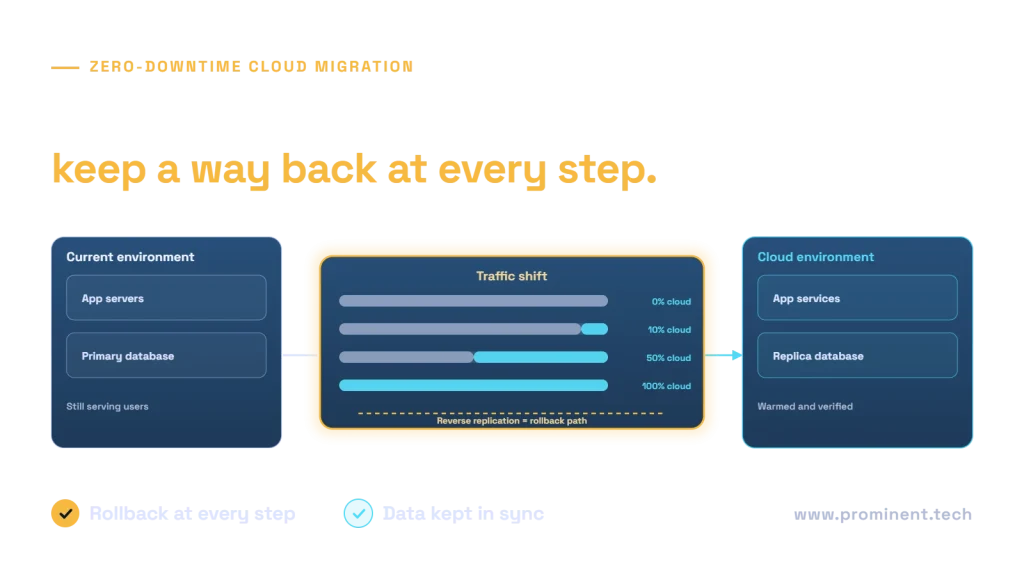
A zero-downtime cloud migration moves a live, high-traffic application to the cloud without a maintenance window by running the old and new environments side by side: data is replicated continuously into the cloud, the new environment is tested with real traffic patterns, user traffic is shifted gradually, and reverse replication keeps a rollback path open until the old environment is retired. The hardest parts are usually the database, session state and external integrations, not the application servers. This playbook covers the end-to-end process, the techniques for each layer and the checks that make each step reversible.
Key takeaways
- Plan around the database: continuous replication and a short, rehearsed final sync are the core of zero downtime.
- Make the application stateless first; sessions and files must work in both environments.
- Shift traffic gradually with weighted routing, watching error rates and latency at each step.
- Keep reverse replication running so you can return to the old environment quickly.
- Rehearse the cutover in a production-like environment before the real one.
The zero-downtime cloud migration playbook
Start by agreeing what “zero downtime” means: typically no planned outage and service-level objectives for error rate and latency that must hold throughout. The Google SRE book explains how to define and monitor such objectives. Build the target environment with infrastructure as code on a well-governed foundation; see our Azure landing zone checklist.
Migrating the database without downtime
| Technique | How it works | Watch out for |
|---|---|---|
| Online migration with change data capture | Initial copy, then continuous replication of changes until cutover | Replication lag; unsupported data types |
| Native replication | Database engine replicas in the cloud kept in sync | Version and network compatibility |
| Short read-only window | Writes paused for seconds to minutes during the final sync | Must be agreed with the business; not strictly zero |
| Reverse replication | After cutover, changes flow back to the old database | Needed for a real rollback option |
Managed services such as Azure Database Migration Service and AWS Database Migration Service support online migrations with ongoing replication. For SQL Server specifics, see our SQL Server to Azure SQL migration checklist. Avoid dual writes from the application unless they are idempotent and reconciled; see idempotency in distributed systems.
Preparing the application for zero downtime
- Externalise state. Move sessions to a shared store or use tokens, and move uploaded files to object storage reachable from both environments.
- Configuration. Make connection strings and endpoints configurable per environment.
- Caches. Warm caches in the new environment before it takes traffic.
- Integrations. Allow-list new IP addresses with partners and confirm firewall rules in advance.
- Scheduled jobs. Ensure jobs run in only one environment at a time to avoid duplicates.
Shifting traffic safely
Lower DNS time-to-live values days before the move, then use weighted routing in a global load balancer or traffic manager to send a small percentage of users to the cloud. See the Azure Traffic Manager routing methods. Increase the share step by step while watching error rates, latency and business metrics. The same principles underpin blue-green and canary deployments.
Rollback planning
- Define rollback triggers in advance, such as error rate or latency thresholds.
- Keep the old environment running and in sync through reverse replication for an agreed period.
- Practise the rollback during rehearsals, not just the cutover.
- Decommission the old environment only after a stable period and a final data reconciliation.
Zero-downtime cutover checklist
| Check | Done when |
|---|---|
| Replication healthy | Lag within threshold for an agreed period |
| Data reconciled | Row counts and checksums match on key tables |
| Performance tested | Load tests at peak traffic passed in the cloud |
| Integrations verified | Partners and internal systems reach the new endpoints |
| Monitoring live | Dashboards and alerts for both environments |
| Rollback ready | Reverse replication running; rollback rehearsed |
| People ready | Cutover team, communications and support rota agreed |
Deciding which workloads to move at all? See cloud migration vs on-premises.
Common questions
Is truly zero-downtime cloud migration possible?
Yes for most web applications, using continuous data replication, stateless application tiers and gradual traffic shifting. Some systems still need a brief read-only window for the final sync.
What is the hardest part of a zero-downtime migration?
Usually the database: keeping data consistent while both environments are live, then cutting over and keeping a rollback path.
How long does a zero-downtime migration take?
Planning, building the target and rehearsals typically take weeks to a few months; the traffic shift itself can happen over hours or days.
How do we roll back after cutover?
Keep the old environment running with reverse replication, then switch routing back if agreed thresholds are breached.
Do we need to change the application?
Often small changes: externalising session state and files, making endpoints configurable and ensuring scheduled jobs run in one place.
Plan your zero-downtime migration
Share your application’s architecture, traffic profile and data volumes. Our cloud and DevOps team will design the replication, traffic shift and rollback plan, and run rehearsals before the real cutover.