
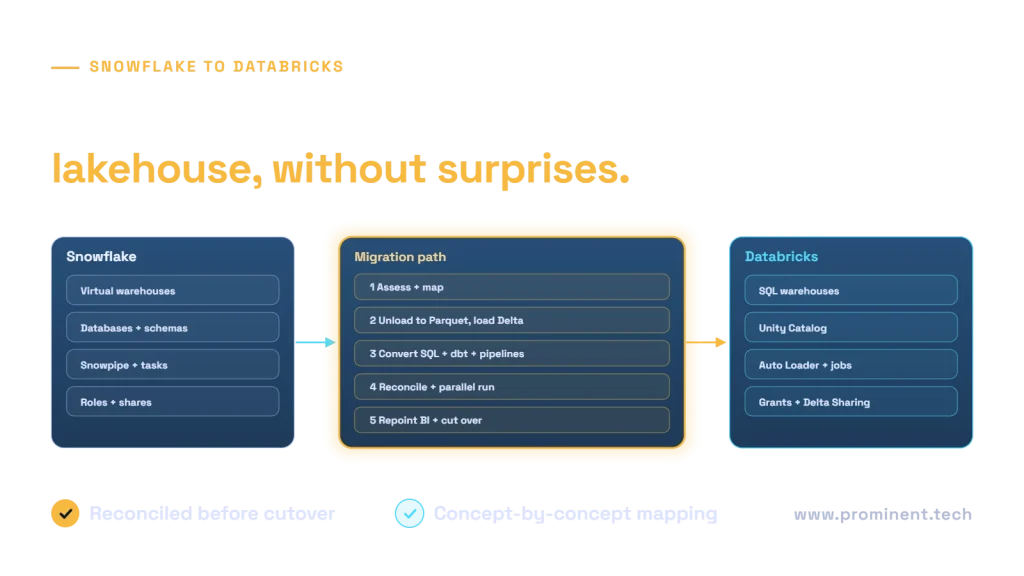
A Snowflake to Databricks migration moves tables, transformations, pipelines, security and BI workloads from Snowflake’s warehouse to the Databricks lakehouse: data is unloaded to cloud storage in open formats and loaded into Delta tables governed by Unity Catalog, SQL and dbt models are converted, ingestion and scheduling move to Auto Loader and Databricks jobs, and results are reconciled through a parallel run before dashboards are repointed. Organisations usually migrate to unify analytics, data engineering and machine learning on one platform with open storage. Cost outcomes depend on workload patterns, so model them before committing. This guide covers the concept mapping, steps, cost considerations and risks.
Key takeaways
- Start with an inventory: tables, views, procedures, tasks, streams, dbt models, shares, roles and BI connections.
- Map each Snowflake concept to its Databricks equivalent before moving anything.
- Migrate in waves by domain, with automated reconciliation and a parallel run.
- Model cost for your actual workloads; neither platform is cheaper for every pattern.
- Plan governance in Unity Catalog from the start, not after the data lands.
Why organisations migrate from Snowflake to Databricks
- One platform for SQL analytics, data engineering, streaming and machine learning.
- Open table formats in your own cloud storage, reducing lock-in.
- Native support for unstructured data and AI workloads.
- Consolidating tools and skills after acquisitions or platform reviews.
Migration is a significant project; if Snowflake meets your needs, a hybrid with data sharing may be enough. For platform comparisons in the Microsoft ecosystem, see Microsoft Fabric vs Azure Databricks.
Snowflake to Databricks concept mapping
| Snowflake | Databricks equivalent | Notes |
|---|---|---|
| Virtual warehouse | SQL warehouse or job compute | Size by workload; use serverless where suitable |
| Database and schema | Unity Catalog catalog and schema | Design catalog structure by domain and environment |
| Tables | Delta tables | Open format in your storage |
| Snowpipe | Auto Loader | Incremental file ingestion |
| Streams and tasks | Declarative pipelines and jobs | Rebuild change processing and schedules |
| Stored procedures, Snowpark | Notebooks, Python or SQL jobs | Code conversion required |
| Time Travel | Delta time travel | Set retention to match needs |
| Roles and grants | Unity Catalog grants | Map roles to groups and privileges |
| Secure data sharing | Delta Sharing | Open protocol for external sharing |
Snowflake to Databricks migration steps
1. Assess and plan
Inventory objects, query history, data volumes, dependencies and consumers. Group them into migration waves by business domain.
2. Design the target
Define Unity Catalog structure, storage layout, layered architecture (see medallion architecture), compute policies and access model.
3. Move the data
Unload tables to cloud storage in Parquet with Snowflake’s COPY INTO location, then load into Delta. For ongoing changes during the transition, run incremental loads.
4. Convert code and pipelines
Translate SQL dialect differences, switch dbt projects to the Databricks adapter, and rebuild tasks, streams and procedures as jobs and pipelines.
5. Validate
Reconcile row counts, aggregates and checksums, and compare key reports between platforms. Automate the checks; see data quality frameworks.
6. Cut over
Run both platforms in parallel, repoint BI and applications wave by wave, then decommission Snowflake objects.
Cost considerations
Snowflake bills credits for compute and charges for storage; Databricks bills compute usage in DBUs plus your cloud infrastructure and storage. Which is cheaper depends on concurrency, query patterns, data volumes and how well compute is right-sized and auto-suspended. Model your top workloads on both before deciding, and include one-off migration effort and temporary dual running.
Risks and mitigations
- SQL behaviour differences: test numeric precision, time zones, null handling and case sensitivity.
- Hidden consumers: use query and access history to find every report and integration.
- Security gaps: map roles carefully and test with real users before cutover.
- Performance regressions: tune table layout, clustering and compute for critical queries.
- Cost surprises: set compute policies, auto-termination and budgets from day one.
Moving from a traditional warehouse instead? See data warehouse to data lake migration.
Common questions
How long does a Snowflake to Databricks migration take?
For a mid-size estate, typically three to nine months in waves, depending on object counts, code complexity and the number of consuming reports.
Is Databricks cheaper than Snowflake?
It depends on workloads. Some patterns cost less on one platform and more on the other. Model your main workloads on both, including migration and dual-running costs.
Can we use dbt on Databricks?
Yes. dbt supports Databricks through an adapter, though some SQL and macros may need changes.
How do we migrate Snowflake data to Databricks?
Unload tables to cloud storage in Parquet, load them into Delta tables, then keep them in sync with incremental loads until cutover.
What happens to Snowflake data sharing?
Recreate shares with Delta Sharing or other access methods, and coordinate with external consumers in advance.
Plan your Snowflake to Databricks migration
Share your Snowflake estate and goals. Our data engineering team will assess objects and workloads, model cost, and plan a wave-based migration with automated reconciliation.