
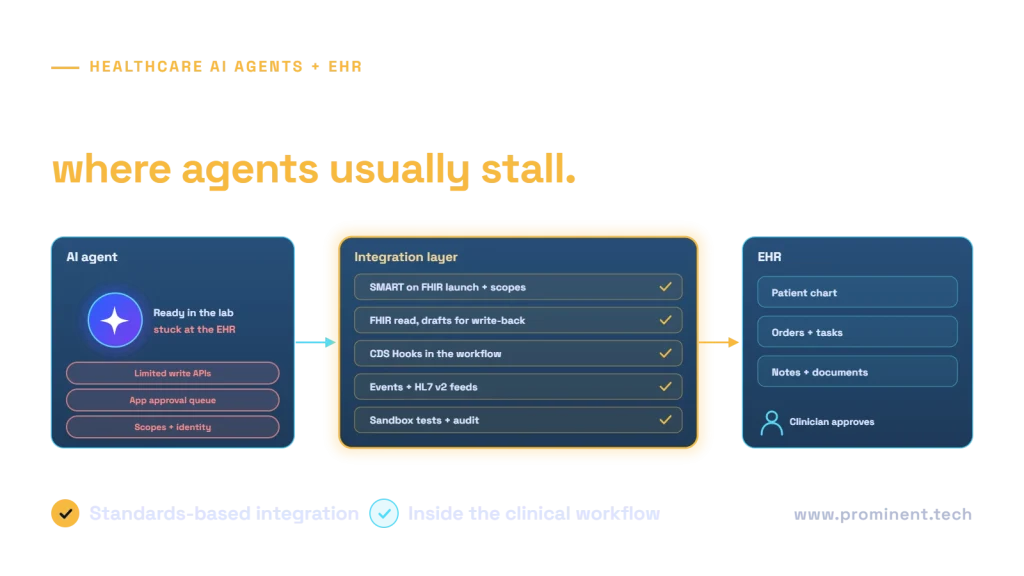
Healthcare AI agents usually stall at EHR integration because the electronic health record limits what outside applications can read and especially write, requires vendor approval and specific authorisation scopes, represents clinical data in variable ways, and sits inside clinical workflows that an agent must fit into rather than replace. Teams that succeed plan the integration first: they launch inside the EHR with SMART on FHIR, read through FHIR APIs, write back as drafts or tasks a clinician approves, use CDS Hooks and event feeds to appear at the right moment, and start the vendor approval process early. This guide explains the common blockers and how to unblock each one.
Key takeaways
- Design the EHR integration before the agent. It sets the limits on what the agent can do.
- Read access through FHIR is widely available; write access is narrower and often needs vendor approval.
- Write back as drafts, tasks or notes for clinician sign-off rather than direct changes.
- Meet clinicians where they work: launch inside the EHR and surface suggestions at the moment of need.
- Start vendor approvals, security reviews and sandbox access at the same time as development.
Seven reasons healthcare AI agents stall at EHR integration
| Blocker | What happens | How to unblock it |
|---|---|---|
| Limited write APIs | The agent can read the chart but cannot update it | Write drafts, tasks or documents for clinician sign-off; confirm supported write resources early |
| Vendor app approval | Production access waits on the EHR vendor’s review process | Start registration and review in week one; use the vendor sandbox meanwhile |
| Authorisation scopes | Tokens lack the scopes the agent needs, or user context is missing | Use SMART App Launch with least-privilege scopes |
| Data variability | The same concept is coded differently across sites and versions | Map to profiles such as US Core and normalise in an integration layer |
| Unstructured content | Key facts sit in notes and scanned documents | Add document extraction with source citations |
| Rate limits and latency | Agents make many calls and hit API limits | Cache permitted data, batch requests, use event feeds |
| Workflow fit | Clinicians will not switch to a separate app | Launch in the EHR and use CDS Hooks to surface suggestions in context |
An EHR integration architecture for AI agents
An integration layer sits between the agent and the EHR. It handles authorisation, normalises data from FHIR resources and HL7 v2 feeds, enforces the minimum necessary rule, caches permitted data, and turns agent actions into supported write operations. The agent never calls the EHR directly. This keeps EHR-specific logic in one place, so the agent can work across sites or even different EHR products. See healthcare FHIR API integration explained for the underlying standards, and the HL7 FHIR specification.
Safe write-back patterns
- Draft documents. The agent creates a draft note or letter that a clinician edits and signs.
- Tasks and work items. The agent creates a task, such as “review medication reconciliation”, rather than changing data itself.
- Suggestions via CDS Hooks. The agent returns cards with suggested actions that the clinician accepts in the EHR.
- Staged orders. Where supported, orders are proposed but not signed by the agent.
Each pattern keeps a clinician accountable and leaves a clear audit trail. For approval design, see human-in-the-loop AI agents.
Fitting AI agents into clinical workflow
Clinicians are time-poor and switch contexts constantly. An agent succeeds when it appears inside the EHR at the right moment, with the right patient context already loaded, and its suggestions can be accepted or dismissed in one or two clicks. Map the workflow step by step with clinicians before design, and measure time saved per encounter in the pilot.
An integration-first delivery plan
Certified EHRs in the US must support standardised APIs under the ONC Health IT Certification Program, which makes read access more consistent, but write capabilities and approval processes still vary by vendor and organisation. Budget for this; see HIPAA-compliant AI agent development cost and HIPAA-compliant AI applications.
Common questions
Why do healthcare AI agents fail at EHR integration?
Because write access is limited, vendor approvals take time, authorisation scopes and data formats vary, and agents built outside the clinical workflow are not adopted.
Can an AI agent write directly into the EHR?
Sometimes, for supported resources and with approval. The safer pattern is to write drafts, tasks or suggestions that a clinician reviews and signs.
What is SMART on FHIR and why does it matter for agents?
SMART App Launch is a standard for launching apps inside the EHR with the user’s and patient’s context and scoped access, so the agent acts with appropriate, limited permissions.
How long does EHR integration take for an AI agent?
Read-only integration can take weeks in a sandbox; production access with write-back often takes several months because of vendor and organisational approvals.
Should we build one integration per EHR?
Use a shared integration layer with standard FHIR interfaces and EHR-specific adapters, so the agent logic stays the same across systems.
Get your healthcare AI agent past the EHR
Share your agent’s purpose and your EHR environment. Our healthcare and API and system integration teams will design the integration layer, plan approvals and deliver a pilot inside the clinical workflow.