
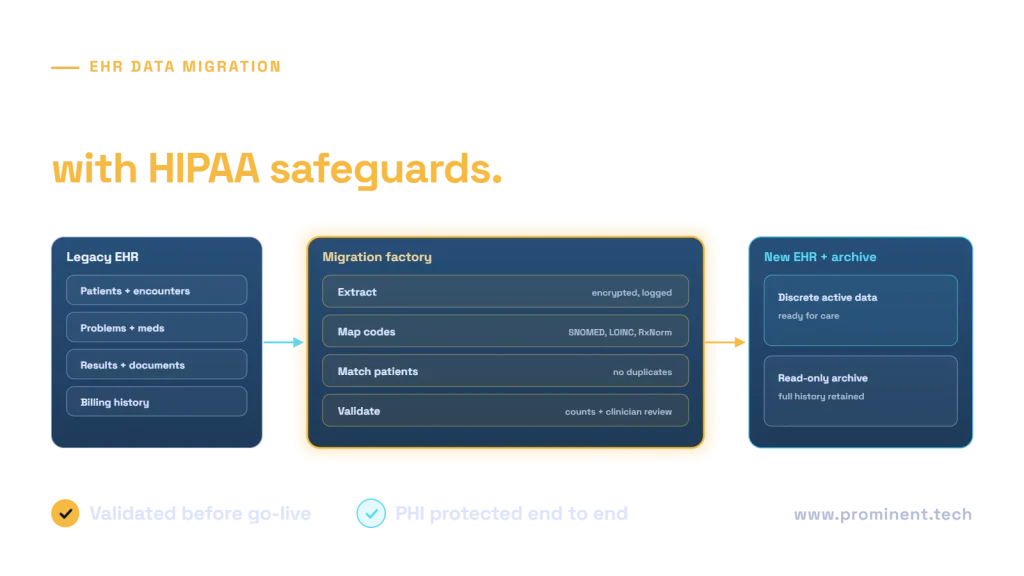
An EHR data migration moves patient records from a legacy electronic health record to a new one, usually by converting active, clinically relevant data into discrete fields in the new system and preserving the full history in a searchable read-only archive. Success depends on deciding scope early, mapping codes and terminologies accurately, matching patients without creating duplicates, validating with both automated reconciliation and clinician review, and protecting PHI throughout with HIPAA safeguards: business associate agreements, encryption, minimum necessary access, audit logging and secure disposal of interim copies.
Key takeaways
- Decide what to convert and what to archive per data type, based on clinical need and effort.
- Terminology mapping and patient matching are where clinical risk concentrates.
- Validate with automated counts and checks plus clinician review of sample charts.
- Apply HIPAA safeguards to every copy of the data, including test loads and staging files.
- Plan retention: the legal medical record must remain accessible after the old system is retired.
Deciding the EHR data migration scope
| Data type | Common approach | Why |
|---|---|---|
| Demographics, allergies, active problems, current medications, immunisations | Convert to discrete data | Needed for safe care and decision support from day one |
| Recent results and vital signs | Convert a defined look-back period | Supports trends and clinical decisions |
| Historical notes and documents | Migrate as documents or archive | Valuable for reference but costly to convert |
| Older encounters and results | Archive | Rarely used in care; must remain retrievable |
| Billing and claims history | Archive or finance system | Needed for audits and appeals |
Agree scope with clinical leaders, health information management, compliance and finance. A read-only archive integrated with the new EHR, so clinicians can open history from the patient chart, reduces conversion cost without losing access.
The EHR data migration process
Terminology mapping and patient matching
Legacy systems often use local codes. Map them to standard terminologies used by the new EHR, such as SNOMED CT for problems, LOINC for lab tests and RxNorm for medications. Have clinicians review mappings for high-risk items such as medications and allergies, and route unmapped values to a review queue rather than dropping them.
Patient matching combines identifiers and demographics to link records. Tune the rules to avoid both duplicates, where one patient becomes two, and overlays, where two patients merge into one. Overlays are the more dangerous error, so ambiguous matches must go to manual review. For integration standards that support the new environment, see healthcare FHIR API integration.
Validation: automated checks and clinician review
- Reconciliation: record counts per data type, per patient and per period match between source and target.
- Field checks: required fields present, formats valid, dates and units sensible.
- Clinical sample review: clinicians compare a sample of charts side by side, focusing on high-risk data.
- Mock migrations: two or three full test runs before go-live, each with fixes from the previous one.
Strong governance of identity and quality, described in healthcare data governance, makes validation faster.
HIPAA safeguards during EHR data migration
Every interim copy, staging database and export file contains PHI and needs the same protection as the production record. The HHS Security Rule guidance describes the safeguards; our guide to HIPAA-compliant applications shows how they apply to modern architectures.
Cutover and legacy retirement
- Run a final delta migration of data created since the last full load.
- Freeze or set the legacy EHR to read-only at go-live.
- Provide clinicians with clear guidance on where history lives.
- Keep the archive accessible for the legally required retention period.
- Securely destroy interim copies and decommission legacy infrastructure with documented disposal.
Common questions
What data should be migrated to a new EHR?
Typically demographics, allergies, active problems, current medications, immunisations and recent results as discrete data, with older history and documents in a read-only archive.
How long does an EHR data migration take?
Usually several months, including scope decisions, mapping, two or three mock migrations, validation and cutover, aligned with the new EHR implementation timeline.
How do we keep PHI secure during migration?
Use BAAs with every vendor, encrypt data in transit and at rest, limit access to named people, log all access, keep data in approved environments and securely destroy interim copies.
What is the biggest risk in EHR data migration?
Clinical errors from incorrect mappings or patient overlays. Clinician review of high-risk data and manual review of ambiguous matches reduce this risk.
Do we still need the old EHR after migration?
You need its data, not necessarily the system. A compliant archive can replace it for retention and reference.
Plan a safe EHR data migration
Share your legacy system, target EHR and data volumes. Our healthcare and legacy modernization teams will plan scope, mapping, validation and HIPAA safeguards with your clinical and compliance leads.