
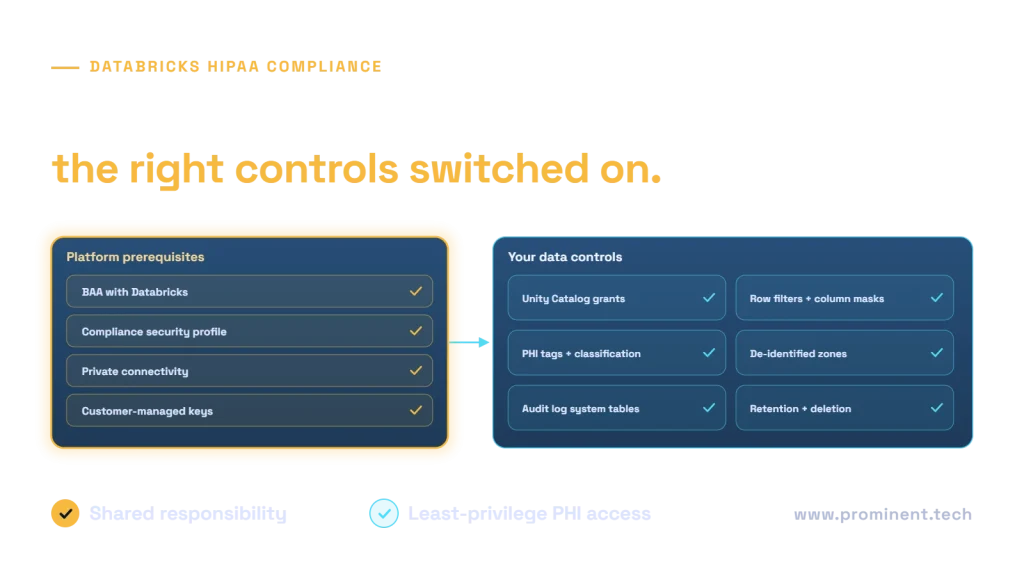
Databricks can be used for HIPAA-regulated workloads when you have a business associate agreement (BAA) with Databricks, enable the compliance security profile on every workspace that processes protected health information (PHI), and implement your own safeguards on top: least-privilege access in Unity Catalog, row filters and column masks for PHI, classification and tagging, de-identified zones for analytics, private connectivity, encryption with keys you control, audit logging and retention rules. HIPAA compliance is a shared responsibility. The platform provides hardened controls, but your organisation remains responsible for how PHI is accessed, used and protected. This guide sets out a reference architecture and checklist. It is technical guidance, not legal advice.
Key takeaways
- Sign the BAA and enable the compliance security profile before any PHI enters a workspace.
- Keep PHI out of names, tags and other metadata fields, which may sit outside the compliance boundary.
- Use Unity Catalog to enforce least-privilege access, with row filters and column masks for sensitive fields.
- Separate identifiable and de-identified data so most analytics never touches PHI.
- Monitor access through audit logs and review it regularly.
Shared responsibility for HIPAA on Databricks
Databricks’ HIPAA documentation explains that HIPAA controls require the compliance security profile and an active BAA, and that customers must confirm the profile is enabled on each workspace. It also warns not to put sensitive information in customer-defined fields such as workspace, job, cluster or tag names. Equivalent guidance exists for Azure Databricks. Your organisation still owns the HIPAA risk analysis, access decisions, workforce policies and breach response.
Platform prerequisites
- BAA in place with Databricks, and with your cloud provider.
- Compliance security profile enabled on every workspace that handles PHI; use only features supported for regulated data.
- Private connectivity between users, workspaces and storage, avoiding public endpoints.
- Customer-managed keys for storage and managed services where your policy requires them.
- Single sign-on and MFA through your identity provider, with groups mapped to roles.
A HIPAA-ready lakehouse architecture
Organise data in layers (see medallion architecture) and add a clear boundary between identifiable PHI and de-identified data. Most analysts and data scientists work only in the de-identified zone. Ingestion from clinical systems often uses HL7 FHIR; see FHIR API integration.
Data controls in Unity Catalog
| Control | How to apply it |
|---|---|
| Least privilege | Grant catalog, schema and table access to groups by role; no direct user grants |
| Fine-grained protection | Row filters and column masks for identifiers and sensitive fields |
| Classification | Tag PHI columns and tables so policies and reviews can find them |
| De-identification | Pipelines that produce de-identified tables for analytics, following HHS methods |
| Audit | Monitor access through audit log system tables and alert on unusual activity |
| Retention | Defined retention and deletion for tables, history and logs |
Broader governance practices are covered in healthcare data governance.
ML and AI on PHI
Train models on de-identified data where possible, record which data each model used, restrict access to identifiable feature tables, and apply the same controls to model serving endpoints and logs. For generative AI over clinical content, see HIPAA-compliant AI applications.
Databricks HIPAA checklist
Common questions
Is Databricks HIPAA compliant?
Databricks offers HIPAA controls through the compliance security profile and a BAA. Compliance also depends on how you configure and operate the platform and your own policies.
Do we need the compliance security profile for PHI?
According to Databricks’ documentation, yes: HIPAA controls require the compliance security profile on each workspace that processes PHI, plus an active BAA.
How do we restrict who sees PHI in Databricks?
Use Unity Catalog grants by role, row filters and column masks for sensitive fields, and keep a de-identified zone for most users.
Can we use Databricks ML features on PHI?
Use only features supported for regulated data in your region, apply the same access controls to features and models, and prefer de-identified training data.
What should we avoid?
Putting PHI in workspace, job, cluster or tag names, using unsupported preview features with PHI, and granting broad access to identifiable tables.
Run regulated healthcare data on Databricks with confidence
Share your workloads and data flows. Our data engineering and healthcare teams will design the workspace setup, controls and pipelines with your compliance team.