
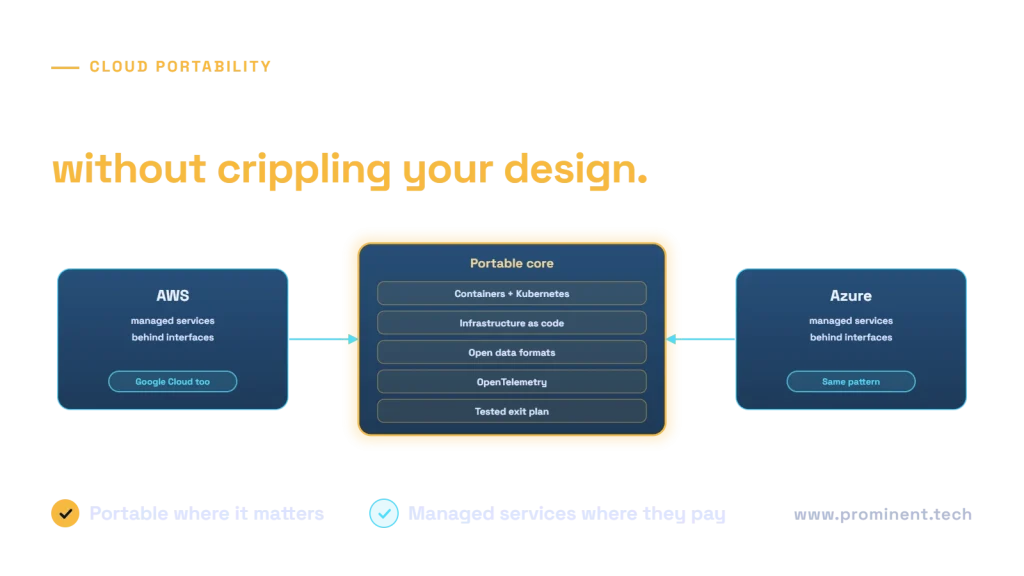
Cloud portability is the ability to move applications and data between AWS, Azure, Google Cloud or on-premises environments with acceptable time, cost and risk. The practical goal is not to run identically everywhere, which forces a lowest-common-denominator design and gives up the managed services that make cloud valuable. Instead, keep a portable core of containers, infrastructure as code, open data formats, standard observability and identity, place cloud-specific managed services behind clear interfaces, and maintain a tested exit plan. That balance reduces lock-in and supports regulatory resilience requirements without sacrificing speed.
Key takeaways
- Define portability goals per workload: some need a fast exit path, most need only a credible one.
- Make data portable first; it is usually the hardest and most expensive part to move.
- Containers, Kubernetes and infrastructure as code cover much of workload portability.
- Use managed services where they add value, wrapped behind interfaces you control.
- Write and test an exit plan, including data egress cost and identity changes.
Why cloud portability matters now
- Resilience. Major outages and changing provider terms make dependency on a single provider a business risk.
- Regulation. Rules such as the EU’s Digital Operational Resilience Act (DORA) expect financial entities to manage concentration risk and maintain exit strategies for critical ICT providers.
- Data sovereignty. Some customers or regulators require specific regions or providers. See GDPR-compliant cloud architecture.
- Commercial leverage. A credible ability to move strengthens pricing negotiations.
- Acquisitions. Merged organisations often run on different clouds.
Levels of cloud portability
| Level | What is portable | Typical techniques |
|---|---|---|
| Data | Data and its schema can be exported and reloaded elsewhere | Open formats such as Parquet, standard databases, documented schemas |
| Workload | Application runtime moves with little change | Containers, Kubernetes, twelve-factor configuration |
| Infrastructure | Environments can be recreated in another cloud | Infrastructure as code with tools such as Terraform or OpenTofu |
| Operations | Monitoring and deployment work across clouds | OpenTelemetry, CI/CD pipelines independent of one provider |
| Identity and security | Users and services authenticate consistently | Federated identity, standards-based protocols, external secrets management |
A portable-core architecture
Run application services in containers on Kubernetes or a compatible container platform; see AKS vs Container Apps vs App Service. Define environments with infrastructure as code and keep landing-zone patterns consistent; see the Azure landing zone checklist. Store analytical data in open formats. Where you use a provider’s managed database, queue or AI service, access it through your own interface or adapter so a replacement affects one component, not the whole codebase.
Equivalent services across AWS, Azure and Google Cloud
| Capability | AWS | Azure | Google Cloud |
|---|---|---|---|
| Managed Kubernetes | Amazon EKS | Azure Kubernetes Service | Google Kubernetes Engine |
| Object storage | Amazon S3 | Azure Blob Storage | Cloud Storage |
| Managed PostgreSQL | Amazon RDS / Aurora | Azure Database for PostgreSQL | Cloud SQL / AlloyDB |
| Messaging | Amazon SQS / SNS | Azure Service Bus | Pub/Sub |
| Serverless functions | AWS Lambda | Azure Functions | Cloud Run functions |
| Generative AI models | Amazon Bedrock | Azure AI Foundry | Vertex AI |
Equivalent does not mean identical: features, limits and pricing differ. Use the providers’ own mappings, such as Azure for AWS professionals and the Google Cloud service comparison, and test the details that matter to your workload.
Trade-offs to avoid
- Lowest common denominator. Avoiding every managed service means running and securing more yourself.
- Active-active everywhere. Running the same workload live in two clouds doubles cost and complexity; reserve it for systems that truly need it.
- Ignoring data gravity. Large data sets and egress charges can make moving impractical unless planned for.
- Abstraction for its own sake. Wrap services where switching is plausible, not everywhere.
Writing a cloud exit plan
- List critical workloads and their provider-specific dependencies.
- Choose a target for each: another cloud, on-premises or a replacement service.
- Estimate time, cost and data egress for each move.
- Document identity, networking and security changes.
- Test the plan, for example by deploying a workload to a second environment from code.
- Review the plan annually or when architecture changes.
If you do move, the techniques in zero-downtime cloud migration apply between clouds too.
Common questions
What is cloud portability?
The ability to move applications and data between cloud providers or on-premises environments with acceptable time, cost and risk.
Is multi-cloud the same as portability?
No. Multi-cloud means using several providers; portability means being able to move a workload. You can be portable on one cloud, or multi-cloud without portability.
Does Kubernetes make applications fully portable?
It makes the runtime largely portable, but data, managed services, identity, networking and operations still need planning.
How do we avoid vendor lock-in without losing managed services?
Use managed services behind your own interfaces, keep data in open formats, define infrastructure as code and maintain a tested exit plan.
What does cloud portability cost?
Mostly design discipline and some abstraction work, plus testing. Full active-active multi-cloud is far more expensive and rarely needed.
Build cloud architecture that keeps your options open
Share your workloads and resilience or regulatory requirements. Our cloud and DevOps team will design a portable core, decide where managed services pay off and write an exit plan you can test.