
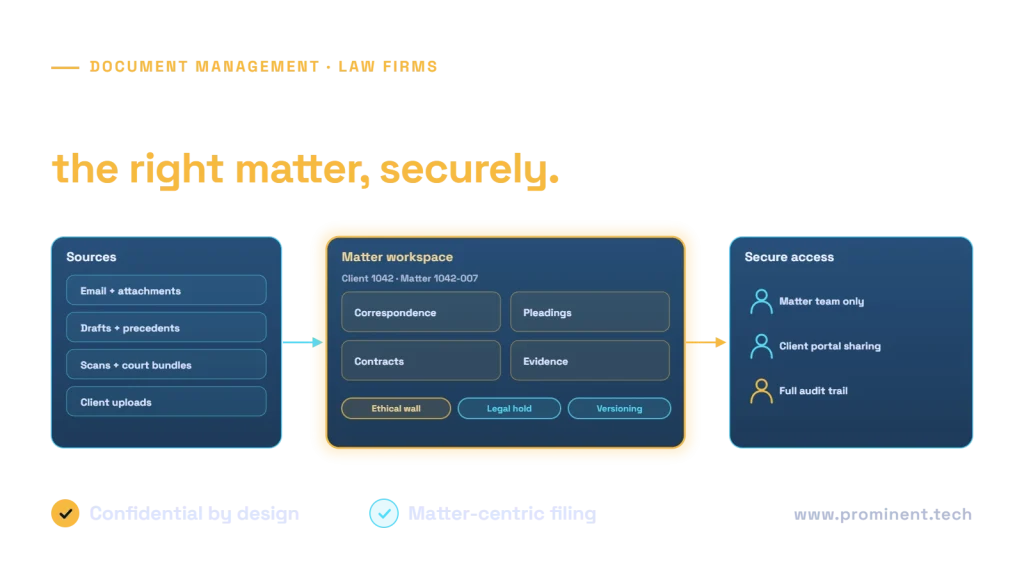
Cloud document management for law firms organises every document and email around the client and matter, enforces confidentiality with matter-level permissions and ethical walls, keeps full version history, applies retention and legal holds, and gives lawyers fast search and secure sharing with clients. Firms typically choose between a dedicated legal document management system and a Microsoft 365 approach built on SharePoint, Teams, Outlook and Purview. A well-designed Microsoft 365 solution creates matter workspaces automatically from the practice management system, applies metadata and sensitivity labels, files email in a click, and is ready for AI tools that respect the same permissions.
Key takeaways
- Structure everything around client and matter, created automatically from your practice management system.
- Confidentiality controls, including ethical walls, must be enforced by the platform, not by habit.
- Email filing must be effortless, or documents will stay in personal inboxes.
- Retention, legal holds and audit trails are core requirements, not extras.
- Get permissions right before introducing AI assistants that search across documents.
What law firms need from cloud document management
| Requirement | Why it matters |
|---|---|
| Matter-centric structure | Lawyers work by client and matter, and billing and conflicts depend on it |
| Email filing | Much of the record is in email and attachments |
| Version control | Drafts change constantly; the right version must be clear |
| Ethical walls | Some teams must be prevented from seeing certain matters |
| Retention and legal hold | Files must be kept for required periods and preserved when needed |
| Search | Find documents and precedents quickly across matters you may access |
| Secure external sharing | Collaborate with clients and counterparties without email attachments |
| Audit trail | Show who accessed or changed what, and when |
Professional duties of confidentiality, such as those in the SRA Code of Conduct in England and Wales or the ABA Model Rule 1.6 in the US, make these controls essential.
Dedicated legal DMS or Microsoft 365?
| Factor | Dedicated legal DMS | Microsoft 365 (SharePoint-based) |
|---|---|---|
| Legal features out of the box | Strong: matter profiles, email filing, walls | Configured and extended to match legal workflows |
| Licensing | Additional per-user licences | Often uses licences the firm already has |
| Collaboration | Integrates with Microsoft 365 | Native Teams, Outlook and co-authoring |
| Flexibility | Vendor roadmap | Highly configurable; needs good design and governance |
| AI | Vendor AI features | Microsoft and custom AI on the same permissions |
Smaller and mid-sized firms often find a well-designed Microsoft 365 solution meets their needs at lower cost; larger firms with complex workflows may prefer a dedicated DMS. Either way, the design principles below apply.
A matter-centric Microsoft 365 architecture
When a matter opens in the practice management system, an automated workflow creates its workspace with the right libraries, metadata, permissions and sensitivity label. Lawyers file email from Outlook into the matter, collaborate in Teams and share with clients through secure links or a portal. Automation uses Power Automate and the Microsoft Graph API.
Confidentiality, ethical walls and retention
- Matter-level permissions granted to the matter team, not the whole firm, with regular reviews.
- Ethical walls using Microsoft Purview Information Barriers or equivalent controls.
- Sensitivity labels that encrypt and restrict highly confidential documents wherever they travel.
- Retention labels and legal holds through Purview retention, aligned to the firm’s file retention policy.
- Audit logging of access and sharing.
- Data protection for client personal data under GDPR or applicable law.
Migrating from file shares or a legacy DMS
Map folders to clients and matters, carry metadata and permissions across, migrate closed matters to an archive tier, and run a pilot with one practice group before the rest. Our SharePoint Online migration checklist covers permissions, metadata and cutover in detail.
AI and law firm document management
AI assistants can search precedents, summarise matter files and classify incoming documents, but only safely when permissions and ethical walls are correct, because AI search respects whatever access users already have. Clean up oversharing before enabling AI. For classification use cases, see AI document classification for legal contracts.
Common questions
Can SharePoint be used as a legal document management system?
Yes, when configured around clients and matters with automated workspace creation, email filing, metadata, permissions, ethical walls and retention. It needs good design and governance.
How do law firms enforce ethical walls in the cloud?
With platform controls such as information barriers and matter-level permissions, so restricted users cannot find or access walled matters, plus audit logging.
How should lawyers file email?
With one-click filing from Outlook into the matter, ideally with suggested matters, so email becomes part of the matter record.
Is cloud document management secure for law firms?
It can be more secure than file servers when configured with strong identity, encryption, sensitivity labels, access reviews and audit logging.
How long does a law firm document migration take?
Typically two to six months depending on volume and complexity, including mapping, pilot, phased migration and training.
Bring your firm’s documents into a secure, matter-centric cloud
Share your current systems, practice areas and pain points. Our legal industry and SharePoint teams will design the matter structure, security and automation, and plan a safe migration.