
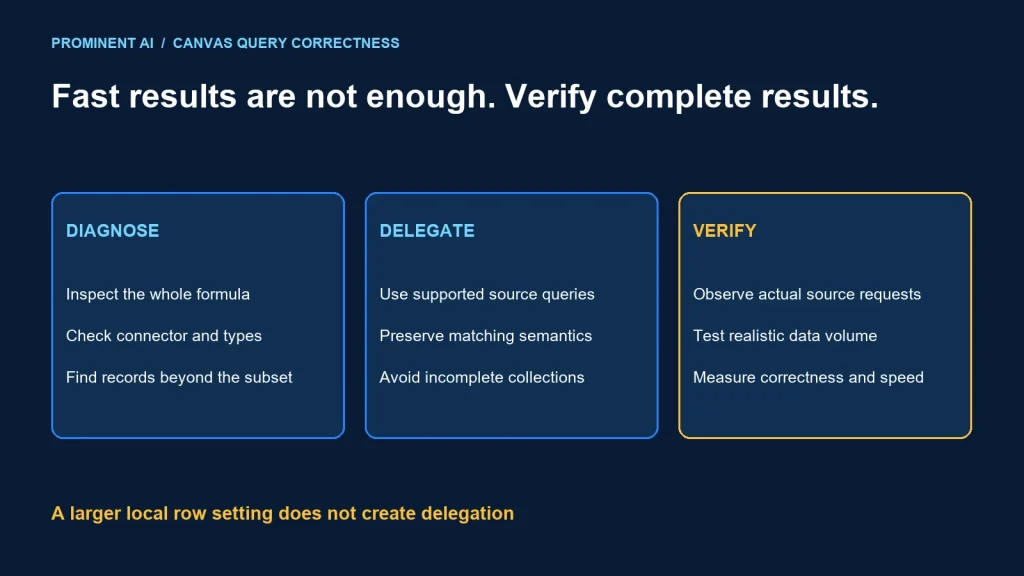
Power Apps delegation sends supported query work to the data source. When a formula cannot be delegated, local evaluation over a limited set of retrieved records can omit valid matches. Fix the query and connector contract before treating the issue as a screen-performance problem.
Key takeaways
- Delegation is a correctness issue when the source exceeds the locally processed subset.
- Support depends on the connector, function, operator, column type and complete expression.
- Increasing a row setting does not turn a local query into a delegated query.
- Validate with records outside the initial subset and with the actual source.
Why a delegation warning can mean missing records
Microsoft’s delegation overview explains query translation and local evaluation when delegation is unavailable. The documented default local row limit is 500. Check the setting and currently supported maximum in your environment; the important distinction is whether evaluation covers the whole source or only the retrieved subset.
Consider a fictional source containing several thousand customers. If the desired customer is outside the subset retrieved for a nondelegable search, the gallery can show no match even though the record exists. A fast empty response can therefore be incorrect.
Delegated intent:
Source filters all permitted rows → returns matching records

Local evaluation risk:
Source returns limited subset → app filters that subset → omitted matches possible
The row setting is not the same as the source’s total record count or a universal cap on a correctly delegated gallery. Avoid explaining every large-list problem as “Power Apps only supports 500 rows.”
A small local collection can legitimately use local formulas. The risk arises when the collection was populated from an incomplete source query and then treated as a complete dataset. Document the collection’s completeness and intended use.
A diagnostic runbook
- Define expected results. Identify a known permitted record and its source key.
- Confirm the source. Record the connector, table/list, column types and environment.
- Inspect the whole formula. Review nested functions, operators, conversions and related fields.
- Read connector delegation support. Check the relevant type and footnotes, not just the function name.
- Isolate the expression. Start from a simple supported predicate, then add terms one at a time.
- Test beyond the initial subset. Place or identify expected matches outside the locally retrieved records.
- Observe actual requests. Use supported diagnostics to see what reaches the source.
- Verify after deployment. Recheck permissions, source configuration and representative data volume.
Keep authorization constant during the comparison. A record missing because the user lacks source permissions is not fixed by rewriting a filter. Likewise, a test against a different environment can conceal the problem.
Record the app version and connector details with the evidence. A claim that a formula “worked last month” does not establish its behavior against another source or schema.
Formula patterns to review
For a hypothetical text column named Name, a candidate expression is:
Filter(Accounts, StartsWith(Name, txtSearch.Text))This is a review candidate, not a universally tested formula. Check whether the connector supports Filter and StartsWith for that actual field type and expression. The name Accounts and control names must match your app.
Transforming every source value inside a predicate can change whether the expression can be translated. Before adding case conversion, text conversion or calculated expressions, confirm connector support. Do not remove a transformation without verifying that search semantics remain correct.
For sorting, prefer a source-supported column and operation when possible. A local sort over an incomplete retrieved set can look plausible while omitting records that should appear earlier. Check the entire filter-and-sort composition.
Do not hide a warning by first loading records into a collection. That can move the incomplete-data problem to the collection population step. A collection is appropriate only when its bounded dataset and refresh behavior are intentional.
Review aggregates separately. Counting or summing a visible subset is not necessarily the total over the source. If a business decision needs an authoritative total, use a supported delegated aggregate or an owned server-side calculation with explicit permissions and freshness.
No Power Apps tenant was used to execute the candidate formula for this article. The runbook deliberately requires verification in your real connector and app. It does not present a local simulation as proof of connector delegation.
Dataverse and SharePoint are not interchangeable
The Dataverse connector reference provides delegation support by operation and type. For example, its table distinguishes text operations from numeric and other types. Apply the reference to the actual column, not a display value that happens to look like text.
The SharePoint connector reference has its own type mappings and delegation notes. Complex fields and subfields need particular attention. A formula validated against Dataverse is not automatically valid for a SharePoint Person, Choice or Lookup field.
Review source-side performance independently. A fully delegated query can still be slow because of source indexing, wide data retrieval or an expensive predicate. Conversely, adding an index does not make an unsupported Power Fx expression delegable.
When migrating sources, treat delegation behavior as part of the compatibility test. Do not approve a move based only on matching column names and a few sample rows.
Capture useful diagnostic evidence
Use the app’s supported monitoring tools and compare source requests with expected filtering. Keep sensitive values out of exported logs and screenshots. The following is a suggested evidence template, not a real platform log:
App/build:
Environment and connector:
Table and relevant column types:
Formula under review:
Known expected record key:
Source confirms user can read record:
Observed request/predicate:
Record outside local subset tested:
Result before / after:
Remaining limitations:
Capture both correctness and performance. Record whether expected records appear, then measure response time and request volume under representative conditions. A formula that returns incomplete results quickly has not met the requirement.
Test blank search, mixed case, non-ASCII text and relevant field values. Do not change search behavior merely to eliminate a blue underline without confirming the user’s intended matching rule.
Choose the smallest correct fix
| Finding | Candidate fix | Verification |
|---|---|---|
| Unsupported predicate | Use a supported equivalent where semantics match | Known records beyond initial subset and edge values |
| Unsuitable source model | Review source-side field/query design | Permissions, freshness and query plan |
| Incomplete local collection | Use a deliberate bounded dataset or delegated access | Population completeness and refresh |
| Authoritative aggregate needed | Supported aggregate or backend computation | Whole-source total and access control |
| Delegated but slow | Tune source access and requested data | Correct results plus measured workload behavior |
A source redesign or custom API may be appropriate when the required query cannot be expressed safely through the connector. That introduces an integration contract, support work and possible licensing implications. Evaluate those explicitly rather than hiding them behind a workaround.
Finish with a regression test containing enough records to expose incomplete-local-evaluation behavior. Maintain known expected matches outside the initial subset so future formula edits cannot silently reintroduce the issue.
See the Power Apps architecture comparison for app selection and the data synchronization guide for source ownership.
Common questions
How do you fix delegation issues in Power Apps?
Inspect the complete expression and connector/type support, use a supported equivalent or backend query, and test known matches beyond the locally retrieved subset.
Does increasing the row limit fix delegation?
No. It changes the locally processed subset; it does not make an unsupported query execute over the whole source.
Can a fast gallery still be incorrect?
Yes. Local filtering can return a quick result while omitting valid source records outside the retrieved subset.
Can I reuse a Dataverse formula with SharePoint?
Recheck it. Delegation depends on the connector, field type and full expression.
Does loading data into a collection remove the risk?
Only if the collection is intentionally complete for its bounded purpose. Incomplete population can preserve the same missing-data problem.
Make canvas-app results correct at realistic volume
Bring the formulas, connector and expected records. Plan a Power Platform implementation that validates query correctness and performance together.