
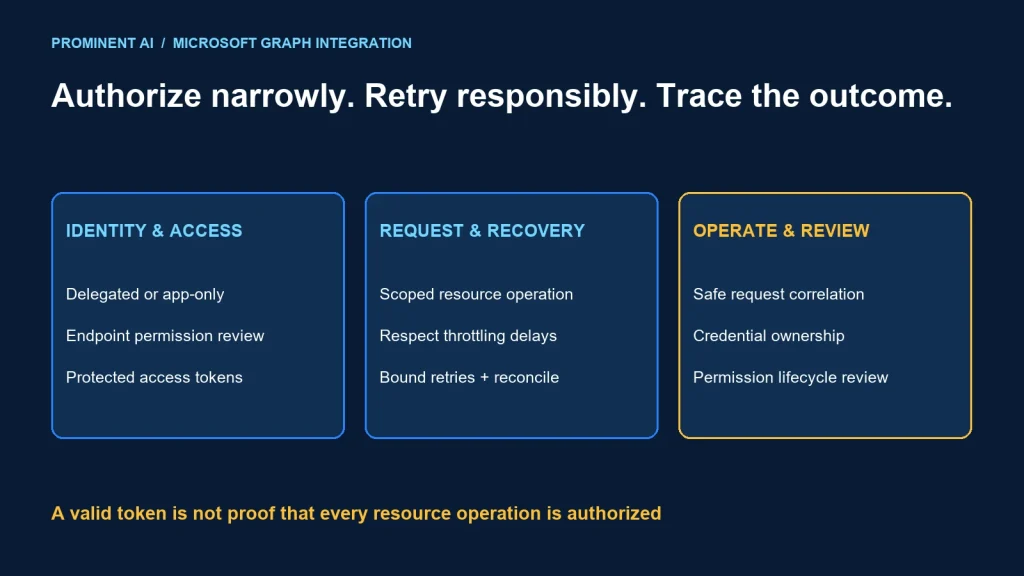
Secure Microsoft Graph API integration starts by choosing delegated or app-only access, granting only the required permissions, and implementing bounded retries with useful diagnostic evidence. Design each integration around a business operation and its data boundary rather than requesting broad directory or file access as a shortcut.
Key takeaways
- Delegated access acts for a signed-in user; app-only access acts as the application.
- Consent and endpoint-specific authorization are part of the design.
- Use access tokens for Graph requests and keep tokens out of logs.
- Handle throttling with the server delay and a bounded retry budget.
- Correlate business operations, requests and failures without recording unnecessary personal data.
Delegated scopes vs application permissions
Microsoft’s authentication overview distinguishes delegated access, where an app calls for a signed-in user, from app-only access, where the workload has its own identity. A daemon without a user is not a delegated application merely because the same developer registered it.
The permissions overview explains the difference between delegated scopes and application permissions. Delegated access is bounded by the user and the granted permissions. App-only grants can be powerful and require deliberate administrative review. Some operations also depend on resource-specific or role-based controls.
| Access model | Candidate scenario | Design evidence |
|---|---|---|
| Delegated | User opens their own information in an application | User context, required scope and resource access |
| App-only | Approved background integration without an interactive user | Workload identity, admin consent and narrowed resource boundary |
| Resource-specific access | Operation limited to an approved collaboration resource | Supported endpoint mechanism and explicit resource grants |
For each endpoint, record the least-privileged permission that supports the actual operation. A permission whose name contains “Read” can still expose a large amount of information. Review both the permitted action and the resources it reaches.
Business operation + intended resource
              ↓
Choose delegated or workload identity
              ↓
Reviewed permissions + required consent
              ↓
Token acquisition through supported identity library
              ↓
Graph endpoint authorization + service response
              ↓
Business result or bounded failure handling
This is a review flow, not a token-protocol implementation. Use supported identity libraries and the authentication mechanism appropriate to the hosting platform. Keep credentials in approved stores and plan rotation and ownership.
A minimal delegated Graph request
The Get user endpoint reference documents the /me alias for the signed-in user and its permission requirements. The following request illustrates reading selected profile fields with an appropriately acquired delegated access token. It was not executed against a tenant for this article.
GET https://graph.microsoft.com/v1.0/me?$select=id,displayName
Authorization: Bearer <delegated-access-token>
Accept: application/json
Do not substitute an ID token for the access token, paste real tokens into published examples or log the Authorization header. The /me route requires a signed-in user; an app-only process must use an endpoint and permission model that supports its scenario.
After authentication, test authorization separately. A successful token acquisition does not prove the requested operation is allowed. Check the token audience, access model, consent and endpoint requirements when diagnosing failures; do not respond to every 403 by granting a broader permission.
Keep examples small in the pilot. Start with an approved read operation, validate the identity and response shape, then add business functionality with explicit tests. Do not use a production directory-wide export as an authentication smoke test.
Common enterprise integration use cases
| Use case | Boundary to define | Operational concern |
|---|---|---|
| Employee-facing profile experience | Current user and approved profile fields | Missing fields and identity changes |
| Document workflow | Approved site, drive or document scope | Changes, permissions and stale references |
| Calendar or collaboration integration | Supported resources and permitted operations | Time zones, duplicate writes and event lifecycle |
| Directory administration workflow | Specific approved administrative operation | Strong authorization and auditable change ownership |
These are architecture candidates, not a promise that one permission or license covers every listed use case. Inspect the specific endpoint’s supported access modes, permissions and service requirements.
For a fictional document-review app, a user-driven experience may read only information the reviewer can access. A background reconciliation process needs a separately approved workload identity and resource scope. Do not quietly reuse an administrator’s delegated token to turn it into unattended automation.
Plan resource lifecycle changes. Renamed users, deleted documents and revoked permissions are normal integration events. A missing resource should become an understandable business result rather than an endless retry loop.
Handle throttling without a retry storm
Microsoft’s throttling guidance recommends handling HTTP 429 using Retry-After when provided and exponential backoff otherwise. Requests inside a JSON batch can fail individually even when the outer batch succeeds. Reduce unnecessary calls and use supported change mechanisms where appropriate.
Service-specific limits vary by workload and operation. Do not build one universal requests-per-second assumption into every integration.
Use a bounded retry policy: a maximum attempt count, an overall time budget and a safe deferral or failure path. Respect a server delay even when it is inconvenient. If it exceeds the current worker’s budget, defer work through the approved queue or scheduler rather than retrying earlier.
We ran the following local policy fixture with seven assertions. It checks a numeric server delay, budget deferral, fallback delay, malformed/negative values and non-429 statuses. It makes no network calls and is not a complete Graph SDK retry handler.
def next_delay(status,retry_after,attempt,remaining_seconds,jitter=0.0):
    if status!=429:return None
    try:
        delay=int(retry_after)
        if delay<0:raise ValueError()
    except (ValueError,TypeError):
        delay=min(2**attempt,32)+jitter
    return 'defer' if delay>remaining_seconds else delay
The simplified function handles numeric delay values only. A production client must follow the applicable header contract, use an appropriate jitter policy, enforce an attempt limit and cooperate with SDK retry middleware. Avoid stacking independent retry loops that multiply the actual number of attempts.
Reads and writes require different recovery thinking. A timed-out write may have succeeded remotely. Reconcile the business operation or use supported idempotency behavior instead of blindly repeating a non-idempotent action. See the idempotency guide for that distinction.
Audit logs and operational diagnostics
Record enough to explain the integration: business correlation identifier, endpoint template, access model, response status, request identifier when available, attempt count, delay and final outcome. Avoid storing raw tokens, secrets or full personal-data payloads in routine logs.
Separate application telemetry from service audit records. Do not claim that one log stream captures every Microsoft 365 action. Identify which service audit capability is needed for the operation and verify its availability, permissions and retention requirements.
For an authorization failure, preserve safe diagnostics and route it to the access owner. For throttling, inspect call volume, concurrency and unnecessary polling. For uncertain writes, route to reconciliation. These are different failure classes and should not all trigger the same automatic retry.
Set operational ownership for app registration, credentials, permissions and downstream processing. An integration becomes fragile when the only owner is a developer’s personal account.
A secure Graph integration checklist
- Describe the business operation and intended resources.
- Select delegated or app-only access deliberately.
- Verify endpoint permissions and consent requirements.
- Acquire and protect the correct access token.
- Test allowed and denied access with representative identities.
- Handle pagination and supported change tracking where the endpoint requires them.
- Test throttling, retry budget exhaustion and recovery.
- Reconcile uncertain write outcomes and duplicate events.
- Inspect logs for token or personal-data leakage.
- Document ownership, credential lifecycle and permission review.
Use approved nonproduction resources for integration tests. The local fixture here validates one policy function only; real authentication, consent, endpoint behavior and operational recovery still need tenant testing.
See the enterprise authentication guide for protocol context.
Common questions
How do applications securely integrate with Microsoft Graph?
Choose the right access model, grant least-privileged endpoint permissions, obtain a protected access token and test authorization, throttling and operational recovery.
What is the difference between delegated and application permissions?
Delegated permissions support calls on behalf of a signed-in user. Application permissions support the workload’s own identity without a signed-in user.
Can app-only authentication call the /me endpoint?
No. The /me alias represents a signed-in user and requires delegated access. Use an endpoint and permissions appropriate to the workload scenario.
How should Graph throttling be handled?
Respect Retry-After when provided, use an appropriate fallback policy otherwise, and bound attempts and total time. Reduce avoidable requests.
Should access tokens be recorded for troubleshooting?
No. Keep tokens and secrets out of logs. Use safe correlation, status and diagnostic identifiers instead.
Connect Microsoft 365 with clear access and recovery boundaries
Bring the required operations, resource scopes and failure scenarios. Plan a Power Platform implementation with a reviewed Graph integration design.