
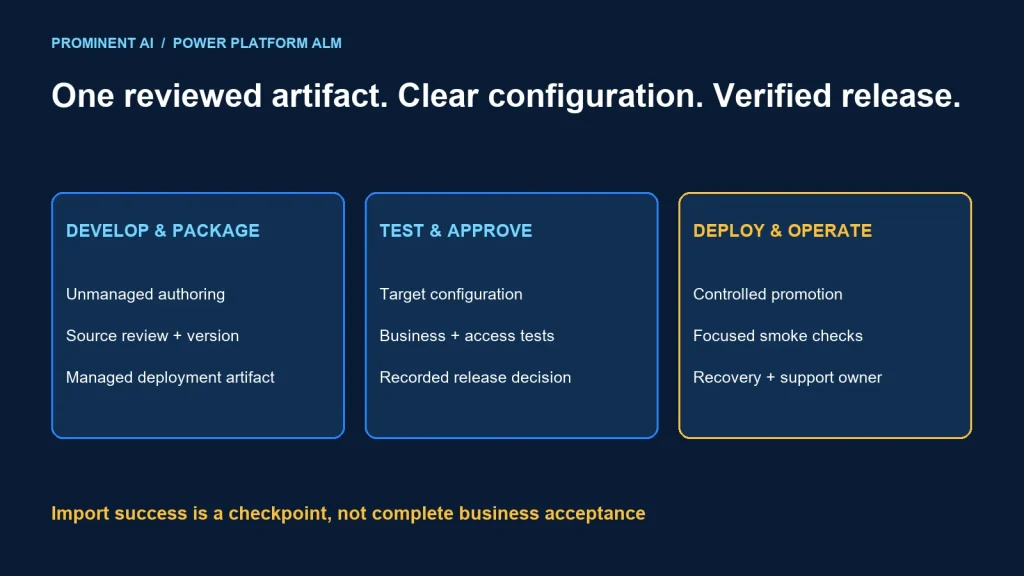
Power Platform ALM is the controlled process for developing, testing, deploying and maintaining apps and automation. Build in a development environment, package changes in solutions, deploy a reviewed managed artifact downstream, and validate the target configuration and business behavior before release.
Key takeaways
- A solution package is not a complete backup of business data and external systems.
- Environment variables and connection references address different configuration needs.
- Successful import is only one part of release acceptance.
- Inspect solution layers when deployed changes do not appear.
- Plan recovery before making schema or data changes.
Solutions, environments, pipelines and managed layers
Microsoft’s solution concepts distinguishes unmanaged development assets from managed deployment artifacts. Use unmanaged solutions for authoring and source control, then generate managed packages for downstream environments. Keep the solution publisher and dependencies deliberate from the start.
| Building block | Purpose | Question to answer |
|---|---|---|
| Environment | Separate development, testing and production use | Who can change it and what data belongs there? |
| Solution | Package supported application components | Are dependencies and publisher consistent? |
| Pipeline | Promote a controlled release through stages | Which artifact, configuration and approvals apply? |
| Solution layers | Determine effective component behavior | Is another layer overriding the expected change? |
| Release evidence | Connect requirements, artifact and test results | Can the team explain what is running? |
For a fictional service-request app, the release may include a form, table customizations and an approval flow. Its external service endpoint, connection identity and operational records require separate attention. Copying an app alone does not prove the whole business process can run in the target environment.
Choose a publisher prefix before creating the component model. Treat identifiers and solution boundaries as architecture decisions. A rushed collection of overlapping solutions can make dependencies and future upgrades difficult to reason about.
A release workflow from development to production
Requirement + acceptance scenarios
             ↓
Development: unmanaged solution + reviewed source changes
             ↓
Versioned managed deployment artifact
             ↓
Test: configuration + permissions + business-process checks
             ↓
Approval: artifact identity + evidence + recovery plan
             ↓
Production: controlled deployment + smoke checks
             ↓
Operational ownership + monitoring + next change
Microsoft’s pipelines overview describes promoting the same exported solution artifact through sequential stages, with deployment validation and environment configuration. Pipelines deploy solution components and configuration, not the business rows stored in Dataverse tables. Review current environment and licensing prerequisites before selecting the pipeline design.
This workflow is a proposed release model, not evidence that a tenant pipeline was deployed for this article. Record the artifact version and the exact acceptance tests at each stage. Do not replace the tested package with a fresh development export just before production and call it the same release.
Keep test data separate from production data. A release rehearsal should not accidentally email customers, run financial actions or modify live external records. Use appropriate test endpoints and approved identities, then verify production configuration explicitly during release.
For application choices before release design, see the canvas versus model-driven architecture guide.
Environment variables vs connection references
Microsoft’s environment-variable FAQ distinguishes data-source parameters from the connection that authenticates to a service. Use environment-specific configuration for the intended endpoint or resource. Do not treat a URL change as proof that the correct identity and permissions are in use.
Connection-reference guidance explains how solution-aware components refer to connections. Review target bindings and the identity behind them. A connection reference is not a portable copy of somebody’s credentials.
| Configuration item | Development intention | Production validation |
|---|---|---|
| Service base URL | Approved test endpoint | Approved production endpoint, no hardcoded test URL |
| Data-source reference | Test dataset or resource | Correct production dataset or resource |
| Connection binding | Approved development identity | Owned, authorized production connection |
| Flow ownership | Named development owner | Operationally supported ownership and access |
| Application permissions | Test personas and role set | Expected production personas, with denied-access tests |
Use this human-readable release manifest as a starting point. It is not a Power Platform import-settings file and should not be uploaded as one.
Release: service-request 1.4.0
Artifact: approved managed solution package identifier
Source review: approved change reference
Target: recorded production environment identifier
Configuration review:
  service_endpoint: verified by integration owner
  data_source: verified by application owner
  connection_bindings: verified by operations owner
Acceptance:
  create_request: expected result and evidence reference
  approval_route: expected result and evidence reference
  denied_record_access: expected result and evidence reference
Recovery: approved procedure and decision owner
Decision: recorded approval or rejection
Keep secrets out of source files, release notes and screenshots. Use the supported credential and secret-handling mechanisms for the chosen connectors and deployment architecture. Include expiration and ownership review in operational readiness.
Release gates that test more than import success
- Package gate: confirm solution version, publisher, components and dependencies.
- Configuration gate: verify endpoints, data-source parameters and connection bindings.
- Identity gate: test ordinary users and workload identities without accidental administrator grants.
- Process gate: exercise the important business path, failure path and approval route.
- Operations gate: identify monitoring, support ownership and recovery decisions.
- Approval gate: connect the approved evidence to the exact artifact being promoted.
For the fictional request app, a useful acceptance scenario creates a test request, routes it to the intended approver and checks the resulting status. A negative scenario attempts an action by an unauthorized persona. A failure scenario disconnects a test dependency and checks that the user receives an understandable result without duplicate processing.
These are proposed tests. They are not measured production results. Define expected outcomes with the process owner and keep any test records sanitized.
Separate technical approval from business acceptance. A package can pass validation while an approval recipient is wrong or a required field is unusable. Conversely, a business reviewer cannot establish secure data access merely by opening the app successfully.
Why managed changes sometimes do not appear
Microsoft’s solution-layer guidance explains that component behavior depends on layers, with merge behavior for certain component types. Inspect the actual layers instead of assuming the most recent import controls every visible property.
A production hotfix made directly in the target can leave unmanaged customization above the managed release. The next deployment may succeed while the visible behavior remains unexpected. Investigate the component, layer history and intended source before taking corrective action.
Do not make “remove active customizations” an automatic troubleshooting step. Review its effect, preserve the intended change and follow the organization’s recovery process. Destructive layer or solution operations can affect application behavior and data.
- Missing dependency: compare required components and versions with the target.
- Wrong endpoint: inspect the resolved target configuration and actual runtime calls.
- Flow does not run: check activation, ownership, connection binding and permissions.
- Old form behavior: inspect layers and confirm the correct published app/version.
- Only administrators succeed: investigate intended privileges and underlying data access.
Plan recovery for both application and data changes
Do not assume reinstalling an older package reverses all effects. A release may have changed data, invoked external systems or removed components. Define recovery according to the specific change and supported platform operations.
For a risky schema change, rehearse on a representative nonproduction environment and document dependent apps, flows and integrations. Decide whether a forward correction, supported restore or another reviewed procedure is appropriate. Assign the person authorized to make that decision.
After deployment, run focused smoke checks and inspect the real operational path. Record the release result, configuration exceptions and support handoff. Monitor relevant failures rather than interpreting a successful import notification as ongoing service health.
Keep environment drift visible. Emergency target edits should become reviewed source changes where appropriate. Otherwise each future release has to rediscover undocumented differences.
Common questions
How do you deploy Power Apps reliably between environments?
Use solutions, a controlled managed artifact, reviewed target configuration, staged testing and recorded approval. Verify the business process after deployment as well as import success.
Should production use managed or unmanaged solutions?
Microsoft recommends managed deployment artifacts for downstream environments and unmanaged solutions for development. Plan dependencies and operational procedures around that distinction.
Do solutions move Dataverse business data?
A solution packages supported customizations; it is not a general business-data migration. Plan required data movement and validation separately.
Are environment variables the same as connections?
No. Variables hold configuration parameters, while connections provide authentication to services. Validate both the target resource and the connection identity.
Why can a managed solution import succeed without changing the app?
Another solution layer or unmanaged customization may influence the component, or the wrong artifact or app version may be in use. Inspect the actual configuration and layers before changing production.
Build a repeatable Power Platform release process
Bring the solution inventory, environment map and current deployment pain points. Plan a Power Platform implementation with a configuration worksheet, test gates and a recovery plan.