
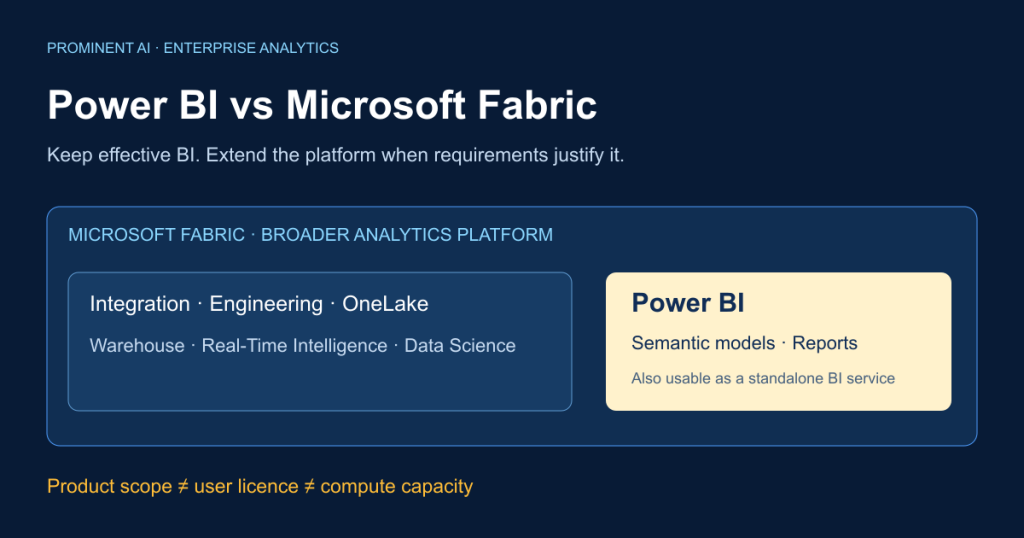
Power BI is Microsoft’s business intelligence and visualisation solution. Microsoft Fabric is a broader analytics platform that includes Power BI alongside data integration, engineering, warehousing, real-time intelligence and data science. You can continue using Power BI with prepared sources without buying Fabric F capacity for ordinary reporting. Fabric becomes relevant when additional workloads, shared analytical storage or capacity requirements justify it. The practical Power BI vs Microsoft Fabric decision is whether to retain an effective BI architecture, extend it selectively, or establish a broader governed data platform—not which unrelated product wins.
Key takeaways
- Power BI remains the reporting and semantic-model layer within Fabric.
- Pro and Premium Per User are user licences; an F SKU provides capacity resources.
- F64+ can support eligible Free viewers. Authors and collaborators still have separate licensing requirements.
- PPU does not provision general Fabric engineering capacity, and its workspace access rules still matter.
- Compare complete costs and accepted workload performance before changing architecture.
Contents
- Product relationship
- Key differences
- Architecture options
- User licensing
- Fabric capacity
- Pricing and TCO
- Storage modes
- Premium migration
- Decision framework
- Frequently asked questions
What is Microsoft Power BI?
Power BI Desktop is the report-authoring application. Power Query connects to and prepares data; semantic models organise tables, relationships and business measures. DAX expresses analytical calculations. Reports present interactive pages, while service dashboards assemble selected tiles. Power BI Service supports publishing, sharing and administration; Mobile supports consumption on smaller devices. Microsoft’s Power BI overview explains these connected experiences.
Import models keep a compressed analytical copy. DirectQuery sends queries to a supported source. The choice affects freshness, source load and responsiveness. Credentials, refresh schedules and an on-premises data gateway where required need operational ownership. Refresh guidance distinguishes refresh responsibilities; visual refresh is not automatically fresh source data.
A company with a governed SQL Server, Azure SQL or existing warehouse may already have the preparation layer it needs. Power BI can provide financial reporting or executive dashboards over that estate. A new lakehouse is not a prerequisite for a useful report. Good modelling, DAX design, access control and deployment discipline still matter.
What is Microsoft Fabric?
Fabric is a unified SaaS analytics platform. OneLake provides a shared analytical storage foundation. Data Factory supports integration, Data Engineering provides Spark-oriented processing, Lakehouse combines files and analytical tables, and Warehouse supports relational analytical work. Real-Time Intelligence addresses event-oriented analysis; Data Science supports analytical experimentation and machine-learning workflows. Power BI supplies business-facing semantic models and reporting. See the Fabric overview.
A typical lifecycle is source ingestion, permitted landing, validation and transformation, curated modelling, then reports or other approved consumption. Identity, governance, monitoring and capacity management span those stages. A shared platform does not automatically establish consistent measures, correct permissions or reliable recovery. Teams must design those responsibilities.
Is Power BI part of Microsoft Fabric?
Yes. Power BI is a Fabric workload, while the Power BI service remains available as a standalone BI service. The Fabric portal can expose experiences beyond Power BI; seeing that interface does not mean every user must buy F capacity. Desktop authoring, user licences, workspace licence mode and capacity assignment are distinct concepts. Microsoft’s service licensing explanation describes the relationship.
A semantic model can continue using an external prepared source. It does not have to move its data into OneLake just because its administrator uses the Fabric portal. Conversely, creating general Fabric notebooks, pipelines or lakehouses needs suitable capacity and permissions; a Pro subscription alone is not that compute pool.
Power BI vs Microsoft Fabric: key differences
The left column describes a BI-focused deployment; the right describes extending that deployment with Fabric. These are scopes, not competing feature checklists.
| Criterion | Power BI-focused environment | Broader Fabric environment |
|---|---|---|
| Core purpose | Business intelligence | End-to-end analytics including BI |
| Scope | Models, reports, sharing | Integration through analytical consumption |
| Typical users | Analysts, BI developers, readers | Those users plus data/platform engineers |
| Reporting | Power BI reports | Same Power BI reporting workload |
| Visualisation | Interactive visuals and dashboards | Power BI plus other workload experiences |
| Data modelling | Relationships and business measures | Upstream data models plus semantic models |
| DAX | Semantic-model calculations | Still used in Power BI models |
| Power Query | Preparation for BI | Also available in appropriate integration experiences |
| Ingestion | Connect to prepared/source data | Add platform ingestion routes |
| ETL/ELT | Existing systems or BI preparation | Broader orchestration and transformation choices |
| Data engineering | Usually elsewhere in the estate | Dedicated engineering workloads |
| Apache Spark | External processing if needed | Fabric engineering capability |
| Lakehouse | Not required for ordinary BI | Available when justified |
| Warehouse | Can use an existing warehouse | Fabric Warehouse is an option |
| OneLake | Not required for every report | Shared analytical storage foundation |
| Real-time analytics | Source/mode-dependent reporting | Real-Time Intelligence plus BI consumption |
| Machine learning | Consume prepared analytical outputs | Add Data Science workflows |
| AI integration | Feature and licence dependent | Additional experiences, settings and capacity costs |
| Semantic models | Central BI contract | Retained as business consumption contract |
| Direct Lake | Requires suitable Fabric capacity | Option for supported Delta-backed data |
| Governance | BI and source ownership | Additional item and data-access boundaries |
| Security | Identity, model and source controls | Also govern OneLake and compute access |
| Licensing | Free, Pro or PPU context | Capacity plus applicable user licences |
| Capacity requirements | F purchase not universal | F capacity for broader workloads |
| Storage | Model and source storage | Applicable OneLake/other storage billing |
| Scalability | Model/source/licence constraints | Capacity and multi-workload constraints |
| Monitoring | Refresh, models and reports | Also pipelines, compute and shared capacity |
| Development complexity | Narrower scope can be simpler | More cross-team operational responsibilities |
| Cost drivers | Users, existing estate, support | Users, compute, storage and engineering |
| Suitable scenarios | Reporting over prepared data | Integration and platform modernisation |
Not Sure Whether Your Business Needs Fabric?
Start with what your reporting environment cannot currently deliver. Discuss Your Power BI & Fabric Requirements before expanding platform scope.
Architecture comparison
1. Standalone Power BI

Text equivalent: ERP/CRM/SQL Server/existing warehouse → connection and Power Query → semantic model → reports → business users. Use a gateway where required, owned credentials, scheduled Import refresh and appropriate sharing. Import materialises model data; DirectQuery delegates supported queries. Arrows describe logical dependencies, not universal physical copies.
2. Fabric with Power BI

Text equivalent: sources → selected Data Factory ingestion → OneLake-backed Lakehouse/Warehouse → accepted transformations → semantic model → reports. Capacity, access, quality and monitoring span the path. Copying ingestion and transformations may materialise data; supported shortcuts reference existing data. Document which occurs rather than promising that Fabric never duplicates data.
3. Extend existing Power BI selectively

Text equivalent: existing data estate plus selected Fabric pipelines/Lakehouse/Warehouse → governed semantic models → validated existing reports. Introduce a bounded workload first. Preserve measure definitions and report behaviour; changing a source or storage mode still needs compatibility and performance tests. Retaining reports is a design goal, not a guarantee of zero migration work.
Power BI licensing explained
| Offering | Unit and authoring | Sharing/viewing and limitations | Suitable situation |
|---|---|---|---|
| Fabric Free | User identity; personal BI creation | Personal use; eligible capacity-hosted viewing requires access | Individual exploration or authorised viewer |
| Pro | Per user; publishing/collaboration rights | Standard organisational sharing with appropriately licensed users | BI teams with prepared data |
| Premium Per User | Per user; includes Pro and additional Premium features | PPU content generally requires PPU consumers; not general Fabric capacity | Defined BI audience needing those features |
| Power BI Embedded | Capacity/application architecture | App-owns-data and user-owns-data have different rules | Customer-facing embedded analytics |
| Existing Premium P | Legacy per-capacity subscription | Transition policy applies; not PPU | Existing customers planning migration |
| Fabric F | Capacity resource, not author identity | User requirements depend on item, role and SKU | Broader analytics or justified BI capacity |
PPU is not an inexpensive F capacity. A report in a PPU workspace can retain a PPU requirement even if someone shares a report elsewhere that depends on its model. Review the PPU access rules, not just the report’s visible location.
Microsoft’s pricing page identifies Power BI Pro as included in Microsoft 365 E5 and Office 365 E5. Inventory assigned entitlements before purchasing additional seats. Do not treat every Microsoft 365 plan as E5 or count an included Pro entitlement twice.
For customer embedding, the application can use an appropriate app-owns-data architecture without each end user holding a Power BI licence. That is different from employees accessing ordinary organisational reports. Authentication, embedding identity, capacity and isolation need deliberate design; see embed for your customers.
Microsoft Fabric licensing explained
F SKUs supply Capacity Units, a compute-resource measure. Current documented choices include F2, F4, F8, F16, F32, F64 and larger sizes through F8192. Workspaces must be assigned to the intended capacity; buying one does not move existing content automatically. Non-Power BI contributors need appropriate Fabric identity and permissions, without necessarily needing Pro just to create a pipeline or notebook. Fabric licensing distinguishes these item types.
Does Fabric F64 eliminate Power BI Pro licensing?
No. On F64 or larger, eligible Free users with the correct Viewer/access arrangement can consume eligible capacity-hosted Power BI content. Authors, publishers and collaborators generally still need Pro or PPU. On smaller F capacities, organisational Power BI viewers generally need Pro or PPU too. Check report and model locations, roles and dependencies. A Free licence plus an arbitrary workspace role is not a universal editing entitlement.
Operating and paying for capacity
PAYG capacity can scale and pause/resume where applicable. Pausing also interrupts availability and may settle outstanding consumption; storage and commitments do not simply disappear. Reservations are a commercial commitment for eligible compute, not a promise of dedicated physical infrastructure or free storage. Match the term, scope and utilisation before committing. See Fabric reservations.
Workloads can compete for capacity. Applicable OneLake storage, optional Spark autoscale billing, enabled capacity overage and other services must be assessed separately. Verify availability by SKU, region and tenant configuration. Copilot requires eligible paid capacity and settings; Pro/PPU alone is insufficient. A configured Fabric Copilot capacity can support specified user scenarios, including Pro/PPU workspaces; avoid assuming the workspace’s own capacity is the only billing route. Check Copilot prerequisites before rollout, including supported geography.
Power BI Pro vs PPU vs Fabric F SKU
| Situation | Candidate | Reason to validate |
|---|---|---|
| Individual analyst | Desktop/Free for personal use | Sharing is a separate requirement |
| Small collaborative BI team | Pro | Prepared sources and normal BI needs |
| Defined audience needing Premium BI features | PPU | Every PPU-content consumer needs suitable entitlement |
| Large report-viewer audience | Compare F64+ with user licensing | Eligibility, existing entitlements and measured capacity |
| Engineering and warehousing teams | F capacity plus relevant user licences | Broader workload requirements |
| Existing P capacity | Assessed F transition | Contract timeline, compatibility and right-sizing |
These are starting points, not user-count rules; existing E5 entitlements can change the economics.
Power BI vs Fabric pricing and total cost of ownership
The following public prices were verified on 29 October 2026. Power BI figures are US-site USD marketing prices with annual payment. Fabric figures are the live Central US, USD, Standard storage selection. They are estimates, not a customer quote. Scenario calculations exclude tax, discounts and currency conversion; checkout/contract tax treatment must be confirmed. Do not apply these USD figures to UK, Canadian, Australian or European procurement unchanged.
| Item | Verified public rate | Billing assumption |
|---|---|---|
| Power BI Pro | USD 14/user/month | Paid yearly |
| Power BI PPU | USD 24/user/month | Paid yearly; includes Pro features |
| F2 PAYG | USD 0.36/hour | USD 262.80 at 730 active hours |
| F16 PAYG | USD 2.88/hour | USD 2,102.40 at 730 hours |
| F32 PAYG | USD 5.76/hour | USD 4,204.80 at 730 hours |
| F64 PAYG | USD 11.52/hour | USD 8,409.60 at 730 hours |
| F128 PAYG | USD 23.04/hour | USD 16,819.20 at 730 hours |
| OneLake hot storage | USD 0.023/GB-month | Applicable average billable GB |
Sources: Power BI pricing and Fabric regional pricing. The browser-rendered selections are captured in the review package. Reservation equivalents are displayed separately by Microsoft; confirm their exact term and quote before using them. A 730-hour month is a modelling convention, not every calendar month’s length.
Monthly TCO = incremental user licences + capacity + applicable storage + additional workload/service charges + operations + amortised engineering/migration. For an all-Pro audience with no existing entitlements: (authors + distinct viewers) × Pro rate. For eligible F64+ consumption: authors × applicable user rate + capacity, plus any other users who still require paid licences. PPU totals use PPU once, not Pro plus full-price PPU.
Three illustrative scenarios
Authors and viewers below are distinct people; none has an existing paid entitlement. Storage quantities and candidate SKUs are assumptions, not sizing recommendations. Additional workload charges W, operations O and amortised implementation M must be added to every relevant subtotal. Zero is not assumed for an unknown cost.
| Scenario | Viable patterns and arithmetic | Monthly subtotal before W + O + M |
|---|---|---|
| A: 10 authors, 50 viewers; existing SQL; daily reporting | Pro: 60 × 14. PPU if required: 60 × 24 | USD 840 Pro; USD 1,440 PPU; existing SQL cost remains |
| B: 20 authors, 250 viewers; multiple sources and daily transformations | Pro: 270 × 14; PPU: 270 × 24. Candidate F16 + Pro + assumed 1,000 GB hot storage: 2,102.40 + 3,780 + 23 | USD 3,780 Pro; USD 6,480 PPU; USD 5,905.40 candidate Fabric path |
| C: 40 authors, 1,500 viewers; engineering, Lakehouse/Warehouse and real-time needs | Candidate F64 + author Pro + assumed 10,000 GB hot storage: 8,409.60 + 560 + 230 | USD 9,199.60; F128 alternative USD 17,609.20, before other costs |
For A, Fabric is not justified by basic reporting alone. For B, Pro/PPU assumes transformations remain in an existing or separately funded system; it does not provide the same platform scope as F16. For C, an all-Pro BI licence comparator is USD 21,560, but it omits the required engineering platform. These figures are not apples-to-apples complete solutions or guaranteed savings. Real-time workloads can require materially different capacity and storage.
Ignoring all other differences, F64’s USD 8,409.60 compute divided by USD 14 per incremental viewer gives a licence-only threshold of 601 distinct viewers, after authors cancel from both sides. This is arithmetic, not a purchase recommendation. Included E5 entitlements, fewer active hours, a different capacity, storage and support can change or remove that apparent break-even. Use the companion calculator with your actual contract.
Get Help Evaluating Power BI and Fabric Licensing
Bring an inventory of users, assigned licences, workspace modes and workload requirements. Discuss your requirements to define the scope of an architecture assessment; Microsoft contract interpretation and purchase terms need commercial verification.
When is Power BI alone enough?
A finance team already has reconciled warehouse tables, stable business definitions, a modest refresh window and a small BI team. Power BI Import reports can present agreed measures without replicating the whole platform in Fabric. Pro may meet collaboration needs; PPU is worth evaluating only for specific Premium requirements and an appropriately licensed audience.
This illustrative case retains transformation and database costs. Validate month-end concurrency, refresh recovery, finance-approved totals and access before declaring it sufficient.
When should businesses adopt Microsoft Fabric?
Consider Fabric when fragmented sources, shared transformations, Lakehouse/Warehouse requirements, cross-team governance, Real-Time Intelligence or data science justify broader operations. For example, an illustrative manufacturer might combine ERP, production events and service data, curate common asset definitions, then supply engineering and BI consumers from accepted datasets.
A proof of concept must demonstrate reliability, useful output, permissions, concurrency and acceptable cost. Check team capability and which workloads should remain outside Fabric.
Can Power BI and Microsoft Fabric work together?
Yes; that is the normal relationship when Fabric supplies upstream data. Shared workspaces, Data Factory, OneLake, Lakehouse/Warehouse and semantic models can connect integration to existing reports. Direct Lake is one option, not an obligatory migration destination. Adopt selected workloads incrementally and retain an existing model when it meets requirements. Govern both old and new access paths during transition.
Power BI Import vs DirectQuery vs Direct Lake
| Criterion | Import | DirectQuery | Direct Lake on OneLake | Direct Lake on SQL endpoint |
|---|---|---|---|---|
| Storage model | Materialised model copy | Source remains queried | Delta-backed column loading | Delta-backed, endpoint-associated |
| Freshness | After accepted model refresh | Source queries plus cache behaviour | Source readiness plus framing/updates | Source readiness plus framing/updates |
| Query execution | In-memory engine | Delegated source queries | In-memory loaded columns | Direct Lake or permitted fallback |
| Performance | Model and memory dependent | Source/network/concurrency dependent | Delta layout and memory dependent | Also inspect fallback conditions |
| Preparation | Source/Power Query as designed | Source-ready transformations | Prepare compatible Delta data | Prepare supported source tables |
| Security | Semantic model plus refresh identity | Source/model identity design | Effective identity and OneLake/model rules | Endpoint/model identity design |
| Capacity | Appropriate BI licence/limits | Appropriate BI licence/limits | Fabric capacity | Fabric capacity |
| Refresh | Load and process data | No full Import copy | Metadata framing still matters | Metadata framing still matters |
| Limitations | Size and refresh constraints | Connector/query limitations | No DirectQuery fallback | Fallback depends on settings/conditions |
| Suitable use | Prepared reporting snapshots | Supported live source querying | Governed Delta-centric analysis | Supported endpoint-centric models |
DirectQuery guidance explains source-dependent trade-offs. Direct Lake overview describes its capacity and refresh model. Direct Lake does not universally eliminate refresh responsibilities or guarantee better performance.
Crucially, Direct Lake on OneLake does not support DirectQuery fallback. Direct Lake on SQL analytics endpoints can fall back under documented conditions, such as SQL views or SQL-based security, subject to behaviour settings. SQL endpoint RLS must not be assumed to protect a direct OneLake access route: align effective identities and enforcement using Direct Lake security guidance. Verify current feature status and guardrails before choosing a mode.
Power BI Premium to Microsoft Fabric migration
Premium per-capacity P SKUs are retiring under Microsoft’s agreement-based transition policy. This does not retire Pro or PPU. The current migration FAQ says migration is not automatic: procure F capacity and reassign workspaces. Sovereign-cloud exceptions need separate guidance; do not apply a universal date to every customer.
Readiness checklist:
- Confirm agreement expiry and applicable cloud policy; arrange the replacement before service interruption.
- Inventory workspace dependencies, models, gateways, licences, permissions and owners.
- Use P-to-F CU mappings only as a starting point; measure existing consumption and planned new workloads.
- Validate model compatibility, refresh, report results, apps and guest access in the target configuration.
- Test peak load, access restrictions, deployment and rollback; agree acceptance with business owners.
- Reassign in controlled groups, monitor costs and behaviour, then retire the old capacity after acceptance.
The migration overview provides current policy context. A licence transition does not require a simultaneous rewrite of every model into Direct Lake.
Governance, security and compliance
Use Microsoft Entra ID, least-privilege workspace roles and explicit item/model permissions. Distinguish model Read/Build access, row-level security, object-level security and underlying data permissions. Power BI RLS guidance explains role-sensitive behaviour; test with actual consumer identities rather than administrator accounts.
Fabric adds OneLake, SQL, notebook and other compute paths. Map each path to its effective identity and enforcement point. Do not assume a report’s RLS protects someone who can read the underlying files. Fabric security guidance supports a platform-level assessment.
Document Microsoft Purview integration where supported, lineage, sensitivity handling, audits, retention, residency and tenant settings. Assign capacity and data owners separately where appropriate. Validate Copilot processing settings and external sharing against organisational requirements. A Microsoft product selection is not a compliance certification; applicable obligations depend on the organisation and its processing.
Performance and scalability considerations
Measure model size, cardinality, DAX query duration, refresh reliability, source latency and visual response under representative concurrency. Compare cold and warm queries, business peaks, background engineering and recovery. Optimise the model before assuming a larger capacity fixes every report.
Fabric introduces shared workload pressure. Inspect utilisation and actual delayed/rejected operations with the Capacity Metrics app. A high utilisation observation alone is not a complete throttling diagnosis. Record workload mix and use capacity planning guidance to validate a candidate SKU. No benchmark or guaranteed speed improvement is asserted here.
Enterprise use cases
The following are illustrative patterns, not client case studies. “Fabric” means adding relevant workloads while retaining Power BI for reporting.
| Use case and problem | Sources | Candidate pattern and rationale | Integration/governance requirement |
|---|---|---|---|
| Financial reporting: inconsistent totals | ERP/ledger/warehouse | Power BI on prepared warehouse when reconciliation exists | Owned measures, period close and finance access |
| Executive dashboards: fragmented KPIs | Accepted departmental datasets | Power BI; add Fabric only for missing integration | Common definitions and refresh ownership |
| Sales analytics: disconnected pipeline and revenue | CRM/orders/billing | Incremental Fabric for shared preparation | Stable account IDs and restricted customer data |
| Manufacturing: production history and events | MES/ERP/sensors | Fabric for integration/event analysis plus BI | Asset mapping, event quality and plant access |
| Healthcare: restricted operational reporting | Approved administrative records | Existing governed source plus BI or justified Fabric | Purpose, minimisation and authorised access |
| Insurance: policy/claims visibility | Policy/claims/finance | Fabric where reusable integration is needed | Sensitive attributes and reviewable definitions |
| Retail/ecommerce: sales and stock mismatch | POS/web/inventory | Fabric curation plus reporting | Product keys, returns and permitted processing |
| Supply chain: exception visibility | Orders/shipments/suppliers | Fabric when ingestion/freshness requires it | Late events, supplier boundaries and reconciliation |
| Customer 360: inconsistent entity views | CRM/support/billing | Governed integration, then BI | Identity resolution, retention and purpose |
| Platform modernisation: duplicated preparation | Existing warehouses/files/APIs | Selective Fabric migration | Contracts, lineage, parallel comparison and rollback |
Decision framework: which should you choose?
| Input | Decision question |
|---|---|
| Authors | Who needs publishing, editing and collaboration rights? |
| Viewers | How many distinct consumers, and what access route? |
| Existing licences | Are Pro entitlements already assigned through E5? |
| Source complexity | Is preparation missing or already well operated? |
| Volume | What model, source and retention limits apply? |
| Transformations | Do engineering workloads solve a documented gap? |
| Reporting | Which measures, refresh and sharing features are required? |
| Real-time needs | What end-to-end freshness is acceptable? |
| Governance | Which access paths and owners must be controlled? |
| Data science | Is managed experimentation/ML genuinely needed? |
| Capacity utilisation | What do representative tests demonstrate? |
| Budget | What is the complete incremental TCO? |
| Skills | Who will operate each workload and recover failures? |
| Microsoft estate | Which existing investments remain useful? |
| Platform strategy | What future scope is funded and accountable? |
Choose Pro for appropriate BI collaboration, PPU for justified Premium features within an entitled audience, or Power BI on an existing warehouse when preparation is already sound. Choose F capacity plus Power BI when broader workloads or capacity economics are validated. Incremental adoption is often safer than a wholesale rewrite.

Text equivalent: if prepared data meets reporting needs, evaluate Pro or PPU; if additional engineering is required, evaluate incremental Fabric. Independently test audience licensing, capacity, complete cost and governance before committing.
Practical implementation roadmap
| Phase | Deliverable | Acceptance criterion |
|---|---|---|
| 1. BI assessment | Source/report/dependency inventory | Owners confirm coverage |
| 2. User/licence inventory | Roles, unique users, entitlements | No double-counted licences |
| 3. Integration requirements | Contracts and freshness targets | Business acceptance defined |
| 4. Architecture selection | Options and trade-offs | Required scope justified |
| 5. Capacity/cost plan | Candidate SKU and TCO | Rates and assumptions traceable |
| 6. Security design | Identity/access/residency map | Consumer access tests agreed |
| 7. Proof of concept | Bounded working path | Correctness and recovery demonstrated |
| 8. Implementation/migration | Controlled releases and rollback | Reports and dependencies accepted |
| 9. Performance validation | Representative peak tests | Agreed latency/refresh targets met |
| 10. Monitoring | Ownership, alerts and review | Cost and reliability visible |
How Prominent AI Services LLP can help
Prominent’s verified pages describe Power BI development, Microsoft Fabric implementation, Azure cloud services, SQL Server and Azure SQL services and data engineering.
Discuss an architecture/licensing-inventory assessment, bounded proof of concept, migration, implementation, dedicated team or ongoing support scope. Agree deliverables for modelling, pipelines, warehouse modernisation, integration, cost monitoring and operations rather than assuming every service is included. Confirm Microsoft licensing and commercial terms with the appropriate supplier. No certification, savings result or response-time promise is implied.
Frequently asked questions
What is the difference between Power BI and Microsoft Fabric?
Is Power BI included in Microsoft Fabric?
Is Microsoft Fabric replacing Power BI?
Do I need Fabric if I already use Power BI?
Is Power BI Pro included with Fabric?
Does F64 remove Power BI Pro requirements?
What is the difference between Pro and PPU?
Is Power BI Premium being retired?
Is Premium Per User being retired?
How much does Fabric cost?
Can I use Power BI without Fabric capacity?
Is Fabric better for large datasets?
What is Direct Lake?
Can existing reports move to Fabric?
Which is cheaper: Power BI or Fabric?
When should an enterprise choose Fabric?
Can Power BI use a Fabric Warehouse?
Does Fabric support data engineering?
Can small businesses use Fabric?
How do we estimate the right Fabric capacity?
Conclusion: choose the justified scope
Power BI vs Microsoft Fabric is a decision about platform scope, licensing and responsibility. Keep effective BI, add only the workloads you can justify, and validate cost and behaviour before migration.
Discuss Your Power BI & Fabric Requirements to define an appropriate assessment or implementation scope.