
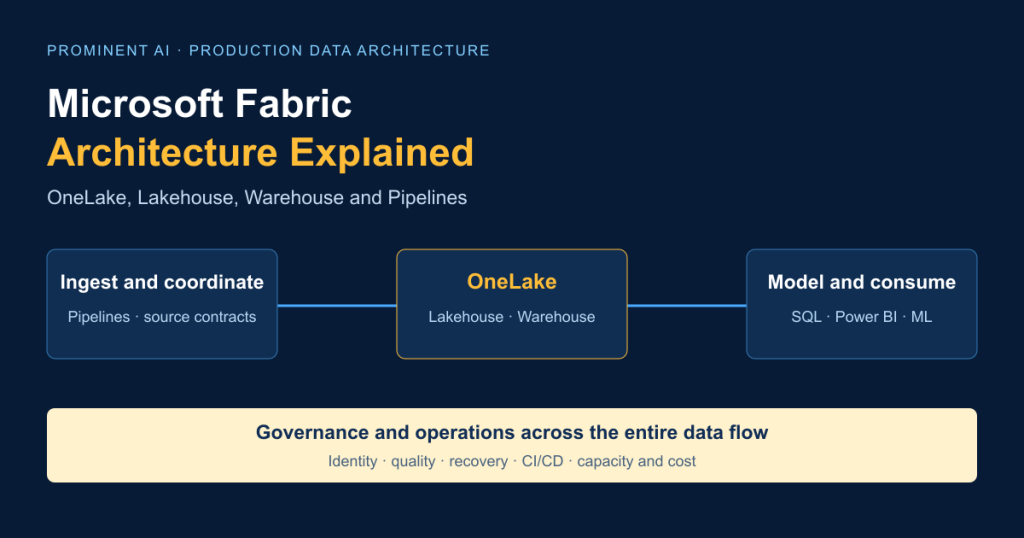
Microsoft Fabric architecture connects ingestion, storage, transformation, analytics and visualisation around OneLake, its unified logical data lake. Data Factory pipelines coordinate work; Lakehouse supports files, Delta tables and Spark engineering; Warehouse supports relational analytics with T-SQL; semantic models and Power BI turn curated data into business measures. Governance, identity, monitoring and capacity management cut across those components. Production design means choosing data ownership, processing engines, access paths and recovery boundaries deliberately. Shared storage can reduce unnecessary copies, but it does not mean unlimited compute, identical security enforcement or automatic recovery across every item.
Key takeaways
- OneLake is a storage foundation; Lakehouse and Warehouse are different analytical experiences above it.
- Pipelines orchestrate activities. Spark, SQL and Dataflow Gen2 perform the selected transformations.
- A Lakehouse SQL analytics endpoint cannot insert, update or delete the underlying table data.
- Shortcuts reference existing data; database mirroring can replicate it. Identify which mechanism each arrow represents.
- Medallion zones express quality and ownership. They need not mean three copies of everything.
- Prove permissions, replay behaviour, freshness and capacity under realistic load before production.
Contents
- Architecture and deployment
- End-to-end diagram
- OneLake
- Lakehouse
- Warehouse
- Lakehouse vs Warehouse
- Pipelines
- ETL/ELT example
- Medallion architecture
- Delta optimisation
- Power BI and Direct Lake
- Real-time architecture
- Security
- Capacity and cost
- CI/CD
- Common mistakes
- Best practices
- Enterprise use cases
- Production roadmap
- Working with Prominent
- FAQs
What is Microsoft Fabric architecture?
Fabric is a SaaS analytics platform with several processing experiences over a shared foundation. Its scope includes data integration, engineering, warehousing, Real-Time Intelligence, data science and Power BI. These experiences are not interchangeable engines: Spark notebooks, Warehouse SQL and semantic-model queries have different responsibilities. Fabric overview.
Distinguish three design views. Conceptual architecture describes business domains, owners and outcomes. Logical architecture assigns ingestion, storage, quality, transformation and consumption responsibilities. Physical deployment architecture specifies the tenant, regions, capacities, workspaces, items, identities and connections implementing that design. Deployment patterns.
A tenant is the organisational boundary; workspaces organise items and access. A capacity supplies compute for assigned workspaces, subject to workload-specific rules. A workspace per environment helps isolate changes; it does not by itself provide dedicated compute. Define capacity isolation separately when peak reporting and engineering must not interfere.
Microsoft Fabric architecture diagram: end-to-end overview

ERP, CRM, SQL Server, Azure SQL, on-premises databases, SaaS APIs, cloud storage, files and events feed an explicitly chosen route. Pipelines can copy records and execute transformations; shortcuts reference supported existing data; mirroring can maintain a replica or synchronise metadata depending on its type. Curated tables then serve SQL, ML or semantic models. Power BI consumes the selected model. APIs require a defined supported serving interface or application layer—not an assumption that every table automatically becomes an application API. Data lifecycle, ingestion options.
Diagram reading guide: blue arrows indicate ingestion/materialisation, green arrows transformation reads/writes, dashed gold arrows references/shortcuts, and purple arrows analytical consumption. Shared access does not require copying a dataset merely because the next engine is different; transformations and intentional replication can still create new data.
Planning an Enterprise Microsoft Fabric Architecture?
OneLake architecture explained
OneLake is Fabric’s tenant-wide logical lake, organised through workspaces and data items. It supplies a common storage namespace, not a standalone compute engine. Parquet is a columnar file format; Delta adds table metadata and transaction behaviour. A directory of Parquet files is not automatically a correctly registered Delta table. OneLake overview, table storage.
Azure Data Lake Storage Gen2 is an Azure storage service managed through its own accounts and controls. OneLake exposes a Fabric-managed logical experience; a Lakehouse is an item using that foundation for files and tables. Existing ADLS data can remain external and be referenced through supported shortcuts. Storage options.
OneLake Catalog helps users discover data, understand governance status and manage relevant controls. Catalog visibility is not equivalent to permission to read every discovered item. Sharing and shortcut design must consider the connection identity, source permissions and the consuming engine. External references avoid a dedicated ingestion copy in that pattern, but reads, optional caching and network use can still incur cost. OneLake Catalog, shortcuts.
Microsoft Fabric Lakehouse architecture
A Lakehouse supports file-oriented landing and table-oriented analytics. Use its Files area for suitable raw files and its Tables area for managed table access. Spark notebooks, PySpark and Spark SQL can prepare Delta tables for analytics and data science. Schema evolution needs a contract: accepting a new column should not silently change downstream measures or permissions. Lakehouse overview, schemas.
The automatically provisioned SQL analytics endpoint provides a read-only T-SQL data surface over supported Lakehouse Delta tables. You can define supported SQL objects such as views, but cannot perform table-data INSERT, UPDATE or DELETE through that endpoint. It is not a Warehouse DML surface. SQL endpoint.
For a sales example, land immutable source batches, retain source timestamps, deduplicate order lines in Spark and publish a reconciled daily-sales table. SQL users query the supported tables; analysts consume approved semantic measures. Treat table registration, endpoint synchronisation and model freshness as separate checks before announcing that a batch is ready.
Microsoft Fabric Warehouse architecture
Warehouse targets relational analytics with T-SQL, distributed processing and Delta storage in OneLake. Its architecture separates processing responsibilities while managing relational metadata and transactions. Teams can load and transform analytical tables through supported SQL operations. This does not make Warehouse an operational OLTP substitute or establish full SQL Server feature parity. Warehouse architecture.
Finance reporting is a useful example: reconcile ledger entries, model dimensions and facts, apply agreed accounting mappings and expose consistent measures. Warehouse can fit teams whose transformation and release practices centre on T-SQL. Test transaction boundaries, concurrent writers, schema changes and month-end reporting together. A transaction within one supported engine does not create an atomic transaction across a source, Lakehouse, Warehouse and semantic model.
Microsoft Fabric Lakehouse vs Warehouse
Choose the authoring and operating model that fits the workload. Neither item type is universally faster or cheaper. Sources: storage decision guidance, Lakehouse, Warehouse, SQL endpoint.
| Criterion | Lakehouse | Warehouse |
|---|---|---|
| 1. Primary purpose | Files, tables and engineering | Relational analytical serving |
| 2. Data types | Structured and unstructured landing | Structured analytical tables |
| 3. Languages | PySpark, Spark SQL; endpoint T-SQL reads | T-SQL authoring and querying |
| 4. Storage | Files and Delta tables in OneLake | Managed relational tables stored in OneLake |
| 5. Ingestion | Pipelines, notebooks and supported references | Supported loading/ingestion routes |
| 6. Transformation | Spark and selected external activities | Supported SQL transformations |
| 7. SQL surface | Read-only endpoint for table data | Analytical SQL with supported DML |
| 8. Writes | Supported engineering engines | Supported Warehouse write operations |
| 9. Spark | Native engineering workflow | Interoperability is not arbitrary Spark write access |
| 10. T-SQL | Query supported Lakehouse tables | Broader analytical SQL authoring |
| 11. Data science | Convenient file/table engineering | Can supply curated analytical inputs |
| 12. Schema | Explicit table/schema contracts | Relational schema managed in Warehouse |
| 13. Performance | Evaluate file layout and chosen engine | Evaluate queries, load and concurrency |
| 14. Security | Workspace/item and access-path controls | Workspace/item and SQL controls |
| 15. Governance | Catalog, ownership and lineage | Catalog, ownership and lineage |
| 16. DevOps | Validate Lakehouse/notebook support | Validate Warehouse deployment support |
| 17. Power BI | Supported semantic and Direct Lake patterns | Supported semantic and Direct Lake patterns |
| 18. Operations | File/table quality and maintenance | Relational load/query operations |
| 19. Users | Data engineers and scientists | SQL/BI engineering teams |
| 20. Use cases | Multi-source preparation, ML data | Dimensional reporting and SQL analytics |
Combine them when Lakehouse preparation and Warehouse-based relational serving solve distinct requirements. Document whether the boundary references supported data or materialises a new serving table. Include reconciliation, security and cost for that boundary; two items should not mean two competing definitions of revenue.
Microsoft Fabric Data Factory pipelines explained
A pipeline coordinates activities, dependencies, parameters and conditional paths. It is orchestration, not one universal transformation engine. Copy activity moves data between supported stores; Copy job offers a simplified data-movement experience. Dataflow Gen2 provides low-code preparation, while notebook activities execute selected Spark logic. Activity overview, Copy activity, Copy job, Dataflow Gen2.

Parameterise an approved batch/window identifier, source configuration and target environment. Choose a supported connector and authentication method. After ingestion, validate counts and required fields, execute transformations and publish only on success. Advance the watermark only after the required outputs are accepted. Schedule deliberately, including time-zone and overlapping-run behaviour. Running and scheduling pipelines.
Retries need a bounded policy and idempotent targets. Retry transient connection failures; quarantine malformed records; stop publication when a business reconciliation fails. Preserve correlation IDs, activity errors, input windows and output versions. A successful orchestration status alone does not prove accurate data. Fabric Data Factory and Azure Data Factory require a connector/activity compatibility assessment before migration.
Step-by-step Microsoft Fabric ETL/ELT pipeline example
This synthetic demonstration combines SQL Server-style orders, CRM customer records and inventory CSV-style rows. The downloadable `examples/` scripts build equivalent sample inputs without contacting those systems. They are illustrative code, not a tested Fabric deployment.
- Create isolated development and test workspaces on an approved capacity; choose the region and permissions first.
- Configure source connections, managed identities/service principals or other supported authentication, and required gateways. Keep credentials outside notebooks.
- Attach a dedicated schema-enabled demo Lakehouse. Define bronze, silver, gold and quarantine responsibilities.
- Build separate ingestion activities for orders, customers and inventory; define windows and source delivery IDs.
- Preserve raw batches and ingestion metadata in Bronze. Production raw data should be replayable.
- Standardise identifiers, timestamps, quantities and money types in Silver.
- Deduplicate by a deterministic update sequence; reject unknown customers/SKUs and invalid quantities.
- Publish Gold aggregates from accepted records, with reconciliation to Silver.
- Add Warehouse serving only if relational requirements justify it.
- Define semantic relationships, measures and access rules.
- Connect Power BI through the selected supported storage mode.
- Schedule loads around source readiness and reporting windows.
- Add bounded retries, failure notifications and an explicit replay runbook.
- Monitor freshness, rejected records, concurrency and cost—not just pipeline success.
The sample has six order events, five latest business records, two accepted records and three rejects. Accepted net sales total 50.00 synthetic currency units: North 30.00 and South 20.00. These are fixture values, not customer metrics.
The core transformation uses standard PySpark APIs:
# Assumes typed orders, customers and inventory DataFrames from the demo.
from pyspark.sql import functions as F, Window

latest = (orders.withColumn("rn", F.row_number().over(
    Window.partitionBy("order_id").orderBy(
        F.col("updated_utc").desc(), F.col("event_id").desc())))
    .filter("rn = 1").drop("rn"))

checked = (latest.join(customers, "customer_id", "left")
    .join(inventory, "sku", "left"))
bad = (F.col("quantity") <= 0) | F.col("region").isNull() | F.col("stock").isNull()
accepted = checked.filter(~bad)
gold = (accepted.withColumn("net_amount",
    (F.col("quantity") * F.col("unit_price")).cast("decimal(18,2)"))
    .groupBy("region").agg(F.sum("net_amount").alias("net_sales")))
The complete companion validates keys and numeric fields, checks dimension uniqueness, writes only isolated demo tables and includes an incremental Delta merge helper. Production needs source-specific deletes, late updates, concurrency and reconciliation policies. Delta merge semantics.
After the Gold table is available through the SQL endpoint, this read-only T-SQL check should return the two fixture aggregates:
-- Run against the demo Lakehouse SQL analytics endpoint after metadata sync.
SELECT region, net_sales
FROM gold.sales_by_region_demo
ORDER BY region;
The example illustrates ELT when raw data is landed before preparation. Transforming before the selected destination is an ETL pattern. Either approach still needs lineage, reproducibility and quality gates.
Medallion architecture in Microsoft Fabric
Bronze preserves source fidelity and audit metadata. Silver applies types, deduplication, validation and business-key matching. Gold publishes curated data products, aggregates and KPI-ready structures. These are quality responsibilities rather than mandatory workspace names. Medallion guidance.

A Lakehouse per layer can strengthen ownership boundaries but adds items and operational work. A single schema-enabled Lakehouse can simplify a small governed workload; schemas alone should not be mistaken for complete security isolation. Bronze/Silver Lakehouses plus a Gold Warehouse can suit SQL-led reporting. Choose from actual access, lifecycle and concurrency requirements rather than multiplying zones automatically.
Materialized lake views provide persisted transformations and managed refresh capabilities. They differ from manually coordinating every notebook dependency. Current documentation marks PySpark authoring as Preview, with full-refresh limitations for that authoring path; event-triggered refresh is also documented as Preview. Validate the chosen authoring/refresh mode before adopting it. Materialized lake views, refresh scheduling.
Delta Lake and data storage optimisation
Delta’s transaction log tracks table changes; its ACID behaviour supports reliable table updates. MERGE/upsert, schema changes and historical versions need compatible engine/table features. A merge source must have unambiguous business keys. Table history is not a substitute for a tested disaster-recovery plan. Delta updates.
Many small files increase planning and read overhead. Compact based on observed workload needs; avoid high-cardinality partitions that create tiny slices. Evaluate supported clustering/layout choices and reader compatibility. V-Order is disabled by default for newly created Fabric workspaces; assess its write cost and read benefit rather than enabling it blindly. V-Order guidance.
Set retention to cover readers, replay and recovery commitments before VACUUM removes obsolete files. Never shorten retention just to make a storage chart smaller. Microsoft labels the dedicated Lakehouse Maintenance pipeline activity Preview; notebook/portal maintenance remains a separate implementation route. Table maintenance.
Power BI and Direct Lake architecture
A semantic model defines relationships, DAX measures and business meaning. Import materialises model data; DirectQuery delegates queries to a source; Direct Lake is a semantic-model storage mode over eligible Delta data through OneLake. Its framing operation updates table references rather than performing the same full copy as Import refresh. Direct Lake overview.

Distinguish configurations: Direct Lake on OneLake does not support DirectQuery fallback. With Direct Lake on SQL analytics endpoints, fallback behaviour depends on supported conditions and the DirectLakeBehavior setting. Do not promise fallback for every model, unlimited model memory or identical access enforcement. How Direct Lake works.
Test data freshness, model framing, denied access, memory pressure and report concurrency. An updated table is not proof that a viewer sees the intended version. Define measures once and verify totals across reports. Power BI engineering includes modelling, security and deployment considerations beyond the connection itself.
Microsoft Fabric real-time architecture
For event-oriented requirements, evaluate Eventstreams for ingestion/routing, Eventhouse and KQL for relevant analytical queries, Real-Time Dashboards and Activator for supported alert/action scenarios. This is a distinct latency and operating contract from a nightly batch. Real-Time Intelligence.
Define event time, duplicate handling, retention, late arrival and recovery. Use a separate streaming pattern when continuous operational visibility justifies its complexity; do not introduce one merely because a source emits events. Validate the region and connector supporting the exact route.
Microsoft Fabric security and governance architecture
Microsoft Entra ID establishes identities; workspace roles, item permissions and engine/data controls determine access. OneLake security can supply granular controls, but broad workspace privileges and alternate access paths matter. Test SQL, Spark, file/API and semantic-model access independently. A rule on one surface does not prove restriction everywhere. Fabric security, OneLake security.
OneLake Catalog supports discovery and governance workflows; Microsoft Purview integration adds relevant classification, protection, auditing and catalog capabilities. Check licensing, configuration and coverage rather than assuming every connector supplies complete end-to-end lineage. Purview integration.
Enterprise acceptance checklist:
- Name data owners, administrators and incident responders.
- Separate consumers, contributors and deployment identities; test allowed and denied access.
- Validate row, column and object restrictions on each supported engine.
- Review source credentials, shortcut identities, sharing and service principals.
- Keep secrets in approved connection/secret-management mechanisms; rotate them.
- Check tenant settings, network restrictions, residency and regional service availability.
- Record classifications, retention, audit retrieval and lineage gaps.
- Exercise credential revocation, restore and access-review procedures.
These controls support an organisation’s security review; they are not a certification or a blanket compliance claim. AI security guidance covers additional risks when these datasets feed models or agents.
Microsoft Fabric capacity and cost architecture
Capacity Units describe Fabric’s compute allocation; they are not a count of bytes or a promise of unlimited concurrent queries. Size for background loads, interactive reporting and isolation requirements. Bursting and smoothing do not make sustained overload free: evaluate throttling, configured overage and actual usage. Capacity planning, cost optimisation.
Use Capacity Metrics and Azure billing together. Include OneLake storage and applicable operations, BI licences, networking and operational support. Spark normally consumes assigned capacity, but eligible autoscale billing uses separate serverless resources; do not count covered compute twice. Billing, Spark billing, licensing.
Monthly cost model: active PAYG capacity or amortised reservation + uncovered capacity/eligible separate compute + storage/operations + BI licensing + networking + operations/maintenance. Pausing eligible capacity does not eliminate storage or a reservation commitment.
The companion calculator has separate development, test and production capacity inputs. A synthetic planning case uses 1,000 GB retained storage, 10 GB/day ingestion, a daily pipeline, five concurrent consumers and a ten-hour reporting window over 22 working days. These describe demand, not a validated SKU. Rates remain blank until a dated regional quote is entered. Test expected and peak demand before procurement. Official pricing.
DevOps, CI/CD and environment management
Use separate development, test and production workspaces, source-controlled definitions, environment-specific connections and reviewed releases. Maintain a per-item Git/deployment support register: support for a notebook does not prove support for every binding, credential or semantic-model configuration. Microsoft lists Lakehouse, notebooks, Warehouse, pipelines, Copy Job and Dataflow Gen2 in its support documentation, while some other item types/features are marked Preview. Git support, deployment support.
Dataflow Gen2 has documented CI/CD and Git support, but its relevant public APIs are labelled Preview. Exported definitions are not the same as a data backup. Dataflow deployment.
Test unit/business rules, schema compatibility, access, connections and smoke queries after deployment. Revert code deliberately; recover data using a separately validated strategy. Record release approvals and the exact artefacts/configuration deployed.
Common Microsoft Fabric architecture mistakes
| Mistake | Practical mitigation |
|---|---|
| One workspace for every environment | Separate promotion and access boundaries |
| Choosing Lakehouse/Warehouse by fashion | Validate language, write and serving needs |
| Ignoring capacity | Measure overlap, queues and reporting peaks |
| Excessive small Delta files | Observe file layout; schedule appropriate compaction |
| No quality gates | Validate keys, types and reconciled business totals |
| Uncontrolled shortcut permissions | Review identity and downstream access paths |
| Credentials in notebooks | Use approved connections and rotation |
| Blind retries | Classify errors and make writes replay-safe |
| No cost monitoring | Assign owners, budgets and usage reviews |
| Missing lineage | Preserve source/run metadata and document gaps |
| Broad contributor access | Separate authoring from consumption roles |
| Inefficient semantic models | Model measures/relationships and test concurrency |
| Manual production edits | Version definitions and promote tested releases |
| Shared storage mistaken for unlimited compute | Design capacity and workload isolation explicitly |
Microsoft Fabric enterprise architecture best practices
Minimum production controls are named ownership, approved access, quality acceptance criteria, replay/failure handling, monitoring and tested recovery. Source-to-consumption lineage and a release record make those controls inspectable. Incremental ingestion and reusable pipeline patterns help when sources support them; neither should bypass deletion handling or reconciliation.
Situational choices include one Lakehouse per quality layer, separate capacities, streaming, shortcuts, materialized views and a Gold Warehouse. Adopt them when the workload justifies the additional boundary. Set semantic-model standards, review cost per accepted data product and maintain operational runbooks. Disaster recovery must include definitions, connections, source replay and business-consumption recovery—not merely table history.
Microsoft Fabric enterprise use cases
These are illustrative designs, not completed client projects or measured outcomes.
| Industry / objective | Sources | Proposed components and flow |
|---|---|---|
| Manufacturing / supply-chain visibility | ERP, suppliers, inventory files | Pipelines → Lakehouse validation → Gold stock/order tables → Power BI; add events only for justified latency |
| Banking / financial reporting | Ledger, risk extracts | Controlled landing → reconciled Silver → Warehouse reporting facts → approved semantic measures |
| Insurance / data consolidation | Policy, claims, broker feeds | Source-specific ingestion → conformed customer/policy keys → curated claims reporting |
| Healthcare / operational analytics | Scheduling, activity records | Restricted ingestion → minimised curated datasets → role-tested operational reports |
| Retail / customer intelligence | POS, commerce, CRM | Incremental orders → identity/quality checks → Gold sales/customer aggregates |
| Real estate / portfolio analytics | Property, lease, finance data | Validated master data → Warehouse or Gold Lakehouse → occupancy/income measures |
| SaaS / product reporting | Tenant events, billing | Tenant-aware ingestion → isolated/filtered data products → permission-tested models |
| Enterprise operations / service visibility | ERP, CRM, service tickets | Owned domain pipelines → consistent measures → shared operational dashboards |
How to design your first production Microsoft Fabric architecture
| Stage | Deliverable | Acceptance criterion |
|---|---|---|
| 1. Requirements and workloads | Owners, SLAs, consumer register | Business owners agree freshness and correctness |
| 2. Data estate assessment | Sources, dependencies, quality profile | Critical access and source constraints recorded |
| 3. Architecture selection | Data-flow and deployment decisions | Every materialisation/reference has a reason |
| 4. Security/governance | Access matrix and enforcement tests | Allowed and denied scenarios pass |
| 5. Pilot implementation | Bounded pipeline and consumer | Reconciled data, replay and failure paths work |
| 6. Performance/cost validation | Concurrency and billing evidence | Agreed service targets met within accepted cost |
| 7. Production rollout | Release, cutover and recovery plan | Named owners accept rollback/recovery tests |
| 8. Monitoring/optimisation | Alerts, runbooks, review cadence | Support team exercises the response process |
Do not assign a universal delivery duration before source access, dependencies and acceptance work are understood.
Need Help Implementing OneLake, Lakehouse or Data Pipelines?
How Prominent AI Services LLP can help
Prominent’s verified offerings include Microsoft Fabric implementation, enterprise data engineering, Azure platform work, SQL Server and Azure SQL services and Power BI engineering.
A practical engagement starts with discovery and an architecture assessment, proves a bounded workload, then defines implementation, optimisation and support responsibilities. Bring your source inventory, current costs, reporting contract and access requirements. No platform choice guarantees a particular saving or delivery outcome.
Frequently asked questions
What is Microsoft Fabric architecture?
What are the main components of Microsoft Fabric?
What is OneLake in Microsoft Fabric?
What is the difference between OneLake and Lakehouse?
What is the difference between Fabric Lakehouse and Warehouse?
How do Microsoft Fabric pipelines work?
Does Microsoft Fabric support ETL and ELT?
How is medallion architecture implemented in Fabric?
Does Microsoft Fabric use Apache Spark?
Can Microsoft Fabric integrate with SQL Server?
How does Power BI connect to OneLake?
What is Direct Lake?
How is Microsoft Fabric secured?
How much does Microsoft Fabric architecture cost?
Is Microsoft Fabric suitable for enterprise data engineering?
Can Microsoft Fabric replace Azure Data Factory?
When should organisations use Lakehouse and Warehouse together?
What are Microsoft Fabric architecture best practices?
Conclusion: design for an accepted data product
Microsoft Fabric architecture succeeds when the complete source-to-consumer path is reliable, understandable and governed. Start with one measurable workload, prove its failure and access boundaries, then expand the pattern. For additional operating context, see cloud scalability and production MLOps.
Discuss Your Microsoft Fabric Architecture
Sources checked 29 October 2026. Recheck feature status, item support, regional availability and rates before publication or implementation. No cloud deployment or performance benchmark was executed for this article.