
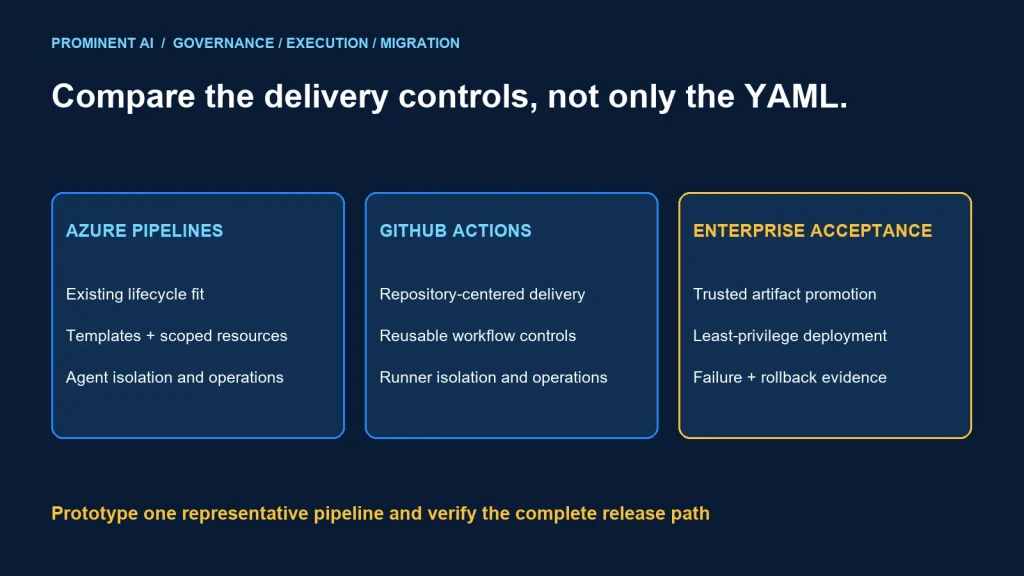
Choose Azure Pipelines or GitHub Actions by repository strategy, governance, execution isolation and the cost of maintaining the delivery workflow. Both can build and deploy enterprise .NET applications. The stronger fit is the platform whose controls your team can enforce and operate—not the one with the shortest demonstration YAML.
Key takeaways
- Compare Azure Pipelines with GitHub Actions for CI/CD; Azure DevOps also includes other lifecycle services.
- Separate untrusted validation from privileged deployment.
- Runner or agent placement is a security and operations decision.
- Migration includes permissions, approvals, artifacts and failure behavior, not only syntax.
Compare equivalent delivery responsibilities
Azure DevOps is broader than its pipeline service. A team may use Boards, Repos, Artifacts and Pipelines together, while another keeps source and collaboration in GitHub and uses Actions. Decide which parts of that operating model are actually in scope.
GitHub’s migration guide describes common job/step concepts and important syntax, shell and execution differences. Similar-looking YAML does not imply identical trigger, authorization or error behavior.
For an enterprise .NET workload, list the complete path: restore dependencies, build, test, scan, package, retain an artifact, approve deployment, authenticate to the target and observe the release. Include private feeds, Windows-specific tools and legacy deployment dependencies where they exist.
Azure DevOps vs GitHub Actions: enterprise decision matrix
| Decision area | Azure Pipelines candidate | GitHub Actions candidate | Evidence to collect |
|---|---|---|---|
| Repository strategy | Fit with existing Azure DevOps and connected repositories | Fit with GitHub source and collaboration workflow | Actual repository, identity and review requirements |
| Reusable delivery logic | Governed templates and task dependencies | Governed reusable workflows and action dependencies | Ownership, version pinning and change review |
| Execution | Hosted or self-hosted agent design | Hosted or self-hosted runner design | Network reachability and isolation tests |
| Deployment controls | Selected environment/resource approval model | Selected environment/protection model | Current plan availability and bypass review |
| Cloud identity | Scoped service connections and supported federation | Scoped workflow identity and supported federation | Target permissions and trust-condition tests |
| Operating cost | Execution, concurrency and agent maintenance | Execution, concurrency and runner maintenance | Measured representative workflow cost |
This is a review worksheet rather than a promise that every feature is included in every subscription or deployment. Verify current licensing, enterprise settings and service limits before selecting a platform.
Governance and deployment identity
Microsoft’s pipeline security guidance discusses restricted resource access, scoped identities, branch policies and fork-build risks. Review the permissions of the running job and service connection, not only who can edit the repository.
GitHub’s secure-use reference emphasizes least-privilege tokens, careful secret handling, third-party action review and untrusted-code risks. A log-redaction feature does not make arbitrary use of sensitive values safe.
In either system, define a trust boundary between pull-request validation and production deployment. Untrusted code should not obtain deployment credentials or execute on a machine with privileged network access. An approval after untrusted code has already accessed a secret is too late.
Use supported short-lived federation when appropriate, with trust conditions tied to the intended repository, branch or environment. A federated token still needs narrowly scoped target authorization. Test that a different repository or unapproved ref cannot obtain the same deployment privilege.
Protect the delivery logic itself. A person who can change a workflow may be able to alter what reaches production or how artifacts are handled. Review reusable templates, external actions/tasks and scripts as part of the supply chain.
Hosted vs self-hosted execution
Choose self-hosted execution only for a clear requirement such as a specialized build environment or controlled connectivity. Assign ownership for patching, images, cleanup, capacity and incident response. A persistent machine can retain files or credentials between jobs if lifecycle controls are weak.
Separate execution pools by trust and purpose. Do not combine public contribution builds with privileged internal deployments merely to reuse spare capacity. Network access, attached identities and cached content all affect the exposure.
Measure queue wait, startup, restore time and build duration separately. A platform with a fast individual job may still have an unacceptable release lead time when concurrency is constrained. Include the cost of warm capacity and maintenance in self-hosted estimates.
For .NET applications, validate SDK versions, private package authentication, test tooling and the exact OS dependencies. A workflow that passes on a developer laptop may rely on undeclared tools missing from the agent image.
Migration is an operating-model change
- Inventory pipelines. Record triggers, schedules, branches, repositories and business owners.
- Map dependencies. Include secrets, service connections, package feeds, artifacts and target networks.
- Translate behavior. Review shell defaults, expressions, conditions, outputs and failure handling.
- Recreate controls. Validate permissions, approvals and deployment identities explicitly.
- Run a bounded pilot. Start with a representative nonproduction application.
- Compare evidence. Reconcile artifacts, test results, timing, cost and recovery.
- Switch authority. Disable duplicate deployment paths under an approved cutover plan.
Keep build and deployment separate where practical. Promote an accepted artifact rather than rebuilding a different binary for each environment. Record source revision, dependency inputs and artifact identity so an incident review can identify what was actually deployed.
During parallel evaluation, prevent both old and new workflows from deploying independently to the same target. Keep the comparison observational or use separate nonproduction targets until a single release authority is agreed.
For a legacy .NET team, migration can be staged. First make the existing pipeline explicit and repeatable, then move one bounded workload. Changing repository platform, build images, deployment architecture and approval model at once makes regressions harder to isolate.
Decision flow and acceptance checklist
Identify repository and lifecycle strategy
  → list mandatory governance and connectivity needs
  → compare current plan capabilities
  → prototype one representative delivery path
  → test permissions, artifact integrity and recovery
  → compare operational effort and measured cost
  → select and document the operating model
Existing Azure DevOps estate: retaining Pipelines can be sensible when the integrated workflow meets requirements and migration value is limited. Review its controls rather than assuming familiarity equals security.
GitHub-centered development: Actions can fit teams seeking delivery automation close to code review and repository collaboration. Validate enterprise policy, runner isolation and deployment protection for the actual plan.
Mixed enterprise: a deliberate coexistence model can support different product groups. Keep shared identity, artifact and release standards understandable so the organization does not maintain two inconsistent security baselines.
| Test | Pass condition |
|---|---|
| Untrusted contribution | No privileged identity, secrets or sensitive network access |
| Failed build/test | No unintended deployment or accepted artifact |
| Changed workflow dependency | Review and version controls behave as designed |
| Deployment authorization | Only the approved source/environment obtains target privilege |
| Artifact promotion | Deployed artifact matches the accepted build |
| Rollback | Previous accepted release can be restored safely |
| Audit investigation | Source, artifact, approver and target outcome can be traced |
No universal cost or performance winner is claimed. Compare equivalent executions, concurrency needs, retention, licensing and staff effort. Use the cost review guide and align deployment access with the landing-zone design.
Common questions
Which CI/CD platform better fits an enterprise .NET team?
Choose by repository strategy, required controls, tooling dependencies, execution isolation and operating cost. Validate a representative pipeline rather than assuming either platform is universally better.
Is moving YAML enough to migrate a pipeline?
No. Triggers, permissions, shells, secrets, artifacts, approvals and failure behavior all need validation.
Are self-hosted runners or agents automatically more secure?
No. They introduce ownership for isolation, network exposure, patching, cleanup and credentials.
Can both platforms be used in one enterprise?
Yes, if responsibilities and shared release standards are explicit and duplicate deployment authority is prevented.
What should a migration pilot prove?
Correct artifacts, test behavior, restricted identities, controlled deployment, rollback and traceable release evidence under representative conditions.
Choose a delivery platform your team can govern
Bring repository strategy, current pipelines and deployment constraints to a review. Discuss a cloud architecture and cost review to compare the options through a bounded enterprise delivery pilot.