
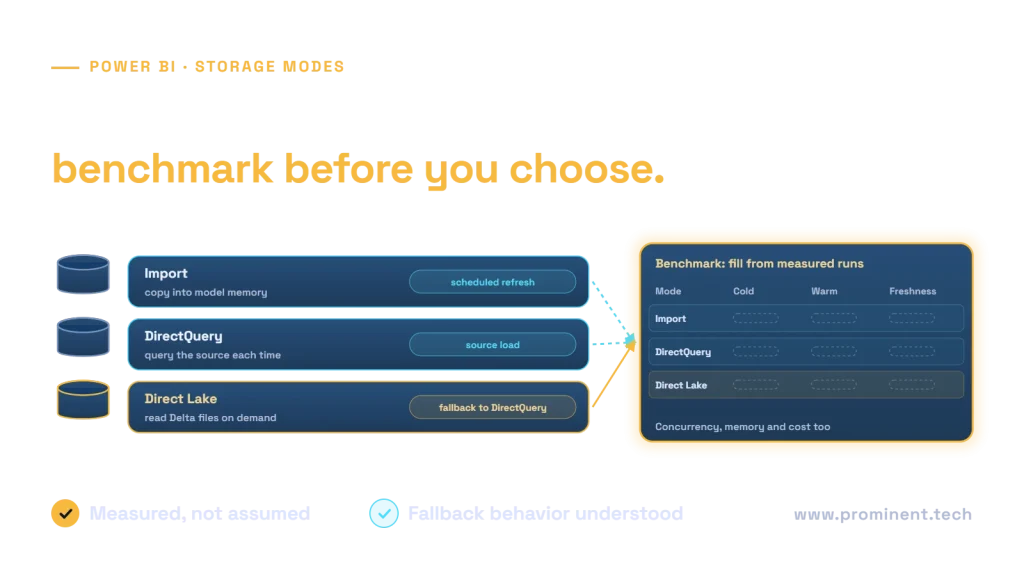
Use Import when a refreshed in-memory dataset meets the workload’s size and freshness needs; evaluate Direct Lake for supported OneLake data at scale; use DirectQuery when querying the source at report time fits the architecture and response-time requirements. No mode wins every performance or cost comparison. Test the exact model, source, security configuration and concurrency before choosing.
This guide provides a benchmark method and results worksheet. It contains no invented latency measurements or claims of a completed Fabric benchmark.
Key takeaways
- Compare the complete data-to-report path, including preparation and refresh.
- Separate cold and warm queries and measure concurrency.
- Record which Direct Lake variant is used; fallback behavior differs.
- Validate freshness, correctness and user permissions alongside speed.
What changes between Import, DirectQuery and Direct Lake?
Microsoft’s Power BI connectivity guidance explains that Import loads selected data into the semantic model, while DirectQuery sends queries to a supported source at report time. Import results reflect the imported state until refresh. DirectQuery performance depends on the source and the query path, including applicable network or gateway overhead.
The Direct Lake overview describes loading columns from OneLake Delta tables into memory for semantic-model queries. It avoids a full Import-style data refresh for that path, but still uses memory and compute. Table layout, model design and capacity remain relevant.
| Mode | Primary query path | Freshness question | Performance question |
|---|---|---|---|
| Import | Data loaded into semantic model | When did the relevant refresh finish? | Does the model fit and serve concurrent queries well? |
| DirectQuery | Queries supported source at report time | What source and query-cache behavior applies? | Can the source sustain report-driven demand? |
| Direct Lake | Columns loaded from OneLake Delta data | Which data state is framed and visible? | How do loading, memory pressure and layout affect queries? |
A storage-mode label is not a complete architecture. Record source preparation, semantic relationships, DAX measures and security rules so comparisons evaluate the same business question.
Distinguish Direct Lake on OneLake from Direct Lake on SQL
Microsoft’s Direct Lake mechanics guide distinguishes the variants. Direct Lake on OneLake does not support DirectQuery fallback. Direct Lake on SQL analytics endpoints can fall back when applicable conditions and configuration allow it. Do not apply a fallback explanation to every Direct Lake model.
Framing updates the semantic model’s references to the underlying data state. The latest successful framing does not necessarily equal the latest source update. Column loading and eviction can also affect cold-versus-warm behavior. Record these conditions when diagnosing a slow visual or apparently stale result.
A test that silently changes execution mode cannot establish the performance of the intended path. Where relevant, capture the observed query behavior and configured fallback setting. If a query fails rather than falling back, preserve that as a test result rather than excluding it from the comparison.
A reproducible benchmark method
1. Define the business workload
Select representative report interactions: summary views, date filters, high-cardinality drilldowns and commonly used measures. Include expensive but legitimate questions instead of testing only a simple total. Agree on acceptable latency, freshness and error rate before running the comparison.
2. Control the data and model
Use the same reporting grain, data snapshot, relationships and measure definitions where possible. Document unavoidable differences rather than hiding them. Reconcile results before comparing timing; a query that omits rows is not a successful optimization.
3. Declare the environment
Record model revision, source size, capacity, region, source compute and concurrent background work. Note applicable limits and security settings. If one candidate gets dedicated resources while another shares a busy capacity, the comparison needs that qualification.
4. Separate cold and repeated runs
Measure initial interactions separately from repeated ones. Explain how you establish each test state using supported tools. Do not call a run “cold” merely because the browser was reopened. Repeat each scenario and preserve failures and outliers with their causes.
5. Add concurrent users and data changes
Exercise the expected concurrency while ingestion or refresh operates. Insert a controlled source change in the test environment and observe when the report reflects it. Test permissions with representative identities. Report the whole path from source acceptance to visible result.
Performance table: fill from measured runs
The table below is a benchmark worksheet, not measured results. Replace “measure” only after a controlled run and retain the test manifest with the values. Use an agreed percentile and sample count rather than a single best response time.
| Scenario | Import | Direct Lake variant | DirectQuery |
|---|---|---|---|
| Cold report interaction | Measure latency and errors | Measure loading and latency | Measure source-query latency |
| Repeated interaction | Measure distribution | Measure distribution | Measure with cache conditions noted |
| Target concurrency | Measure latency and failures | Measure memory and latency | Measure source saturation |
| Source update visibility | Measure refresh-to-report path | Measure framing-to-report path | Measure actual visible state |
| Recovery after failure | Verify refresh recovery | Verify data and query recovery | Verify source and connection recovery |
Publish the assumptions beside any resulting chart: dataset revision, report interactions, concurrency, repetitions, capacity configuration and observed execution mode. Another team should be able to understand what the result covers and what it does not.
Count preparation, serving and operating cost
Import includes refresh and serving work. Direct Lake still needs prepared Delta data and query-serving resources. DirectQuery shifts important work to the source rather than eliminating it. Compare the total system cost required to meet the same correctness, freshness and latency targets.
- Record ingestion and transformation work required by each design.
- Include refresh or framing operations and serving consumption.
- Measure source compute and applicable gateway or movement costs.
- Account for failed runs, retries and support effort.
- Distinguish shared capacity allocation from incremental spending.
Use current regional prices and contract terms. A faster warm query does not prove lower monthly cost. Refer to the Fabric capacity planning guide to test overlapping workloads and saturation.
Freshness is an end-to-end commitment
A rapidly queried stale dataset still misses the requirement. Define the permitted delay from the source event to the business report. Trace ingestion, transformation, model state and report behavior separately so the team can locate the actual delay.
Illustrative decision examples
Bounded departmental model: Import is a sensible candidate when the model fits, refresh deadlines are acceptable and self-service flexibility matters. Validate refresh duration and growth rather than assuming today’s model remains small.
Curated OneLake analytics: Direct Lake is a candidate when supported Delta data and a Fabric-centered operating model already exist. Validate the chosen variant, model behavior and cold-query performance.
Source-centered operational reporting: DirectQuery can be a candidate when the supported source must be queried at report time. Test real source load, query plans, network overhead and concurrent report interactions.
Hybrid or composite designs may be appropriate, but they add boundaries to test. Do not add complexity before showing which requirement a simpler design cannot satisfy.
Common questions
When does Direct Lake outperform Import?
There is no universal threshold. Compare representative cold, warm and concurrent queries, plus preparation and refresh costs, on the actual model and capacity.
Does Direct Lake always fall back to DirectQuery?
No. Direct Lake on OneLake does not support fallback. Direct Lake on SQL analytics endpoints has different behavior that depends on conditions and configuration.
Is DirectQuery always real time?
It queries a source at report time, but end-to-end freshness also depends on source updates and applicable query, model and report behavior.
Does Direct Lake require no memory?
No. It loads needed columns into memory. Model design, column cardinality and concurrent memory pressure can affect performance.
Which mode is cheapest?
Measure total cost for the same accepted workload, including preparation, serving, source compute, retries and operations. The mode name alone cannot determine cost.
Choose a mode with workload evidence
Use the Lakehouse and Warehouse comparison for the underlying data layer. Plan your Microsoft Fabric implementation with a benchmark manifest and measurable service targets.