
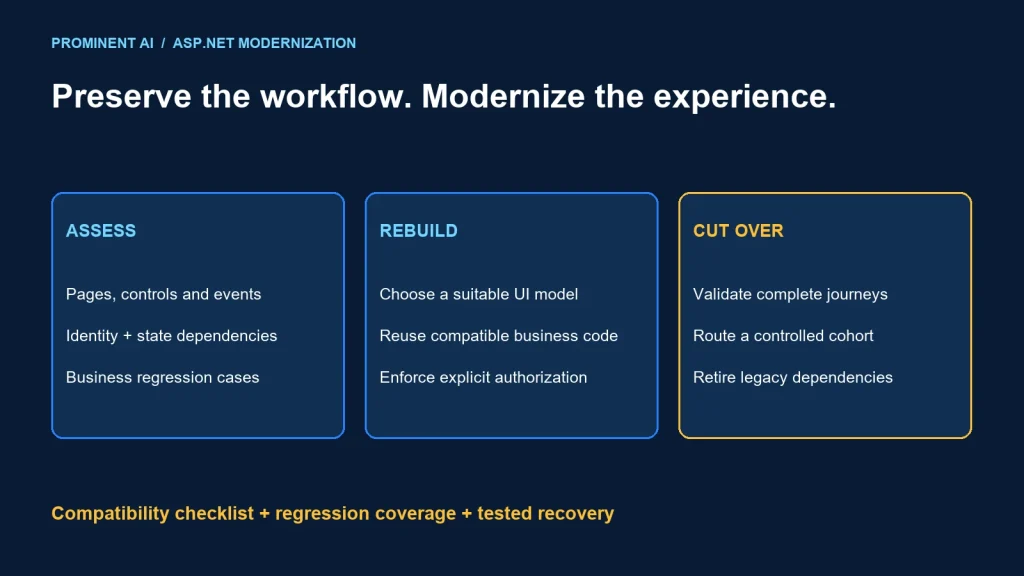
Modernize an ASP.NET Web Forms application by assessing its page lifecycle, controls, business logic and infrastructure dependencies, then rebuilding suitable UI workflows on a supported target through tested stages. Web Forms pages are not directly portable to ASP.NET Core. Some business libraries may be reusable after compatibility work, while the UI and framework-specific behavior need an explicit replacement plan.
Key takeaways
- Separate reusable business behavior from page events and System.Web dependencies.
- Choose Blazor, Razor Pages, MVC or another client architecture from workflow needs.
- Authentication, session, files, reporting and third-party controls need individual assessment.
- Preserve critical journeys through characterization tests and controlled cutover.
ASP.NET Web Forms modernization starts with behavior
Microsoft’s ASP.NET migration guidance identifies System.Web, authentication, session and dependency chains as important migration concerns. Its guide for Web Forms developers explains that Web Forms belongs to .NET Framework and is not ported to modern .NET, while Blazor offers a component-oriented alternative.
Inventory pages by business capability and usage rather than treating every .aspx file as an independent migration unit. A single approval workflow can span several pages, controls, stored procedures and scheduled jobs.
Record page-load logic, event handlers, validation, postback assumptions and state stored in controls or session. Identify where a visual interaction triggers a real business mutation. Those implicit relationships must become explicit in the replacement.
Distinguish intended rules from accidental legacy behavior. Preserve important business outcomes, but make intentional corrections through product review and tests. Reproducing an authorization defect merely to match old output is not a valid compatibility goal.
Assessment checklist
- Critical workflows, user roles and data boundaries.
- Master pages, user controls and third-party UI components.
- System.Web use inside shared libraries and utilities.
- Authentication, session, cache and application lifecycle assumptions.
- Reports, exports, uploads, downloads and browser integrations.
- Database procedures, external services and background work.
- Current OS, .NET Framework, vendor and hosting support status.
Support must be checked for the actual installed stack. The age of Web Forms alone does not establish the support status of every application or justify a rushed rewrite.
Choose a UI target from the application’s workflows
| Target direction | Potential fit | Evaluate |
|---|---|---|
| Blazor | Component-focused interactions and a .NET-oriented team | Rendering mode, connectivity, state, accessibility and component support |
| Razor Pages or MVC | Server-rendered workflows with clear HTTP request boundaries | Form behavior, validation, navigation and progressive enhancement |
| Separate web client and API | Rich client requirements or several independent consumers | Client skills, API authorization, state and delivery complexity |
| Retain a bounded legacy area temporarily | A dependency blocks replacement while other workflows can move | Support, access boundaries and an owned retirement plan |
Do not choose Blazor solely because both frameworks have events and controls. A Web Forms page lifecycle and a modern component lifecycle are different contracts. Prototype the hardest interaction, including large grids, validation, browser navigation and file handling.
For each target, test keyboard behavior, labels, focus movement and responsive layouts. A migration that compiles but loses usability for existing staff is incomplete. Include representative users in validation of the changed workflow.
Review third-party control alternatives with the vendor. A similarly named grid or report component may have different data binding, export behavior, licensing and deployment needs. Plan replacement effort before committing to a page-by-page schedule.
A compatibility worksheet
| Legacy concern | Migration decision | Validation |
|---|---|---|
| Page events and postbacks | Map to explicit request or component actions | Correct state transitions and duplicate submission handling |
| ViewState and control state | Design new state ownership | Refresh, back navigation and multi-tab behavior |
| Session data | Minimize, replace or bridge deliberately | Expiry, concurrency and deployment behavior |
| Authentication cookies | Choose a supported coexistence or sign-in design | Login, logout, denied access and renewal |
| System.Web library use | Refactor framework coupling behind useful contracts | Supported targets and representative library behavior |
| Reports and files | Replace or isolate dependencies | Output correctness, permissions and large-file limits |
| Configuration and secrets | Move to the approved target configuration model | Environment separation and absence of secret leakage |
Authentication coexistence is a specific engineering task. Do not assume copying a cookie name or encryption setting provides a secure bridge. Use supported guidance for the exact frameworks and verify identity and authorization across both applications.
Keep tenant and user context server-authoritative. Replacing ViewState with hidden fields or browser storage does not make those values trusted. Validate every business action at the application boundary.
Separate UI modernization from data redesign where practical. A compatible database contract can reduce cutover complexity, while a simultaneous schema rewrite changes the recovery path. Record when a broader change is necessary and test it explicitly.
An incremental migration architecture
Existing users → controlled routing boundary
├─ Unmigrated workflow → Web Forms application
└─ Migrated workflow → modern application
    → authorized use cases → compatible data and integration contracts

Shared transition responsibilities:
identity, navigation, observability, data ownership and recovery
Choose a workflow with a clear boundary and useful business value. It should be representative enough to expose real dependencies but small enough to validate. A static page rarely proves the migration path for a complex operational form.
- Capture current workflow contracts and important regression cases.
- Extract reusable business behavior where it can be isolated safely.
- Build the replacement UI with explicit state and authorization.
- Validate coexistence, navigation and data compatibility.
- Route a controlled user group to the new workflow.
- Observe business completion and error signals before expansion.
- Retire old code only after dependencies and recovery requirements are resolved.
Use the incremental migration playbook for seam selection and ownership transfer. Moving to ASP.NET Core does not require splitting every workflow into a microservice.
Regression coverage for business workflows
Test the complete journey, including authorization, state changes and output. Screenshots can help compare layout but cannot prove a transaction was recorded correctly. Database assertions and integration evidence should support the important business outcomes.
| Journey | Cases | Acceptance evidence |
|---|---|---|
| Create or amend a record | Valid, invalid, duplicate and concurrent submissions | Correct persisted state and user feedback |
| Approve or reject | Permitted and denied roles; stale record | Authorized transition and audit evidence |
| Search and grid use | Filters, sorting, pagination and large data | Correct records and acceptable interaction |
| Export or report | Permissions, formatting, totals and file limits | Reviewed output and safe download |
| Session and navigation | Expiry, logout, back, refresh and multiple tabs | Predictable state and access behavior |
For a fictional purchasing workflow, capture the rules for draft, submitted and approved states before rebuilding the page. Test that a refreshed browser does not submit a purchase twice and that an unauthorized user cannot invoke approval directly. This illustrates test design rather than a completed customer result.
Measure representative performance and resource use through the actual target hosting path. A small test database can conceal query and rendering problems. Use the ASP.NET Core diagnostic runbook to investigate differences.
A cutover and recovery plan
- Confirm the routing rule, user cohort and deployment artifact.
- Verify identity, navigation and business transaction checks.
- Keep the data contract compatible during the planned reversal window.
- Define signals for holding or reversing the rollout.
- Name release, data and support decision owners.
- Rehearse recovery and communicate expected user behavior.
- Remove obsolete routes, controls and credentials after retirement.
If the new workflow writes data the old application cannot read, switching routes back is insufficient. Plan reconciliation or forward recovery before that change. A credible cutover plan states its last reversible boundary.
Record lessons from the first workflow and revise estimates for the remaining inventory. Avoid extrapolating from a simple form to every report, control and integration. The goal is a supported and maintainable application with preserved business outcomes.
Common questions
Can ASP.NET Web Forms be migrated to ASP.NET Core?
Yes, through assessment and replacement of framework-specific UI and behavior. Web Forms pages are not directly portable, while suitable business code may be reusable after compatibility work.
Is Blazor the only modernization option?
No. Blazor, Razor Pages, MVC or a separate client/API design can fit different workflows and teams. Prototype the important interactions before choosing.
Can old and new applications run together?
They can with a deliberate routing, identity, navigation and data-compatibility design. Coexistence needs testing rather than assumptions about shared session or cookies.
Should every page be rewritten at once?
Not necessarily. A bounded workflow migration can reduce uncertainty while the existing application continues to serve other functions.
What proves a migrated workflow is ready?
Business regression results, denied-access tests, usable interaction, compatible data, operational evidence and a rehearsed recovery path.
Plan Web Forms modernization around working journeys
Bring your page inventory, controls and critical workflows. Discuss your .NET modernization roadmap to choose a UI target, validation plan and incremental cutover.