
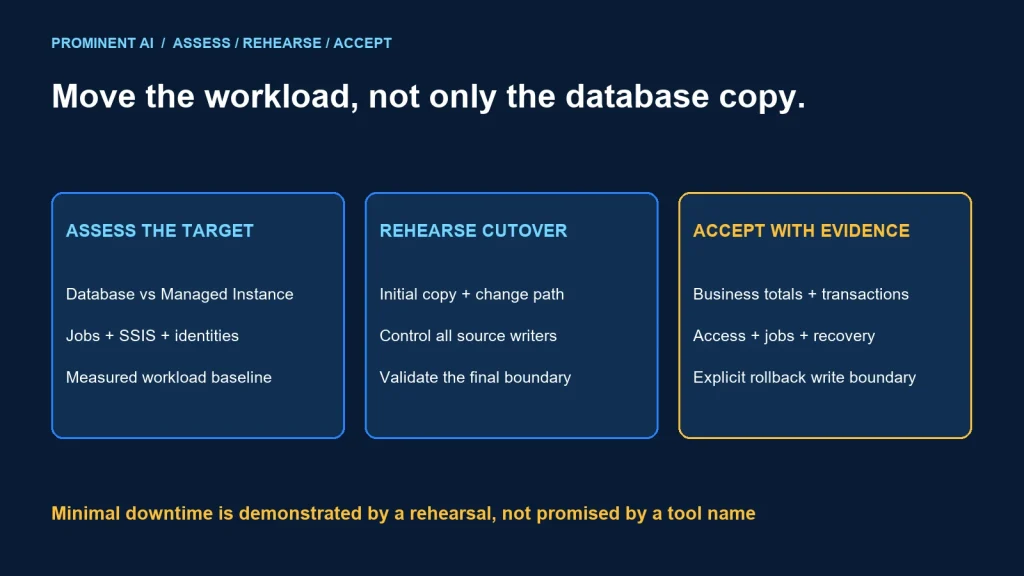
Migrate SQL Server to Azure SQL by assessing the complete application dependency set, selecting the right target and rehearsing the data move and cutover before production. Minimal downtime depends on the supported migration path, source change rate, application behavior and validation window. A successful database copy alone does not establish a successful application migration.
Key takeaways
- Azure SQL Database and Azure SQL Managed Instance are different targets.
- Inventory jobs, integrations, identities and server-level dependencies alongside tables.
- Rehearse final synchronization, write control and application reconnection.
- Define the rollback boundary before accepting writes on the new target.
Choose the Azure SQL target before choosing a tool
Microsoft’s SQL Database migration guide describes a managed database target and migration considerations. It highlights instance-scoped dependencies such as SQL Agent jobs that need another design. Do not assume a restored logical database brings its surrounding server environment with it.
Managed Instance migration guidance covers an instance-oriented target and options including native backup/restore, Log Replay Service and Managed Instance link. Validate the exact source version, target configuration and current method prerequisites before selecting one.
Use the official feature comparison for target-specific support. SQL Agent, cross-database access, CLR and other instance features differ. A compatible database level does not prove every external dependency or operating procedure is supported.
| Candidate | Investigate | Acceptance evidence |
|---|---|---|
| Azure SQL Database | Database-scoped design and external orchestration needs | Application and dependency tests on the selected tier |
| Azure SQL Managed Instance | Instance dependencies and supported migration path | Validated feature compatibility and network design |
| SQL Server on Azure VM | Requirements for OS access or unsupported managed-service features | Explicit ownership for the VM and database operations |
Document why the target was selected. Avoid selecting a service solely because its name resembles the existing product or a calculator shows a lower monthly figure.
Compatibility checklist: inventory the whole workload
Collect evidence from configuration, application owners and representative execution. Static dependency analysis can miss dynamically constructed SQL, scheduled scripts and integrations that run only at period end.
| Area | Inventory | Decision required |
|---|---|---|
| Database objects | Tables, types, procedures, functions, triggers and extensions | Support, remediation and test owner |
| Instance objects | Logins, jobs, credentials, operators and server configuration | Migrate, replace or retire each dependency |
| SSIS and integration | Packages, drivers, file paths, secrets and schedules | Approved execution location and connectivity |
| Application behavior | Connection strings, retries, transactions and cross-database calls | Target-compatible behavior under failure |
| Security | Identities, grants, network routes and certificate dependencies | Least-privilege target design and verification |
| Operations | Backup, restore, monitoring and recovery procedures | New service responsibilities and runbooks |
SQL Agent jobs
For every job, record its purpose, schedule, owner, dependencies and side effects. A job may invoke an operating-system command or notify an external service, not simply run T-SQL. Confirm the chosen target’s support and plan replacements where required. Test missed-run recovery and duplicate execution.
SSIS packages
List the package runtime, connection managers, providers, local resources and secret sources. Microsoft’s migration guide discusses Azure-SSIS integration runtime as an option; rewriting a package is a separate engineering decision. Prove connectivity and output correctness before moving the schedule.
Application compatibility
Exercise ordinary reads and writes, long transactions, concurrency, error handling and connection recovery. Review collation-sensitive comparisons, time assumptions and data-type conversions. A smoke test that opens the home page is not adequate evidence for a finance or operational workload.
Choose and rehearse the migration method
Distinguish a schema deployment, an initial data copy and the mechanism that carries subsequent changes. A bulk load without a change-capture phase cannot keep a busy source synchronized indefinitely.
Use the current Microsoft guide for the chosen target to confirm a method’s support matrix and lifecycle. Do not treat an old tutorial’s tool extension as a current recommendation without checking it. Capture the exact tool/runtime versions and a tested recovery procedure in the migration record.
For a planned offline move, measure the complete stop-to-acceptance window. For an online synchronization approach, measure catch-up under the real change rate and rehearse the final handover. “Online” can reduce the copy-related outage while still requiring controlled write quiescence and application switching.
Discover + assess → remediate + provision
                 → schema + initial data
                 → supported change synchronization
                 → rehearsed cutover gate
                 → application validation + observation
Keep schema changes controlled while synchronization is active. Verify what happens if a source column changes, a large transaction arrives or replication stops. A migration plan must cover recovery from those events rather than assuming the happy path.
A controlled cutover plan
- Authorize the window. Confirm owners, communications, acceptance criteria and the rollback decision deadline.
- Check readiness. Verify backups, target capacity, network access, credentials, monitoring and dependency readiness.
- Control source writers. Stop or drain applications, jobs and integrations according to the rehearsed method.
- Finish synchronization. Confirm the agreed source boundary has reached the target and inspect errors.
- Validate before reopening. Run data reconciliation and critical application tests.
- Switch consumers. Apply approved connection/configuration changes and reopen writes deliberately.
- Observe and accept. Watch errors, latency, jobs and business outcomes through the agreed stabilization period.
Assign a named owner and evidence for each gate. Do not allow several teams to switch writers independently without a shared boundary. A forgotten integration can continue writing to the old source after the main application has moved.
Data validation and the rollback boundary
Compare schema, row counts at an agreed boundary, key coverage and important business totals. Add targeted value comparisons for critical entities. Counts can match while amounts, relationships or permissions are wrong.
| Check | Evidence | Failure response |
|---|---|---|
| Data reconciliation | Accepted totals, keys and exceptions | Hold acceptance and investigate the mismatch |
| Application transactions | Representative reads, writes and rollback behavior | Follow the approved cutover decision |
| Access | Permitted and denied identity tests | Correct grants before business reopening |
| Jobs and integrations | Schedules, outputs and one-time execution | Prevent duplicate or missed business effects |
| Recovery | Demonstrated restore/failover runbook where applicable | Do not substitute a configured setting for a recovery test |
Before the new target accepts writes, reverting may involve returning to a still-authoritative source. After target writes begin, simply changing the connection string back can lose or split transactions. Define reverse synchronization, reconciliation or another approved recovery path in advance. Be explicit if rollback is no longer a simple switch.
Keep the old environment protected and controlled until the retention and acceptance plan allows retirement. Prevent accidental parallel writers and preserve the evidence needed to investigate defects.
Cost checklist and post-migration review
- Target compute, storage and expected growth.
- Temporary migration capacity and overlapping source/target operation.
- Backup retention, recovery architecture and network transfers.
- Integration runtimes, job replacements and monitoring.
- Licensing eligibility verified against the actual agreement.
- Engineering remediation, testing and operational support.
Use measured CPU, memory, I/O and transaction patterns for sizing, then validate with a representative workload. Record latency and cost after stabilization. No universal savings percentage or guaranteed downtime is assumed.
For source-change design, review the CDC guide. For recurring downstream loads, compare streaming and batch ETL.
Common questions
How can you migrate SQL Server to Azure SQL with minimal downtime?
Choose a supported synchronization method, remediate dependencies and rehearse final write control, catch-up, validation and application switching. Measure the complete cutover window.
Is Azure SQL Database the same as Managed Instance?
No. Their instance-level compatibility and migration options differ. Assess the workload against the specific target.
Will jobs and SSIS packages move with the database?
Do not assume so. Inventory their runtime and external dependencies and test the approved migration or replacement design separately.
Are matching row counts enough to accept migration?
No. Reconcile important values and keys, test application behavior and verify access and integration outputs.
Can you always roll back by restoring the old connection string?
No. Once the target accepts writes, returning to the source requires an explicit data reconciliation or synchronization plan.
Make migration acceptance a business decision with evidence
Bring the database estate, dependency inventory and allowed outage window to a review. Request a data engineering pipeline assessment to define the target, remediation work and cutover acceptance plan.